The Upload Worked. Then They Asked Who Saw It.
How solo founders ship an in-app AI consent sheet, name OpenAI as a third party, align App Privacy labels, and give users a real Settings → AI control panel.
 By Iryna25 min read
My tester tapped Upload. The spinner lasted two seconds. She frowned and said, "Wait, did that go to the cloud?" I had wired OpenAI on the backend the week before. I had a privacy policy link in settings. I did not have a screen that asked permission in plain language before her screenshot left the phone. She was not angry. She was careful. That is worse than anger, because careful people do not leave one-star rants. They just delete you and tell one friend you felt sketchy.
That Thursday on TestFlight was when ios ai consent third party solo founder work stopped being a legal checkbox for me and became product design. Consumer apps that touch messages, photos, journals, or dating screenshots are not selling "AI." They are selling relief in a private moment. The moment you send that moment to a vendor model without naming the vendor, you are gambling with the only asset you have: trust.
I am Iryna. I ship Finish Him Replies, which reads a chat screenshot and returns three paste-ready replies. OpenAI processes the image on my server path. I am not a backend engineer. I am a designer who learned the hard way that App Privacy labels, an in-app consent sheet, and a Settings → AI section have to tell one story or strangers assume the worst. If you are still wiring your first loop, read how to build your first consumer iOS app. If you are sequencing first-session trust, pair this with iOS app onboarding for solo founders. For the longer legal-and-copy map, our micro-SaaS terms of service template post covers privacy policy versus App Privacy labels. This article is the mobile-specific layer: consent at upload time, OpenAI named as third party, labels that match, and settings people can find with one thumb.
Position I will defend: a solo founder should ship a dedicated AI consent sheet before any user content hits a third-party model, even if you already have a privacy policy. The sheet is not redundant. It is the handshake at the dangerous second. Caveat: if your app only runs on-device models and nothing leaves the phone, you need a different story. Most indie consumer apps I see are not there yet. They call OpenAI, Anthropic, or a hosted proxy and hope "we take privacy seriously" on the App Store listing covers it. It does not.
ios ai consent third party solo founder: consent is a screen, not a PDF
When I say consent here, I do not mean GDPR checkbox theater on a web form. I mean an in-app sheet that appears at the decision point: "You are about to send this screenshot to our servers for analysis by OpenAI. Here is what that means. Allow or not now." For ios ai consent third party solo founder builds, that screen is as important as the paywall layout. Maybe more important, because users will forgive an ugly button before they forgive a silent upload of something personal.
Third party matters because Apple and users treat vendor processing differently from "data stays on device." OpenAI is not a abstract cloud. It is a named company people have opinions about. Your App Privacy nutrition label will ask what you collect, whether it is linked to identity, and whether you use it for tracking. Your marketing can say AI-powered all day. Review and angry reviewers compare the label, the policy, and what the app actually did on a cold install.
The solo-founder mistake I made first was conflating disclosure with permission. Disclosure is "somewhere in our policy we mention service providers." Permission is "tap Allow before the network request fires." You need both, but permission is what saves you at the upload button. If the user already picked a photo and your code sends it before the sheet resolves, you failed the product test even if your lawyer is happy.
Think about the emotional state. Someone opens your app because they are stuck in a conversation, embarrassed, or curious. Their guard is up. They have seen enough TikToks about apps selling data. A consent sheet that names the vendor, states retention in one line, and offers a real decline path signals you understand the moment. A policy link alone signals you understand paperwork.
I am not telling you to scare people. Fear-based copy converts badly and feels gross in consumer apps. Clarity converts better long term. "Processed by OpenAI to generate replies. We do not store your screenshot after processing." That is boring. Boring is good. Boring is what you want at 11 p.m. when someone decides whether to paste a screenshot of their ex's text.
Another nuance: consent can be persistent without being sneaky. After a clear Allow, you can remember the choice in UserDefaults or the keychain and not nag every upload. You still need Settings → AI to revoke it. You still need to re-prompt if you change vendors, data types, or retention. Changing the pipeline without a fresh ask is how trust dies quietly.
If you take one implementation rule from this section: gate the network call, not the UI chrome. The sheet should complete before URLSession fires. Designers mock sheets easily. Engineers wire the happy path first. As a solo founder wearing both hats, test the decline path with the same energy you test success. Decline should not crash. It should not white-screen. It should offer a human next step.
I re-read Guideline 5.1 and the privacy pages every few months not because I enjoy it, but because my memory drifts toward what I wish were true. The official language is dry. Your sheet is the translation layer for a tired human. If the translation is wrong, the original document does not save you in a one-star review that says " lied about AI."
Founders sometimes ask whether Apple "requires" OpenAI by name. Apple requires accurate disclosure of what happens to user data. Users require feeling respected. Naming the vendor satisfies both in practice. Vague "cloud AI" copy reads like you are hiding a brand they already have feelings about. Specificity is a trust signal even when the brand is controversial.
The first time data leaves the phone for a model
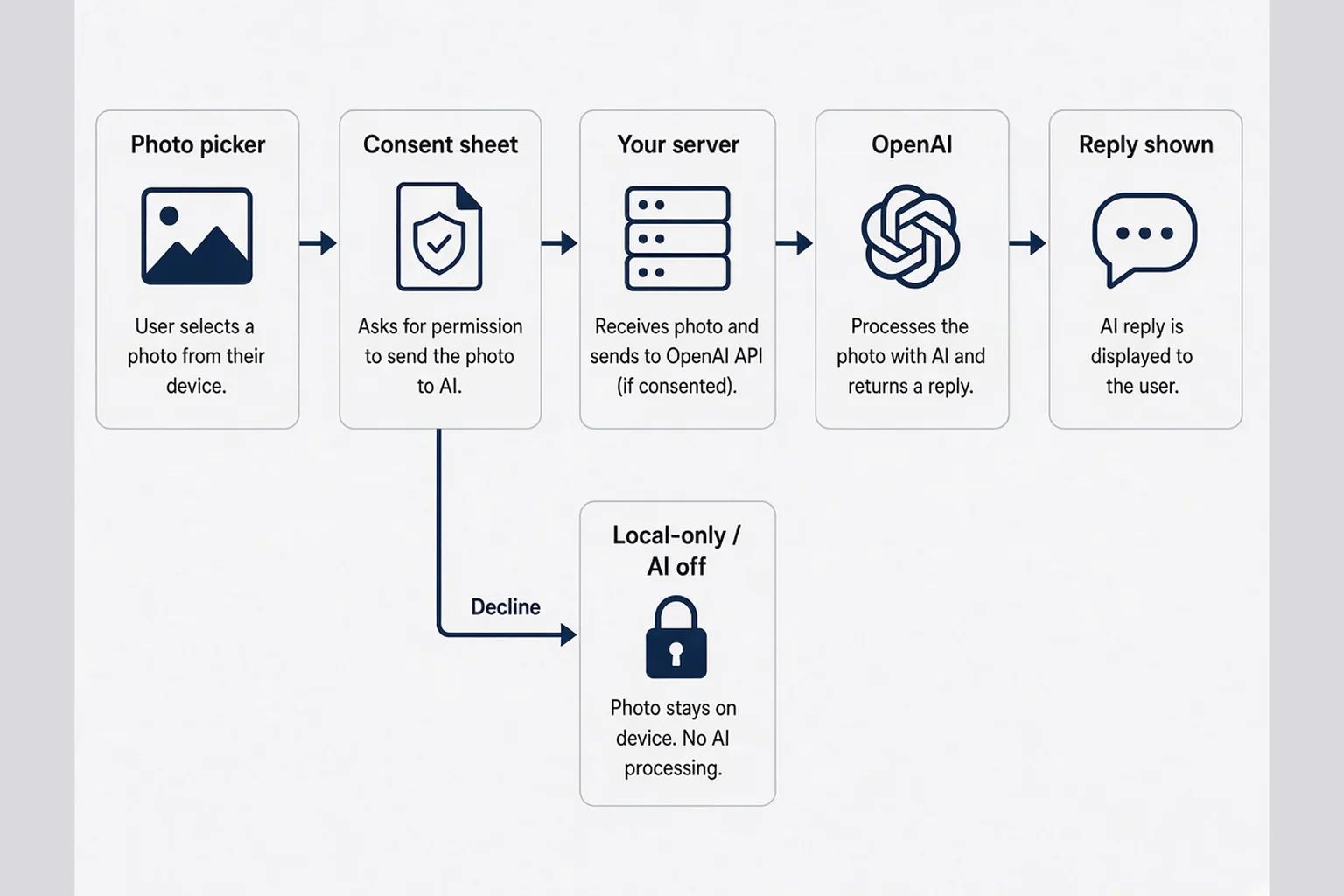
The first outbound trip is the whole brand in miniature. Before that packet leaves, the user has only your icon and your App Store promise. After it leaves, they have evidence. Evidence sticks.
Map the path on paper before SwiftUI. Device picks image. App optionally resizes or strips EXIF (worth doing). Consent state checked. If no consent, sheet presents. If user allows, upload to your backend or edge function. Backend calls OpenAI with your key. Response returns. You display result and delete the temp file if that is your story. Every hop is a sentence on the consent sheet or a lie.
Solo founders often skip the diagram because the code is "just one API call." That call is the product to a user who does not know what an API is. When I explain Finish Him to friends, I say the screenshot goes to my server, OpenAI reads it once, I send back text, I do not keep the image. That sentence belongs in product copy, not only in a Notion doc for yourself.
Decline paths deserve equal ink. Not now might mean: show a static help article, offer on-device tips, or let them edit text manually. Do not punish decline with infinite loops. I tried a version that re-prompted every tap until they gave up. TestFlight numbers did not lie. People closed the app. The fix was respect plus a settings path to opt in later when they felt ready.
Latency interacts with consent. If the sheet appears and they tap Allow and nothing happens for six seconds, they assume double sending. Show honest progress. "Uploading for analysis" beats a generic spinner with no nouns. Nouns are privacy copy too.
Security basics still apply even in a design article. TLS everywhere. No API keys in the binary. Rotate keys if TestFlight builds leak. Max would roll his eyes if I pretended to be an infra expert. I am saying do not ship the naive tutorial code to production and call it consent because you showed a sheet. The sheet plus leaky key equals still sketchy.
OpenAI as third party also means your subprocessors story in the privacy policy should match. If your policy lists five analytics vendors you never integrated but forgets OpenAI, sophisticated users notice. Unsophisticated users still feel the mismatch when review asks you to fix labels. Alignment is cheaper than rejection loops.
Test the first-send moment with people who do not build apps. Ask them to narrate what they think happened. You will hear "it went to ChatGPT" even if you never said ChatGPT. That is fine. Clarify OpenAI in copy. Do not fight the mental model with jargon like inference provider.
Rate limiting and abuse prevention sit downstream of consent, not upstream as a secret. If you hash device identifiers to stop botting, your label and policy should mention identifiers if Apple’s definitions say you should. Consent is not a shield for collecting extra fields you forgot to declare. I learned that from reading other founders’ rejection threads, not from heroics of my own.
Imagine a user on airplane mode. They pick a photo, tap send, see your sheet, tap Allow, then fail offline. The error should not imply data was sent. Copy like "Could not reach our server — nothing was uploaded" prevents midnight panic. Small sentence. Large trust deposit.
What belongs on the consent sheet (and what does not)
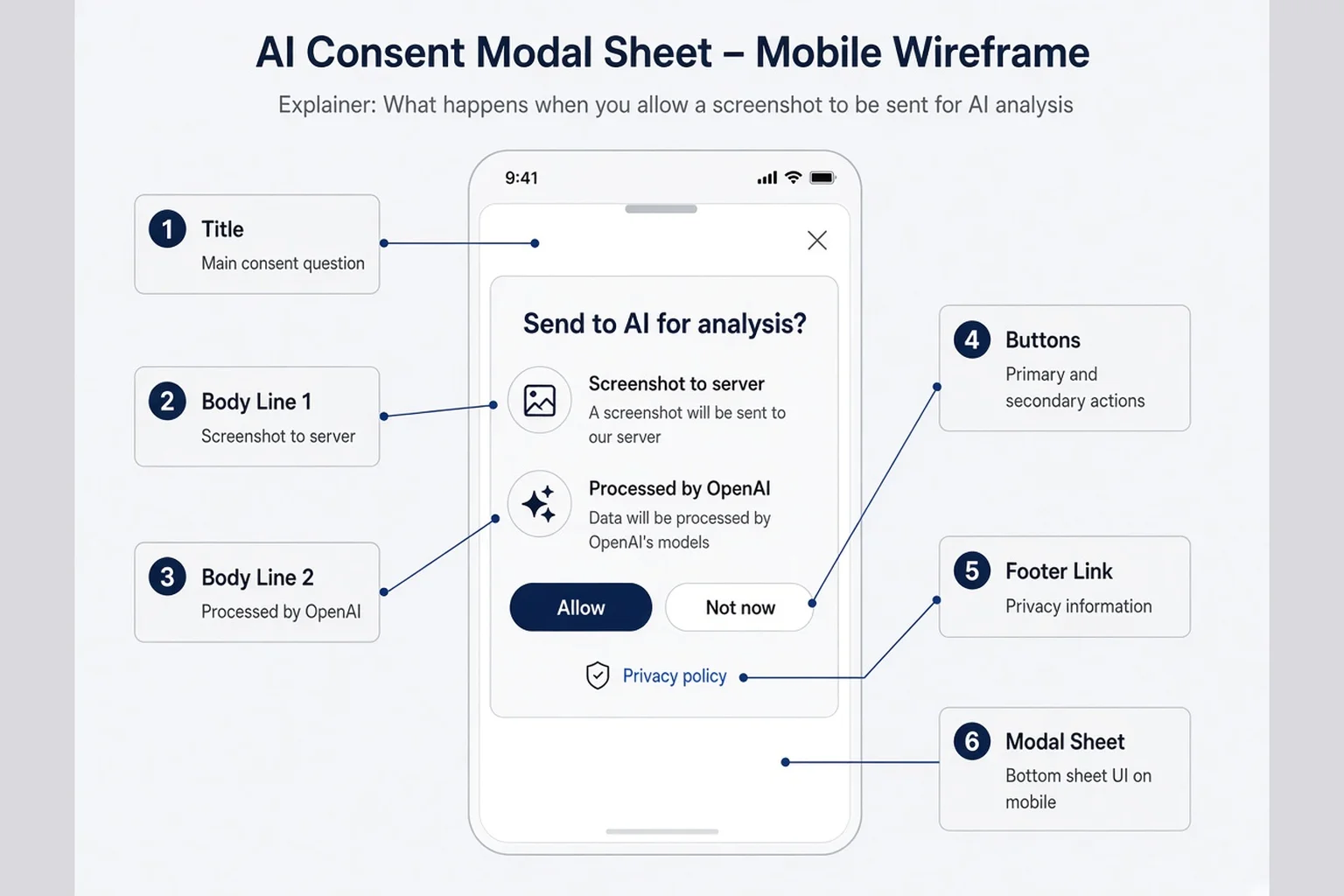
My consent sheet template is intentionally boring. Title: Send to AI for analysis? Body: two short lines. Primary button: Allow. Secondary: Not now. Tertiary text link: Privacy policy. Optional: Learn how we handle data. No walls of legalese. No pre-checked boxes. No dark patterns that make Not now the same color as the background.
Line one names the data: "Your screenshot will be sent securely to our server." Line two names the vendor and purpose: "OpenAI processes it to generate replies. We do not use it to train their public models." Adjust verbs to your truth. If you cache images, say so. If you strip metadata, say so. If you only send cropped text OCR, say that instead of screenshot.
What does not belong: marketing superlatives, model names they do not recognize ("GPT-4o-mini"), guarantees you cannot prove, or jokes. This is not the place for brand personality. Personality can live in the replies your app generates, not in the legal handshake.
Apple Human Interface Guidelines favor clear modal sheets for consequential choices. Use native materials. Large title, readable body, obvious buttons. If you custom-design a cute cartoon robot here, you signal immaturity at the worst time. I say that as someone who loves cute UI elsewhere.
Accessibility matters on consent. Dynamic Type should not clip the vendor line. VoiceOver should read the full disclosure, not only button labels. If your sheet is a custom overlay with unlabeled icons, fix that before you argue about conversion.
Localization is a later problem for many solo founders. English-first is fine if your audience is English-first. Do not ship auto-translated legalese. When you localize, re-run the label questionnaire in App Store Connect for each storefront if requirements differ.
Compare your sheet text to your App Store subtitle and screenshots. If screenshots scream unlimited AI magic and the sheet whispers data leaves device, you created cognitive dissonance. Marketing can be aspirational. Consent must be factual.
For apps that also offer non-AI features, the sheet appears only when AI path triggers. Do not show it on launch "just in case." Timing is part of copy. Early ruins first impressions. Late ruins trust. Upload confirm is the sweet spot for screenshot apps. For typing assistants, first send on AI-suggested text might be the moment.
Keep a changelog for consent copy. When you update it, bump a version flag and consider re-consent for major changes. Users rarely read change logs, but review might ask what changed between builds. Your notes in App Store Connect should mention copy updates plainly.
Dark mode and light mode both need readable contrast on the sheet. A gray Not now button on a gray sheet is a dark pattern even if accidental. I check screenshots in both appearances before TestFlight because I ship at night in dark mode and forget half my users live in sunlight.
If you offer "Learn more," the destination should be a short in-app page, not a PDF that downloads and vanishes. Mobile users treat mystery links like phishing. One scrollable explainer with the same bullets as the sheet builds literacy without sending them to Safari guilt.
Wire the sheet into SwiftUI without trapping users
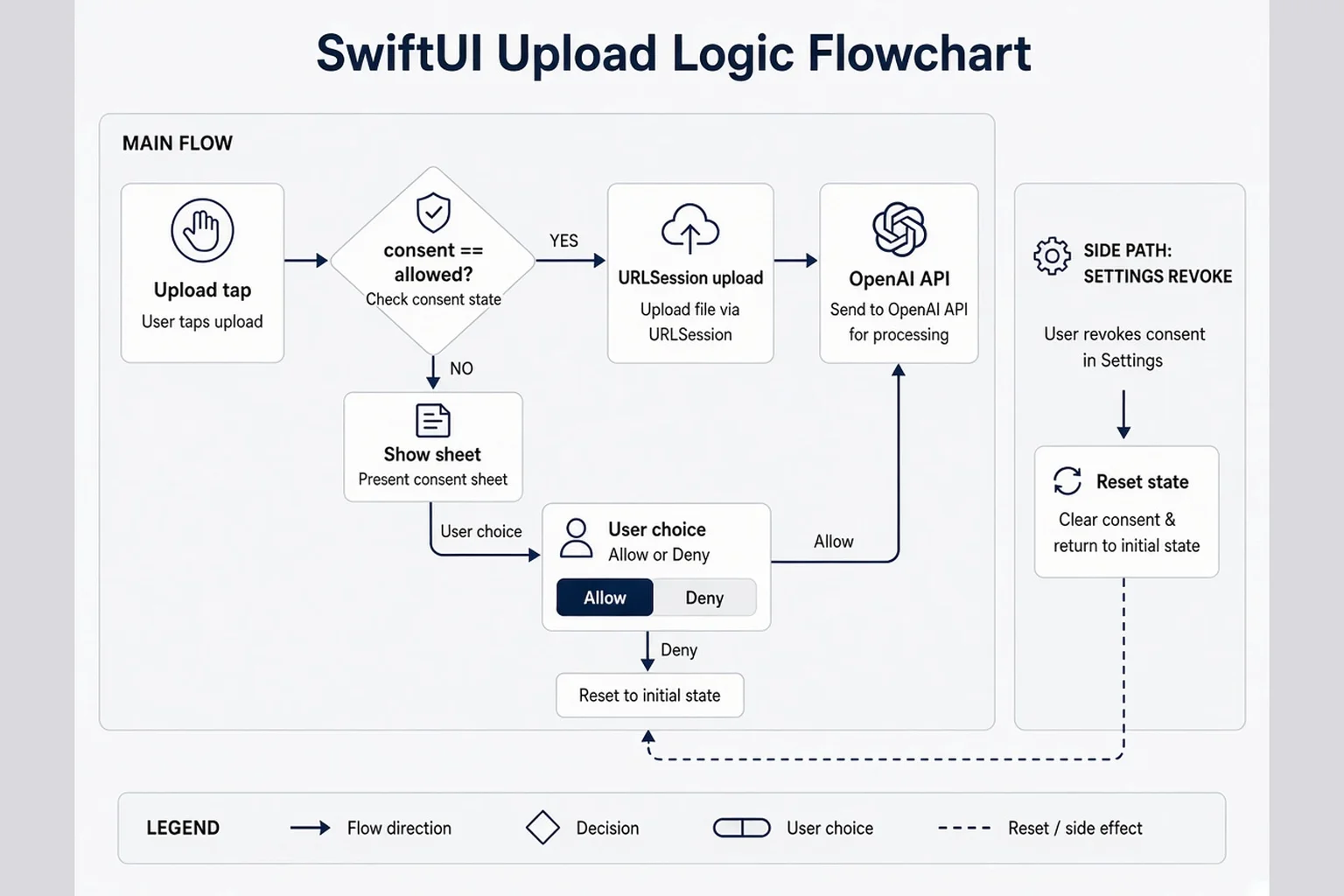
I build in SwiftUI with Cursor holding my hand on the ugly parts. Pattern that worked for me: an @AppStorage or dedicated ConsentManager enum with three states: unknown, denied, allowed. Unknown triggers sheet. Denied blocks the API route and shows an inline explanation with link to Settings. Allowed skips sheet until policy version changes.
Present the sheet with .sheet or confirmationDialog depending on weight. Sheets feel right for multi-line disclosure. Do not stack a sheet on a sheet. If upload picker is already modal, sequence carefully. I once had photo picker, then consent, then paywall in one flow. Testers called it ambush. Reordered to value, consent, paywall. Different article, same principle: one consequential ask at a time.
Pseudo-structure without pretending this is production code you should paste blindly:
enum AiConsentState: String {
  case unknown, denied, allowed
}

func uploadScreenshot(_ image: Data) async throws {
  guard consentState == .allowed else {
    presentConsentSheet = true
    return
  }
  try await apiClient.analyze(image)
}
The guard is the product. Everything else is UX sugar. Wire tests in TestFlight builds that log consent transitions if you need debugging. Remove logs before App Store if they capture content identifiers.
Settings → AI should flip denied and cancel in-flight requests if possible. If a upload is mid-flight, define behavior. I show a cancel unavailable message rather than lie. Honesty again.
Edge case: user allows, upload fails, they retry. Do not re-show sheet every retry unless failure was auth-related. Nagging on network blips feels broken.
Edge case: user denies, later enables in Settings. Next upload should work without reinstall. State should be obvious in UI. A small "AI off" chip near the upload button saves support DMs.
App extensions and share sheets complicate consent. If you add a share extension later, it needs the same gate. Extensions that silently call home are a common review surprise. Plan extension consent even if v1 is main app only.
Pair engineering with onboarding timing. If onboarding already explained AI at a high level, the sheet can be shorter but must still name OpenAI at the upload moment. Onboarding hype plus silent send equals betrayal.
Max could implement this cleaner than I can. If you are stuck on async race conditions, ask someone who ships APIs for a living. The design requirement stands: no silent send.
Unit tests are not my love language, but I do manually test race taps: Allow spammed twice, Not now then Allow quickly, background app during upload. Chaos taps reveal whether your gate is real or cosmetic. Cosmetic gates fail in production the first time a teenager uses your app.
Photo library limited access on iOS means some users only grant one image. Your consent sheet still applies to that one image. Do not treat limited library as implied consent for all future photos. Each send is its own decision unless you clearly switched to a persistent Allow model in copy.
App Privacy labels that match the sheet word for word
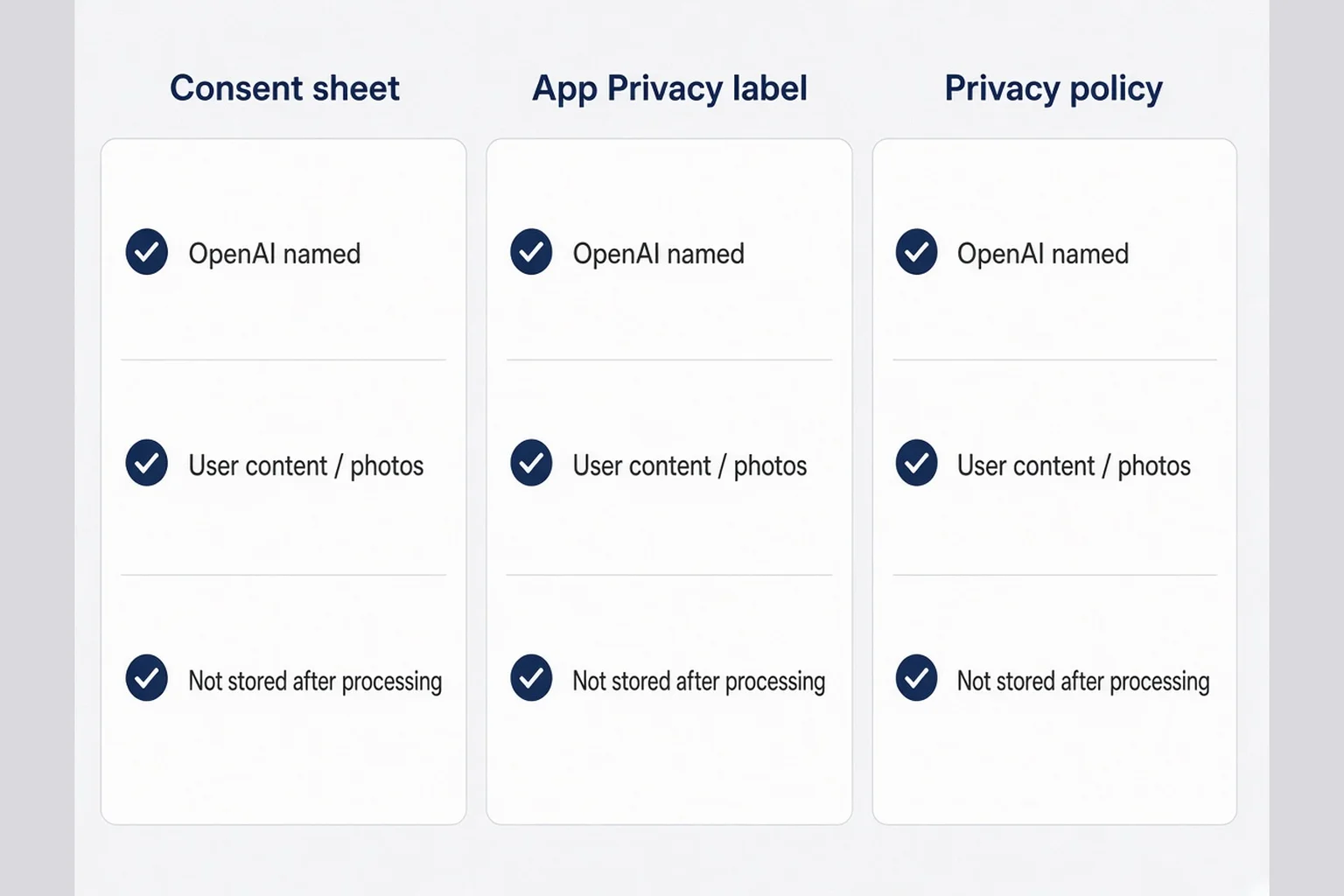
App Privacy labels are not marketing. They are structured answers Apple shows on the product page. Treat them like a contract between you and a paranoid reader. When I filled mine the first time, I clicked quickly and hoped for the best. That hope cost me a revision when my sheet said "not stored" and my label implied persistent user content.
Walk the questionnaire slowly. Photos or screenshots? User content? Identifiers? If you use account IDs tied to uploads, linked data is yes. If you truly anonymize device tokens, still be careful claiming not linked unless counsel agrees. Solo founders often overclaim "not linked" because it sounds nicer.
Third-party AI processing usually means data collected and used for app functionality, not tracking, if you are not doing cross-app ads. Your mileage varies. Read Apple's definitions at the time you ship. Guidelines shift. This article is product advice, not legal advice. When stakes are high, pay a lawyer for an hour.
Create a single source of truth doc with three columns: consent sheet line, label answer, policy paragraph. Any row that disagrees gets fixed before submit. I keep mine in the same Notion page as my App Store screenshot copy. Boring admin wins review weeks.
Nutrition labels show "Data Used to Track You" separately. If you embedded analytics SDKs that track, your AI story is not the whole label. Consent for AI does not fix secret tracking. Strip SDKs you do not need. Consumer trust apps should not ship adtech defaults because a tutorial added them.
Updates: when you add a new data type (voice notes, location), re-open the questionnaire. Version 1.1 is where founders forget labels while celebrating new features. Schedule label review in the same checklist as release notes.
Reviewers sometimes compare your policy URL to labels. Keep the policy readable on mobile Safari. Wall of text hurts, but missing vendor names hurts more. Link OpenAI's policy if you rely on their subprocessors language, plus your summary in plain English.
If you use Sign in with Apple and tie uploads to accounts, say so everywhere. Anonymous-first apps still might collect device identifiers for rate limiting. Declare what you actually store in logs. Logs are storage even if you pretend they are not.
Export compliance and AI are adjacent headaches for some apps. If you touch encryption export rules, that is separate from consent but shows up in the same stressful week. Batch admin tasks so you are not fixing labels at 2 a.m. before a flight.
When in doubt, under-promise in marketing and over-deliver in clarity. Labels are promise surfaces now.
Screenshot your completed label summary and pin it next to your sheet Figma frame. Visual side-by-side catches drift faster than reading prose twice. I caught a "photos" versus "user content" mismatch that way. One word difference. Review cares about words.
If you ship a widget or Live Activity later, ask whether it displays AI-derived content that came from third-party processing. The label story might need a footnote in policy even if the widget shows only local text. Future features inherit your consent architecture. Plan the hook early, even if v1 skips the feature.
Settings → AI as your ongoing trust contract
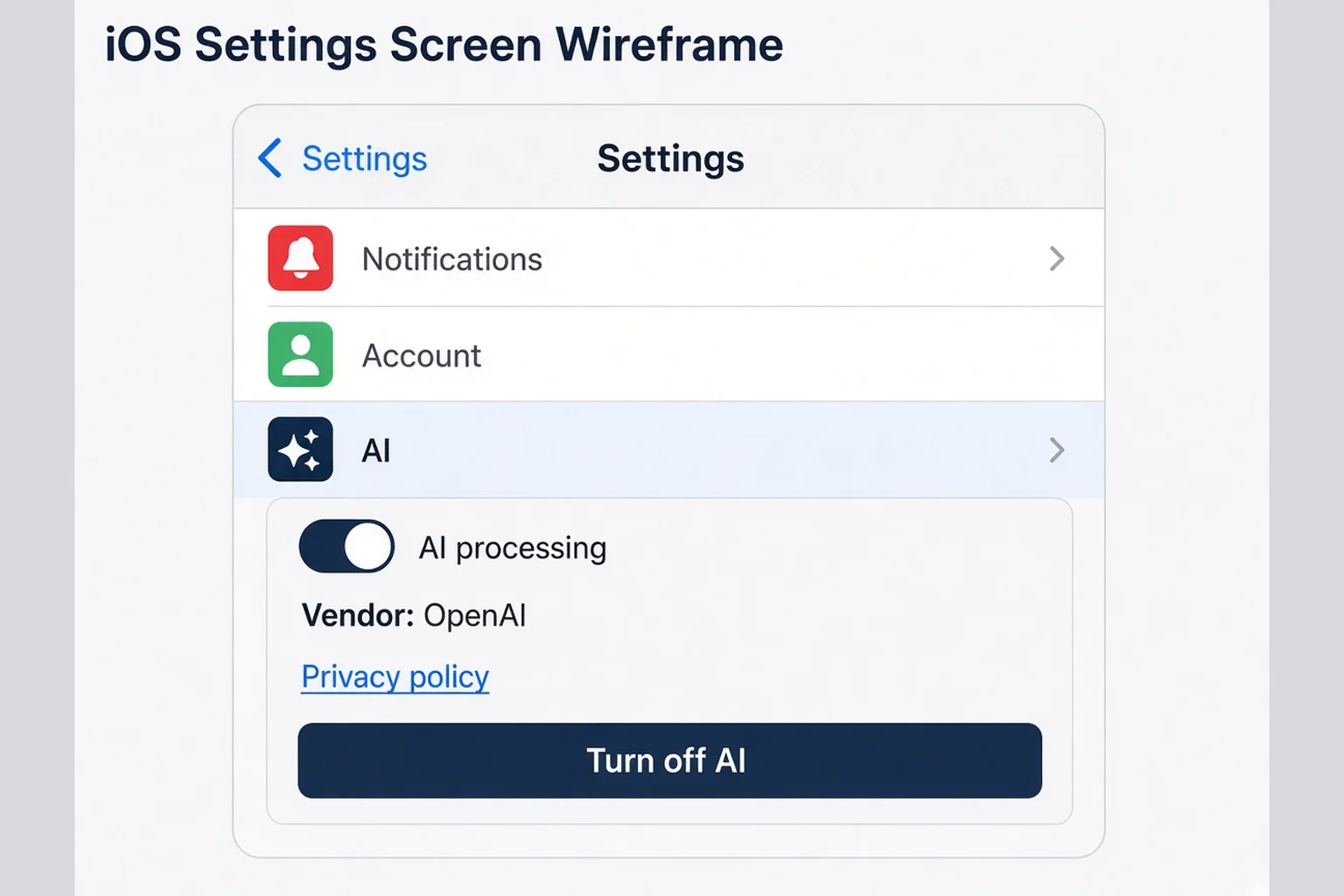
Users who feel weird after the fact go to Settings. Not your FAQ. Not your Twitter. Settings. If AI controls are buried under Legal, you lost. I use a top-level Settings → AI row on the root settings screen, same visual weight as Notifications or Account.
Inside, mirror the sheet: toggle for AI processing, static text naming OpenAI, one line on retention, button to privacy policy, optional link to vendor security page. If toggle off, disable upload-to-AI UI in the main flow and explain why with the same words. Changing behavior is mandatory. A dead toggle is worse than no toggle.
Revoke should feel empowering, not punitive. "Turn off AI processing" beats "Disable smart features." Language shapes guilt. Guilt drives uninstalls.
Consider showing last updated policy date. Nerds appreciate it. Reviewers might too.
Support email in settings helps when someone asks "did you send my photo to OpenAI yesterday?" You should be able to answer from logs without seeing their content if your architecture supports that. If you cannot answer, fix architecture or copy.
Parental controls and shared devices are edge cases for personal apps. Still, a clear off switch helps roommates and partners who share phones.
Deep link to Settings → AI from the consent sheet footer after first allow. "Change anytime in Settings → AI." Plants the wayfinding seed.
Sync settings across devices if you have accounts. Nothing feels broken like iPhone allowed and iPad silently sends because sync lagged.
Widget and Siri shortcuts that trigger AI need the same gate. Future features inherit consent debt if you forget.
This section is where your terms and privacy template work meets daily UX. Policies are static. Settings are living. Keep them aligned when you ship 1.0.1.
Add a one-sentence reminder under the toggle: "When off, uploads stay on your device" only if that is literally true. If off means the button disappears but analytics still fire, you lied. Off must mean off for the AI path you described.
Search in settings should find AI. iOS settings search indexes your app’s settings bundle. Use consistent wording between the row title and searchable terms. I use "AI processing" in both places, not "Smart assist" in one and "OpenAI" buried in another.
OpenAI in your subprocessors story (without hand-waving)
Vendor language scares solo founders because it sounds enterprise. It is not. Subprocessor just means another company touches user data on your behalf. OpenAI is the one consumers name, so name it in the sheet, settings, policy, and review notes.
Read OpenAI's business terms for the API tier you use. Consumer ChatGPT plans and API usage differ. Do not copy a comforting FAQ from a random blog. Your policy should say what you send (image bytes, extracted text), how long you keep it (seconds, hours, never on disk), and whether humans at your company can see it.
If you use a proxy (Supabase edge, Vercel function, your small VPS), you are still responsible for the hop. Users might not care about your VPS brand. They care that data left the phone. Optional: name your server region if it helps ("processed in US data centers"). Do not invent regions.
Data processing agreements and EU representatives are topics for lawyers when you scale. For first App Store ship, focus on truthful copy and minimal retention. Retention wins trust faster than adjectives.
When OpenAI has an outage, your app fails. Error copy matters. "AI provider unavailable, try again" beats "something went wrong." Naming the dependency sets expectations.
Switching models later (OpenAI to Anthropic) is a consent event. New vendor name, new sheet version, possibly new label answers. Budget time for that migration in public.
If you anonymize before send (strip names, crop to message bubbles only), say exactly that. Do not claim anonymization if a face remains in frame. Screenshots are messy.
Kids and sensitive categories: if your app could be used by minors or touches health-adjacent content, pause and get real legal help. This article assumes typical adult consumer utilities. The consent pattern still applies, stakes go up.
Keep vendor emails in a runbook: OpenAI status page, your host, your email provider. Incident response copy belongs in a draft note before you need it. "We paused AI processing" is a setting toggle plus a banner, not a tweet storm.
When to show the sheet relative to onboarding
Timing is where product teams argue and solo founders guess. My default: never on first launch. Show value or empty state first. When they tap the action that requires AI, show the sheet. That pairs with onboarding that earns trust before asks.
Pre-warning in onboarding can shorten the sheet later. One line on slide two: "Uses AI to analyze what you upload. You choose each time at first." Do not replace the upload-moment sheet with onboarding prose. People forget onboarding by the time they need the feature.
Paywall before consent is a trap. Asking for money before they understand data flow feels predatory. Consent before paywall, or after a free taste that does not send data, depending on your model. Finish Him shows replies before subscription; consent happens before the first send. Order matters emotionally even if code allows shuffle.
Returning users who already allowed should not see the sheet every session. Reset only on policy version bump or vendor change. TestFlight friends will toggle aggressively; respect that.
If you A/B test copy, keep label and policy aligned with the winning variant. Do not run dark copy tests against App Store declarations.
Seasonal campaigns that mention AI should match in-app language. Holiday push saying "smart magic" while sheet says OpenAI is a disconnect.
What App Review notices when AI touches personal data
Review is not a consistent person. It is a process. Still, patterns repeat. Notes for Review that explain upload → server → OpenAI → deletion in five plain sentences saved me follow-up questions. Offer a demo account if needed. Do not hide the AI path.
They compare screenshots to behavior. If you market "private" and label says linked user content to third parties, expect a thread. Fix marketing or fix behavior. Middle ground is lying.
Guideline changes around AI show up in news before they show up in your inbox. Follow Apple developer news at a skim level. You do not need a compliance team. You need one afternoon before each major submit.
Rejections sometimes ask for clearer in-app disclosure even when policy exists. That is consent sheet territory. Add the sheet, resubmit, move on.
Kids category, health claims, and UGC each add lenses I will not pretend to master here. If you are in those lanes, treat this article as base layer only.
User reviews that say "sent my data to OpenAI without asking" are brutal social proof. Fix before they accumulate. Reply once with what changed if you ship a fix. Do not argue with strangers in public.
Copy you can adapt for three common app types
Screenshot helpers like mine: "Send screenshot to our server. OpenAI analyzes it to suggest replies. We delete the image after processing. Allow / Not now." Short. Named. Deletable.
Journal or mood apps with AI reflection: "Your entry text is sent for AI-generated prompts. Stored on device unless you turn on sync. OpenAI processes text when AI insights are on." Different data type, same structure.
Photo editors with AI filters: "Uploads photo for cloud rendering by OpenAI. Original stays in Photos unless you save. Allow cloud processing / Use on-device filters only." Offer a non-AI path if possible.
Swap OpenAI for your vendor string. Swap nouns. Keep verbs honest.
Do not copy my lines into labels without mapping each phrase to questionnaire answers. Copy-paste legal text without mapping is how founders get stuck in revision.
Questions I still ask before each TestFlight build
Did the network fire before Allow in any code path including retries, share extensions, and background tasks? Did I change policy text without bumping consent version? Do labels still match? Does Settings → AI toggle actually block the client and server? Can a stranger explain back where data went after one read of the sheet?
If any answer is fuzzy, I delay the build. Not because I love delay. Because personal apps live on trust, and trust fixes are louder than feature releases.
Run one session recorded screen-only with audio. Watch where eyes narrow. That is your rewrite list.
Before you mark the build done, send the app to one friend who is not in tech and one who is paranoid about privacy. The non-tech friend tells you if the sheet reads English. The paranoid friend tells you if you sound slippery. Both opinions hurt a little. Both are cheaper than a public review that says you hid OpenAI.
A few things people ask me about AI consent on iOS
Do I need a separate consent sheet if I already have a privacy policy?
Yes for consumer apps that send personal content to a third-party model. A privacy policy is the long story. The consent sheet is the yes-or-no at the moment data leaves the device. Apple expects honest App Privacy labels and in-app behavior that match. Burying OpenAI only in a web PDF while the upload silently hits the API is how trust breaks and review gets awkward.
How do I disclose OpenAI in App Store Connect App Privacy?
Answer the questionnaire as if a skeptical user will read it. If user content or photos go to your server and then to OpenAI for processing, declare the data types collected, whether they are linked to the user, and name third-party processing in your policy. Your in-app sheet should use the same vendor name and the same retention story. Mismatch between labels, policy, and UI is a common solo-founder footgun.
When should the AI consent sheet appear?
Immediately before the first action that sends data to the model, not on cold launch and not after the upload already left the phone. Pair it with the upload button or the confirm step. If they decline, offer a limited offline path or a clear not now, not a dead end. You can ask again later with context, not nagging on every tap.
What belongs in Settings → AI?
Repeat the same toggles and words as the consent sheet: whether AI processing is on, what vendor processes it, how to revoke consent, and a link to your privacy policy. Users who panic-search settings at midnight should find the same promises you made at upload time. Changing behavior when the toggle is off is non-negotiable.
Can I say we do not train on user data if I use OpenAI's API?
Only if that matches your OpenAI account settings and contract and your actual integration. API defaults for many solo founders differ from consumer ChatGPT. Write what is true for your stack, not a comforting slogan. If you are unsure, read the vendor docs and ask in Notes for Review with plain language.
Will App Review reject my app for AI consent?
Review rarely rejects for having a consent sheet. They reject or question apps that process sensitive content without clear disclosure, contradict App Privacy answers, or market magic while hiding data flows. A clear sheet plus aligned labels plus honest Settings usually helps. Vague AI-powered marketing with silent uploads hurts.
The sheet is the product at the dangerous second
I still find consent boring to design. I would rather tune reply tones or tweak paywall gradients. But the dangerous second is when users decide if you are safe with their life, not when they decide if your gradient is pretty.
Ship the sheet. Name OpenAI or whoever actually processes the data. Match App Privacy labels and Settings → AI to the same sentences. Gate the request. Respect Not now. Update all three when the pipeline changes.
Your first consumer app does not need to be perfect. It needs to be trustworthy at the moment personal content leaves the pocket. Everything else is decoration, including my favorite typography choices.
If you do only one thing this week, open App Store Connect, your sheet mock, and your privacy policy side by side. Fix the first row that disagrees. That afternoon is unglamorous. It is also how solo founders keep strangers from closing the app after the spinner stops and asking the question that hurts: who saw that?




Comments