I Owned the Domain. DNS Still Said No.
How to set up a custom domain and DNS for a micro-SaaS without coding: buy the name, point records at Vercel or Netlify, fix SSL, and smoke-test before you paste the pretty URL anywhere public.
 By Imani29 min read
Listen to this article
AI-generated podcast-style overview of this article (not a word-for-word narration).
It was 2:14 on a Thursday in Austin and I was sitting on my terrace with the laptop balanced on a wobbly side table. The domain had been mine for eleven days. The app had been live on a Vercel subdomain for three. Signup worked there. Checkout worked there. I had told myself the custom domain was "just branding" and could wait until the product felt real.
Then I pasted my pretty URL into a client proposal. She clicked it. Her browser showed a security warning and a half-loaded page with a broken lock icon. I had pointed DNS on Sunday without re-running smoke tests. I had updated nothing in Clerk. Stripe still thought my canonical site lived on something ending in vercel.app.
That is custom domain micro saas without coding in one embarrassing afternoon. Not a coding problem. A coordination problem between three dashboards you barely understand yet. I still cannot read a production codebase like Max can. I can copy DNS records without crying now. That skill matters because strangers judge your seriousness from the URL bar before they judge your feature list.
If you built without coding and deployed, you are probably staring at a green deploy checkmark and a registrar tab you opened once. This post is the bridge between "it works on reminder-app-abc.vercel.app" and "I trust this enough to type my card number." It pairs naturally with my auth without coding guide because domains and login redirects are the same hallway. Break one and the other looks guilty.
I write for people who google "what is DNS" and still ship. You do not need a computer science degree. You need a mental map of registrar versus host versus DNS records, a copy-paste ritual, and the discipline to test on a phone that is not logged into your personal Chrome profile. The product does not care who configured the CNAME. It cares whether a stranger lands on HTTPS and can log in tomorrow.
Some numbers in here are illustrative. Round example prices, composite scenes, hypothetical timelines. I flag when I am guessing. Real domain nights of mine involved registrar tabs, one wrong A record, and the specific shame of explaining to a friend why the lock icon was yellow. That texture is what you are here for.
Custom domain micro saas without coding: what you are actually buying
Custom domain micro saas without coding does not mean DNS disappears. It means you refuse to run your own nameserver or hand-edit server configs. You buy a human-readable name from a registrar, paste a few records the host gives you, wait, and let modern hosting handle TLS certificates. The "without coding" part is true for the happy path. The "without thinking" part is false.
You are buying three separate things that people smash into one word "domain." The name (myapp.com). The DNS records that tell browsers where that name points. The host that actually runs your app when traffic arrives. Confusing those three is how you end up with a paid domain, a working deploy, and a public URL that still shows a registrar parking page.
A custom domain is trust packaging. Early users forgive ugly subdomains when the workflow saves them time. They hesitate when the lock icon is broken or the URL redirects through four hops. You are not buying SEO magic on day one. You are buying the feeling that this is a real business, not a weekend experiment that might vanish.
Say you ship a tiny invoice tool at fifteen dollars a month. Thirty customers might not care whether the URL says vercel.app. The thirty-first might be an accountant who will not type card numbers into anything that looks temporary. Custom domains are often that threshold, not a vanity project.
I bought domains early because naming things feels like progress when feature work is stuck. Naming is cheap progress. Pointing DNS before deploy behaves is expensive progress. Buy the name when you want. Point it when production already works on the default URL.
What changes when the URL bar shows your name
Cookies attach to domains. OAuth redirect allowlists match exact hostnames. Stripe success URLs must match what users see. Email links generated by your app often embed whatever you set as site URL in environment variables. Change the domain once without updating those dependencies and half your flows work on www while half fail on the apex. Half is a miserable debugging category.
You also inherit maintenance. Certificates renew automatically on good hosts, but you should know where the domain renews and which email address gets the renewal notice. I almost lost a domain once because the renewal notice went to an old job email I stopped checking. The product still ran on Vercel. The brand name nearly became a squatter's lottery ticket.
Good enough before ten paying customers
Good enough looks like this: HTTPS green lock on one canonical hostname, signup and checkout pass in incognito on that hostname, auth redirects include that hostname, and you can explain in one sentence where DNS lives if something breaks. Fancy email on your domain, multi-region DNS, and CDN tuning can wait. Broken SSL cannot wait.
I used to think custom domains were a launch day flex. Now I think they are a trust checkpoint. The checkpoint comes after function, not before. You can absolutely send a Stripe payment link from a Gmail address on day one while DNS waits. You cannot send that same link from a hostname that throws certificate errors. One looks scrappy. The other looks sketchy. Scrappy gets forgiven when the tool works.
Non-coders sometimes ask whether a custom domain helps SEO immediately. Honest answer: not much at your scale. Search engines care more about content, links, and whether the site loads reliably. A custom domain helps branding, email trust, and your own confidence. Treat SEO as a reason to buy the name, not a reason to rush broken DNS.
Why I bought the domain before I understood DNS
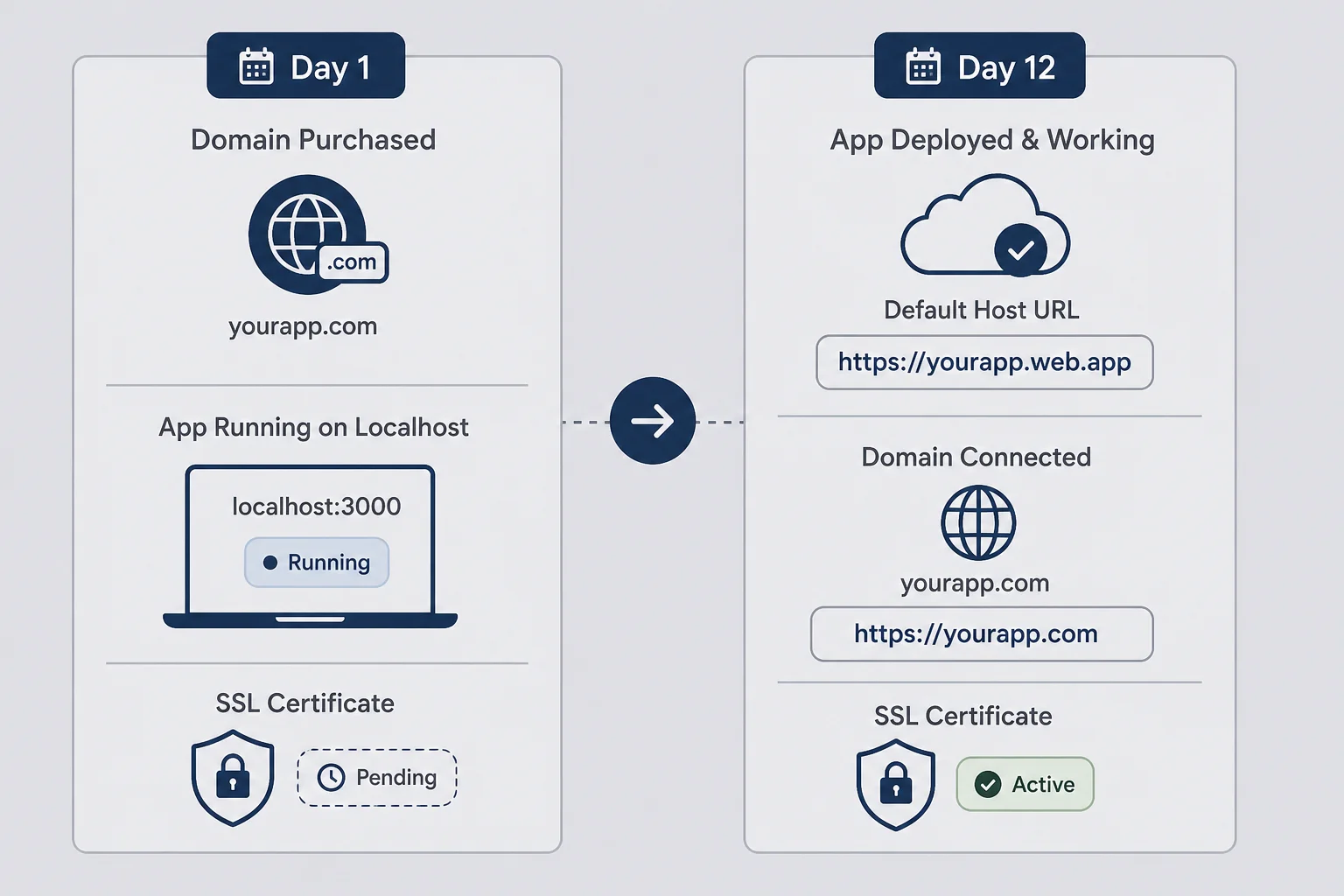
I am not proud of how many times I have owned a domain before I understood what DNS does. The pattern is emotional. You pick a name at midnight. It feels like commitment. The registrar checkout is smoother than fixing your onboarding copy. You tell yourself you'll "hook it up later." Later arrives when you are tired and launch-curious.
DNS is the phone book the internet uses without being a phone book anymore. Someone types myapp.com. Their browser asks DNS servers which IP address or hostname actually serves that site. Your registrar stores the records. Your host tells you which records to store. When those disagree, users get parking pages, SSL errors, or the right app on the wrong protocol.
I thought buying the domain automatically connected it to Vercel because I clicked "import project" in the same week. Those systems are related, not married. The registrar knows you own the name. The host knows how to run your code. DNS is the handshake between them. Nobody sends a wedding invitation automatically.
The buy-early mistake is not the purchase. It is pointing DNS while the app is still half-configured. I connected a domain to a staging branch once because I selected the wrong project in the host dashboard. Real users who bookmarked the pretty URL hit a build that still had test Stripe keys. The subdomain I had been smoke-testing was fine. The domain I put in my email signature was not.
Another mistake is treating DNS like instant messaging. Propagation takes time. TTL values, cached responses, and registrar backends all move slower than your anxiety. I have refreshed a broken site forty times in an hour and changed nothing except my mood.
If you already bought the domain, good. You secured the name. If you have not pointed DNS yet, thank your past self for patience you did not feel. Use the ugly URL until deploy and auth behave. Then connect the pretty name as a victory lap, not a gamble.
The emotional trap of "real business" URLs
Founder brain equates custom domains with legitimacy. Sometimes investors and enterprise buyers care. Your first ten indie customers often care more whether the tool works at 9 a.m. on a Tuesday. I am not saying skip domains forever. I am saying do not let registrar dopamine replace deploy checklists.
When I feel the urge to "just connect it now," I open my smoke test note instead. If the note is not all green on the default URL, DNS waits. That rule saved me more hours than any DNS tutorial.
Registrar marketing loves urgency. "Your perfect domain is available for six hours only." Sometimes that is true for a specific spelling. Often it is theater. I bought getremindlyhq.com once when remindly.com was taken. I have never loved typing the HQ version aloud. Buy names you can say in a voicemail without apologizing.
Domain auctions and premium pricing tempt founders who confuse expensive names with expensive outcomes. A fifteen-dollar .com and a clear landing page beat a three-thousand-dollar domain with no product. I am not anti-premium domains. I am anti-delaying deploy to finance a name.
When buying early still makes sense
Buy early when the name is specific and might get snapped. Buy early when your product name is the domain and you are committing publicly to the idea. Do not buy seventeen variants on day one unless you have a habit of buying domains instead of shipping. I have that habit. I am trying to save you from it.
Registrar, host, and DNS: the three panels nobody names clearly
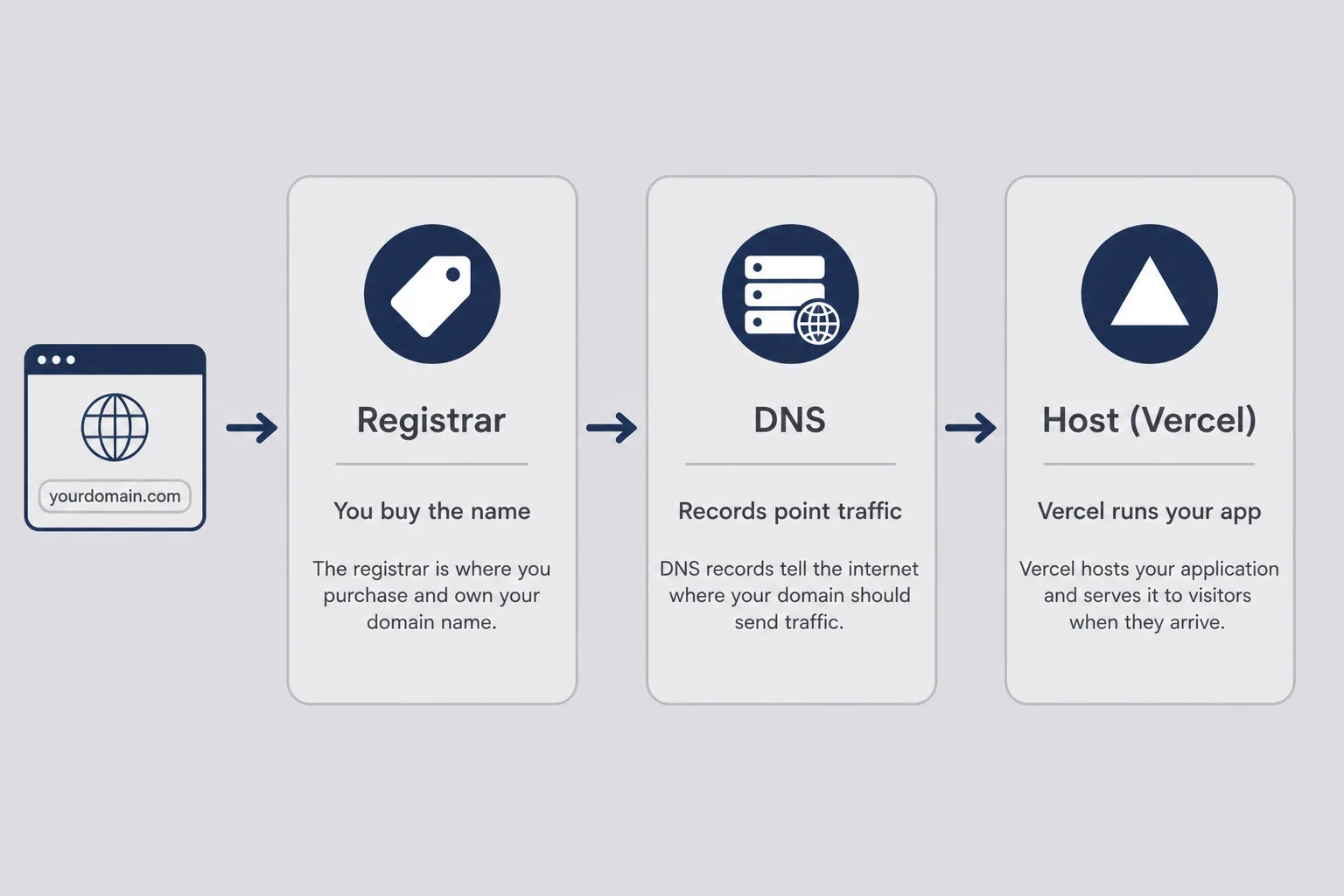
Non-coders stall on custom domains because three different companies touch the problem and each dashboard uses different vocabulary. Once you name the three panels, the rest is copy-paste discipline.
Registrar is where you bought myapp.com. Namecheap, Cloudflare Registrar, Google Domains successor, Porkbun, whatever. This panel controls DNS records for the name unless you moved DNS elsewhere. Think "land deed office." You go here to paste records.
Host is where your app runs. Vercel, Netlify, Render, Cloudflare Pages. This panel knows how to serve your Next.js or static export. Think "the building." You go here to add the custom domain and read which DNS records the building requires.
DNS records are the instructions stored at the registrar (usually) that aim traffic at the host. A records point to IP addresses. CNAME records point to another hostname. TXT records prove you own the domain for email or certificates. You do not memorize all record types. You copy what the host displays.
The browser path is simple in theory. User types domain. DNS lookup returns a target. Browser connects to host. Host serves your app. Theory breaks when the registrar still advertises a parking page CNAME while you also added Vercel records. Some registrars want you to delete old records first. Some let conflicting records coexist like a bad roommate situation.
I keep a note with three links: registrar login, host project settings, auth dashboard. When DNS breaks, I open those three tabs before I open Twitter for "DNS down??" posts. Half the time I am logged into the wrong Cloudflare account. The other half I pasted a trailing dot incorrectly because the UI showed one.
Who actually answers when you email support
If the site shows "domain not found," registrar or DNS issue. If the site connects but shows the wrong project or 404 from the host, host configuration issue. If the site loads but login breaks, auth redirect issue, not DNS. Knowing which vendor to blame saves days. Blaming yourself generically saves nothing.
When to move DNS to Cloudflare
Some founders move DNS to Cloudflare for visibility and free CDN features. That is optional advanced mode. You can ship without it. If you do move DNS, your registrar points nameservers to Cloudflare and Cloudflare becomes where you paste host records. One more panel. Useful later. Not required for first deploy.
Picture three clipboards on a wall. Registrar clipboard holds the deed. Host clipboard holds the building address. DNS clipboard is the set of arrows between them. Non-coders succeed when they stop trying to merge clipboards mentally. Open the right clipboard for the task. Paste arrows when the host says paste arrows. Close the tab when done.
I ask Cursor "which DNS records does Vercel need for apex and www on this domain?" when the dashboard language feels thick. The answer is not cheating. It is translation. You still paste the records yourself. You still wait for propagation yourself. Translation shortens shame loops.
The DNS records your host will ask you to paste
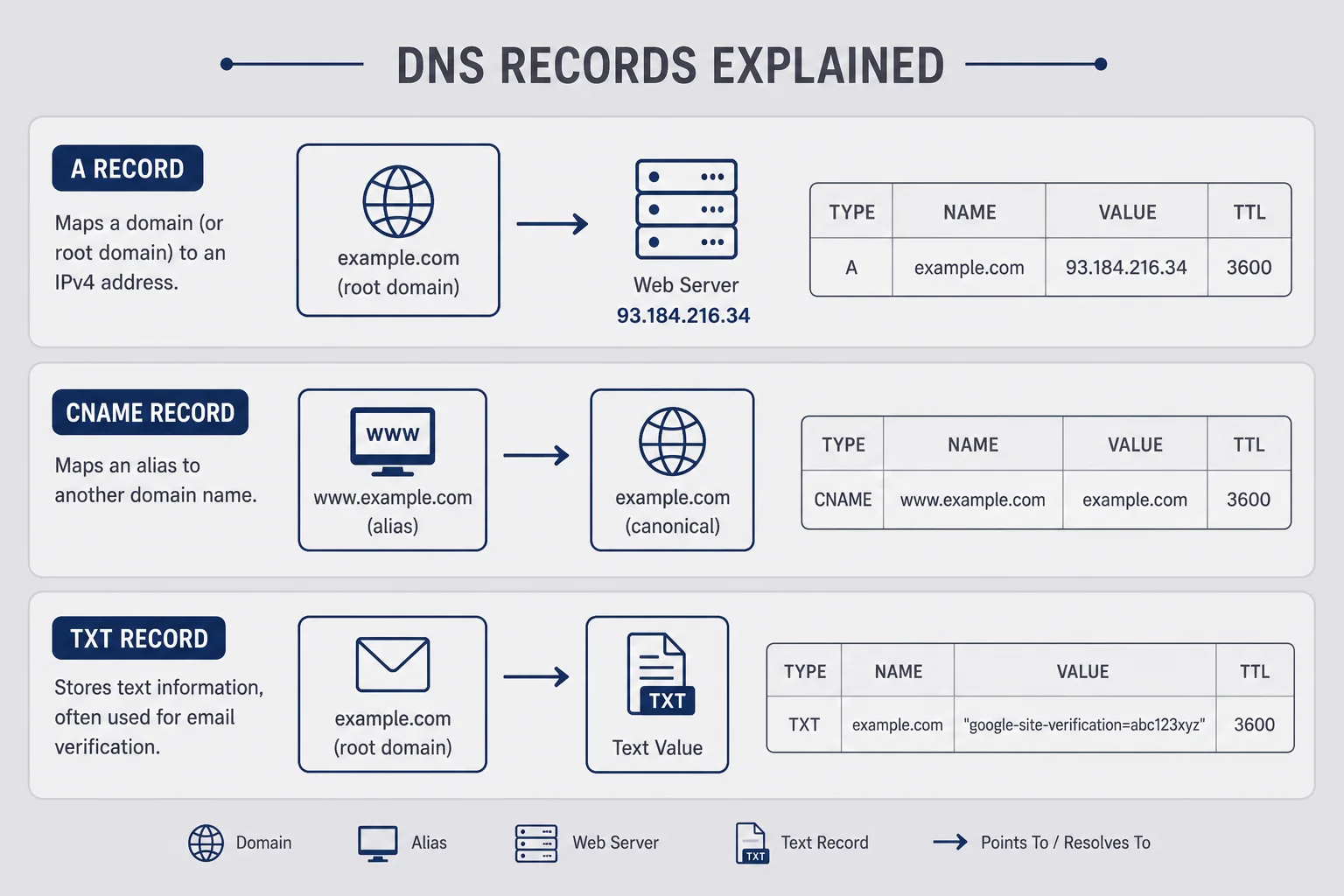
You do not need a DNS certification. You need to recognize the four records hosts repeat constantly and paste them without creative editing.
A record on the apex domain (the bare myapp.com without www) often points to an IP address the host provides. Vercel and some others use A records for apex. The value looks like 76.76.21.21 or similar. Copy the exact digits. Typos become mysterious partial outages.
CNAME record points a hostname to another hostname. Common pattern: www CNAME to cname.vercel-dns.com or a Netlify target. CNAME means "ask over there instead." Browsers follow the chain until they reach something that resolves.
ALIAS or ANAME records appear on some registrars that do not allow CNAME on apex. UI labels vary. Follow your host doc for apex when CNAME at root is forbidden. This is a registrar limitation, not a moral failing.
TXT records show up for verification, email authentication, or certificate issuance. Early custom domain setup might include a TXT verification row the host checks before issuing SSL. Paste it. Wait. Do not delete it because it looks random.
When Vercel says "add this configuration," screenshot it. Paste into registrar DNS settings. Set TTL to automatic or 300 seconds if you are impatient. Save. Many registrars have separate sections for "DNS records" versus "domain forwarding." Forwarding is not DNS. Turning on forwarding while also adding A records creates loops that feel supernatural.
I failed apex configuration twice because I only configured www. www.myapp.com worked. myapp.com showed the parking page. Customers type both. Configure both or set redirect rules explicitly.
The trailing dot and other copy-paste footguns
Some DNS UIs show values with a trailing dot indicating a fully qualified domain. Some strip it. If a record fails validation, compare character by character with the host dashboard. I once copied a CNAME from a blog tutorial instead of my own dashboard and wasted an evening because tutorials are not your project.
How to check propagation without losing your mind
Use your host's domain status indicator first. It usually says pending, verifying, or valid. Supplement with a DNS lookup tool searching for your A and CNAME records from an external resolver. If external tools see your new records but the site still fails, the problem may be SSL provisioning or host project linkage, not propagation.
TTL is the other vocabulary word worth knowing lightly. TTL means how long resolvers cache a record. Lower TTL speeds up corrections during cutover. Higher TTL reduces lookup traffic later. Registrars default to something reasonable. Do not obsess on day one. If you fix a wrong record and the old value lingers, TTL explains why your fix is correct but the internet is still remembering the mistake.
Wildcard DNS records (*.myapp.com) look convenient for subdomains. Wildcards also create surprises when a forgotten subdomain resolves somewhere you did not intend. I avoid wildcards until I understand my own subdomain plan. Convenience without a map is how staging.myapp.com accidentally becomes public.
Connect a custom domain on Vercel without touching the terminal
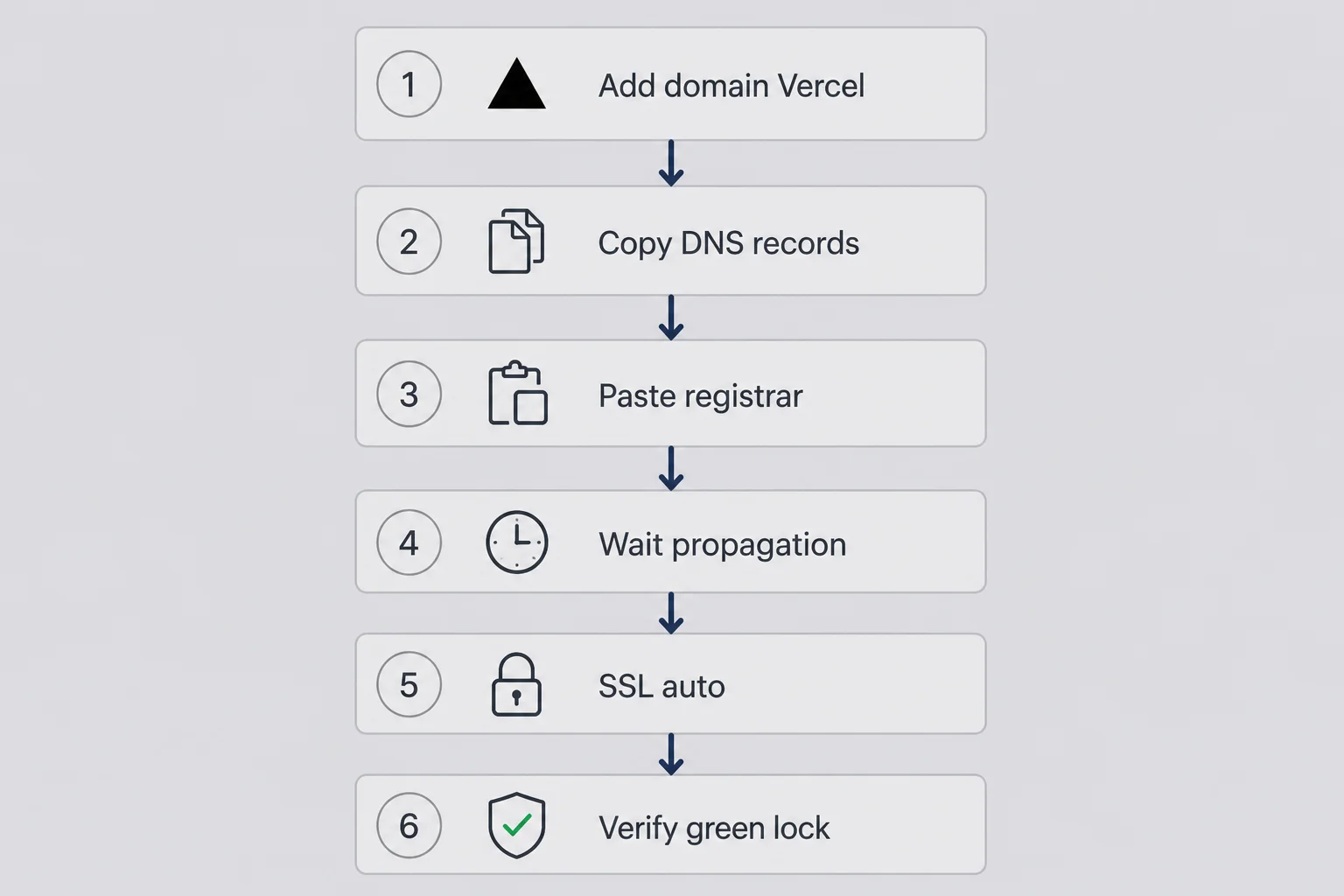
Most AI-built exports land on Vercel. connect domain vercel no code workflows are dashboard-driven. You do not need the Vercel CLI unless you want it. I have never used the CLI for domains. Dashboards exist because founders like me exist.
Open your project in Vercel. Go to Settings, then Domains. Type your domain. Vercel asks whether you own it. You do. Add both apex and www if the UI offers both. Vercel displays required DNS entries per domain.
Log into your registrar. Find DNS management for that domain. Delete obvious conflicts: old A records pointing at parking servers, wildcard CNAMEs you do not understand, email-only MX records you should not delete accidentally. Add each record Vercel lists. Save.
Return to Vercel. Status flips from pending to verifying to valid when DNS and SSL succeed. Valid means more than DNS. It means certificate issued and attached. Until valid, do not put the domain in paid ads.
In your project environment variables, set or update NEXT_PUBLIC_APP_URL or whatever your stack uses for canonical site URL. Redeploy after changing env vars. Apps that generate magic links or Stripe redirects read that value at build or runtime. Skipping this recreates localhost links on a beautiful domain.
If you use preview deployments, know that preview URLs remain on vercel.app subdomains. Custom domain usually maps to production branch. That is fine. Test production domain after merge to main.
When Vercel shows "invalid configuration," click the error. It often names the record that disagrees. Fix that record only. Do not wipe all DNS because panic enjoys blank slates.
Vercel's domain UI sometimes suggests nameserver delegation instead of manual records. Nameserver delegation means the registrar points to Vercel DNS entirely. That can be simpler for non-coders who want one less panel. Tradeoff: email DNS for the same domain must be managed wherever nameservers live. Read the email section below before you delegate nameservers blindly.
If your repo uses serverless functions or edge middleware, custom domain attachment rarely changes code paths. The same deployment serves both ugly and pretty URLs once DNS routes traffic. That is comforting. Configuration is external. You are not redeploying a different app. You are changing the sign on the door.
Redirect www to apex or apex to www
Pick one canonical host. Vercel offers redirect toggles. I prefer apex as canonical with www redirecting because it matches how I say the brand aloud. Others prefer www for legacy corporate reasons. Either works if applied consistently.
Multiple domains on one project
You can attach more than one domain to a single Vercel project. Marketing site and app subdomain patterns sometimes need app.myapp.com plus myapp.com. Subdomains are separate DNS rows. Add them in Vercel, paste new CNAME targets, wait again. Subdomains are not free emotionally. They are just more rows.
Connect a custom domain on Netlify when your builder sent you there
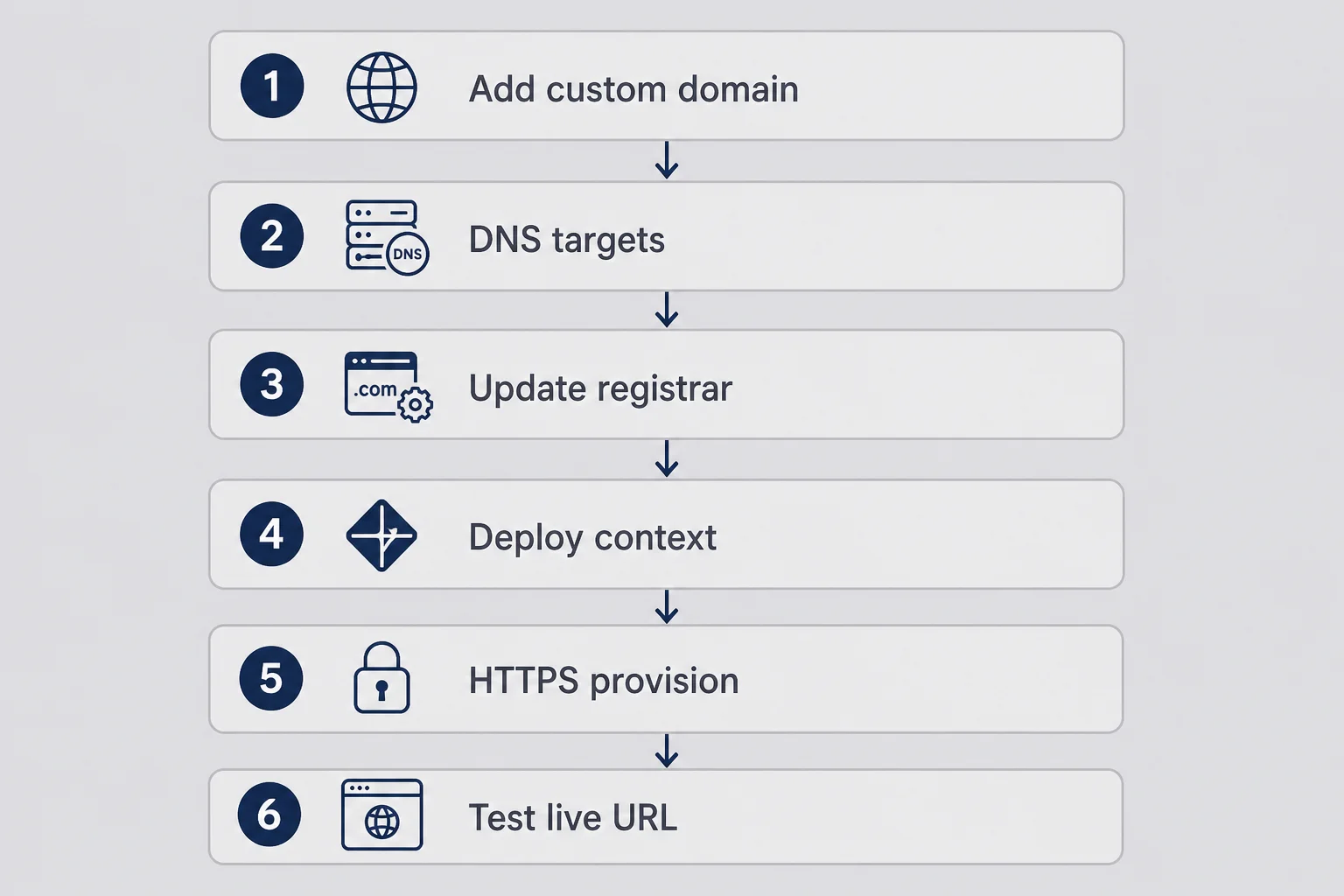
Netlify's custom domain netlify saas path mirrors Vercel with different labels. Site settings, Domain management, Add custom domain. Netlify scans DNS and tells you what is missing. Netlify also offers Netlify DNS if you transfer nameservers to them. Transfer is optional.
If you keep DNS at the registrar, copy Netlify's target records. Netlify often uses A records for apex and CNAME for www toward apex-loadbalancer.netlify.com patterns. Always copy live dashboard values, not remembered values from a previous project.
Netlify shows HTTPS status per domain. Certificate provisioning can hang when DNS is correct but stale A records linger at registrar caches. Netlify docs include a "verify DNS configuration" button. Click it before you assume the internet is broken.
Build settings matter on Netlify too. Wrong publish directory means DNS succeeds while the site serves an empty folder. That looks like DNS failure when it is build config failure. If you see Netlify's default success page instead of your app, return to build settings, not DNS.
Bolt exports and some static stacks land here. The emotional experience is identical: add domain, paste records, wait, test. Builder-specific deploy docs mention Netlify when they mention anything. Read that doc once before connecting DNS so vocabulary sticks.
Netlify DNS versus external registrar
Using Netlify DNS reduces panels. Registrar nameservers point to Netlify. Netlify controls records automatically when you add domains in their UI. Tradeoff: your DNS and hosting couple tighter. For a solo micro-SaaS, that coupling is often fine until you need exotic email DNS on the same zone.
Branch deploys and domain targets
Netlify branch subdomains help staging. Production custom domain should map to production branch. Same lesson as Vercel previews. Do not point your marketing domain at a branch where test keys live. I checked this wrong once. Nobody died. My pride did.
SSL and the green lock panic on a Thursday night
ssl certificate micro saas anxiety peaks at night because browsers scream security warnings in red typography designed to shame. Modern hosts automate TLS. Automation is not instant. Pending is normal for an hour. Pending for a day with correct DNS means investigate.
HTTPS protects credentials in transit. Users should not type passwords on plain HTTP in 2026. OAuth providers may refuse redirects on non-HTTPS URLs. Stripe requires HTTPS for live checkout in production contexts. The lock icon is not decoration. It is infrastructure.
When SSL stays pending, check these in order: DNS records match host dashboard exactly, apex and www both configured, no conflicting records, domain added to correct host project, no CAA records blocking certificate authorities your host uses. CAA records are rare for beginners but vicious when present.
Mixed content warnings happen when your HTML loads over HTTPS but assets load over HTTP. AI-generated templates usually avoid this. Custom edits sometimes reintroduce http:// image URLs. If the lock shows broken with "not fully secure," inspect browser console warnings. Ask Cursor to find hardcoded http asset links.
Certificate renewal is automatic on Vercel and Netlify for standard setups. Note renewal either way. Calendar reminders feel corporate until a launch morning certificate edge case ruins breakfast.
If you must serve traffic before SSL completes, do not tell users to "click through" browser warnings. Fix SSL first. One warning-trained customer is a future phishing victim. You do not want that karma.
Browsers also show subtle "connection is secure" versus "certificate is valid" distinctions in developer tools. You do not need to live in those tools. Know they exist when a user sends a screenshot with a scary detail you cannot see on the surface. Ask them for the exact URL they typed, whether they used www, and whether they are on corporate VPN. VPNs and corporate DNS sometimes intercept SSL in ways that look like your fault.
Certificate authority failures on hosts are rare but loud on status pages. Before you rewrite DNS for the fourth time, check host status. Once I chased DNS for two hours during a provider incident that was not my registrar at all. The incident ended. My DNS was fine. My time was not.
HSTS and when not to touch advanced SSL settings
Do not enable HSTS manually on day one. HSTS tells browsers to remember HTTPS-only for your domain. Misconfigured HSTS with broken HTTPS traps even you. Host defaults are enough for early products.
Cloudflare orange cloud confusion
If DNS runs through Cloudflare proxy, SSL modes matter. Flexible versus full versus strict trips founders who add Cloudflare without reading. If you use Cloudflare, read their SSL mode doc once. If you do not use Cloudflare yet, ignore this paragraph until you do.
WWW versus apex and why half my login tests failed
dns records solo founder stories often climax at www. Browsers treat myapp.com and www.myapp.com as different origins unless you redirect one to the other. Cookies set on one do not appear on the other. OAuth redirect allowlists must include the exact origin users type.
I configured www perfectly once. Apex still pointed at a parking page. Half my tests used www because I typed it habitually. Half used apex because a link in an email omitted www. Login worked for half my tests. I thought auth was haunted.
Pick canonical. Enforce redirect. Update auth allowlists for both if redirect lags during propagation, then remove the extra entry later. Clerk, Supabase Auth, and Google OAuth all want explicit redirect URLs. "It should work everywhere" is not a configuration strategy.
Stripe checkout success and cancel URLs need the same discipline. Customer portal return URLs need it too. Environment variable site URL needs it. I treat domain cutover as a four-dashboard event: host, registrar, auth, payments. Missing one dashboard creates a ghost that only appears on the custom domain.
Cookies also affect "remember me" during testing. You tested on vercel.app yesterday. Today you open myapp.com in the same browser profile. You are not logged in. That is not necessarily failure. Test in incognito when validating domain cutover.
Subdomains beyond www
app.myapp.com for product and myapp.com for marketing is a common pattern. Each subdomain needs DNS rows and host configuration. Auth may need separate redirect entries. Stripe may need separate webhook paths if APIs live on subdomains. Subdomains multiply panels. Plan before you spawn them casually.
International domains and punycode
If you use non-ASCII domain names, browsers display unicode while DNS uses punycode. Registrars handle conversion usually. If your domain is unusual, verify both registrar and host accept it before announcing.
Email on your domain without becoming a mail admin
Custom domains tempt founders into Google Workspace setup before checkout works. Support email matters. It does not need to block DNS for the app. Separate problems. Separate timelines.
For hello@yourdomain.com without full Workspace, use registrar email forwarding to your personal Gmail. Forwarding is not the same as sending as that address reliably at scale. It is enough for early support. Transactional email for magic links uses SendGrid, Resend, Postmark, or your auth vendor's defaults. Those services verify domain ownership with TXT records separate from web DNS.
Adding SPF, DKIM, and DMARC TXT records improves deliverability when you send from your domain. DNS panels get crowded. Label your TXT rows in a personal note so you remember which is for email versus SSL verification. Deleting the wrong TXT row can break magic links silently. Silent email failure is worse than loud SSL failure.
Do not block app deploy on perfect email branding. Block on whether magic links arrive from production at all. Domain email polish is a week-two problem unless email is the product.
When to pay for Google Workspace
Pay when you send serious outbound sales email from your domain daily, need shared calendars with a cofounder, or want clean separation between personal and business inboxes. Until then, forwarding plus transactional provider covers most micro-SaaS needs.
MX records and accidental breakage
MX records control inbound mail routing. Web DNS changes sometimes tempt founders to "clean up" DNS and delete MX rows they forgot about. If you use registrar email or Workspace, note existing MX before editing. Breaking MX does not break your app. It breaks your ability to receive mail at that domain.
Smoke-test your pretty URL like you smoke-test login
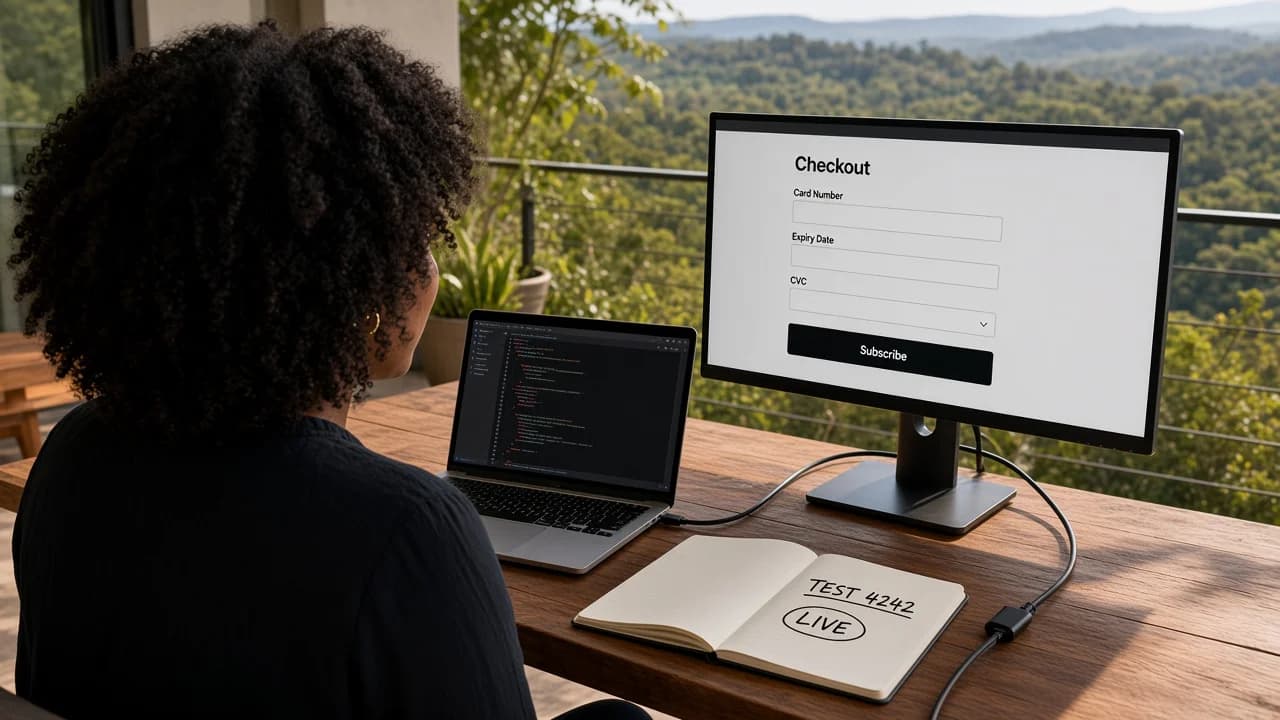
Deploy checklists without domain checklists are half checklists. After DNS and SSL show valid, run the same flows you ran on the default host URL. Signup. Logout. Login. Core action. Checkout if you charge. Settings change. Do it in incognito. Do it on your phone on cellular, not home wifi only.
I call this the pretty URL parade. Ugly URL parade happens first on vercel.app. Pretty URL parade happens after domain connect. Skipping the second parade because the first passed is how I embarrassed myself in front of a client.
Specific domain-only failures include: magic links still embedding old hostname, OAuth returning to vercel.app, Stripe redirecting to wrong host, API calls blocked by CORS when public URL changed, assets loading from old CDN hostname. Each fix is usually env var or dashboard allowlist, not code.
Screenshot your DNS records after success. Store registrar login in password manager. Future you will forget which registrar holds the domain. Future you will need to renew during a stressful year. Future you will thank present you for documentation.
Add one friend test on the pretty URL after your own parade passes. Friends type URLs differently. They tap links from Messages. They use older phones. They do not read instructions. A friend who fails where you succeeded usually reveals www issues, mobile Safari cookie quirks, or corporate DNS caching. One friend is enough. Ten friends before DNS is stable is chaos.
Performance checks belong here too. Custom domains should not slow the site materially if the host is the same. If pretty URL feels slower, compare with browser network tools or a simple speed test on both URLs. Sometimes slowness is propagation still serving an old edge path. Sometimes it is a misconfigured redirect chain. Redirect chains show up as multiple quick hops in network tabs. Fewer hops is better.
The two-URL note
Keep one note with two columns: default host URL and custom domain. Write smoke test results for each. Green on both means you can paste the pretty link in public.
Timing the public switch
Announce the custom domain after pretty URL parade passes twice on two days. Propagation plus SSL plus config drift can introduce delayed failures. One parade is hope. Two parades is data.
What to tell existing beta users
If beta users bookmarked the ugly URL, both URLs may work indefinitely. That is fine. Communicate the canonical URL for trust. Do not break old URLs without redirect rules if people already paid. Redirect old host URL to custom domain when possible. Vercel and Netlify support redirects at edge.
When custom domain setup fights auth and Stripe
Domain work is not finished when the homepage loads. Auth and payments are hostname-sensitive. My auth without coding post covers login smoke tests in depth. Domain cutover adds one layer: repeat every auth test on the new hostname.
Clerk dashboard: add production domain to allowed origins and redirect URLs. Supabase Auth: update site URL and redirect lists. Google OAuth console: add authorized JavaScript origins and redirect URIs for both apex and www if both exist during transition.
Stripe dashboard: update checkout success and cancel URLs if they were hardcoded. Verify webhook endpoint still receives events on production. Webhooks use paths, not browser hostname, but checkout redirects absolutely use hostname. Customer portal return URL must match.
If auth works on ugly URL but fails on pretty URL, compare redirect allowlists character by character. If checkout works on ugly URL but fails on pretty URL, compare NEXT_PUBLIC site URL env vars and Stripe redirect settings. The bug is almost never "DNS random." It is "you forgot a dashboard."
Hermes once reminded me to update Clerk after I bragged about DNS propagation. The reminder was warranted. Agents can be rude productively.
Environment variables that embed domain strings hide everywhere in AI-built repos. Search the project for your old vercel.app hostname before you announce cutover. Replace in env vars, redeploy, then test. Search again after redeploy because agents sometimes reintroduce old URLs in config files when you ask for unrelated fixes. Paranoia is a skill.
Webhook URLs for Stripe typically use paths on your domain (https://myapp.com/api/webhooks/stripe). If you already deployed webhooks on the ugly URL, Stripe may still deliver events to the ugly URL until you add or switch endpoints. Many setups keep one production webhook path and the domain change does not break delivery if the path still resolves. Verify in Stripe dashboard event logs after cutover. Empty logs after real test payments mean something still points wrong.
Auth session cookies sometimes set Domain attributes explicitly in framework config. Rare in beginner templates but worth searching if login works on one hostname only. Cursor query: "Does this app set cookie domain anywhere?" Read the answer even if you do not understand every line.
Staged cutover strategy
Some founders keep ugly URL for internal testing while pretty URL serves customers. That works short term. Long term, maintain one canonical story to avoid split-brain config. Staged cutover is a tactic for a week, not a year.
Rollback plan
If pretty URL breaks production catastrophically, revert DNS to remove custom domain mapping or point marketing back to ugly URL temporarily. Registrar changes can roll back. Panic rolls back poorly. Write rollback steps before cutover. "Delete these A records, re-add parking" is a plan. "Cry and refresh" is not.
Questions people ask me about custom domains
Can I connect a custom domain to my micro-SaaS without knowing how to code?
Yes. Your host dashboard gives you DNS records to paste at your registrar. You copy A and CNAME values, wait for propagation, and let the host provision HTTPS. You do not write DNS scripts or nginx configs. Your job is careful copying, patience during propagation, and smoke-testing the live URL in incognito.
Should I buy a custom domain before I deploy my app?
Buying early is fine. Pointing DNS before deploy works is risky. Secure the name you want, but connect DNS after your app runs on the default host URL and passes smoke tests. A broken app on yourbrand.com hurts more than a working app on a long Vercel subdomain.
How long does DNS propagation take for a new SaaS domain?
Hosts say minutes. Reality is often thirty minutes to a few hours. Sometimes overnight. Plan domain connection on a day when you are not launching to press. Use your host's verification status and an external DNS checker while you wait. Do not panic-refresh every thirty seconds.
Do I need both www and non-www for my micro-SaaS?
Pick one canonical version and redirect the other. Most hosts offer a toggle. Consistency matters for cookies, OAuth redirects, and Stripe return URLs. Mixed www and apex without redirects creates half-working login flows that waste entire evenings.
Why does SSL stay pending after I added DNS records?
Usually DNS is not fully propagated yet, a record is wrong, or the apex and www records conflict. Double-check you pasted values exactly from the host dashboard. Remove old parking-page records from the registrar. Wait an hour and check again before opening five support tickets.
When should I update auth and Stripe for the custom domain?
After DNS resolves and HTTPS shows valid, before you send the pretty URL to anyone. Add production domain to auth redirect allowlists and Stripe checkout return URLs. Run signup, login, and checkout on the custom domain in incognito. Skipping this step recreates the localhost redirect nightmare on a nicer hostname.
The pretty name is not the product. It is the handshake.
I still get a small thrill when the browser shows my domain instead of a host subdomain. The thrill is valid. It is also dangerous if it convinces you that branding finished the work. DNS is plumbing. Plumbing matters when guests arrive. Nobody pays for pipes. They pay for water.
Buy the name when you care about the name. Point DNS when deploy and auth already pass on the default URL. Paste records like a careful operator, not a inspired poet. Wait through propagation with a book instead of a refresh loop. Run the pretty URL parade on incognito and on your phone. Update auth and Stripe dashboards the same afternoon, not "when you remember."
You do not need to become a network engineer. You need three logins, a screenshot habit, and the humility to test like a stranger. The founders who win without coding are not the ones who never break DNS. They are the ones who break it, fix the record, and ship anyway before perfection arrives.
My terrace table is still wobbly. The laptop still balances. The difference now is I connect domains after the app earns the name, not before the app earns trust. Custom domain micro saas without coding was never about skipping DNS. It was about skipping fear long enough to copy the right rows.
Go finish the ugly URL checklist first. Then make the pretty URL true.



Comments