Localhost Lied to Me. Then I Hit Deploy.
How to deploy a micro-SaaS without coding: pick the right host, wire env vars and Stripe for production, smoke-test like an operator, and ship something strangers can actually use.
 By Imani27 min read
Listen to this article
22:36AI-generated podcast-style overview of this article (not a word-for-word narration).
It was 10:42 on a Sunday night in Austin and I was sitting at my kitchen table staring at a green button that said Deploy. The app had worked on localhost for four days. Signup looked fine. Stripe test mode pretended to charge me. My Hermes agent had even congratulated me in Telegram, which felt premature in retrospect.
I had not written the code. Bolt had scaffolded most of it. Cursor had helped me paste environment variables I only half understood. I still google basic terms sometimes. But deploy micro saas without coding was the step I had been avoiding because building felt like progress and deployment felt like exposure. Localhost lies kindly. Production emails your customers when you break checkout.
If you built without coding, you are probably one green button away from the same stomach drop. This post is the room between "it works on my machine" and "a stranger can pay me." It sits in Micro-SaaS From Zero right after the build article and before you need Max's pricing math or his launch playbook. I write for people like I was in 2023: smart, motivated, no CS degree, willing to learn in public.
I am not going to make deployment sound mystical or effortless. It is neither. It is also not a reason to wait six more months learning Kubernetes. Small products deserve small infrastructure. Your job as a non-coder operator is to get a real URL, wire the scary secrets correctly, and test like you are the first customer. The product does not care who clicked deploy. It cares whether someone can sign up without you hand-holding them in a DM.
Some examples in here use round numbers or composite scenes. I will flag hypotheticals. Real deploy nights of mine involved cold coffee, one wrong Stripe key, and the specific embarrassment of telling a trial user to refresh while I fixed webhooks. That texture is the point.
Deploy micro saas without coding: what "going live" means when you did not write the repo
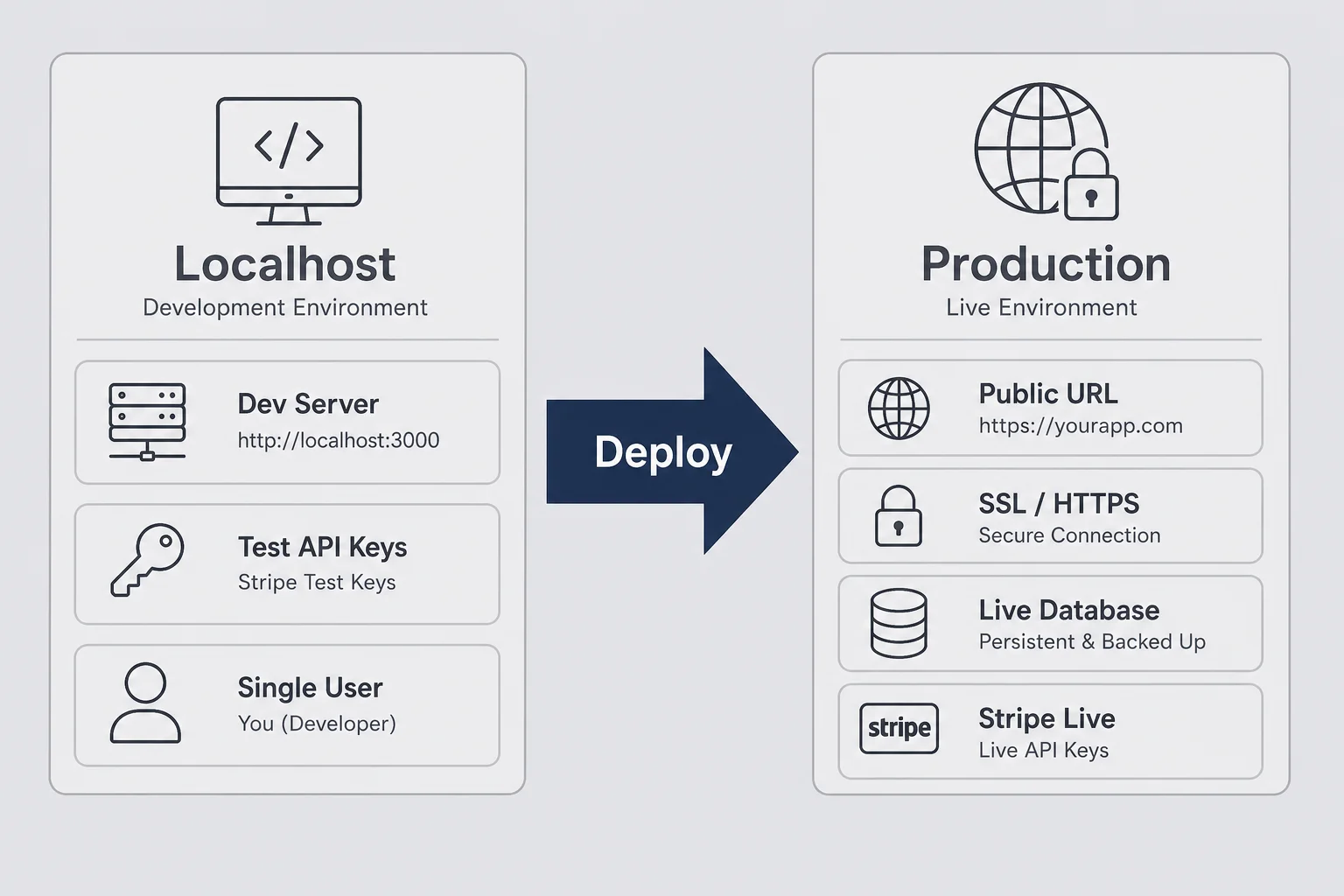
When people search how to deploy micro saas without coding, they often picture a rocket launch. Confetti. Product Hunt comments. In practice, going live means three boring things happen at once: your app runs on a public URL instead of localhost, it talks to production services instead of test keys, and strangers can reach it without you starting your laptop.
You did not write the repository. Fine. You still own what ships. Deployment is where operator responsibility shows up. An agent or builder generated files. You decided to point a domain at them and charge money. That decision has consequences.
Localhost is a sandbox with training wheels. Your database might be empty or seeded with fake users. Stripe is in test mode. Email might log to the console instead of sending. Cookies behave differently. CORS errors hide because everything lives on the same port. I have celebrated "it works" on localhost and then watched signup fail in production because the auth redirect URL still said http://localhost:3000. The code did not change. The environment did.
Going live also means you stop being the only person who can trigger bugs. On your machine you know the workaround: refresh twice, log out and back in, do not click save too fast. Customers do not know your rituals. Production exposes the difference between a demo and a product.
For non-coders, the mental model I use is simple. Build is "does this workflow exist?" Deploy is "can this workflow run without me in the room?" Debug (when it breaks) is covered in my debug AI-generated code post. Deployment connects build to the real world. Skip it and you do not have a business. You have a portfolio piece.
You do not need to understand every file in the repo to deploy. You need to understand the boundaries: where user data lives, where payments happen, which secrets the host must inject, and which URL users will bookmark. If you can draw that on a napkin, you can deploy.
What changes the moment you leave localhost
The shift is not just "internet can see it." Third-party services start enforcing rules they ignored locally. Stripe webhooks need a public HTTPS endpoint. OAuth providers want exact redirect URLs. Email APIs reject localhost links. Database connection strings point at cloud instances with IP allowlists you forgot to update.
I learned this on a reminder tool I shipped too fast. Worked on my Mac. First real user in Chicago could not log in. Google OAuth was still registered to localhost. Fixing it took twenty minutes once I knew what to search. Finding it took two hours of shame because I assumed the user did not know how to click.
The operator definition of "production ready"
Production ready, for a solo non-coder, does not mean "no bugs ever." It means the core path works twice in a row on the live URL: sign up, do the one thing your product promises, pay if you charge money. Everything else is iteration. Perfectionism before deploy is often fear wearing a productivity costume.
Why deployment scares non-coders more than building
Building without coding is creative. You describe features. You see screens appear. You get dopamine when the preview updates. Deployment is the opposite energy. It is exposure. It is terminal output you do not read fluently. It is the fear that one wrong click deletes something important.
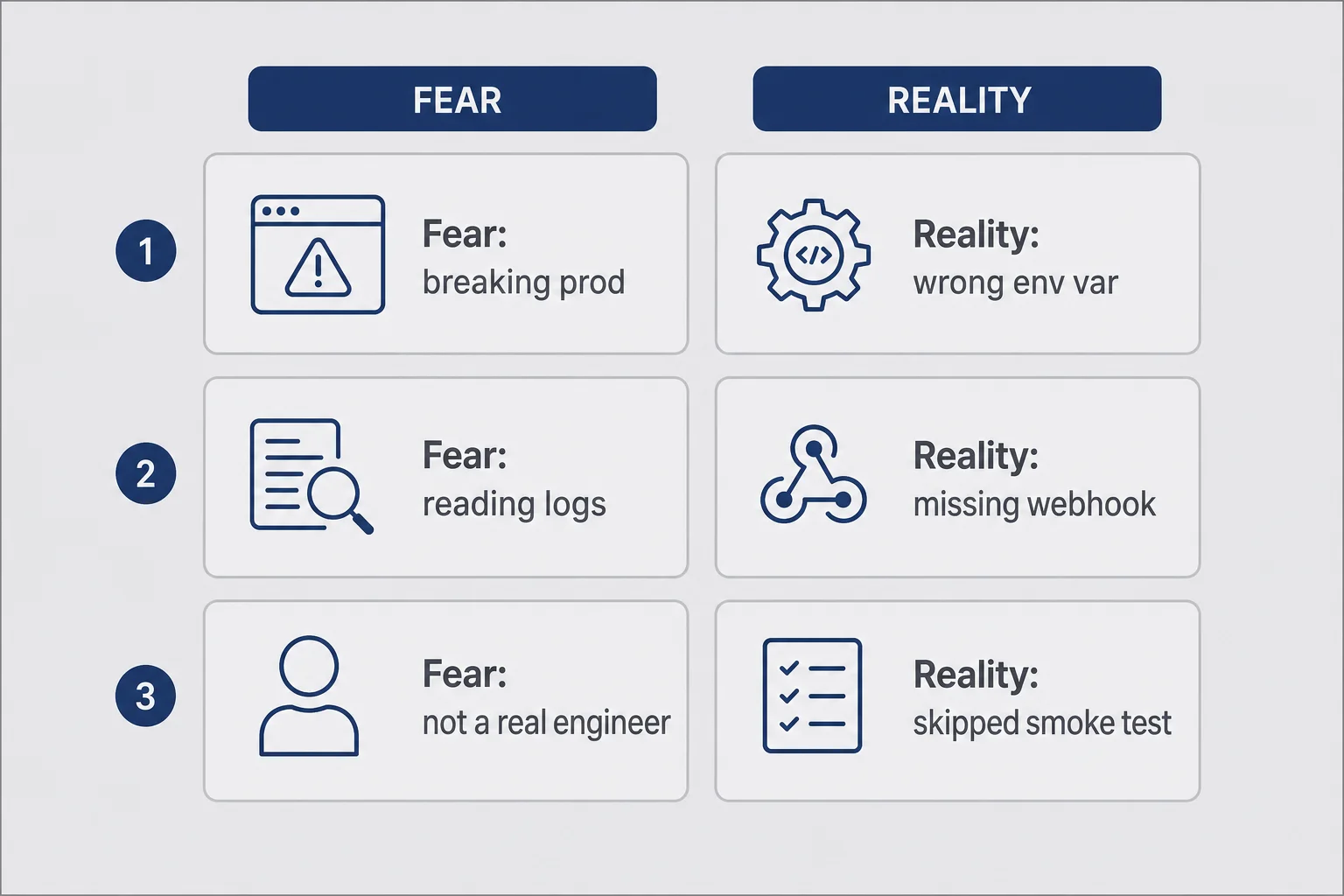
I think deployment scares non-coders more than building for three reasons, and naming them helped me stop procrastinating.
First, building has friendly UI. Bolt, v0, Cursor chat. Deployment often drops you into a dashboard with words like "build logs," "edge functions," and "environment." Those words are not harder than they look. They are just unfamiliar, and unfamiliar feels like danger when money is involved.
Second, the blast radius feels bigger. On localhost, only you see the broken save button. In production, a customer emails you. That email is not actually catastrophic for a ten-user product. It feels catastrophic at 11 p.m. when you are alone with an error you cannot parse.
Third, impostor syndrome peaks at the boundary between "I directed AI" and "I am responsible now." Developers feel this too. Non-coders feel it louder because we were told for years that production was someone else's job. It is your job now. That is uncomfortable and also kind of the point.
Here is the reframe that helped me. Deployment is not a test of whether you are a real engineer. It is a checklist. Checklists are what ops people do. You probably have ops instincts from some job you had before this. Use them.
The actual risks are narrower than your anxiety suggests. Wrong environment variables. Missing webhook configuration. Auth redirect URLs still pointing at localhost. Deploying an old branch. Forgetting to turn off debug mode. None of those require reading TypeScript. They require reading carefully and testing twice.
What deployment is not: a judgment on whether you deserve to be a founder. What it is: flipping the sign on the door from Closed to Open. You can flip it back. Rollbacks exist. Pausing Stripe exists. Telling five beta users "fixed now, sorry" exists. Small products are forgiving if you stay honest.
I still get nervous before I deploy. The nervousness shrinks each time I follow the same pre-deploy routine instead of winging it. Routine is how non-coders fake expertise until the expertise becomes real.
A founder in a Discord I lurk in described deployment as "pushing your diary onto the internet." I laughed because it felt accurate. Building is private. Deploy is public. The emotional weight is real even when the technical steps are copy-paste. Naming that weight does not remove it. It stops you from treating procrastination as preparation.
If you are waiting until you feel ready, you will wait past the point where learning would have helped. Ready is a moving target. Checklist-complete is not. Finish the list, click the button, fix what breaks. That loop is the job.
The pre-deploy checklist I run before a stranger can sign up
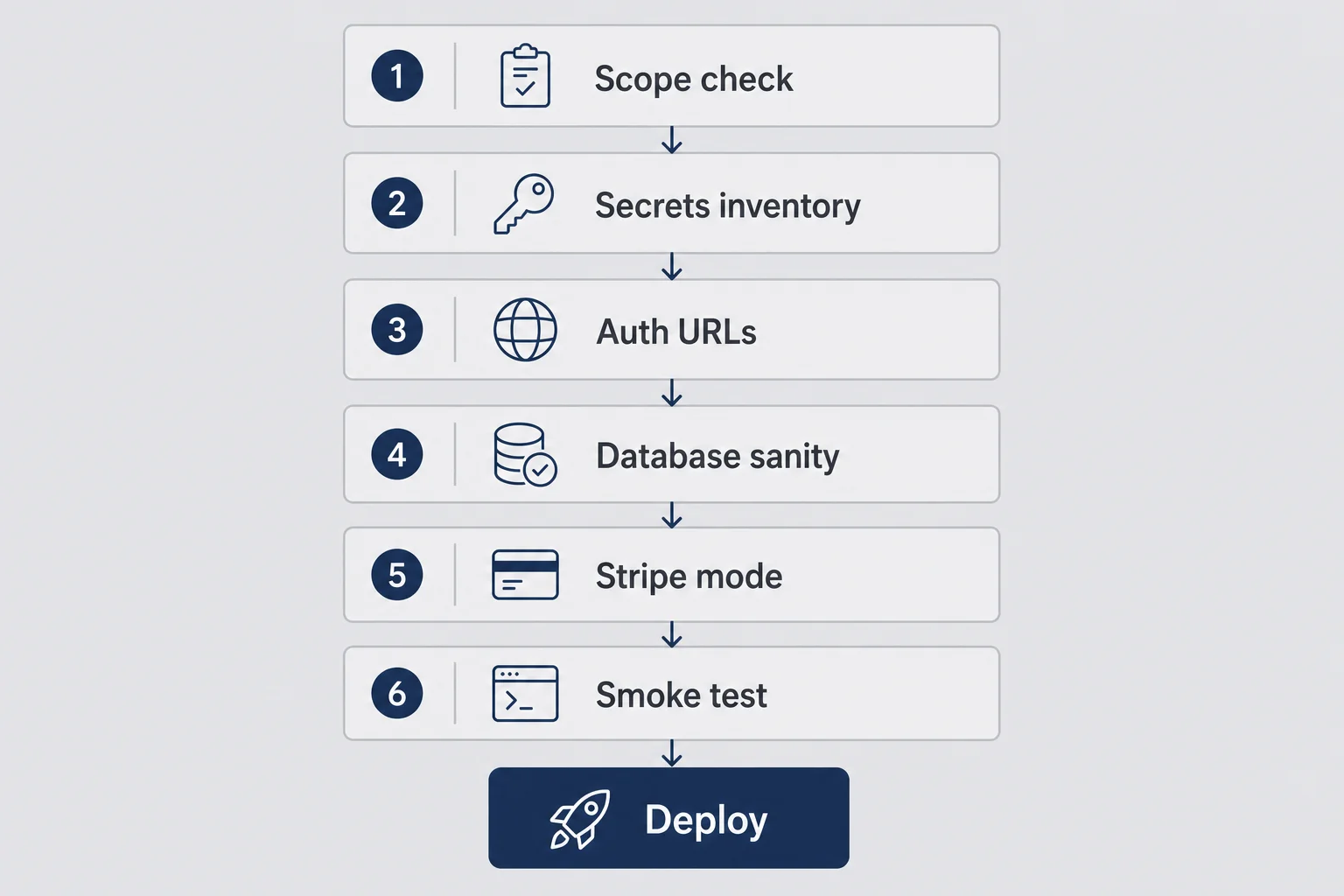
I keep a note on my phone called "before deploy." It is not elegant. It has saved me from announcing broken checkout more than once. If you deploy saas without coding on a regular basis, you want a ritual, not heroics.
Scope check. Can you describe the one workflow a paying user completes in one sentence? If not, deploy is premature. Not because deployment is hard. Because you will not know if production works. My worst deploy was a feature-rich dashboard where I could not name the magic moment. I shipped anyway. Support threads were chaos.
Secrets inventory. List every API key your app uses: database, Stripe, email, auth, analytics. Confirm each one has a production value, not a test value, when you intend to charge real money. Confirm none of them live in your GitHub repo. I search my project for sk_live and password before every deploy like I am cleaning a kitchen before guests arrive.
Auth redirect URLs. If you use Google login, magic links, or any OAuth, open the provider dashboard and add your production domain. Localhost entries can stay. Production entries must exist. This is the number one "works locally, fails live" issue I see in non-coder founder groups.
Database migration sanity. If your builder or agent created tables, confirm the production database has the same schema your code expects. You do not need to write SQL. You need to know whether deploy runs migrations automatically or whether you must click something in Supabase. Ask Cursor "what happens to the database on deploy?" and read the answer slowly.
Stripe mode alignment. Test keys on staging, live keys on production. Obvious until you are tired and paste the wrong one. Live keys with test card numbers fail in confusing ways. Test keys with real customers mean you earned zero dollars while feeling productive.
Smoke test script. Write five steps you will run on the live URL in an incognito window after deploy. Sign up. Log in. Core action. Settings change. Checkout or upgrade. Do not skip incognito. Your personal session hides cookie bugs.
I run this list even when I am excited. Excitement is when people ship without checking webhooks. Webhooks are how Stripe tells your app that payment succeeded. Without them, users pay and stay locked out. Max's Stripe billing post goes deep on setup. For deploy night, the question is simpler: does the live URL receive webhook events? Stripe's dashboard has a test button. Click it.
One more item I added after a bad week: support inbox ready. If something breaks live, users need somewhere to reach you that is not your personal Instagram DMs. A simple hello@yourdomain.com address forwarded to Gmail is enough. Read customer support as a solo founder when you are past deploy panic. For tonight, just make sure the email on your error page actually exists.
I also screenshot my env var list (values redacted) and store it in a password manager note. Not because I love paperwork. Because redeploying at midnight after a host glitch is easier when you are copying from a saved list instead of hunting through five dashboards while your brain is fried.
The two-browser trick
I keep one browser profile logged in as me and one incognito session pretending to be a stranger. If incognito cannot complete signup, I am not done, no matter what localhost promised.
Pick a host that matches how you actually built
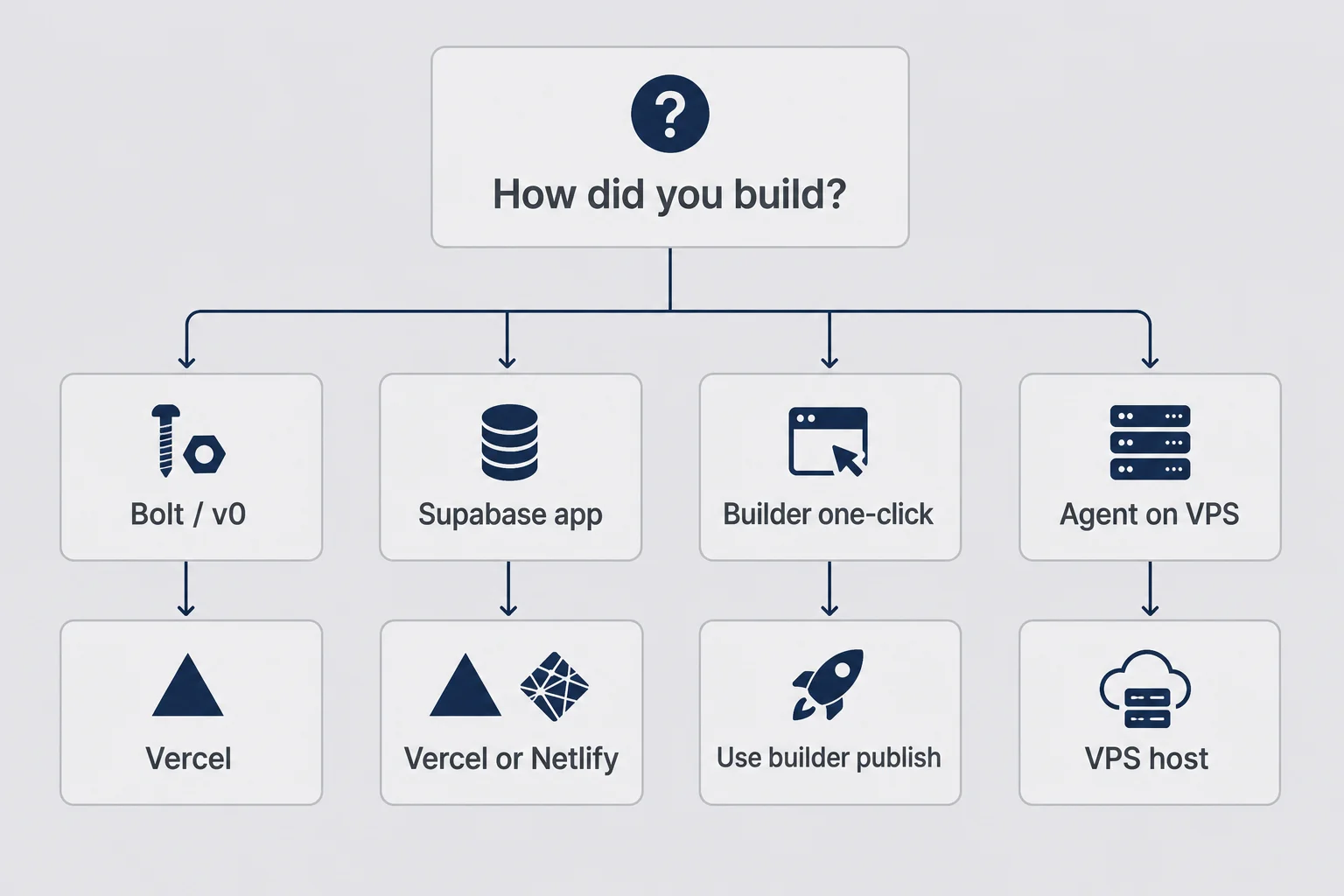
The internet loves debating hosts. For a solo founder trying to deploy micro saas without coding, the right host is the one that matches your build path with the fewest translation steps. Fancy infrastructure is not a flex when you are the entire team.
If you built in Bolt or v0: Vercel is the default gravity well. Export or connect GitHub, import the repo, deploy. Netlify works for many similar stacks. I pick Vercel when the project is Next.js because the docs and the builder defaults align. I am not loyal. I am lazy in a strategic way.
If you have a Supabase backend: Database stays on Supabase. Frontend deploys to Vercel or Netlify. Your job is connecting environment variables so the frontend finds the cloud database. Supabase's dashboard shows the connection string. Copy it into Vercel under Environment Variables. Redeploy. This sounds obvious. I have watched founders paste the anon key where the service role key belongs and wonder why security rules feel "broken."
If your builder has one-click publish: Use it for v1. Seriously. Velra, Meku, LengkApp, and similar tools exist because deploy friction kills non-coders. Publishing inside the builder is not a moral failure. It is speed. You can export code later when you understand what you are exporting.
If you run an always-on agent on a VPS: That is a different shape. My Hermes setup lives on a small server, not Vercel. Agent products are closer to "long-running process" than "static site." If your product is mostly a web app with a database, use a web host. If your product is literally an agent with a gateway, read the agent docs and do not force it into serverless because Twitter said so.
What I avoid as a non-coder on day one: AWS console archaeology, Kubernetes, self-managed Docker on a random VPS for a CRUD app, multi-cloud redundancy. Those are problems you buy with revenue or hire with revenue. They are not problems you need before your first ten strangers pay.
Compare hosts on three questions only. Does it connect to my GitHub repo or export path? Does it support environment variables without a YAML file I do not understand? Does it give me HTTPS automatically? If yes to all three, ship.
When solo founder deploy micro saas decisions stall, the blocker is usually perfection, not platform fit. Pick the host your builder documentation mentions first. Deploy. Learn. Migrate later if you outgrow it. Migration is cheaper than six months of localhost cosplay.
Vercel deploy no code saas in plain language
Connect repository. Set framework preset if the host asks (Next.js is common for AI exports). Add environment variables before you click deploy the first time if you can. Watch the build log. Green checkmark means the host compiled your app. It does not mean your app works. That is what smoke tests are for.
Build failures scare non-coders because the log looks like accusation. Copy the last thirty lines into Cursor and ask "what does this error mean in plain English and what should I do?" You are not cheating. You are operating.
Netlify feels similar in practice: connect repo, set build command if the defaults fail, paste env vars, deploy. I have bounced between hosts when one builder's export landed cleaner on one platform. The decision is reversible. Your first deploy does not marry you to a cloud provider. It marries you to a URL that works.
Preview deploys are underrated for non-coders. Many hosts give you a unique preview URL for every Git push. That is a free staging environment without learning Docker. Push a branch, get a link, run your smoke test there, merge to main when green. I treat preview URLs like dress rehearsals. The audience is me and one patient friend.
If you are deploying from a no-code builder's export for the first time, read their deploy doc once end to end before you click anything. Not because you will understand every word. Because you will recognize the vocabulary when something fails. "Root directory," "build output," "framework preset." Those phrases become searchable later.
Environment variables without pretending you are a DevOps engineer
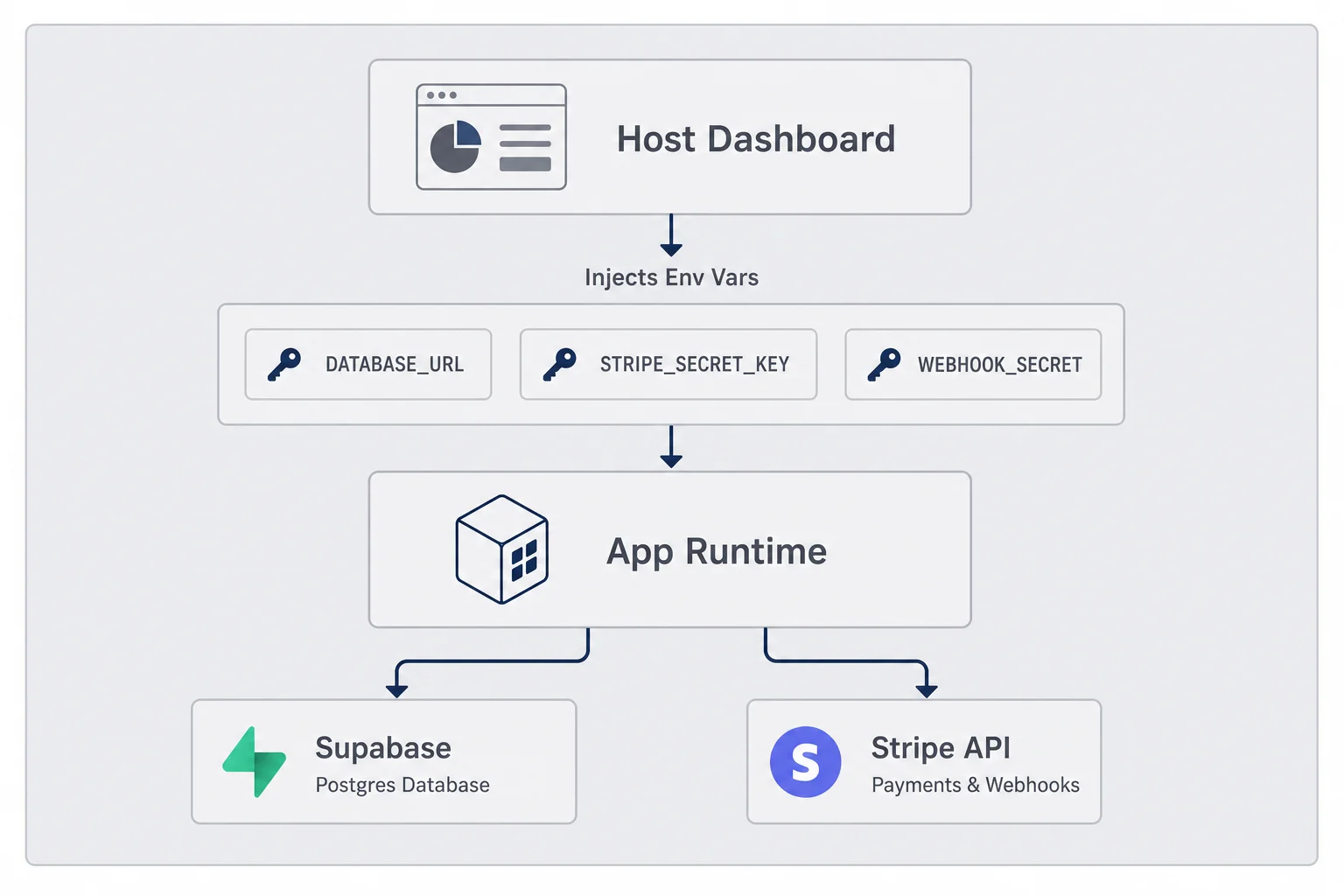
Environment variables are the config your app reads at runtime instead of hardcoding secrets in files. That is the whole concept. You do not need a DevOps certificate. You need to know which strings go where and that redeploying is required after you change them.
Think of env vars as labeled envelopes the host hands your app when it wakes up. DATABASE_URL might be the envelope with database connection info. STRIPE_SECRET_KEY is the one with payment power. Variables prefixed with NEXT_PUBLIC are visible to the browser. Never put secrets in a NEXT_PUBLIC variable. I learned that from a panic Google search, not a computer science class.
Where they live: your host dashboard, usually under Settings → Environment Variables. Paste name and value. Assign to Production, Preview, and Development as needed. Save. Redeploy. The redeploy step matters. Changing env vars does not always restart running instances instantly.
How to know which ones you need: search your codebase for process.env in Cursor, or ask the AI "list every environment variable this project expects and what each one does." Export that list to your pre-deploy note. Check them off one by one.
Common solo-founder mistakes: using test Stripe keys in production, forgetting STRIPE_WEBHOOK_SECRET on the live site, pointing at a local Supabase instance, missing NEXT_PUBLIC_APP_URL so email links send users to localhost forever. That last one embarrassed me on a small tool in March. One line fix. Three angry users because I skipped the checklist.
Rotating keys after a leak: if you accidentally commit a secret to GitHub, rotate it immediately in Stripe or Supabase, update the host env var, redeploy, and revoke the old key. GitHub's secret scanning might email you. Do not ignore that email because shame is loud.
You are not pretending to be a DevOps engineer. You are pasting labeled envelopes. Operators do this in every industry. Software just uses ugly names for envelopes.
A practical trick for ship ai built saas projects: create env vars in the host dashboard before the first production deploy when you can. Some apps read config at boot and cache assumptions. Setting vars after the fact works, but you will redeploy anyway, so front-load the work while you are already anxious and focused.
If your tool stack includes Supabase and Vercel, both dashboards have copy buttons next to keys. Use them. Manual typing is how typos sneak in. I once spent ninety minutes debugging a database connection that failed because I copied a trailing space. The space was invisible. My dignity was not.
Custom domain and HTTPS: the part that always takes longer
Every host gives you a free subdomain. something-random.vercel.app is a real URL. You can ship your first paying users there. I did. Custom domains are branding and trust, not a technical prerequisite for learning whether anyone wants your product.
Buy the domain when you are ready. Connect it in the host dashboard. Add the DNS records the host shows you. Wait for propagation. Propagation is where time goes to die. "A few minutes" often means an hour. Sometimes overnight. Have a book ready.
HTTPS should be automatic on modern hosts. If it is not green-lock automatic, stop and read docs before you send traffic. Do not send passwords over HTTP in 2026. I should not have to say that. I say it because I have seen beginner tutorials skip it.
WWW versus apex (www subdomain vs bare domain) trips people up. Pick one canonical version and redirect the other. Your host usually has a toggle. Consistency matters for cookies and OAuth redirects. Change the domain once, then update every third-party dashboard that whitelists URLs.
Email on your domain is a separate problem. You do not need hello@yourdomain.com on day one to deploy the app. You might want it for support later. Do not block product deploy on Google Workspace setup unless email deliverability is core to your product.
If DNS frustrates you, ship on the default subdomain and fix the pretty domain on Tuesday. Customers who want your solution will click an ugly URL. Customers who only trust pretty URLs are often not your early believers anyway.
Registrar dashboards are designed for people who deploy domains weekly. You deploy yearly, maybe. Screenshot the DNS records your host gives you. Paste them exactly. Typos in CNAME records are the silent killer. I once pointed the www subdomain correctly and left the apex domain hanging for two days wondering why half my test clicks failed. Half is a miserable debugging category.
HTTPS certificates renew automatically on good hosts. Note the date you connected the domain anyway. Calendar reminders feel corporate until a certificate edge case ruins a launch morning. Corporate is fine when it prevents public embarrassment.
Stripe and webhooks in production (not localhost)
Localhost Stripe testing is theater that prepares you, not proof. Production Stripe touches real cards, real disputes, and real webhook signatures tied to your live URL. If you charge money, this section is not optional.
Before deploy, complete Stripe setup in test mode on localhost. After deploy, switch to live keys only when you are ready for real charges. Many founders run one more day of test mode on production URL with test keys to verify webhooks fire on the public endpoint. That middle step saved my sanity once.
Webhooks need a public HTTPS URL. In Stripe dashboard, add an endpoint like https://yourdomain.com/api/webhooks/stripe (exact path depends on your app; search your repo for webhook). Stripe sends events. Your app verifies the signature using STRIPE_WEBHOOK_SECRET. If verification fails, payments succeed in Stripe and your database never grants the user access. Support tickets follow.
Use Stripe's "Send test webhook" button after deploy. Watch your host logs if you can. Ask Cursor where logs live. Success means your app returns 200 and the user state updates. Failure means read the error, fix env vars or URL, redeploy, test again.
Checkout URLs must use production domain in success and cancel redirects. Customer portal links must match. These are the same class of bug as OAuth localhost mistakes. The payment works. The user lands on a broken page. They think you scammed them.
Read Max's Stripe billing for micro-SaaS before you flip live keys if you have not already. He explains products, prices, and webhook failure at 2 a.m. better than I will. My contribution is narrower: deploy is when those warnings become real.
Say you charge $19/month and three people pay on launch day. That is $57 MRR, not retirement money, but proof strangers trust your deploy. Webhooks are how that trust converts into working accounts.
Billing portal links deserve the same production treatment as checkout. Users who want to cancel or update a card will click settings and expect a Stripe portal that matches your live domain. Test that path once. A broken portal on day three creates more churn than a missing dark mode toggle.
I also verify that failed payments behave sanely before I announce anything. Stripe test mode can simulate a declined card. Your app should show a human message, not a JSON error. Non-coders fix copy faster than we fix architecture. Use that advantage.
If you integrated annual plans, test monthly and annual once each. AI builders love to wire one price ID and hallucinate the second. Discovery in production is expensive emotionally.
Smoke test like an operator, not a QA team
You do not need a QA department. You need discipline. After every deploy, run the same short script. I timebox it to twenty minutes. If it takes longer, the product might be too wide for v1.
Incognito window. Sign up with a fresh email you control. Confirm confirmation email if you have one. Log out. Log back in. Complete the core action your product promises. Change one setting. If you charge, complete checkout with a real card or Stripe test card depending on mode. Open the app on your phone browser once.
Do it twice. Not because I am obsessive. Because intermittent bugs exist, especially in AI-generated code. The second run catches state that the first run left behind.
Watch for: slow loads that timeout on mobile, forms that silently fail, buttons that work once, error messages that mean nothing to normal humans. Write down anything weird in plain language. "Save clicked, spinner forever, refresh shows data" is a better bug report than "it broke."
Ask one friend to run the script if you can. Non-founder eyes catch embarrassing copy and confusing steps you normalized. Pay them in coffee or a free month. Cheaper than lost customers.
Log issues in a note, not your head. Fix blockers before you tweet the link. Ship non-blockers on the next deploy. Perfection is not the bar. Trust is. A confusing onboarding line can wait if checkout works. Checkout cannot wait.
This is how you ship ai built saas without pretending you ran a formal test suite. Operators rehearse the path customers take. Engineers automate the rehearsal later when revenue justifies it.
Record a thirty-second screen capture of your smoke test passing. Not for marketing. For you, next week, when you wonder whether production ever worked or your memory is lying. I have gaslit myself after a bad deploy by thinking the product was always broken. Video evidence is rude and effective.
Mobile testing catches layout sins desktop hides. Buttons below the fold. Modals wider than the screen. Inputs that zoom weird on iOS. You do not need every device. One phone browser session is enough to embarrass you productively.
When deployment fails and you cannot read the error
Build failed. Red text. Log output that looks like it wants a blood sacrifice. Your stomach drops. Welcome. This is the job.
First move: copy the error into Cursor with context. "I am deploying to Vercel. This is the build log. Explain the failure in plain English and give me the smallest fix." That prompt has never failed me completely. Sometimes the fix is "you need to set NODE_VERSION." Sometimes it is "this import path is wrong in one file." You do not need to understand the whole stack to apply a one-line fix the AI suggests, then redeploy and see if green returns.
Second move: check whether the failure is build-time or runtime. Build-time means the host cannot compile your app. Runtime means compile succeeded but the live site errors when you click. Different categories, different searches. Build failures block deploy. Runtime failures block customers.
Third move: roll back. Vercel and Netlify keep previous deployments. If the new one is broken and the old one worked, promote the old one while you fix forward. Rollback is not defeat. It is incident response for solo founders.
Fourth move: know when to stop for the night. If you have redeployed four times and the error mutated each time, sleep. Message affected users if any saw the broken version. Pick it up tomorrow with the debug playbook. Fresh eyes beat heroic stupidity.
Fifth move: hire one hour of help. A patient contractor who reads build logs can cost less than your time agonizing. Give them repo access, host access, and the error. Do not hire an agency for this. One hour, one scoped problem.
Common non-coder deploy failures I have lived: missing env var (build succeeds, runtime white screen), wrong Node version, importing a dev-only package in production, edge runtime incompatible with a library, database URL pointing at wrong project. All fixable without becoming Max.
The error is not telling you that you should have learned to code. It is telling you one specific thing failed. Find that thing. Fix that thing. Redeploy. The emotional story is optional.
What I ship on day one versus what I save for later
Scope discipline does not end at build. It returns at deploy. The enemy is not missing features. It is shipping a wide product that nobody can test end to end on a live URL.
Day one: signup, login, one core workflow, one pricing plan, working checkout if you charge, basic error messages, a support email, terms link if you store user data. That is enough to learn whether strangers pay.
Week two: better onboarding email, analytics, custom domain polish, minor UX fixes from smoke tests.
Later: team accounts, API, integrations, fancy admin dashboard, migration to fancier infra, automated test suite, CI/CD pipelines with badges.
I have shipped without custom domain, without pretty emails, without analytics, without a mobile app. I have not shipped successfully without working checkout when I charged money. Prioritize accordingly.
Feature flags and staging environments are nice. Staging can be a duplicate Vercel project pointing at a test database. You do not need enterprise workflow. You need a URL that is not production where you paste webhook test keys.
If your builder tempts you to add "just one more screen" before deploy, say no. Deploy ugly. Deploy narrow. Deploy with the subdomain. You are not launching to the world yet. You are opening the door a crack to see if cold air or warm air comes through.
When revenue appears, reinvest in hardening. Until then, speed and clarity beat architecture theater.
The vercel deploy no code saas path I recommend to friends is intentionally boring. Connect repo, paste env vars, deploy, smoke test, tell five humans, listen, fix, redeploy. Excitement belongs in customer conversations, not infrastructure choices. Boring deploys are repeatable deploys. Repeatable deploys let you sleep.
I keep a "not yet" list in the same note as my pre-deploy checklist. Team seats, annual billing, affiliate program, public API docs. Writing ideas down somewhere that is not the codebase stops feature creep from blocking deploy. The product can be small on day one. Your backlog can be large in a notebook.
Questions I get on this
Can you deploy a micro-SaaS without knowing how to code?
Yes, if you built with a host-friendly stack and you treat deployment as configuration, not engineering. Connect your GitHub repo or export from Bolt, set environment variables for Stripe and your database, click deploy, and test the live URL yourself. You still need to understand what goes live and what stays secret. You do not need to write deployment scripts by hand.
What is the easiest way to deploy an AI-built SaaS?
Match the host to how you built. Bolt and v0 projects usually go to Vercel. Supabase-backed apps often deploy to Vercel or Netlify with the database already hosted. If your builder has one-click publish, use that for your first version and migrate later if you outgrow it. Easiest is the path with the fewest manual steps between your repo and a public URL.
Do I need a custom domain before launch?
No. Ship on the default host URL first, run your smoke tests, and connect a custom domain when the product works. A broken app on yourbrand.com hurts more than a working app on a long Vercel subdomain. Buy the domain early if you want, but DNS can wait until production behaves.
What environment variables does a solo founder need in production?
At minimum, whatever your app uses for database connection, Stripe secret keys, webhook signing secrets, and any API keys for email or auth. Never commit these to GitHub. Paste them into your host dashboard under Environment Variables, redeploy, and test one paid flow on the live URL. If checkout works locally but fails live, env vars are the first suspect.
How do I test deployment without breaking real customers?
Use Stripe test mode keys on a staging URL if you have one, or deploy to production with no public announcement yet. Run signup, login, one core action, and checkout yourself in an incognito window. Ask one trusted friend to try. Do not post the link on social until those flows pass twice. Production is not where you discover missing webhooks.
When should I hire someone to handle deployment?
When you need Docker, Kubernetes, multi-region setup, or compliance you cannot explain in plain language. Also when you have redeployed five times and the same cryptic build error keeps returning. For a first micro-SaaS on Vercel or Netlify, you usually do not need a DevOps hire. You need patience and a checklist.
The door is open now. Walk through it.
I hit deploy that Sunday. The build took four minutes that felt like four hours. The live URL loaded. Incognito signup failed once because I forgot a redirect URL. I fixed it, redeployed, ran the script twice, and went to bed without tweeting anything.
Monday morning a woman in Ohio signed up. She did not know I was at my kitchen table. She did not care that Bolt wrote most of the code. She wanted the workflow to work. It did. That is the whole deploy micro saas without coding story in one sentence: make the workflow work where she can reach it.
You already did the hard creative part if you have something that runs locally. Deployment is administrative courage. Checklist, env vars, smoke test, fix the obvious thing, try again. You do not need permission from a senior engineer to open the door.
When you are live and stable, go read Max on how to launch a micro-SaaS. Launch is about people, not hosts. Deploy gets you a URL strangers can click. Launch gets them to click it. Different jobs. You just finished the first one.
My GitHub still looks like a museum of abandoned projects. The ones that survived all share one boring trait. They left localhost. You can do the same tonight. Cold coffee optional. Green button required.




Comments