Your Webhook Will Fail at 2 A.M. Plan for It
How to wire Stripe billing for a micro-SaaS as a solo founder: Checkout, webhooks, idempotency, and the database fields that actually gate access.
 By Max26 min read
Listen to this article
23:44AI-generated podcast-style overview of this article (not a word-for-word narration).
The Slack message arrived at 1:47 a.m. on a Wednesday. A customer had paid. Stripe showed the charge. My app still thought they were on the free tier. I had wired Checkout in an afternoon and told myself I would "do webhooks properly later." Later showed up while I was asleep, wearing the expression of someone who trusted a happy-path demo.
That was years ago, on a different product. The bug was boring. My webhook route parsed JSON before verifying the signature. Worked in one environment. Failed in another. Stripe retried for hours. I woke up to three duplicate support threads and a database that disagreed with reality. Revenue had happened. Entitlement had not.
If you are wiring Stripe billing for a micro-SaaS as a solo founder, the pricing decision comes first. Read micro-SaaS pricing for solo founders before you touch the dashboard. Pick one plan, one price, one trial rule — and run that price through a Stripe fee calculator so you know net revenue after processing, not just the number on the Checkout page. Then come back here. This post owns the plumbing: products, Checkout, webhooks, the table that gates access, and the mistakes that only appear after real money moves. I am not going to recreate the build guide stack tour. Assume you have an app shell, auth, and a subscription_status column in your database. Some examples below use round numbers. They are illustrative, not claims about my current MRR.
Bootstrapping billing is not glamorous. Nobody tweets about idempotency keys. But the founders who skip this layer ship a product that charges without unlocking, or unlocks without charging, or double-provisions on retry. All three hurt more than spending one focused evening on Stripe the right way.
I still meet founders who treat Stripe as the last checkbox before Product Hunt. They have a landing page, a login screen, and a vague idea that npm install stripe is the integration. Billing is not a dependency you sprinkle on launch eve. It is the contract between your app and reality. Get it wrong and your launch story is "we had paying users we could not onboard."
The good news: Stripe's solo-founder path is narrower than their enterprise docs imply. You are not implementing Connect marketplaces on week one. You are not issuing virtual cards. You are selling one subscription to one audience with one price until evidence says otherwise. That constraint is a gift.
This post sits between pricing (Part 3) and launch (Part 4) in Micro-SaaS From Zero. You already picked a number. This is the plumbing that makes charging and access match in production.
Stripe billing for micro-SaaS when you are the entire finance team
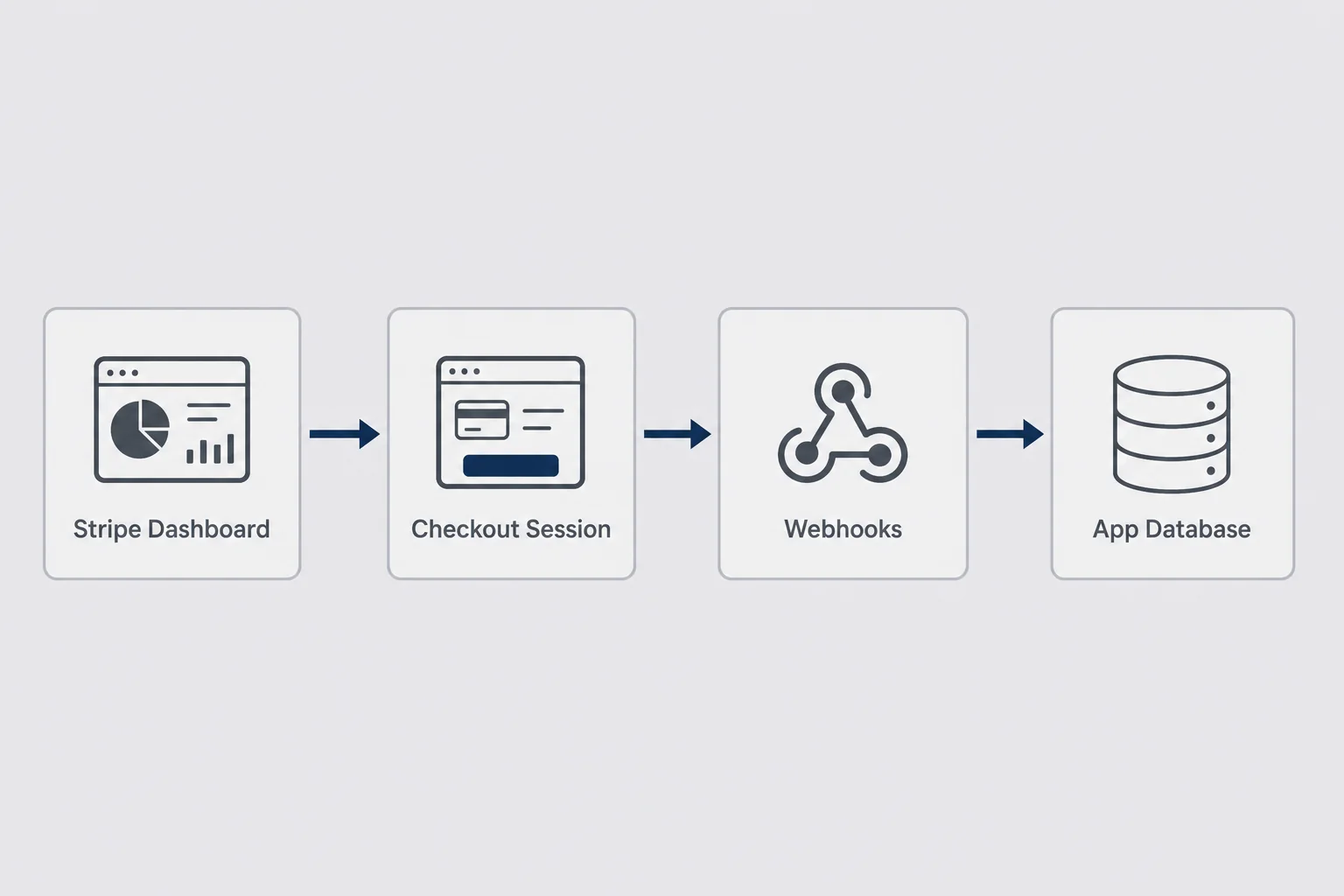
Here is the mental model I wish someone had drawn for me before I integrated Stripe the lazy way. Stripe owns money movement, card storage, tax calculation if you turn it on, invoices, and receipts. You own entitlement: what this user can do inside your app right now. The bridge is asynchronous. Webhooks tell your database that money changed. Your app reads the database. It does not call Stripe on every request to ask if someone is paid.
That separation is the whole game for micro-SaaS subscription setup. Founders blur it because Stripe's dashboard feels authoritative. It is authoritative for payments. Your app should not treat it like a session store. Network calls fail. Dashboard lag exists. Webhooks retry. Your database is the read model your features trust, updated by events you verify and dedupe.
Solo founders get tempted to skip the database sync and call stripe.subscriptions.retrieve in middleware on every hit. That works in a demo. It fails in production the first time Stripe's API hiccups during your customer's busiest hour, or when you rate-limit yourself during a traffic spike. Cache entitlement locally. Refresh it from webhooks. Reconcile periodically if you are paranoid. Paranoia is cheaper than refunds.
You validated. You built. Now you need the pipe that turns "paid" into "can export PDF" without you awake at 2 a.m. Imani covers tools like Stripe from a non-coder angle in micro-SaaS tools for non-developers. This is the engineer's cut: what to click, what to store, what to fear.
What Stripe owns versus what your database owns
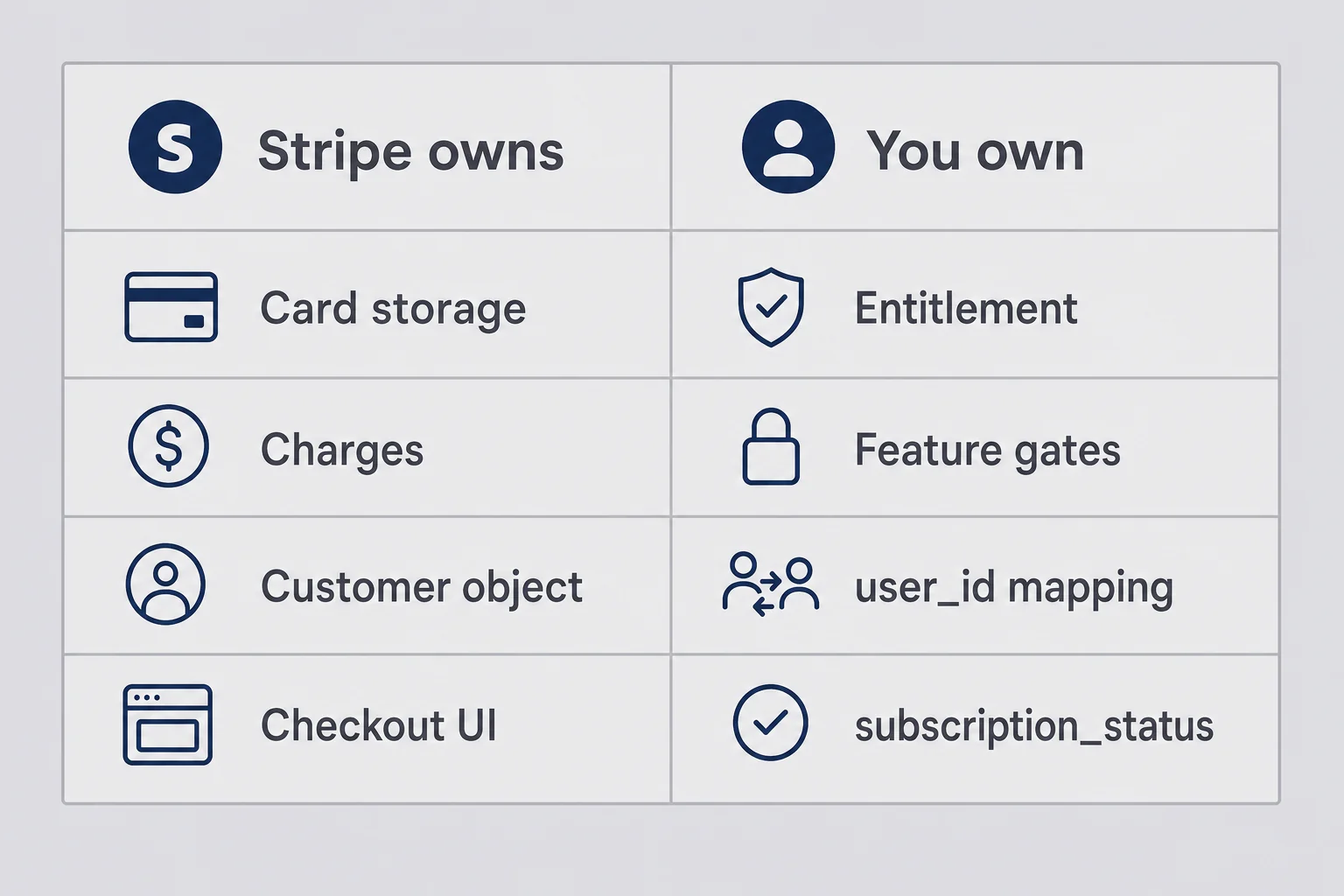
Stripe is very good at being a payments company. You are very bad at being a payments company if you try to compete on card storage. Let Stripe keep the card. Let Stripe send the receipt. Let Stripe fight with banks about 3-D Secure. Your job is narrower: record that user 4821 has an active subscription to your one price until the current billing period ends.
| Stripe owns | You own |
|---|---|
| Card numbers and PCI scope | users row and auth |
| Charges, refunds, disputes | Feature flags tied to plan |
| Customer object (cus_...) | Mapping internal user id to stripe_customer_id |
| Subscription lifecycle in their system | subscription_status your code reads |
| Hosted Checkout and Portal UI | Onboarding after pay succeeds |
| Webhook delivery and retries | Idempotent handlers that update your DB |
The mapping row is where solo founders get sloppy. They store stripe_customer_id eventually, but not which price_id is active, not cancel_at_period_end, not the last processed event id. Then a customer upgrades, Stripe knows, your app does not, and support becomes archaeology.
Minimum columns before live mode:
| Column | Why you need it |
|---|---|
| stripe_customer_id | Link app user to Stripe customer |
| stripe_subscription_id | Track the active subscription object |
| subscription_status | Gate features (active, trialing, past_due, canceled) |
| price_id | Know which plan they are on, including legacy prices |
| current_period_end | Show renewal date, grace logic |
| updated_at | Debug stale rows |
Optional soon: trial_end, cancel_at_period_end.
Say you run Postgres on Supabase. Migration might look like adding nullable columns first, backfilling nothing, then enforcing NOT NULL on stripe_customer_id only after first payment. Nullable is fine early. Missing column is not fine.
Your middleware checks subscription_status for active or trialing, or whatever your pricing trial rules require. Not a live Stripe API call on every request. Not localStorage. Database.
Stripe's dashboard will look authoritative forever. Your database row is what your middleware reads. Treat dashboard checks as debugging, not as runtime gates.
Feature gates belong in one helper function. canExport(user), canUsePremiumFeature(user). Read subscription fields there. Scatter if (user.plan === 'pro') in fourteen components and you will miss one. Billing bugs love scattered conditionals.
Micro-SaaS subscription setup: the minimum viable billing stack
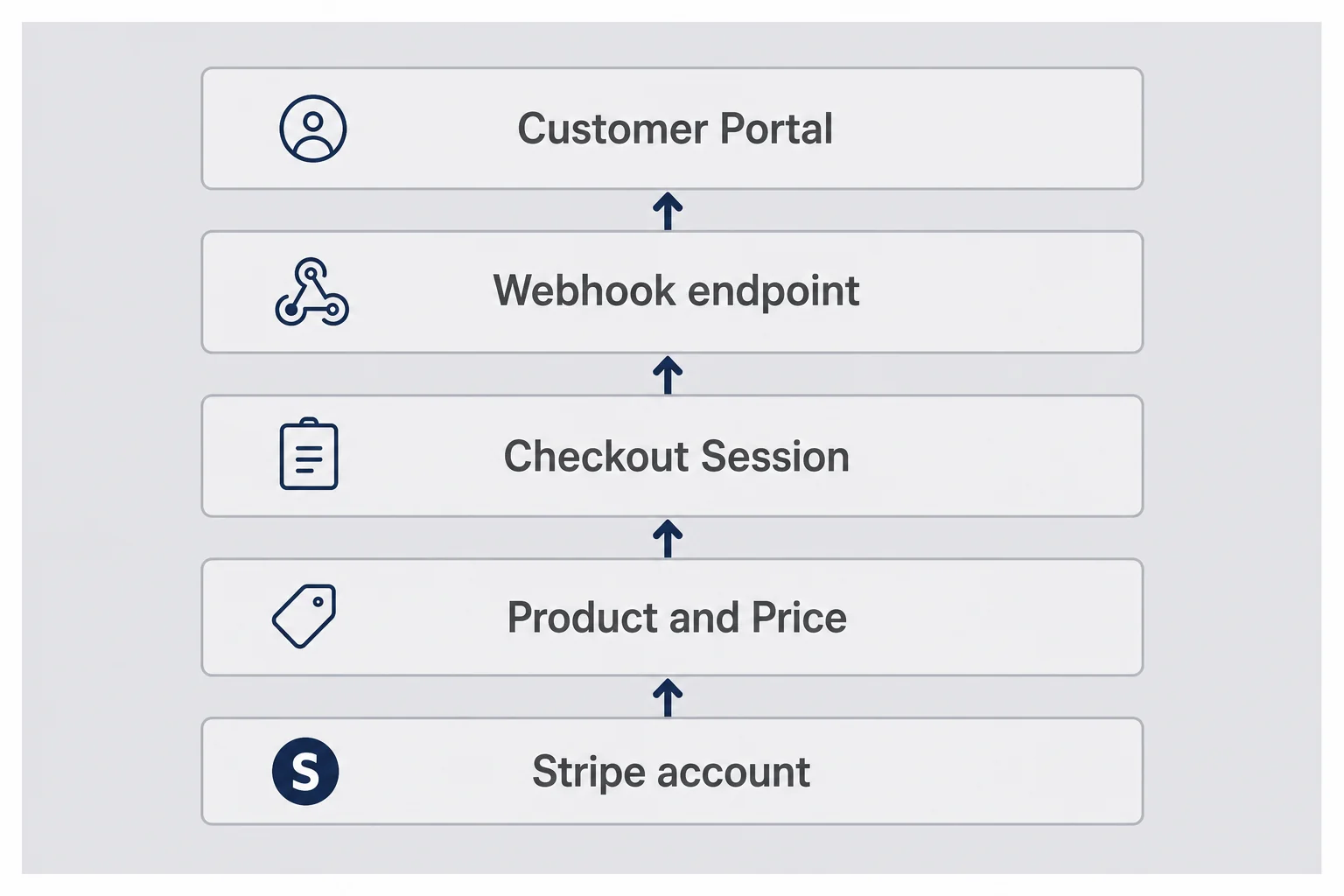
You do not need Billing Metering, Revenue Recognition, or a custom invoicing engine on day one. You need five pieces.
Stripe account in test mode. Verify your business details early if you are going live soon. Payout delays surprise founders who thought test mode was representative.
One Product and one Price in the dashboard matching your single-plan rule. Recurring, monthly, amount you already decided. Copy the price id into env vars. Yes, env vars. Not hardcoded strings scattered in three files.
Checkout Session creation on your server. Client clicks Upgrade. API route creates a session with customer email or an existing customer id, line items pointing at your price, mode set to subscription, plus success and cancel URLs. Return the session URL. Redirect. Done.
Webhook endpoint on your server. Verify signature with raw body. Handle the events that change entitlement. Persist event id before you mutate business state.
Customer Portal link in settings, configured after you have something to cancel. Optional on literally day one, mandatory by customer ten.
That stack handles more micro-SaaS launches than whatever complex abstraction you were about to build because you saw a conference talk about event sourcing.
Tools like Supabase, Next.js API routes, and the Stripe Node SDK are the common combo I reach for. Imani's stack post covers alternatives. Stripe itself is the constant. The SDK changes slowly. Your webhook bugs do not.
Where each piece lives in your repo
Keep billing routes together under app/api/billing/ and app/api/webhooks/stripe/. Future you searches one folder. Put shared Stripe client in lib/stripe.ts with singleton init. Put subscription update helpers in lib/billing/sync-subscription.ts so webhook handler and manual reconcile script call the same function. Duplicated update logic is how active in Stripe becomes trialing in Postgres with no one noticing.
Client components get an Upgrade button that POSTs to checkout route and redirects to returned URL. No secret keys in browser. No Stripe.js unless you need Elements later.
Database migrations for billing columns ship before you flip live. Not during. I have watched founders run ALTER TABLE during launch hour. Do not be that founder.
Products, prices, and why one Stripe price beats twelve
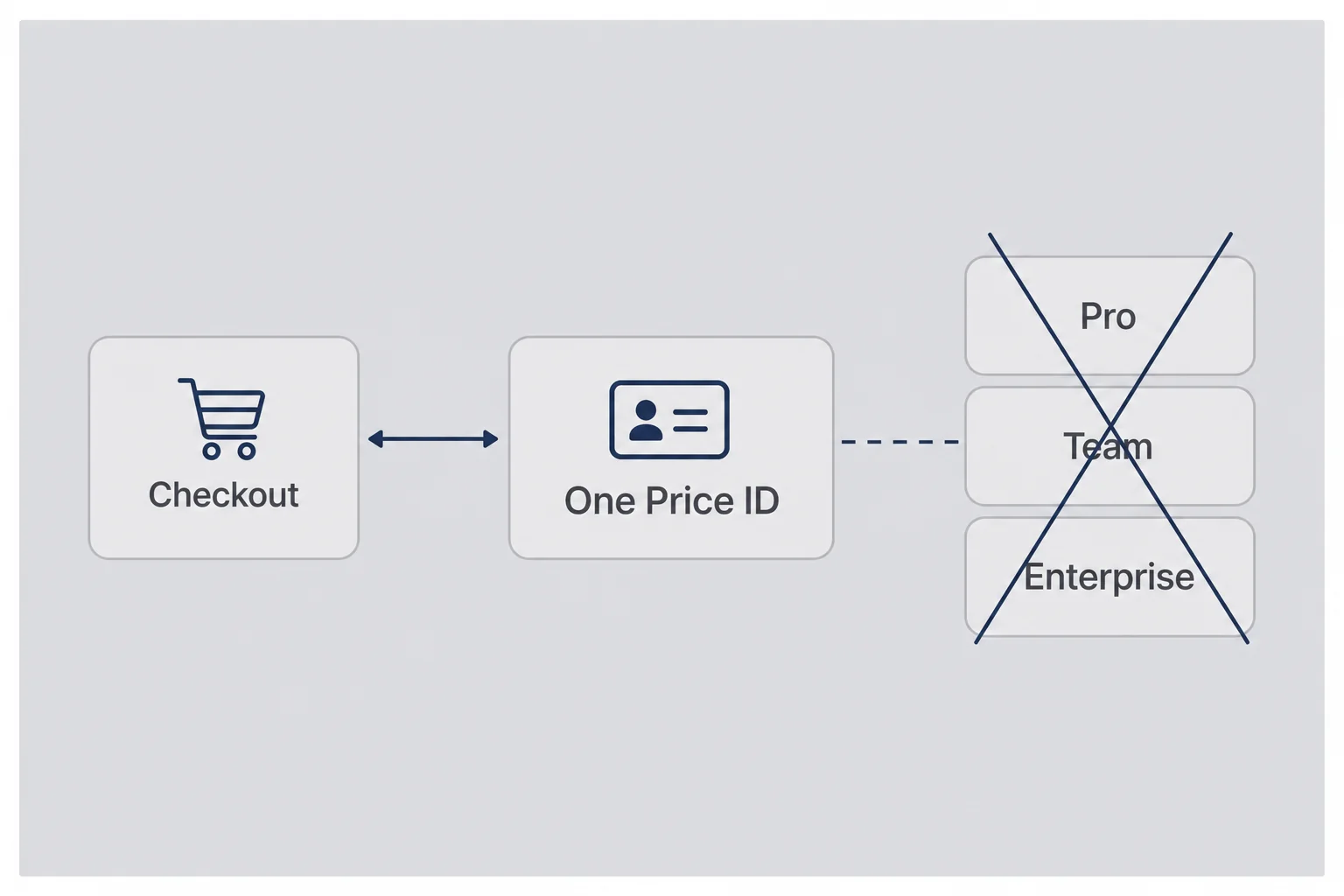
Every extra price in Stripe is an extra branch in your webhook handler, your upgrade flow, your support brain, and your pricing page. I have seen founders create monthly, annual, monthly-with-trial, annual-with-trial, and "founder lifetime" prices before they had one paying user. Each price is a future bug.
Start with one recurring price. If you offer a trial, attach trial days to Checkout Session creation or to the price object, not both in conflicting ways. Read the docs once. Pick one mechanism.
Naming matters in the dashboard when you have six prices six months later. Name it pro_monthly_49, not price_1. Your future self greps logs.
When you raise price, create a new price object. Grandfather old subscribers on the old price_id. Stripe subscriptions stick to the price they started on until you migrate them. Your app's price_id column tells you who is on legacy. This pairs with the raise playbook in the pricing post.
Annual plans can wait. Founders want annual cash for runway. Fine. But monthly-only for launch reduces test surface. Add annual when monthly webhook flow is boringly reliable.
Stripe Checkout for micro-SaaS: the boring default that wins
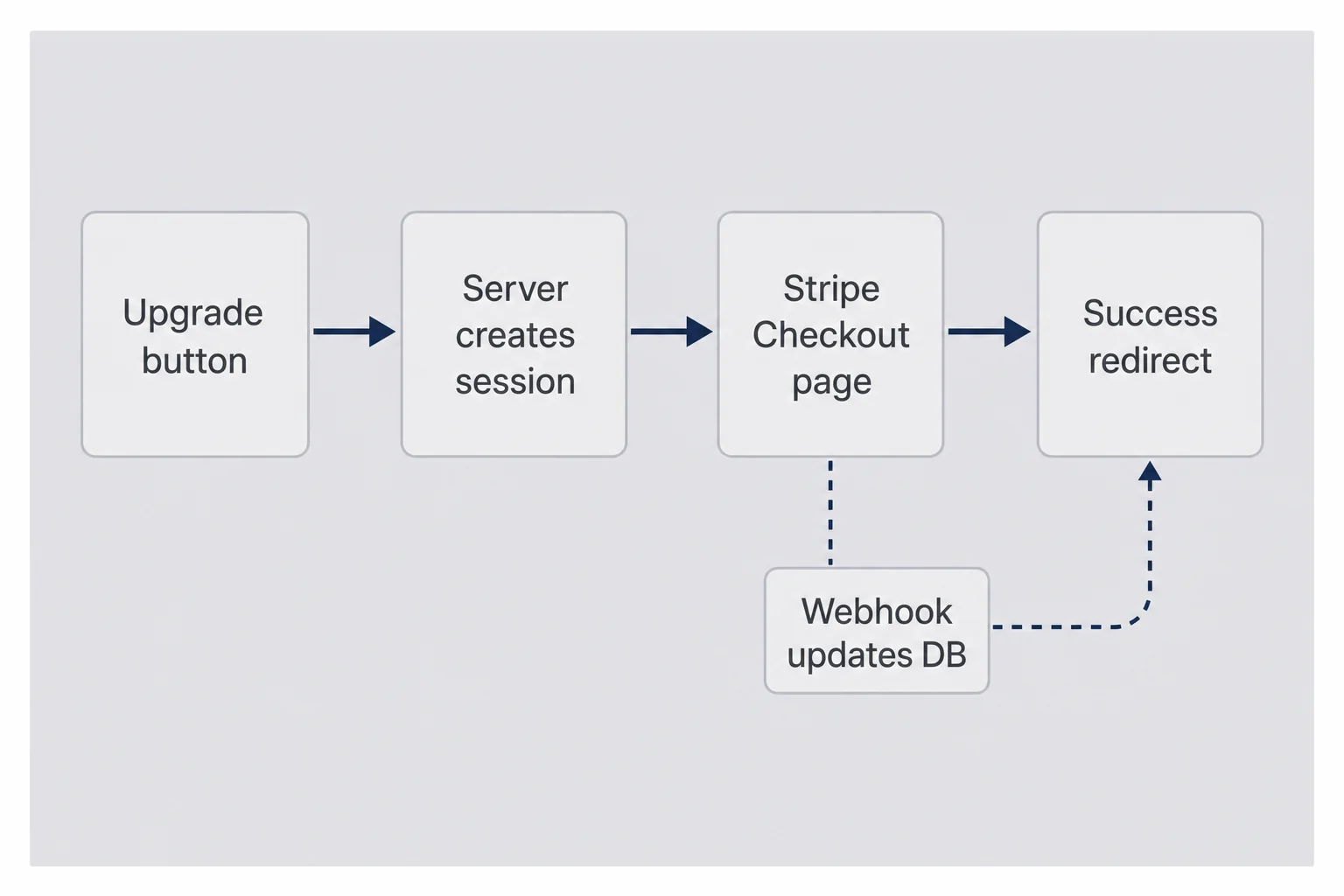
Stripe Checkout is a hosted payment page. You redirect. Customer pays. Stripe redirects back. Your app still does not know they paid until the webhook fires, which is why founders feel betrayed when success_url loads and features are locked. Expected. Not a bug. Document it in your success page copy. "You're in. Access unlocks in a minute."
Server-side session creation keeps secret keys off the client. Typical pattern:
import Stripe from "stripe";

const stripe = new Stripe(process.env.STRIPE_SECRET_KEY!);

export async function POST(req: Request) {
  const body = await req.json();
  const userId = body.userId;
  const email = body.email;

  const session = await stripe.checkout.sessions.create({
    mode: "subscription",
    customer_email: email,
    client_reference_id: userId,
    line_items: [{ price: process.env.STRIPE_PRICE_ID!, quantity: 1 }],
    success_url: process.env.APP_URL + "/billing/success?session_id=CHECKOUT_SESSION_ID",
    cancel_url: process.env.APP_URL + "/billing/canceled",
    subscription_data: { trial_period_days: 14 },
  });

  return Response.json({ url: session.url });
}
In production, wrap the success_url with Stripe's CHECKOUT_SESSION_ID placeholder (curly braces in the real string).
The client_reference_id field is your friend. Pass internal user id. When checkout.session.completed fires, map session to user without guessing by email.
Payment Links are the even lazier path. Good for manual first sales. Bad when you need auth tied to checkout. Know which problem you are solving.
Embedded Payment Element looks premium. Budget an extra week minimum if you have never done it. Checkout first. Vanity later.
Tax, invoices, and settings you can ignore for now
Stripe Tax exists. Turn it on when you sell cross-border enough that VAT nightmares appear in your inbox. Under roughly a thousand dollars MRR selling mostly US B2B, many solo founders defer tax automation and talk to an accountant once. Not tax advice. Anxiety advice.
Collecting billing address in Checkout is a checkbox. Enterprise buyers want invoices with company name. Checkout can collect tax ids later. Do not block launch on invoice PDF customization.
Receipt emails from Stripe are on by default. Read one test receipt. Make sure your product name in Stripe dashboard is not "prod_xxx untitled."
Success page without lying
Your success page should not promise instant access if webhooks take ten seconds. Say payment succeeded. Say provisioning may take a moment. Offer refresh. Log session id for support. The worst support tickets are "I paid and nothing happened" when the webhook failed silently. Alert on webhook failures from day one.
Stripe webhooks for solo founders: where billing actually lives
Here is where founders spend an afternoon and earn three weeks of incidents.
Stripe sends HTTP POST to your endpoint when state changes. You must verify the stripe-signature header against the raw request body. Frameworks that parse JSON first break verification. In Next.js App Router, that means req.text(), not req.json(), on the webhook route only.
import Stripe from "stripe";

const stripe = new Stripe(process.env.STRIPE_SECRET_KEY!);

export async function POST(req: Request) {
  const body = await req.text();
  const sig = req.headers.get("stripe-signature")!;

  let event: Stripe.Event;
  try {
    event = stripe.webhooks.constructEvent(
      body,
      sig,
      process.env.STRIPE_WEBHOOK_SECRET!,
    );
  } catch {
    return new Response("Invalid signature", { status: 400 });
  }

  // idempotency + handling below
  return new Response("ok", { status: 200 });
}
Use Stripe CLI during dev:
stripe listen --forward-to localhost:3000/api/webhooks/stripeCopy the webhook secret it prints. Do not reuse production secrets locally.
Events to handle first:
| Event | What you do |
|---|---|
| checkout.session.completed | Link customer and subscription to user; set trialing or active |
| customer.subscription.updated | Sync status, period end, price id |
| customer.subscription.deleted | Set canceled; gate features |
| invoice.payment_failed | Set past_due; show banner; maybe degrade |
Return 200 quickly. Heavy work async if it takes more than a second. Stripe retries failures for days. Slow handlers cause duplicate deliveries and timeouts.
Return 200 for unhandled event types too. You do not want infinite retries on customer.updated because you subscribed to all events and ignored most.
Log event id and type on every receipt. When production breaks, you will search logs by evt_...
Next.js App Router gotcha
If you use Next.js middleware or body parsers globally, exclude the webhook route. The raw body must arrive unmodified. Document this in a code comment above the route file. The next person touching your repo might be you in six months with amnesia.
What to do in the handler versus in a queue
For micro-SaaS under a few hundred subscribers, inline handling is fine if you only update a database row and send one email. If fulfillment triggers provisioning in three external systems, enqueue. The rule is response time, not dogma. Stripe wants 200 within roughly a few seconds. Slow email providers do not belong in the critical path.
I use a simple rule: if handler code can fail because Mailgun hiccuped, move email out. If handler code only touches Postgres, keep it in.
Reading subscription state from events
Event payloads are snapshots. customer.subscription.updated carries a subscription object, but the durable pattern is: extract ids, then optionally re-fetch subscription from Stripe API inside handler if you are paranoid about stale fields. I usually trust the payload for status and period end on updated events. For checkout.session.completed, fetch session with expanded subscription and customer because the webhook payload might be thin depending on version.
Document which events you treat as authoritative for which fields. Future debugging you will ask "why did status flip?" Answer should be in git blame on webhook file, not folklore.
Idempotency: the table you create before live mode
Stripe retries. Your handler will run twice for the same event. If double-running sends two welcome emails, annoying. If double-running provisions two API keys or doubles usage credits, expensive.
Create a stripe_events table with event_id (unique), type, processed_at, and maybe a payload jsonb column for debugging. Flow:
- Verify signature
- Insert event_id with ON CONFLICT DO NOTHING
- If insert did nothing, return 200 immediately
- Else process event, update user subscription in same transaction if possible
- Return 200
Some teams enqueue a job here instead of processing inline. Fine at scale. For micro-SaaS, inline processing is OK if you are fast.
The subtle bug: insert event id, process, process throws, you return 500, Stripe retries, insert conflicts, you return 200 without fixing the user. Now you are stuck. Log failures aggressively. Alert on 500. Have a manual replay path from Stripe dashboard you know how to use.
Prune old stripe_events rows after 30 to 90 days. The table grows forever otherwise.
The insert step can be a single SQL statement: unique constraint on event_id, insert, and skip processing when conflict returns zero rows. Keep the subscription update in the same database transaction as marking the event processed when your ORM makes that easy. If the handler crashes after updating the user but before returning 200, you still want the event row present so retries do not double-apply business logic.
Idempotency is not optional polish. It is part of stripe webhooks solo founder survival. The three-day retry window is long enough to ruin a launch weekend.
Stripe billing portal and self-serve cancellation
After your first five paying users, add Stripe Customer Portal. Configure in dashboard: payment method update, cancel subscription, maybe invoice history. Generate portal session server-side linked to stripe_customer_id. Put "Manage billing" in settings.
Portal saves you from building cancel flows while you are still fixing core product. Cancellation is a feature. Make it honest and easy. Founders who hide cancel breed chargebacks and angry tweets.
I configure portal to allow payment method updates and cancellation. I disable plan switching until I have a second price worth switching to and webhook branches tested for upgrades. Invoice history visible is nice for B2B buyers who expense software.
Link generation is another server route that calls stripe.billingPortal.sessions.create with customer id and return_url. Return URL goes back to settings. Do not expose customer id client-side without auth checks. Obviously.
Some founders ask whether portal hurts retention. Sometimes yes, honestly. Hiding cancel hurts more when the card issuer gets involved. A clean cancel with a one-question survey beats a mystery charge on a card they forgot about.
Portal also handles card expiry updates. You do not want those emails.
Stripe's hosted billing portal is not pretty branding. It is a relief valve. Solo founders who postpone it end up manually canceling subscriptions in the dashboard while a customer waits on email. Turn it on early even if you only link it from a footer labeled "Billing."
Do not enable plan switching in portal until you have multiple prices and upgrade logic tested. One-plan SaaS does not need switch yet.
Test mode, live mode, and the flip checklist
Test mode is free emotional damage. Live mode is real. Checklist before flip:
- Business details and payout bank added in Stripe
- Webhook endpoint registered for production URL with production secret in env
- Same events selected as test
- Three flows pass in test: new sub, cancel, failed payment
- STRIPE_SECRET_KEY and STRIPE_WEBHOOK_SECRET live keys only in production env, not committed
- Success and cancel URLs use production domain
- Customer support email exists for billing questions
First live charge should be yours or a friend's. Small amount. Real card. Watch webhook logs. Watch database row. Refund if you want. The point is end-to-end truth.
Keep test mode keys in local .env. Never mix them in one deployment. I have seen production apps charge $0.50 test cards because env was wrong. Embarrassing.
Before you announce billing is live, run the same three flows again on production with your own account: subscribe, open Customer Portal and cancel, trigger a failed payment with Stripe's test decline card if you still have a test user in a staging environment. Production surprises come from URL typos in success_url, webhook endpoints pointing at old deployments, and price ids copied from test mode. The checklist above catches most of that if you actually click through instead of assuming env vars are right.
Mistakes I keep seeing in solo-founder Stripe setups
Trusting success redirect as proof of payment. It is not. Webhook is proof.
No client_reference_id. Now you match by email and pray.
Parsing webhook body before verify. Signature fails mysteriously.
Gating features on Stripe API every request. Slow, brittle, rate-limit bait.
One webhook secret for dev and prod. Rotation nightmare.
Ignoring invoice.payment_failed. Users think they are paid. You think they are too. Stripe knows otherwise.
Building custom dunning before you have ten customers. Stripe Smart Retries and email exist. Use defaults first.
Twelve prices, zero docs. Future you hates past you.
Skipping Customer Portal. You become human cancel button.
None of these are theoretical. I have done at least three. You will do one. Make it the small one.
The support email that saved a launch
Say a customer pays, webhook fails, they email "I was charged." Your success page should tell them to wait two minutes. Your support playbook should include: look up stripe_customer_id by email, check subscription_status in DB, check Stripe dashboard subscription tab, compare event id in logs. If Stripe shows active and DB shows free, manually update row and fix webhook. Refund is rarely the right first move if they want access. They want the product. Fix entitlement. Then fix pipe.
Document that playbook before launch. You at 2 a.m. is not smarter than you with a checklist at 2 p.m.
When to add complexity (and when to stop)
Add annual billing when monthly is stable. Add team seats when solo users beg and usage data supports it. Add usage-based metering when flat price lies about your costs. Add tax automation when you sell cross-border enough to care. Add custom invoicing when enterprise asks and pays.
Before each addition, ask: does this new Stripe object need a webhook branch, a new column, and a support answer? If yes, count the branches. Complexity compounds in billing silently.
For most indie hacking SaaS under $5k MRR, Checkout plus webhooks plus portal plus one price is enough for a year. Revenue is validation. Billing plumbing is how you keep validation from turning into support tickets. Reconcile Stripe against a simple monthly recurring revenue calculator so missed webhooks do not lie to you about progress.
Reconcile weekly early on: script that lists active subscriptions in Stripe and compares to your database. Mismatches happen. Webhooks get missed in deploys. Five-minute cron saves an afternoon.
Graduating to metered billing
When your costs scale with usage (API calls, generated pages, stored gigabytes), flat price lies. Stripe metered prices exist. They are more moving parts: usage records, aggregation, invoice line items that confuse customers. Add when unit economics force it, not when you imagine you might need it someday.
Until then, soft limits in app with fair upgrade nudge beat premature metering infrastructure.
Paddle and Merchant of Record alternatives
Some founders use Paddle or Lemon Squeezy to outsource tax compliance. Higher fees, less webhook homework, different dashboard religion. Valid if international tax keeps you up at night. Stripe direct is still the default for US-focused B2B micro-SaaS where you want maximum control and a thinner fee stack — model the Stripe side with a Stripe fee calculator before you assume "cheaper than MoR" without numbers. Choose consciously. Migration later is annoying.
Before you flip live mode
The sections below are not separate products. They are the checklist items founders forget until a real card hits a real subscription. Read them once while you are still in test mode.
Linking Stripe customers to users you already have
Auth exists before billing in most apps. Supabase, NextAuth, Clerk, whatever you picked in the build guide. The Stripe Customer is a separate object. Your job is a durable link.
Pattern I use: on first Checkout, pass client_reference_id with your internal user id. In checkout.session.completed, read session.client_reference_id, session.customer, and session.subscription. Write all three to your user row. If the user already has stripe_customer_id from a previous aborted checkout, pass the existing customer id when creating the session instead of customer_email. Stripe reuses the customer. Fewer duplicates.
Duplicate customers in Stripe happen when founders create a new customer on every checkout attempt. Search by email in dashboard, merge manually, learn humility. Code fix: always look up stripe_customer_id before creating.
For logged-out marketing-site flows, email might be the only key temporarily. That is fragile. Get them authenticated before checkout when possible. Email-only matching breaks when someone pays with a work card and personal email.
Metadata on Stripe objects helps debugging. subscription_data.metadata.userId and customer.metadata.userId cost nothing. When you are staring at a weird subscription in dashboard at midnight, metadata is the breadcrumb.
Environment variables and secrets that belong in production only
| Variable | Notes |
|---|---|
| STRIPE_SECRET_KEY | Server only. Never expose as NEXT_PUBLIC_ |
| STRIPE_WEBHOOK_SECRET | Per endpoint. Different in dev vs prod |
| STRIPE_PRICE_ID | Your one plan's price id |
| APP_URL | Success and cancel redirect base URL |
| NEXT_PUBLIC_STRIPE_PUBLISHABLE_KEY | Only if you use client-side Elements. Checkout redirect may not need it |
Rotate webhook secrets when you suspect leakage. Create new endpoint in dashboard, dual-run during deploy, swap env, delete old endpoint. Stripe documents this. Read once before panic.
Never log full webhook payloads with card details in production logs. Stripe events can include billing address. Scrub if you pipe logs to third parties.
Trial periods without fooling yourself
Trials show up in pricing debates constantly. Technically they are easy. Strategically they are a promise that your onboarding works before money moves. For trial length, card policy, and conversion design, read micro-SaaS free trial for solo founders. This section covers the Stripe flags.
Set trial_period_days on Checkout Session or on the Price. Pick one place. Stripe sets subscription status to trialing until trial end, then active or past_due depending on payment outcome.
Your app gates on trialing the same as active if trial users get full access. Some founders gate reduced access during trial. Be explicit in code and marketing.
customer.subscription.trial_will_end fires a few days before trial ends. Handle it if you want warning emails. Stripe can send emails too. Configure who sends what so users do not get duplicate nagging.
When trial ends without payment method, subscription cancels. Make sure your webhook handles customer.subscription.deleted from trial expiry, not only from user clicking cancel. Test this in test mode with shortened trial clocks if available, or trust docs and verify once manually.
Founders sometimes ask whether to require card upfront for trial. Card upfront lowers trial starts, increases paid conversion quality. No card increases top of funnel, increases ghost trials. Match your pricing trial philosophy. Stripe supports both. Your analytics tell you if you chose wrong.
Failed payments and the past-due gray zone
invoice.payment_failed is not moral judgment. Cards expire. Banks decline. Handle it calmly.
Set status past_due in your database. Show in-app banner: update payment method, link to Customer Portal. Degrade features or freeze exports depending on your ruthlessness and churn philosophy. Do not silently leave them premium for three months out of guilt.
Stripe Smart Retries dunning runs by default. Learn what emails Stripe sends before you duplicate them. Solo founders duplicate emails and annoy customers.
After final failure, subscription may cancel. Your customer.subscription.deleted handler should downgrade. If you miss this event, you are giving free premium to ghosts.
Reconciliation when you do not trust webhooks alone
Webhooks fail during deploys. Nginx misconfigures. Someone fat-fingers the route. A weekly reconcile job saves you.
Pseudo-flow: list active subscriptions from Stripe API for your price, compare to users with subscription_status active in DB, flag mismatches, email yourself a report. Run Sunday morning with coffee. Not glamorous. Catches real drift.
Some teams poll Stripe on login as soft reconcile. Acceptable backup if rate limits respected. Do not make login depend on Stripe being up.
Local development without ngrok nightmares
Stripe CLI listen forwards webhooks to localhost. Install it early. Document the forward command in your README for future you.
Without CLI, you will click checkout, pay in test mode, wonder why database empty. Success URL is not the webhook. CLI fixes that loop.
Commit a docs/billing-test-checklist.md if you want. I keep mine in a note titled "before live." Same content.
Stripe's test clock feature can simulate subscription time forward for trial end testing. Worth an hour once you have basic flow working. Not required for first commit.
When a teammate joins later, they need test card numbers and webhook forward command in onboarding doc. Solo today, team tomorrow, same Stripe account forever.
What I would not build yet
Custom invoicing PDFs. Tax engine for three countries. Usage metering with five dimensions. Affiliate payouts. Multiple currencies on day one. Each item is a company department pretending to be a feature.
Your first ten customers do not need a billing settings page with graphs. They need pay, work, cancel, update card. Checkout and Portal cover that.
If you are building without coding, Stripe plugins exist on no-code platforms. This post is for people who own a repo. The principles still apply: something async updates entitlement. Find where your platform stores that.
Questions I get about Stripe billing for micro-SaaS
Should I use Stripe Checkout or build my own payment form?
Use Stripe Checkout for your first version. It handles card fields, SCA, Apple Pay, and receipt emails without you touching PCI scope. Embedded forms look slicker but cost a week you do not have and break in edge cases you have not heard of yet. Graduate to embedded Payment Element only when Checkout conversion data proves people are paying and you have a specific UX reason to own the form.
Which Stripe webhook events do I need for a subscription SaaS?
At minimum handle checkout.session.completed for the first purchase, customer.subscription.updated for plan changes and renewals, customer.subscription.deleted for cancellations, and invoice.payment_failed for dunning. Return 200 for events you ignore so Stripe stops retrying. Log everything else for the first month so you see what actually fires for your flow before you trim the list.
How do I test Stripe billing without going live?
Stay in test mode until a real customer is ready to pay. Use test card 4242424242424242 for success flows and 4000000000000341 for failed charges. Run Stripe CLI to forward webhooks to localhost during development. Create a checklist of three flows before you flip live: new subscription, cancellation, and failed payment. If those three work in test with your database updating correctly, you are closer than most first launches.
What database fields should I store for Stripe billing?
Store stripe_customer_id, stripe_subscription_id, subscription_status, current_period_end, and price_id at minimum. Your app gates features on subscription_status in your database, not on a live Stripe API call on every page load. Treat Stripe as the source of truth you sync toward via webhooks, with an occasional reconciliation job as backup. Never store full card numbers. Stripe owns the PAN. You own the entitlement row.
When should I add the Stripe Customer Portal?
Add it once you have paying users who will need to update cards or cancel without emailing you. The portal is a hosted page Stripe maintains. You link to it from settings. It saves solo founders from building cancellation UI at 11 p.m. on a Sunday. Configure which actions are allowed before you share the link. Many founders enable cancel and payment method update, disable plan switching until they have multiple prices worth switching between.
Checkout Session or Payment Links for a micro-SaaS?
Checkout Session when billing lives inside your app flow. Payment Links when you want a URL you can paste in an email or landing page without code. Many solo founders start with Payment Links for the first ten manual sales, then move to Checkout Session once auth and onboarding exist. Both use the same Stripe primitives underneath. Pick the one that matches where your buyer clicks pay today, not where you wish they clicked.
Flip the switch after pricing, not before
I still find old Stripe test customers in dashboards I forgot to archive. Billing code outlives features. Write it boring. Comment the webhook events you handle. Name prices like an adult. Keep the idempotency table.
You already picked a price, or you are about to. Charge more than feels comfortable if you have not committed yet. Then wire Stripe once, correctly, with Checkout and verified webhooks and a database row your app trusts. Launch comes next. Nobody is waiting, but when they show up, they should pay once and get what they paid for without you awake at 2 a.m. fixing signature parsing.
That is the whole stripe billing micro-saas stack for a solo founder. Unsexy. Durable. Ship it before you need it.
If you wire this once with one price and verified webhooks, you will reuse the same patterns on every product you ship afterward. Billing stops being a launch-week panic and becomes a folder you copy forward. That is the real payoff for doing it boringly right the first time.




Comments