My Bolt App Worked Until I Needed a Database
Supabase for micro-SaaS when you build without coding: tables, auth, RLS, storage, and Edge Functions explained for operators who direct AI instead of writing SQL by hand.
 By Imani25 min read
Listen to this article
23:50AI-generated podcast-style overview of this article (not a word-for-word narration).
I was in Florence for a wedding when my reminder app broke.
Not the whole app. Just the part where users could see each other's tasks. I had shipped from Bolt on a Thursday. Stripe worked. Signup looked fine on my laptop. Then a beta tester in Ohio emailed a screenshot of someone else's project name. I was sitting at an outdoor café table near the Duomo with an espresso going cold, laptop open, Cursor on hotel Wi-Fi, googling "row level security" like it owed me money.
That was the week I learned that supabase micro saas without coding is not a tutorial keyword. It is a specific wall. Bolt gives you screens. Vercel gives you a URL. Supabase is where user data actually lives, and if you do not understand the boundaries, you are not running a product. You are running a shared spreadsheet with a login button.
I am not a developer. I still ask AI what half the dashboard tabs mean. What I can do now is describe what my app needs to store, who should see it, and test those rules with two fake accounts before I let strangers pay. That operator skill matters more than memorizing SQL syntax.
This post is for people who already built without coding or used prompt AI to build micro saas and hit the moment when "add a database" stopped being abstract. It sits in Micro-SaaS From Zero between my auth without coding piece and deploy if you have not gone live yet. Max covers Stripe plumbing in stripe billing for micro-SaaS. I cover the backend layer non-coders actually touch when AI scaffolds the repo.
Some numbers here are round examples. Some scenes are composite. Real incidents involved worse timing and less picturesque backdrops than Florence.
The stack cost conversation matters too. Budget zero on the free tier, then roughly twenty-five dollars a month when you outgrow it, plus whatever your host and Stripe take. That is still cheaper than hiring a backend developer for week one. It is not cheaper than skipping configuration and hoping.
Supabase micro saas without coding: what you are actually buying
When founders search supabase micro saas without coding, they often want a yes-or-no answer. Yes, you can use it. No, it is not magic that replaces thinking.
Backend micro saas without coding usually means one hosted Postgres you configure through a dashboard, not a custom server you maintain. Supabase is the default answer in that bucket for AI-built apps in 2026. Firebase and PlanetScale exist. I keep landing on Supabase because Bolt, v0, and Cursor already know the docs, the free tier is real, and auth plus storage live in the same project as your tables.
Supabase is managed Postgres plus auth, file storage, and optional server functions. For solo founders it is the default backend behind a lot of AI-built apps because it has a generous free tier, a visual dashboard, and documentation that AI tools already know how to cite. You are not buying "a database" in the abstract. You are buying four decisions you will live with:
Where rows live. Every signup, project, invoice, or uploaded file becomes rows in tables. If you cannot name your main nouns in plain English, pause and validate before you add schema.
Who can touch which rows. That is Row Level Security. We will get there. It is the difference between a product and a leak.
How people log in. Email magic links, Google OAuth, whatever you enable. Auth ties to those rows through a user id column.
What runs with secret keys. Stripe webhooks, email API calls, anything that cannot live in the browser. That is Edge Functions or your host's server routes.
Non-coders win when they treat Supabase like an ops dashboard with guardrails, not like a second programming language to master before launch. You will paste SQL AI writes. You will click buttons in the Table Editor. You will break something at 11 p.m. and forward the error to Cursor. That is normal.
The mistake I see constantly is shipping Bolt UI first and treating Supabase as a weekend task. Data models are product decisions. If your app lets agencies manage client campaigns, "campaign" and "client" need tables and relationships before you polish button colors. AI will happily build a beautiful frontend on top of the wrong shape. You are the person who knows what the business object is called.
The mental model that saved me
I picture three layers. Frontend (Bolt, v0, Next.js) shows screens. Supabase stores truth. Stripe stores money truth. Frontend lies easily. Supabase only lies if you misconfigured it. When something looks wrong in the app, I ask which layer is wrong before I prompt AI to "fix the button."
What Supabase is not
It is not a replacement for customer interviews. It will not tell you whether forty-seven recruiters would pay twelve dollars a month. It is not a reason to skip debugging discipline when prod breaks. It is also not something you must fully understand before your first test user. You must understand enough to not expose everyone's data.
Say you ship a client portal at nineteen dollars a month. Thirty customers is five hundred seventy in MRR. Not retirement money, but enough that a data leak becomes a trust problem, not a shrug. Supabase is where that trust is enforced. The login screen is marketing. The policies are the contract.
How this fits the build cluster
If you came from CI/CD without coding, you already know preview deploys save you from public embarrassment. Supabase adds a parallel rule: preview projects or separate dev databases save you from testing RLS on production rows. I use one Supabase project for prod and another free project for experiments. Yes, it is another dashboard. Cheaper than apologizing in a support thread.
Why Bolt scaffolds feel finished until data shows up
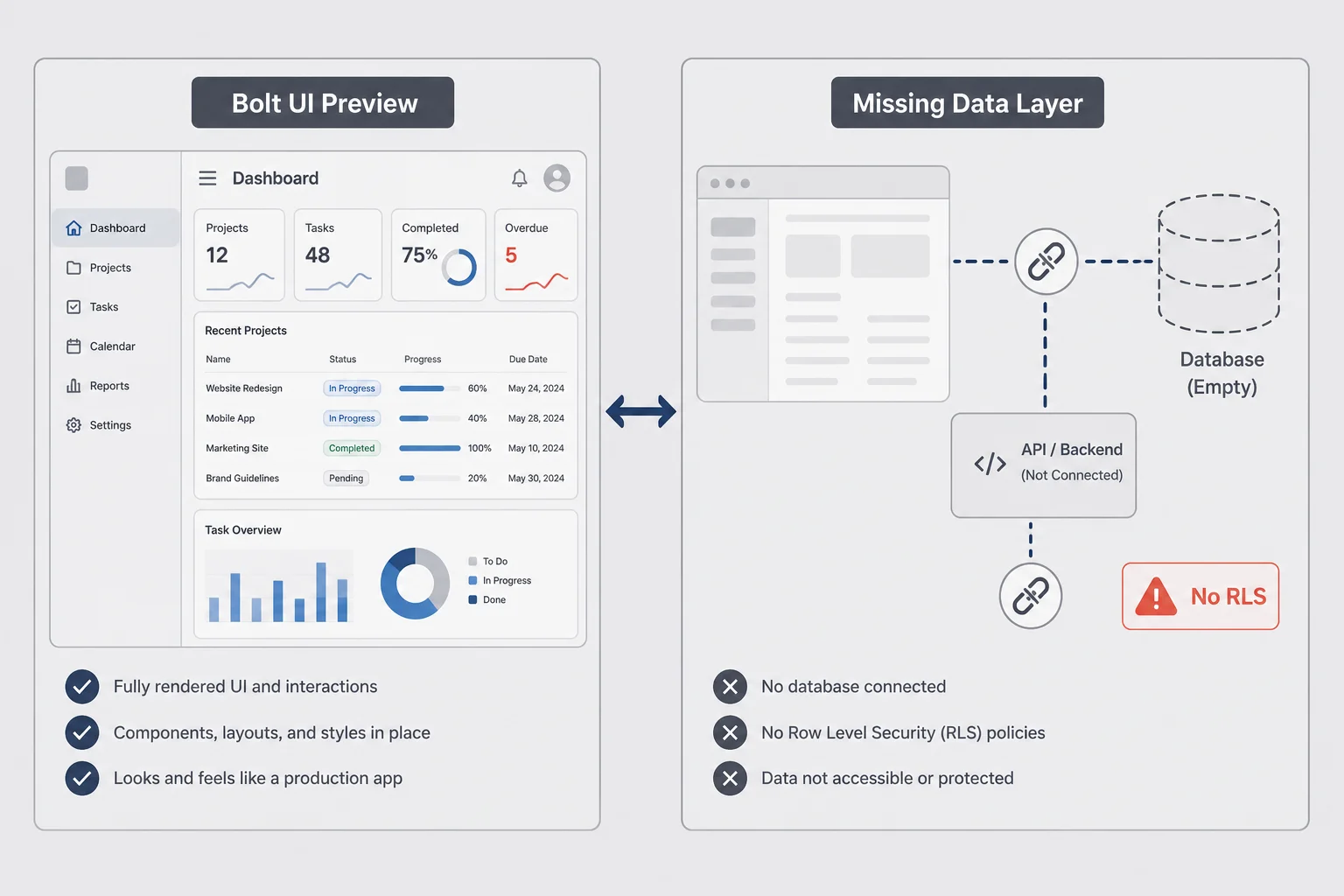
Bolt and v0 are incredible at the first ninety minutes. You describe a product. Screens appear. Maybe auth shows up. You feel like a founder in a montage. Then you need per-user data that persists, and the scaffold gets vague.
Common pattern: the UI has a "projects" page but projects live in browser memory or a single JSON blob. That works for a demo video. It fails the moment two people sign up. You discover you never created a projects table. Or you created one without a user_id column. Or you created one with open policies that let everyone read everything. Three different bugs. Same user email: "I can see stuff that is not mine."
A Carrd waitlist with fifty emails does not need Supabase. A logged-in product where user A must never see user B data does. That line sounds obvious until you are polishing animations on a page that still reads from localStorage. I have been there. The fix is not more UI. The fix is admitting you crossed from marketing site to multi-tenant app and backend work is now on the critical path.
I have been that founder. I have also been the founder who added twelve tables before validating one workflow. Both hurt. The fix is sequencing. UI scaffold first is fine. Before paid users, you need a one-page data map: what objects exist, who owns them, what actions mutate them.
AI builders love generic names. items, entries, data. Rename early to words your customer uses. "Reminder," "client," "invoice." Future you will prompt Cursor with those nouns and get better SQL.
Another Bolt gap: relationships. A reminder app might need reminders linked to lists linked to users. Bolt will not infer that from vibes. You describe it once in a product brief and again in Supabase. Boring repetition beats clever schema regret.
If you already picked a build path with the build path picker, note whether your stack assumed Supabase from day one. Switching databases later is not impossible. It is a week you could spend on customers instead.
The "it works on my account" trap
Everything looks fine when you are the only user. Your admin eyes see your rows. Beta user two sees a blank page or, worse, user one's rows. Test with two accounts on localhost before deploy. I call them Red Account and Blue Account. Red creates. Blue must not see Red's stuff unless your product is literally collaborative sharing.
I once spent a full Sunday adding animations to an empty state while the user_id column sat null on every insert. The UI looked elite. The data layer was a diary anyone could read if they tried. Bolt did not warn me. Supabase did, in Logs, after I finally looked. Builders optimize for the screenshot. Operators optimize for the second user.
Signs your scaffold is lying
If refresh wipes data, you are not persisted yet. If every user sees the same hardcoded list in the source, same. If the Supabase dashboard shows zero rows while the app shows content, you are looking at mock data or the wrong project URL. These sound obvious. They are also the top three tickets in my own DMs from first-time founders.
The three Supabase pieces non-coders should set up first
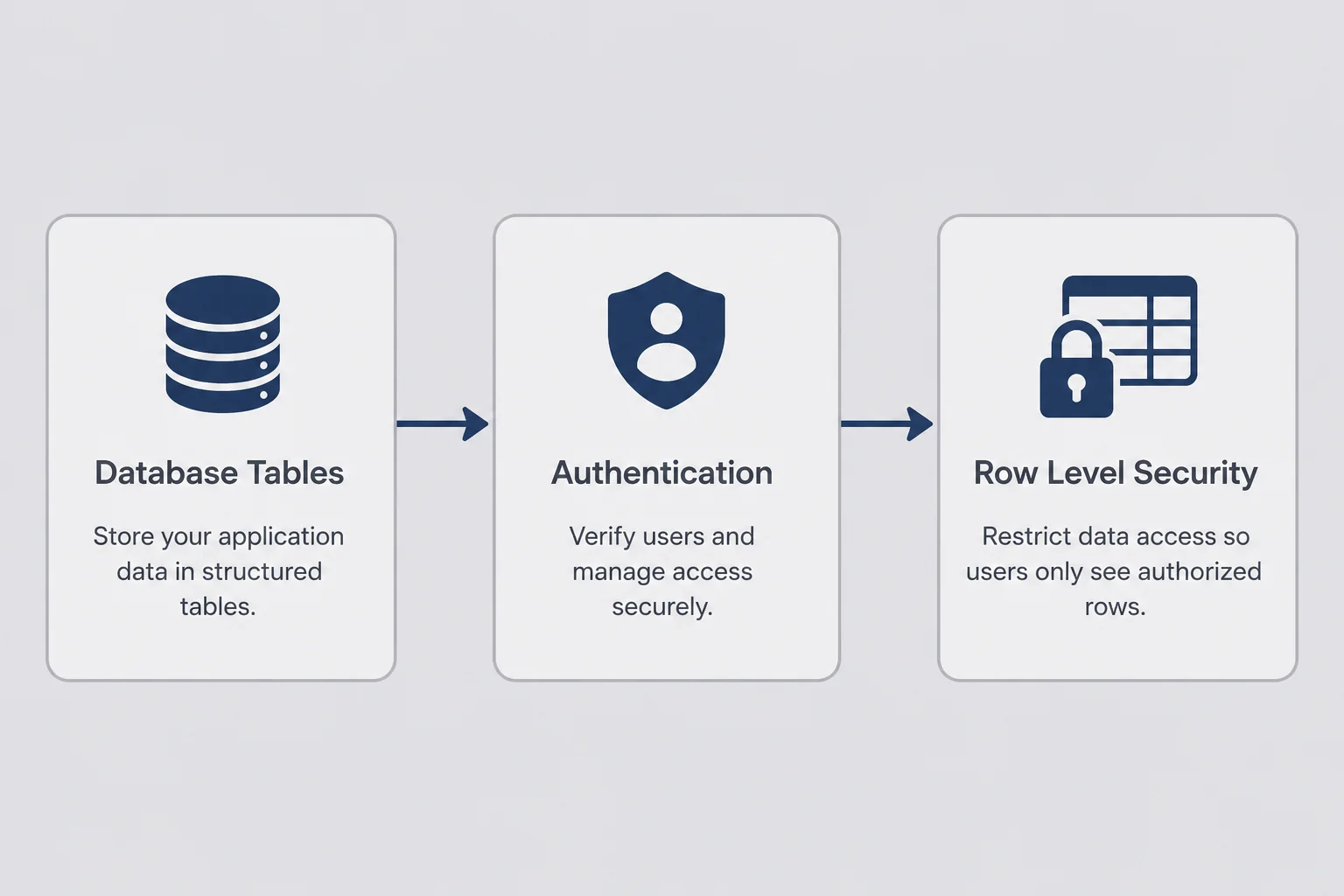
Ignore Edge Functions and storage buckets for hour one. Get these three working in order.
Piece one: a project. Sign up at supabase.com, create a project, wait for the database to provision. Copy the project URL and the anon public key into your app's environment variables. The service_role key is root access. It stays in server-side code and CI only. I pasted it into a client once. I do not recommend learning that way.
Piece two: one real table. Start with your core noun. Reminders. Clients. Uploads metadata. Use the Table Editor if SQL scares you. Add columns you can explain: id, created_at, user_id, plus two or three fields your UI needs. Enable Row Level Security immediately even if policies are not perfect yet. An open table with RLS enabled and no policies blocks everything, which is safer than the opposite.
Piece three: auth wired to that table. Sign up through your app. Confirm a row appears in auth.users in the dashboard. Insert or auto-create a row in your table with the same user_id. If signup works but lists stay empty, you usually missed the insert trigger or the client query filter.
Only after those three pass the Red Account / Blue Account test should you add Stripe webhooks or image uploads. I know you want payments today. Leaky data ends businesses faster than missing a paywall gradient.
Say you are wiring Bolt to Supabase for the first time. Open the Bolt integrations panel (or paste env vars manually). Create the project in Supabase first. Copy URL and anon key. In Cursor, ask: "Connect this Next.js app to Supabase using these env vars and fetch rows from a reminders table filtered by the logged-in user." One working select beats an afternoon of guessing which tab in the dashboard you forgot to click.
Environment variables non-coders actually need
At minimum: NEXT_PUBLIC_SUPABASE_URL and NEXT_PUBLIC_SUPABASE_ANON_KEY for client-side apps. Server routes or Edge Functions add SUPABASE_SERVICE_ROLE_KEY when they must bypass RLS for admin tasks. Match names your scaffold expects. AI is good at aligning names if you paste your .env.example.
Where the dashboard clicks matter
Table Editor for quick fixes. SQL Editor for policies AI writes. Authentication tab for redirect URLs and providers. Logs when something fails silently. I live in Logs more than I admit.
Hour one ends when Red creates a row and Blue cannot see it in the Table Editor or the app. Not hour one plus Stripe. Not hour one plus file uploads. Isolation first. Revenue second. I have the order wrong often enough to preach about it.
Triggers and auto-insert patterns
Many scaffolds forget to create a profile row on signup. You log in, the app expects profiles, nothing exists, features half work. AI can add a database trigger or a client-side insert on first login. I do not care which. I care that a new auth user always has the child rows your UI assumes. Test signup twice. Check both auth.users and your public tables. Empty child table after signup is a clue.
Tables and relationships: supabase database for non-coders
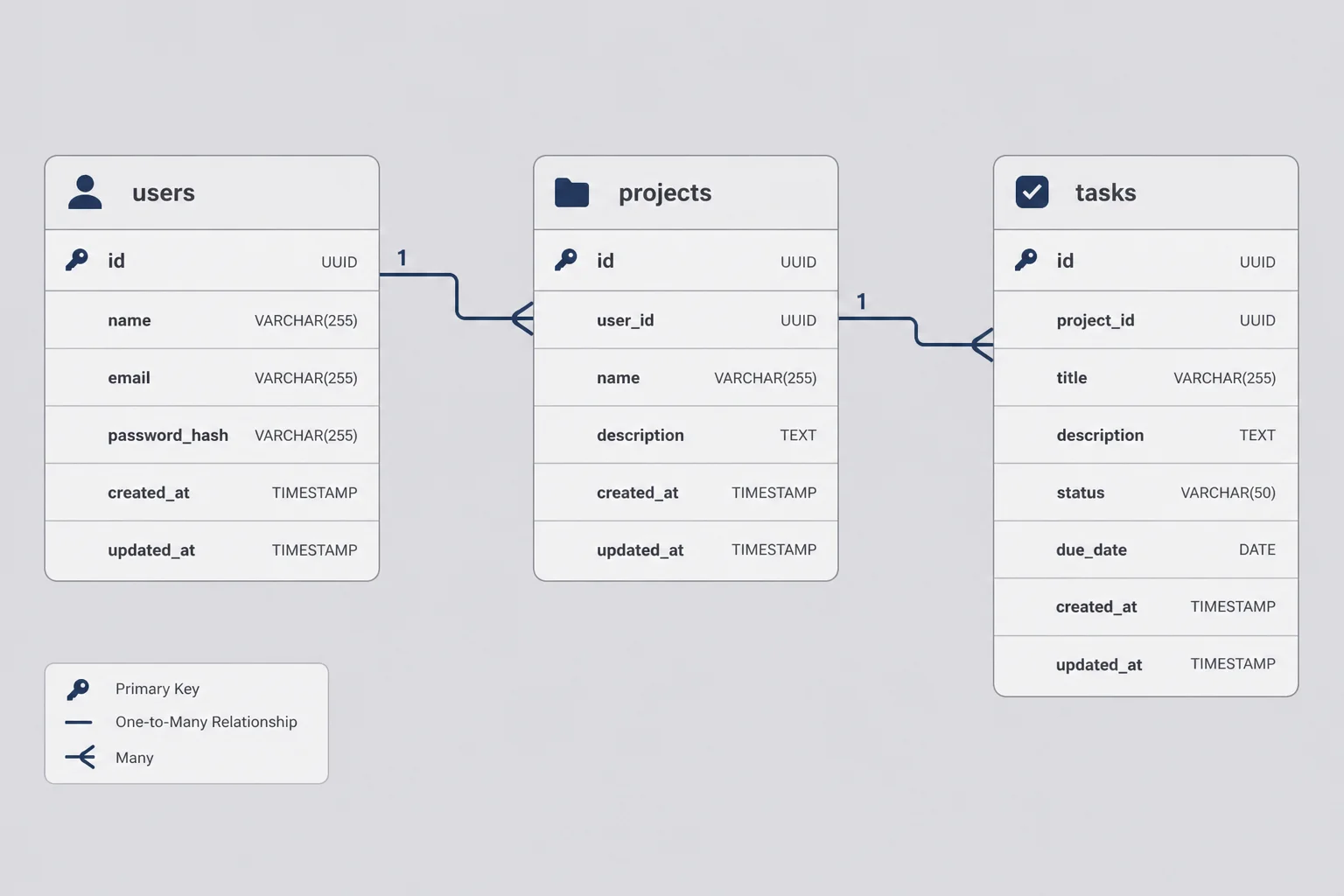
You do not need a computer science degree. You need consistent nouns and one rule: every user-owned row should trace back to auth.users through a user_id column or a chain of foreign keys. That is the whole supabase database non coder playbook in one sentence. Everything else is naming and relationships.
Single table products are valid. A habit tracker might be habits with user_id and title. Ship that before you invent teams and workspaces you do not need until month six.
Parent-child is the next pattern. projects belong to users. tasks belong to projects. The query path is user → projects → tasks. In the dashboard, create foreign keys so orphaned tasks are harder to accidentally make.
Many-to-many is where non-coders stumble. Users and tags. Projects and collaborators. You usually need a join table. Describe the relationship in plain English to AI: "A project can have many collaborators; a user can collaborate on many projects." Let it propose project_members with composite keys. You review whether it matches your pricing (per-seat vs per-project).
Types matter less than naming at MVP stage. Text vs varchar debates can wait. created_at timestamps defaulting to now() are your friend for support emails ("when did this break?").
I keep a living Google Doc called Data Map with one section per table: columns, who creates rows, who reads them, what deletes them. It sounds corporate. It saves hours when Cursor asks "what is the schema?" and you can paste truth instead of guessing.
Migrations without fear
Supabase tracks schema changes as migrations. AI will generate SQL files. You do not have to understand every line. Read for table names and destructive words like DROP. Run on a branch or staging project if you have one. If you only have production, export a backup before big changes. The dashboard backup button is not decoration.
Seed data for development
Create two test users. Add three rows each. Screenshots for marketing later. Debugging later. When something breaks, you can compare Red's rows to Blue's in the Table Editor without impersonating customers in prod.
Example schema in plain English
For a simple invoice reminder tool: clients (user_id, name, email), invoices (user_id, client_id, amount, due_date, status). One user owns many clients. Each invoice belongs to one client. Queries always filter by the logged-in user_id even when joining clients to invoices. I describe that paragraph to Cursor before I ask for SQL. The paragraph is the product. The SQL is a translation.
Row Level Security for solo founders: the wall Florence taught me about
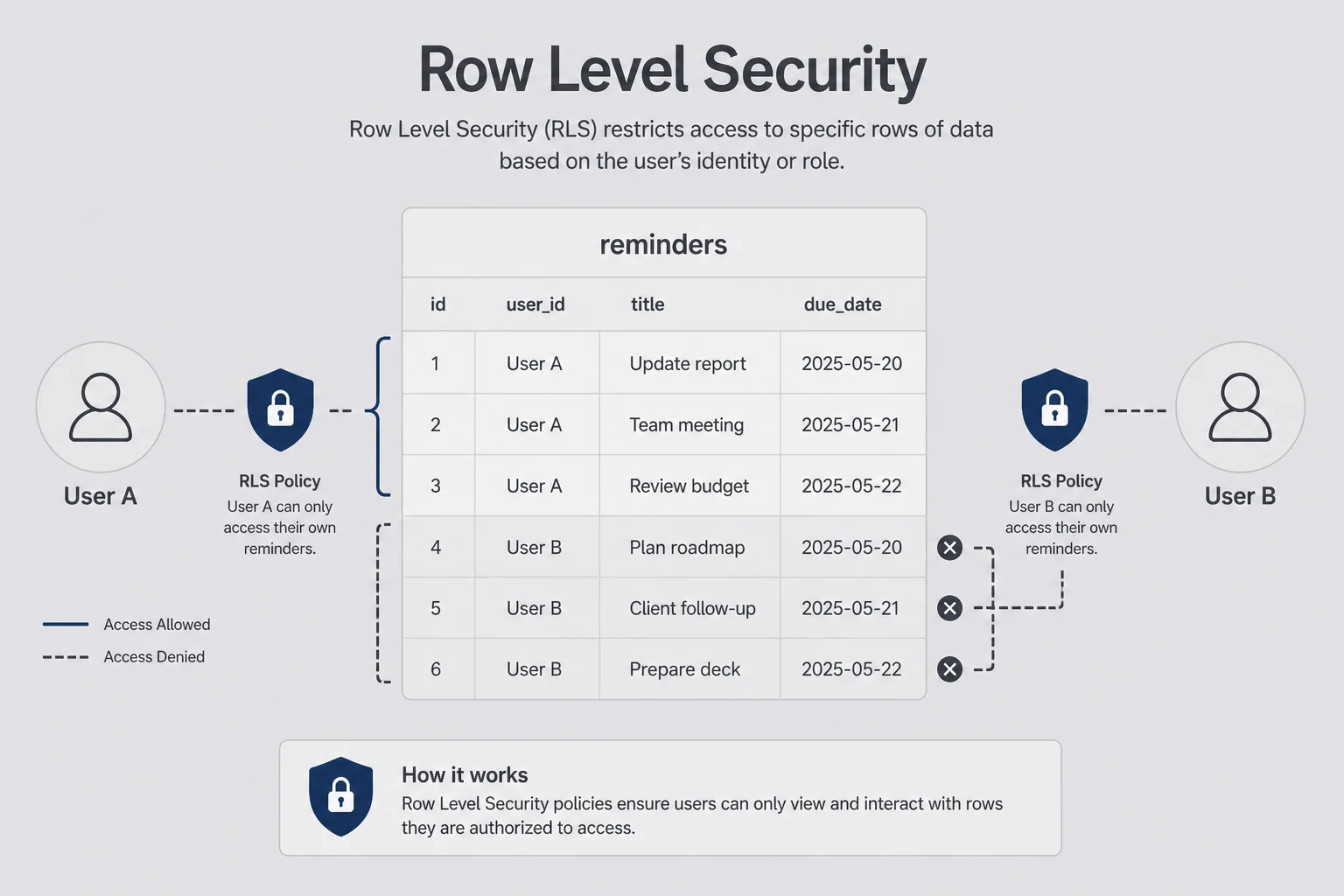
Row Level Security is Postgres enforcing "user A only sees user A rows" even if the frontend asks for everything. Without RLS, a curious user can call your API directly and dump data. With RLS enabled but wrong policies, the app shows blank screens and you blame CSS. Supabase rls solo founder work is not a weekend certification. It is four English sentences, four policies, and two test accounts.
My Florence bug was classic. RLS enabled. Policy only checked auth.uid() = user_id on reminders, not on lists. Lists were wide open. One join later, names leaked. The fix was two policies and a shame spiral in Italian time zone.
Non-coder workflow that works:
- Write policies in English first. "Users can select their own reminders." "Users can insert reminders only with their user_id."
- Ask AI to translate each sentence to a
CREATE POLICYstatement. - Apply in SQL Editor.
- Test with Red and Blue accounts on the real UI and with the Supabase client in browser devtools if you are brave.
Start restrictive. Add sharing rules deliberately. "Collaborators can read project X" is a second policy, not a vibe you hope the UI enforces.
Do not skip this because AI said it is advanced
If your app stores anything users would not want strangers to read, RLS is not optional. Frontend hiding is not security. I am not a security engineer. I still sleep better when policies exist and two test accounts prove they work.
Common policy mistakes
Forgetting insert policies so signup succeeds but saving fails. Writing select policies that forget team sharing you promised on the landing page. Using the service role key in the browser to "make it work" (please do not). Testing only as yourself while admin privileges hide bugs.
When to ask for help
If policies involve roles, organizations, and billing tiers in one table, consider a short contractor review. That is cheaper than a breach email. Max's world. My line is user-owned rows and simple sharing. Past that, I pay for an hour of eyes.
Supabase Auth vs Clerk: supabase auth no code edition
If you have not read auth without coding yet, start there for login flows, redirect URLs, and smoke tests. This section is the database-post version of the same fork: which auth product matches a Supabase-backed app.
I have shipped Supabase Auth on three products and Clerk on one a client insisted on. Both work with AI assistance.
Pick Supabase Auth when the database is already Supabase, you want one vendor, and magic link or email password is enough. Social logins are configurable in the dashboard. Redirect URLs must match your localhost and production domains exactly. Same lesson as OAuth in my deploy post.
Pick Clerk when you want polished prebuilt components, organization features, or your scaffold already imported Clerk. You will still store app data in Supabase or elsewhere. Auth provider and database are separate bills and separate dashboards.
Switching mid-build is painful. AI-generated code mixes client hooks, middleware, and session shapes. If Bolt started Supabase Auth, stay unless you have a week to burn.
Session debugging tip: when "logged in" flashes then disappears, check cookie domains and redirect URLs before you rewrite the app. I burned a Saturday on that.
Clerk's dashboard feels friendlier on day one. Supabase Auth feels cheaper on day three hundred when you are already paying for storage and database in one place. Neither is morally superior. I pick based on what the repo already imported. Fighting the scaffold is how non-coders turn a weekend project into a month of auth migration.
Magic links reduce password support burden. They annoy people who live in Outlook spam filters. Passwords add reset flows. Pick one path and test signup, logout, login, and still see data. The auth post has the full smoke script. This post assumes login works and asks whether rows behind that login are isolated.
Storage buckets when your product is files
Not every micro-SaaS needs storage day one. If users upload PDFs, images, or CSVs, Supabase Storage is S3-like buckets with their own policies.
If your product is text-only (reminders, invoices generated as PDFs server-side, simple CRM notes), skip storage until someone asks to attach a file. That is a valid sequencing choice. I have shipped three products that never touched Storage because the MVP was rows in Postgres and nothing else. Adding buckets because a tutorial included them is how you spend a Tuesday on CORS rules you did not need yet.
Pattern I use when files matter: metadata in Postgres (files table with user_id, path, mime_type), bytes in Storage. RLS on the table mirrors Storage policies so Red cannot fetch Blue's path. Public buckets are for marketing assets only. User uploads stay private with signed URLs.
Watch size on the free tier. A tool accepting four-megabyte images from fifty users adds up. Compress on upload if AI can wire it. Or charge enough to cover storage like a grown-up. I once burned a month of headroom on a side project because I stored full-resolution uploads when thumbnails would have been fine.
AI prompts that work: "Create a private bucket user-uploads. Only the owning user can read their files. Store path in table documents with user_id." Then test by uploading from Red and trying to open Blue's URL in an incognito window.
Storage policies mirror table RLS in spirit. If you can read the row, you can fetch the file. If you cannot, signed URLs should fail. I learned that by accidentally making a bucket public for "speed" and spending an evening un-panicking.
Edge Functions: server code for people who do not write server code
Edge Functions scared me until Stripe webhooks did. Webhooks need a public HTTPS endpoint that verifies signatures with a secret key. That secret cannot live in React. Max's stripe billing post covers what happens when webhooks fail at 2 a.m. This section is where those webhooks land if you are not using Next.js API routes on Vercel.
Supabase Edge Functions are Deno snippets you deploy from the CLI or dashboard. AI writes them. You paste secrets as function env vars. Typical uses: Stripe checkout.session.completed, sending transactional email, calling OpenAI with your API key.
You do not need Edge Functions for basic CRUD. You need them when the browser must not hold the key. If your Bolt app already uses Next.js API routes on Vercel for webhooks, you might not add Edge Functions at all. One server surface is enough. Two is confusion.
My workflow: describe the webhook event and desired database update in plain English. Ask Cursor to create the function, deploy commands included. Run the Stripe CLI to forward events locally. Watch Logs when it fails. Repeat until invoice.paid creates the row you expect.
Edge Functions use Deno, not Node. That confused me because half my stack is Next.js. AI knows both. You do not need to. You need the function URL in Stripe and the signing secret in function settings. Copy-paste discipline again.
I keep a sticky note on my monitor: service role never in the browser, Stripe secret never in the browser, webhook secret only on the server. Three lines. Prevents the expensive mistakes.
Local testing webhooks
Stripe CLI forward to localhost or a deployed function URL. Trigger test events. Confirm idempotency (same event twice should not double-charge or duplicate rows). AI forgets idempotency often. You should not.
How I wire Supabase to Cursor without pretending I am a DBA
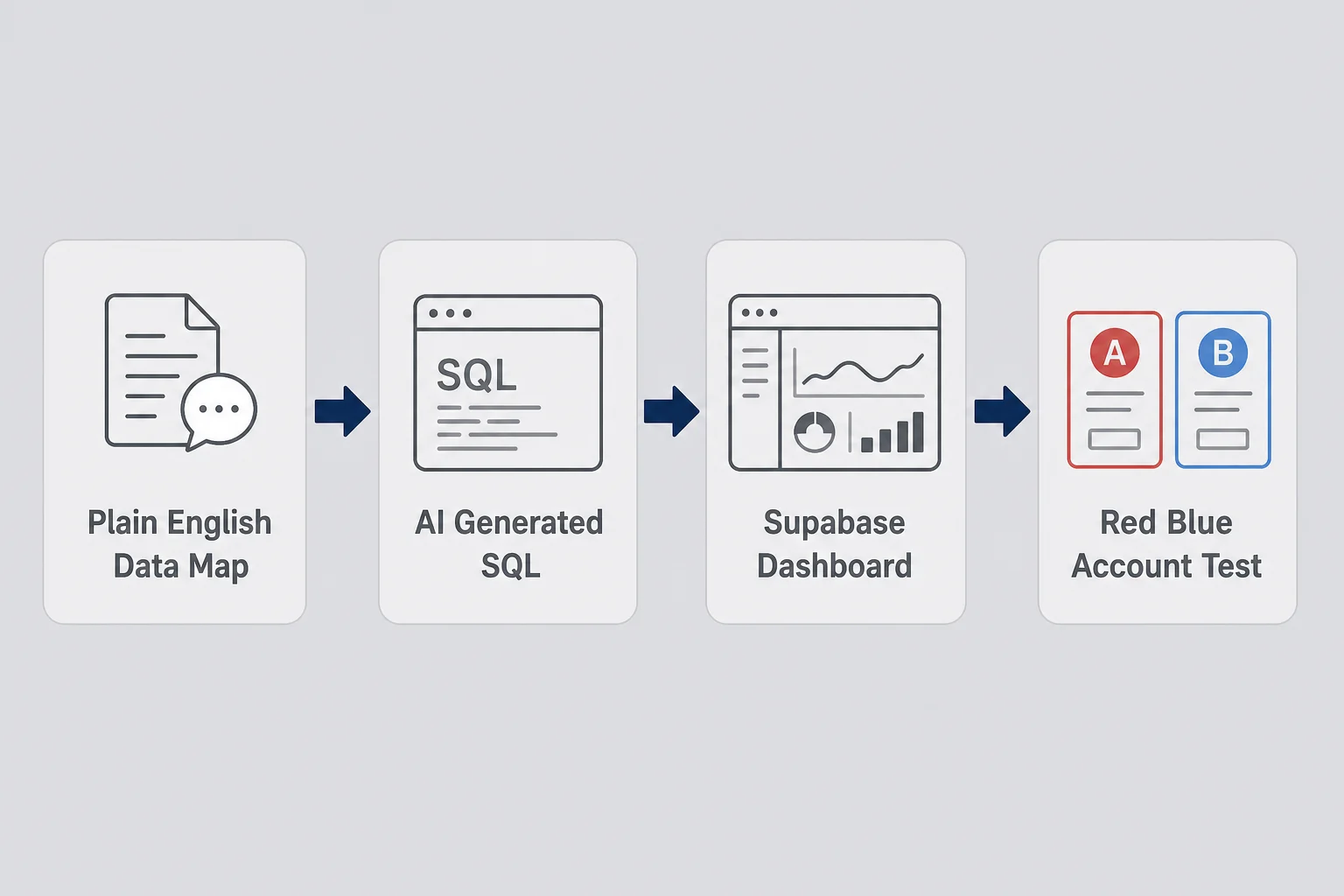
My actual loop is embarrassingly repeatable.
Morning: update the Data Map doc with any new feature noun. "Users can archive a reminder." Does that mean a boolean column or a status enum? Decide in English.
Cursor session: paste the map, paste the error, or paste the feature request. Ask for migration SQL plus client query changes plus RLS policies in one go. Review table names.
Supabase dashboard: run SQL, refresh Table Editor, check Policies tab.
Red and Blue test on localhost.
Deploy only after both accounts pass.
Hermes on my VPS sometimes drafts the migration while I am grocery shopping. I still run it manually. Autonomous agents plus production databases without human eyes is how I got the Florence email.
Helpful prompts:
"Given this schema, write RLS policies so users only access their own rows in projects and tasks." "This select returns empty for logged-in users. Here is the policy list. What is wrong?" "Add a deleted_at soft delete column and update policies to hide deleted rows."
I do not read every line. I read table names, policy names, and words like DROP.
When to use the SQL Editor vs Table Editor
Table Editor for quick row inspection and manual fixes. SQL Editor for policies, functions, and migrations. If AI gives you a migration file, run it in SQL Editor and save it in your repo if you have one. Future migrations need history.
Pair with the rest of your stack
My tools for non-developers stack is Bolt or v0 → Supabase → Stripe → Vercel. Supabase is the hinge. Auth post covers login. Deploy post covers env vars on the host. This post is the hinge's hinge.
The errors I still Google at midnight
"new row violates row-level security policy": insert policy missing or user_id not set on insert. Check client insert payload and policy for insert.
Empty arrays but no error: select policy too strict or wrong auth.uid() assumption. Compare user_id in row to logged-in id in Auth dashboard.
Works locally, fails deployed: env vars on Vercel wrong or still pointing at old project. I have deployed to prod while still wired to a dev Supabase project. Fun afternoon.
Infinite loading spinners: often auth session not ready before query runs. AI fixes with loading gates. You still test it.
CORS errors on Edge Functions: function URL or headers wrong. Paste error to AI with function code.
Keep a note file of errors and fixes. Your personal FAQ beats generic docs when you are tired.
"JWT expired" or random logouts: clock skew is rare; more often you are mixing anon and service clients or refreshing tokens wrong. Ask AI with the exact auth helper your scaffold uses.
Realtime subscriptions eating quota: if you enabled realtime because a tutorial said so, disable it until you need live updates. I left it on once and wondered why my free tier complained. Vanity feature, real bill.
Performance worries at small scale
Do not optimize indexes before you have fifty users unless queries visibly lag. Do delete obvious mistakes like fetching every row without filters. Supabase logs show slow queries when you are big enough to care.
At ten paying users, your bottleneck is still onboarding and support, not query plans. I have watched founders tune indexes while their signup flow was broken. Wrong layer. Fix isolation and auth first. Performance tuning is a nice problem to have.
Questions I still ask before I ship data changes
I run this checklist before any schema change touches production. It is the non-coder equivalent of a code review.
Can I explain each table in one sentence a customer would understand? Does every user-owned row have a path to user_id? Did I test Red and Blue after policy changes? Did I avoid putting service role keys in the frontend? Did I backup or at least export CSV if I am about to run ALTER on a live table with real users? Does Stripe test mode still match the user rows I expect after webhooks?
One more I added after Florence: did I write RLS on every table that joins to user data, not just the obvious one? Joins leak through the weakest table. My bug was lists, not reminders.
If any answer is no, I fix that before I tweet about the feature.
Shipping fast matters. Shipping leaky data is faster in the wrong direction.
Questions people ask when Supabase meets AI-built apps
Can I use Supabase for a micro-SaaS if I do not know how to code?
Yes, if you treat Supabase as infrastructure you configure with AI help, not as a skill you must master before shipping. You need to understand what tables store, who can read which rows, and where auth tokens come from. You do not need to write SQL from memory. Paste errors into Cursor, follow Supabase docs one step at a time, and test with two fake user accounts before you charge money.
Is Supabase free enough for a solo founder MVP?
Usually yes for early validation. The free tier covers small Postgres databases, auth, and modest storage for months while you find paying users. Watch connection limits and storage if you upload large files. Upgrade to Pro around twenty to fifty paying customers or when you need daily backups and better support. Budget twenty-five dollars a month into your pricing math before you promise lifetime cheap plans.
What is Row Level Security and do I really need it?
Row Level Security is Postgres rules that say which rows each logged-in user can see or change. You need it if user A must never see user B data. Skipping RLS and hoping your frontend hides rows is how micro-SaaS breaches start. You do not need to love SQL. You need policies that match your product promise. Ask AI to write policies from plain English rules and test with two accounts.
Supabase Auth or Clerk for a non-coder?
Supabase Auth fits when your app already uses Supabase for data and you want one bill and one dashboard. Clerk fits when you want prettier prebuilt login UI and social providers with less backend thinking. I have shipped both with AI help. Pick the path your scaffold already started. Switching auth providers mid-build is a week you will not enjoy.
When do I need Supabase Edge Functions?
When something secret must run on the server. Stripe webhooks, sending API keys, transforming data before it hits the client. Your browser cannot hold Stripe secret keys. Edge Functions are small server snippets Supabase hosts for you. Non-coders use them for payment webhooks and email triggers even if they never read TypeScript fluently.
How do I connect Supabase to Bolt or Cursor projects?
Copy the project URL and anon public key into environment variables your host reads. Never put the service role key in frontend code. In Bolt, use the Supabase integration panel if available. In Cursor, ask AI to wire the Supabase client using those env vars. After connecting, create one test row in the dashboard and confirm your app displays it on localhost before you deploy.
You do not need to become a database person
Florence was pretty. The bug was not. I fixed policies from a café table, pushed before dinner, emailed the beta tester, and finished my espresso cold. That is the job. Not heroic engineering. Careful operations with AI doing the syntax.
Supabase micro saas without coding is viable if you respect what you are configuring. Tables are product decisions. RLS is your promise to users. Auth is the door. Edge Functions are where secrets live. You can direct all of it without typing SQL from memory.
You will mess up once. Maybe you already did. Fix it, test with two accounts, document the rule in plain English, move on to the thing that earns revenue. The product does not care who wrote the policy. It cares whether strangers trust you enough to pay.
If your scaffold is still frontend-only, go make the Data Map before you add another gradient. If you are leak-free on localhost, deploy and charge someone. Backend fear is just building fear wearing a Postgres hat.
Hermes still pings me when a migration file lands in the repo. I read it on my phone, approve or reject, run the SQL when I am at a real keyboard. Agents are good at drafts. Humans are still good at deciding whether a DROP TABLE belongs in prod. That division of labor is the whole non-coder game in 2026.
You do not need permission from a bootcamp to configure a database. You need two test accounts, honest policies, and the willingness to email a beta user when you mess up. I did. She stayed. The espresso in Florence did not.




Comments