Prod Broke at 11 P.M. I Could Not Read the Fix.
A non-coder playbook for debugging AI-generated micro-SaaS code — symptom language, safe rollbacks, and when to stop pretending you understand the diff.
 By Imani24 min read
Listen to this article
22:13AI-generated podcast-style overview of this article (not a word-for-word narration).
Prod broke at 11:07 on a Thursday. Not dramatically. No smoke. A customer emailed that the save button on my settings page did nothing the second time they clicked it. Worked fine once. That detail mattered and I almost missed it because I was tired and wanted to blame the internet.
I opened the repo in Cursor, stared at files named things I only half understood, and felt the old shame creep in. I am Imani. I ship micro-SaaS with AI tools and agents. I do not read production TypeScript the way Max does in his build with AI posts. When something breaks, I cannot "just trace the stack" like a senior dev. I still have to fix it, or rollback, or pay a stranger on Upwork before my trial users decide I am flaky.
This article is the playbook I wish I had before I learned to debug ai generated code micro saas the hard way: by apologizing in support threads while pasting error messages into chat windows like offerings to a tired god. If you build without coding, you already know the stack. If you run an always-on agent, you know agents can break prod too. Debugging is the missing room between "ship fast" and "sleep at night."
I am not going to pretend you will become an engineer from one post. You will not. You will get better at describing what broke, testing whether it is really fixed, and knowing when to stop digging. That is enough to keep a small product alive.
Some numbers in here are illustrative examples, not brags. I will say when they are hypothetical. The first time prod broke after I had paying users, I almost quit for the night. Tomorrow-you is also confused, just with less sleep. I stayed up, handed the AI evidence instead of vibes, and fixed it in under two hours. That shift is the whole game.
Debug ai generated code micro saas: what broke is not what you think
The first mistake I made that Thursday was assuming the save button was "broken." That is not a bug report. That is a mood. A real bug report sounds like: "On /settings, when I change my timezone and click Save, the first save shows a success toast and persists after refresh. The second save within the same session shows success but reverts on refresh." See the difference? One invites panic. The other invites a fix.
When you debug ai generated code micro saas without reading every file, your job is to shrink the problem until an AI tool or a contractor can act on it. You are the person who names the symptom, proves it is real, and checks whether the fix worked. You are not the person who heroically understands dependency injection at midnight. Different job. Still important.
AI builders optimize for the demo path. Bolt, v0, Cursor, Hermes: they all want the first run to look brilliant. First signup works. First payment works. First upload works. Real users do not live on the first run. They come back tomorrow. They click Save twice because they changed their mind. They open two tabs because that is normal human behavior. The bugs live in the second run, the back button, the empty form field, the session that never cleared.
I used to think debugging was a skill gate I had not unlocked yet. Like someday I would learn JavaScript properly and then errors would make sense. That day is not scheduled on my calendar. What actually happened is I learned operator debugging. Same outcome for customers. Less pretending.
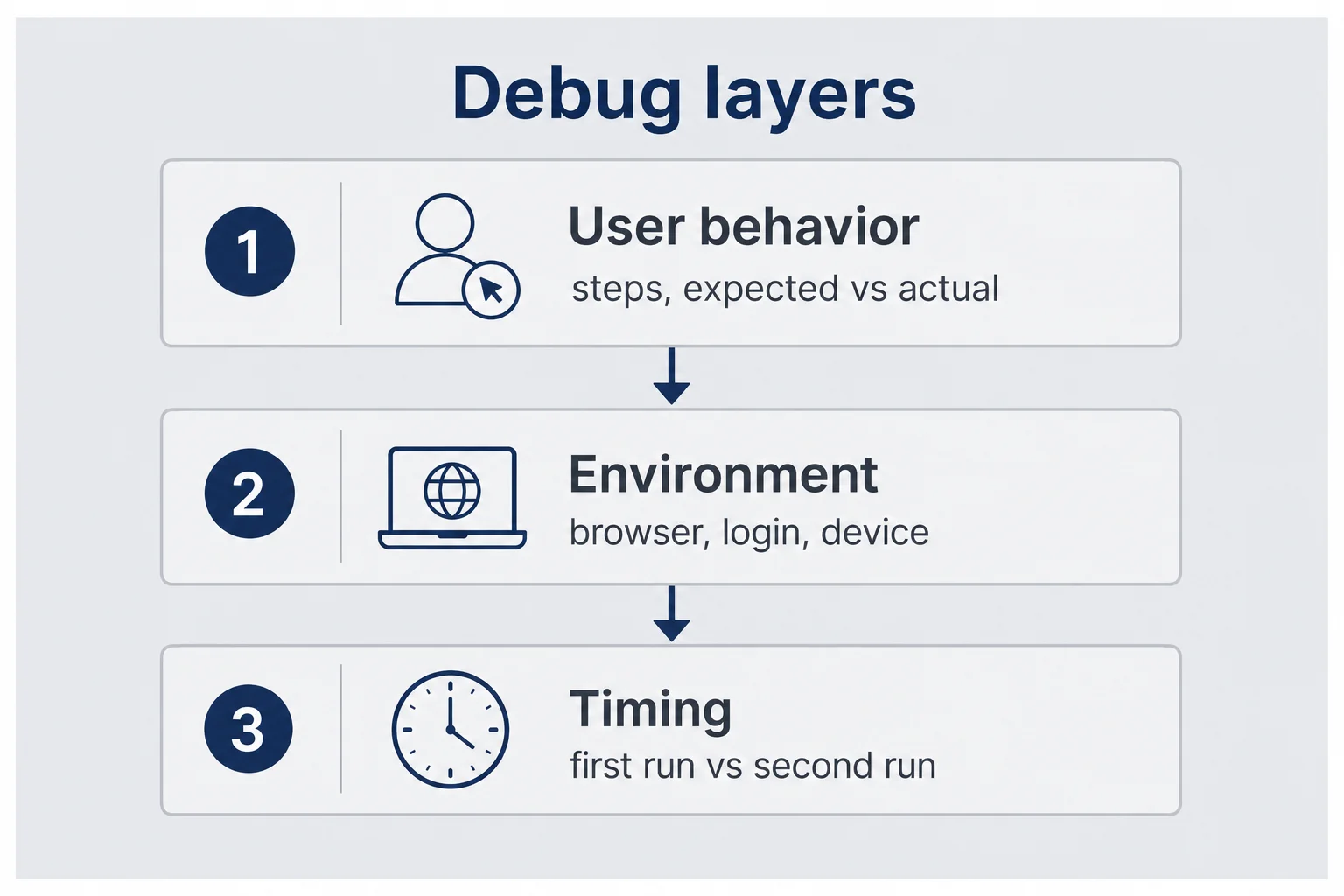
Here is the frame I use now. Layer one is user-visible behavior: what they did, what they expected, what happened instead. Layer two is environment: browser, logged in or not, mobile or desktop, first visit or return visit. Layer three is timing: first click or second click, before refresh or after. Most of my AI-generated bugs collapse into layer three. The code "works" once and forgets to reset something. I did not discover that from reading React docs. I discovered it because a customer was nicer than I deserved and included "the second time" in her email.
If you are hunting a bug and your notes say "it feels buggy," stop. Open a notes app. Write steps. Number them. Add expected versus actual. That five minutes saves you five hours of vibe fixes that create new vibe bugs. Non-coder debugging workflow starts with specificity, not courage.
Why non-coders hit different bugs than engineers
Engineers debug from the inside out. They read the function, set a breakpoint, watch state change. I debug from the outside in. I watch behavior, then ask tools to explain which file probably lied. Both approaches can work. They fail in different places.
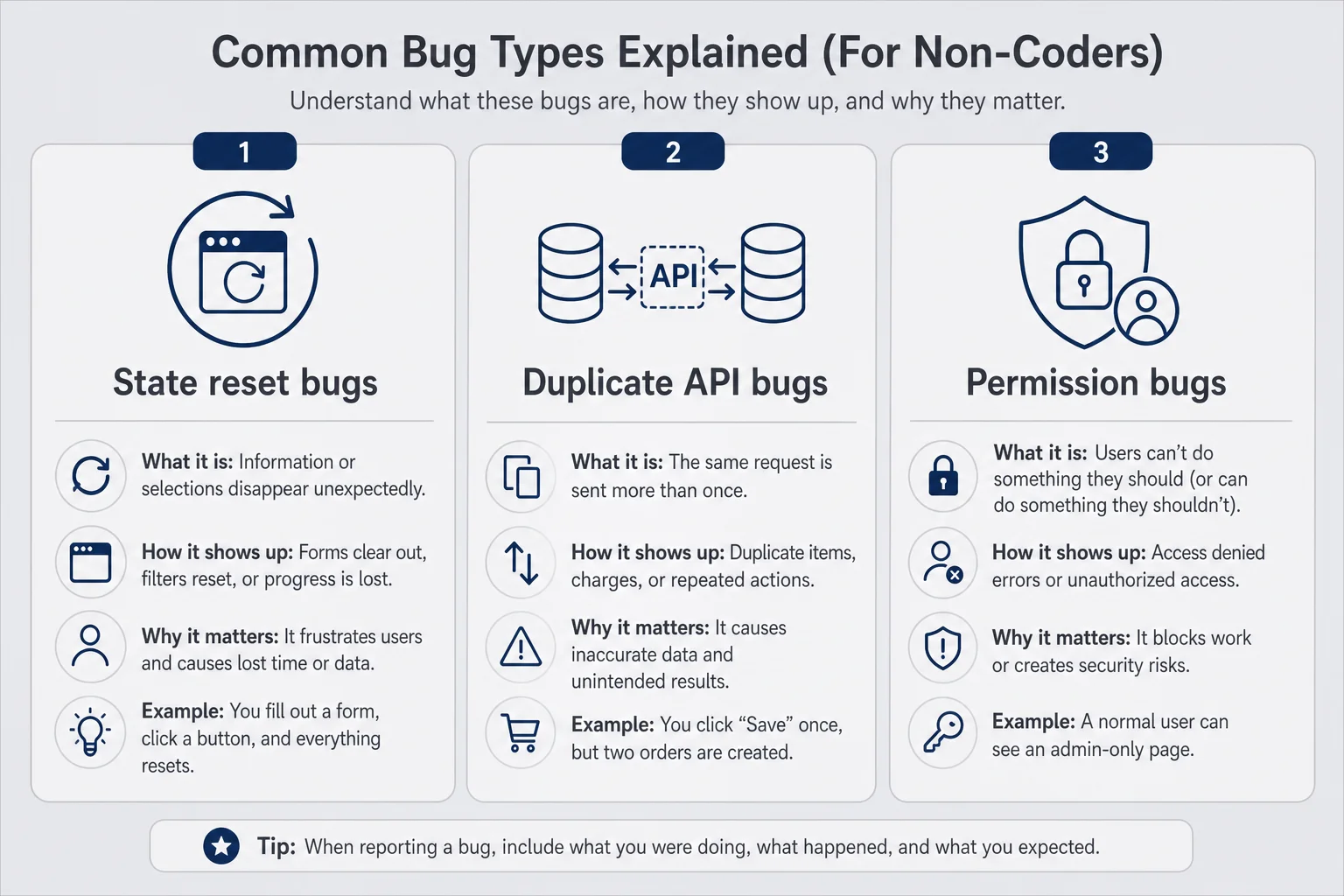
Non-coders hit three bug categories more often than we admit in public. First, state and reset bugs: something works once because a flag never clears. Second, duplicate action bugs: the app fires two API calls when you only clicked once, or fires the wrong verb on update versus create. Third, permission and environment bugs: it works on your machine because you are logged in as admin, or because your test Stripe key forgives sins your live key does not.
AI makes all three worse because it confidently writes the happy path and hand-waves the cleanup. I have seen generated useEffect blocks that fetch data beautifully and never cancel in-flight requests. I cannot always spot that in code. I can spot "when I navigate away and back, old data flashes" in the product. That is troubleshoot ai built saas at the only level I need to own.
There is also a psychological difference. Engineers trust that the system is mostly coherent. I trust nothing until a customer proves otherwise. That sounds unhealthy. It is actually useful when your codebase is a collage of prompts from three different Tuesdays. Skepticism is QA.
You will feel stupid writing reproduction steps for bugs you "already understand." Write them anyway. The AI does not understand your mental model. It understands the text you paste. When I stopped assuming Cursor remembered my product from last week, my fix rate went up and my 2 a.m. panic went down.
One more honest note. Sometimes the bug is not in code. It is in your Stripe dashboard setting, your Supabase row-level policy, or the DNS record you forgot after moving domains. I spent forty minutes blaming an agent for broken webhooks before I noticed I pointed staging at the wrong endpoint. Operator debugging includes checking the boring admin panels. Engineers know to look there. I learned after embarrassment.
The operator mindset before you open Cursor
Cursor is not a priest. You do not confess "it broke" and receive absolution. It is a contractor who needs a brief. The brief comes from you, the operator, before you touch a single file. I keep a template in Apple Notes because tired-I forget adjectives.
The template has five lines: URL or screen name, steps to reproduce, expected result, actual result, and "first time or second time." That last line feels silly until it saves your week. Fill it before you open the editor. If you cannot fill it, you are not ready to change code. You are ready to watch more carefully.
Reproduce on purpose
Reproduce on purpose means you are trying to break it again, not hoping it healed. Open an incognito window. Use a test account. Follow your own steps twice. Screenshot or screen-record if the bug is visual. I use Loom for thirty-second clips when I hire help. Contractors believe video. They ignore vibes.
If you cannot reproduce it, pause before you "fix" anything. Intermittent bugs from AI code often mean race conditions or duplicate requests. You might need to click faster, throttle your network in Chrome dev tools, or test on a slower phone. Yes, that sounds advanced. You do not need to understand the word race condition. You need to say "happens more on slow wifi" in your prompt. That is enough for many fixes.
Reproduction also protects you from ghost bugs that were actually user error. I once pushed a deploy for a "broken invite link" that was missing a trailing slash in the customer's email client. Reproducing on my side would have saved an hour and a little dignity.
Write the one-sentence bug
After you can reproduce, compress everything into one sentence. Example: "Second save on settings ignores timezone change after first successful save in same session." That sentence is the spine of every prompt you send to Cursor, Hermes, or a human.
If your one sentence needs "and also" more than once, you might have two bugs. Fix one at a time. AI loves to shotgun changes when you shotgun symptoms. You get a green checkmark and a new mystery. I split bugs aggressively now. Slower in the moment. Faster by Friday.
The operator mindset is calm and petty. Calm enough to write steps. Petty enough to prove the bug is real before you let a model rewrite auth. You are not slowing down. You are preventing theatrical fixes that look like progress.
I also set a timer. Ninety minutes for a first-pass debug session. If I am still stuck when it rings, I stop changing code and either write better reproduction steps or schedule a contractor call. Open-ended debugging turns into rewriting random files because motion feels like control. It is not control. It is anxiety with a keyboard.
Keep a "bug log" note per product. Date, one-sentence bug, root cause in plain English once you know it, fix summary. After ten entries you start seeing patterns. AI forgot to reset state again. Webhook pointed at staging again. You are building personal documentation no course sells because it is too specific to your messy repo. That is fine. Specificity is the point.
Symptom language that actually gets fixes
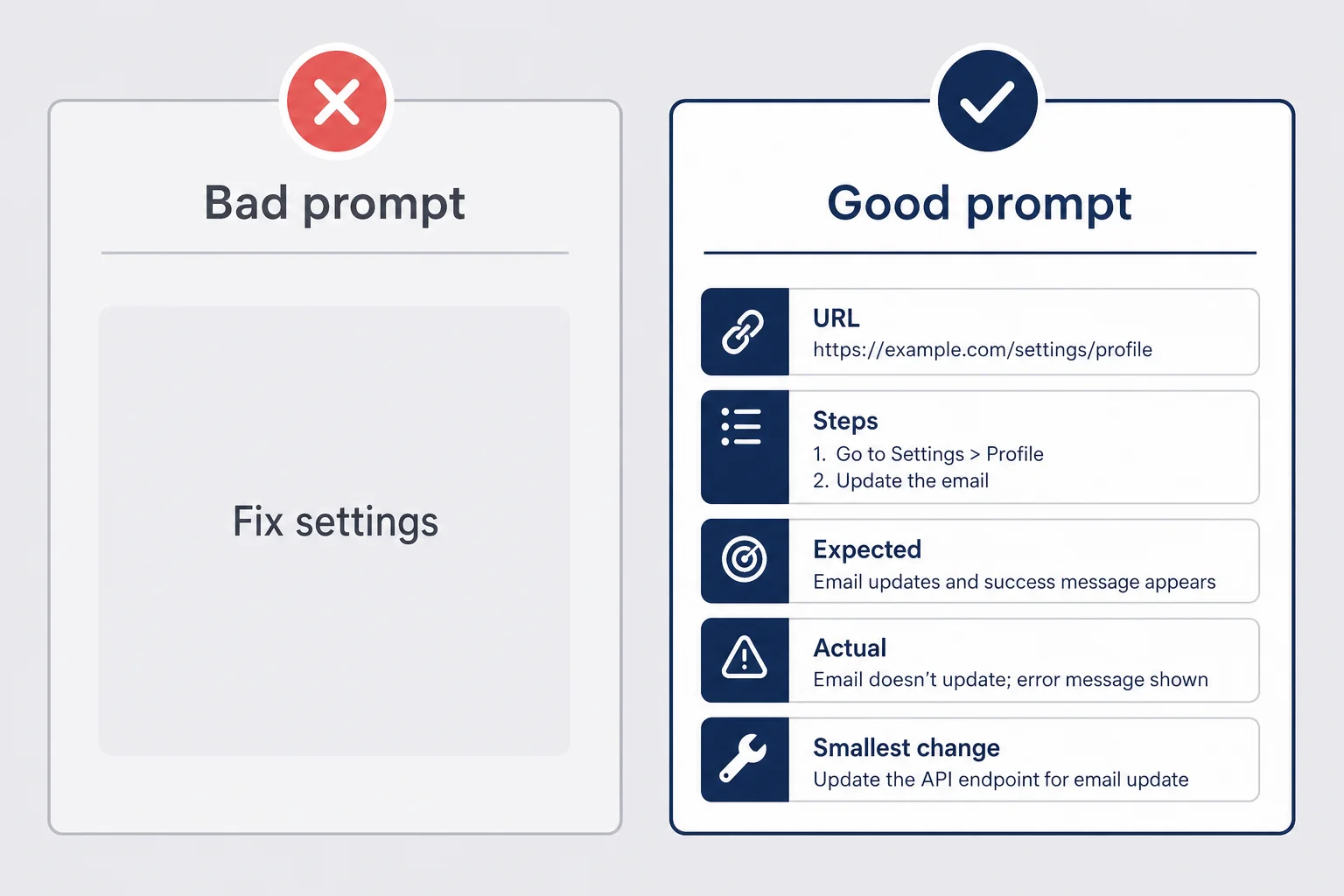
Bad prompt: "Fix the settings page." Good prompt: "On /settings, steps 1-4, expected X, actual Y, only on second save in same session. Suggest the smallest change. Explain what file you will touch in plain English before editing."
I talk to AI like I talk to a contractor who is smart but has never seen my apartment. Location, steps, constraints, smallest change. That language is vibe coding bug fixes 101 and it is boring on purpose.
Include boundaries in the prompt. "Do not refactor unrelated files." "Do not change Stripe webhook handlers." "Do not rename components." AI loves scope creep because scope creep looks like thoroughness. You are one person. You cannot review a forty-file diff at midnight.
Ask for a plain-English summary before and after. Before: "Which file likely controls second-click save on settings?" After: "I changed file X to reset state Y after save." If the after summary is longer than two sentences, you probably accepted too much change. Reject and ask for smaller.
When you get ai generated code errors in the console, paste the exact text, not a paraphrase. "TypeError: cannot read property of undefined" is useful. "Something about undefined" is not. Screenshot the red text. Include the line number if shown. You still do not need to understand the line. The model does, or it fakes it convincingly enough to try.
For UI bugs, describe pixels and labels. "The blue Save button below Timezone dropdown" beats "the button." For data bugs, describe records. "User id 42 in Supabase still shows free plan after upgrade" beats "billing is weird." Specificity is how non-coders fake seniority.
I also name what I already tried. "Hard refresh did not help. Incognito reproduces. First save works." That stops the model from suggesting cache clears like a corporate help desk. Respectful but firm.
If the model proposes a fix that touches auth, payments, or deletes data, I stop and read the summary twice. Those are the zones where I hire a human faster. More on that later. Symptom language gets you far until it does not.
Run the flow twice (the rule I learned the hard way)
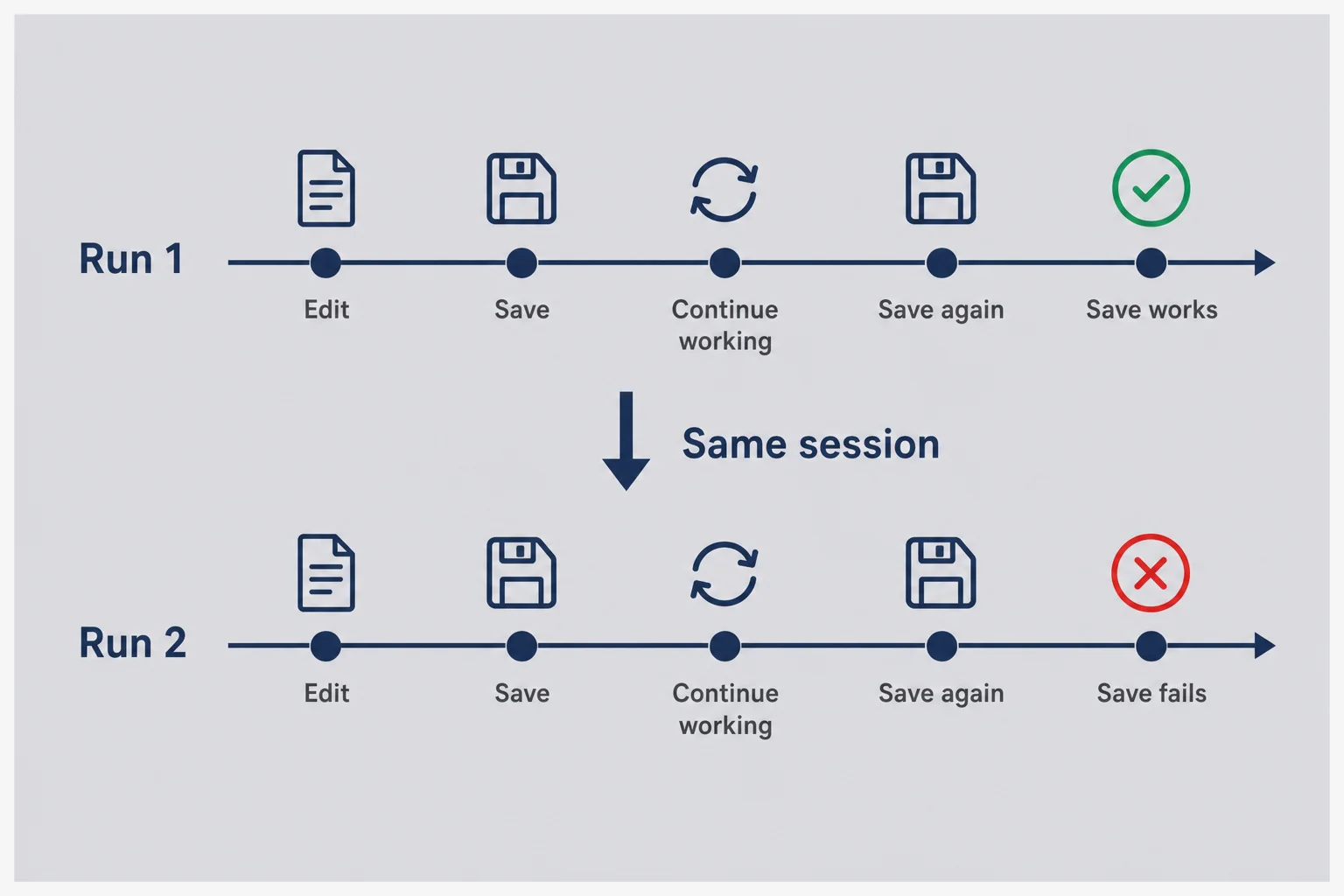
If you take one habit from this post, take this one. Run every critical user flow twice in a row. Signup twice. Upload twice. Save settings twice. Checkout with two different test cards. Cancel and resubscribe. The second run is where AI code confesses.
My Thursday bug was a classic second-run failure. First save wrote to the database and updated local state. Second save still thought it was "creating" instead of "updating," or whatever polite way Cursor eventually explained it to me. I would never have caught that running the flow once before deploy. I would have shipped, felt proud, and met the customer email twelve hours later.
Make a short list of flows that matter for your product. For a typical micro-SaaS mine looks like: create account, complete onboarding checklist, connect integration, change a setting, upgrade plan, cancel plan, export data. Yours will differ. Ten flows, twenty minutes, twice each. That is cheaper than one support thread with an angry early believer.
When the second run fails, note whether the UI still shows success. AI loves optimistic UI. Toast says saved. Database says no. Users trust the toast. You look like a liar. Testing twice trains you to distrust toasts until refresh proves truth.
Add refresh to your test script. Click Save, see toast, hard refresh the page, confirm the value stuck. Click Save again with a new value, refresh again. I catch more bugs at the refresh step than at the toast step. Customers live at the refresh step. They do not live in your optimistic UI fantasy.
Teach this to anyone who tests for you, including friends and partners. "Click everything twice" is a complete QA policy for a solo founder. Not enterprise grade. Good enough until you have revenue for enterprise grade.
Flows that involve money deserve a third run. Subscribe, cancel, resubscribe. Upgrade, downgrade, upgrade again. AI billing code is a museum of edge cases. Stripe's test cards are free. Your reputation is not.
I keep a sticky note on my monitor that says "2x" in bad handwriting. My agent thought it was a branding idea once. It is not. It is trauma prevention.
Say you ship a tiny reminder tool at twelve dollars a month. Thirty people sign up. That is three hundred sixty dollars MRR. One settings bug that only hits on the second save can still cost you four or five of those people if they hit it during onboarding — plug churn into the MRR calculator to see how fast that erodes a small base. You do not need a QA team. You need the discipline to click twice before you tweet about launch day.
Browser tools I use without pretending to be a developer
I use Chrome because every tutorial assumes Chrome. You do not need to love Google. You need the devtools shortcut. Right-click, Inspect, or Cmd+Option+I on Mac. I spend ninety percent of my debugging time in two tabs: Console and Network. That is the whole secret handshake.
You are not learning web development. You are learning where to point your phone camera when you ask for help. Think of devtools as a window into whether the app actually talked to the server, or just pretended to on the front end.
Network tab for duplicate API calls
Open Network before you click the thing. Click Save once. Watch for new rows appearing. Click Save again. Count whether you see one request or two. Look at the method column: POST versus PUT matters even if you do not know why. POST often means create. PUT or PATCH often means update. If your second save still POSTs, you found a clue you can paste into Cursor without understanding REST theology.
Click a row. Glance at Status. 200 good. 400 or 500 bad. You do not need to read the whole response. Screenshot the status and the request name. "settings-save 500 on second click" is a gift to your future self.
Duplicate calls also show up when AI attaches the same handler twice. Users see one click. Network sees two identical requests. Your symptom language becomes "single click creates duplicate rows in Network tab." That is troubleshoot ai built saas with evidence, not superstition.
Filter Network by Fetch/XHR to hide image noise. I learned that from a YouTube video at 1.5x speed while eating cereal. You are allowed to learn debugging the same way.
Console errors you can screenshot
Console shows red text when JavaScript throws a fit. You do not need to fix it from the Console. You need to capture it. Click the red line, copy, paste into your bug doc. Include the timestamp from your reproduction video if you made one.
Some errors only appear after the second action. Clear the console, run the flow twice, watch what appears on run two. Pair Console with Network. Console says what the front end complained about. Network says what the server answered. Together they replace a lot of guessing.
If Console is clean but behavior is wrong, suspect silent state bugs, not absence of errors. That is when you go back to symptom language and second-run testing instead of chasing ghosts in empty logs.
I still google half the error strings I see. That is allowed. The goal is paid users, not ego.
Mobile Safari deserves its own line in your bug doc. I have shipped features that worked in Chrome on my laptop and failed on iPhones because of autocomplete quirks, viewport height bugs, or tap targets AI sized for mice. If your customers use phones, reproduce on a phone. Borrow one if you have to. "Works on desktop only" is a valid bug classification that saves hours of irrelevant prompts.
The Application tab in devtools exists for cookies and local storage. I only open it when login "randomly" logs people out. Sometimes the token expired. Sometimes AI stored auth in sessionStorage when it should use cookies. I do not need to understand the storage API. I need to screenshot what is empty when it should not be.
When Hermes or Cursor is the debugger
I use two different tools depending on whether I am at my desk. Cursor when I can see the repo and click through files like a tourist with a map. Hermes, my always-on agent, when I am away from the laptop but need logs checked or a small fix queued for review. Both can debug ai generated code micro saas if you give them the same brief. Neither should auto-deploy because you are anxious.
In Cursor, I open the file the model names, but I do not read it deeply. I skim for whether the change matches the one-sentence bug. If the diff touches twelve files for a button reset, I reject. Scope creep is how vibe coding turns into vibe bankruptcy. Ask again with "smallest possible change only."
Cursor's at-mentions help. Point at the settings component. Point at the API route. Paste your reproduction steps in the chat. Ask it to explain the bug hypothesis before editing. That explanation is your literacy moment. You are learning architecture one plain paragraph at a time, which is how I learned what an API was in 2023.
Hermes shines on ops chores around bugs. Tail logs after you reproduce. Summarize the last deploy. Run a test script if you configured one. Message me on Telegram with "here is what I think broke." I still approve deploys manually for anything customer-facing. The agent post covers permissions. The debugging post covers judgment. Same theme: narrow tools, human review.
Do not ask either tool to "just fix it" without staging. I type some version of: "Propose fix. Do not deploy. Summarize files changed in one sentence each." If the summary mentions middleware.ts and my bug was a button, I ask why middleware is involved. Sometimes there is a reason. Often there is not.
When AI fixes fail twice, stop prompting and return to reproduction. Either your steps were wrong or you have two bugs masquerading as one. More prompts without new evidence just shuffle deck chairs on the Titanic. I have been on that Titanic. It is embarrassing and wet.
Compare agents versus chat in the ai agent micro saas solo founder piece if you are deciding whether you even need always-on tooling. Debugging does not require Hermes. It requires discipline. Agents just let you be disciplined from the grocery line sometimes.
One pattern I use weekly: ask Cursor to add a temporary console.log with a unique string, reproduce, confirm the string appears once or twice in Console, then ask it to remove the log after the fix. Yes, engineers use proper debuggers. I use labeled breadcrumbs because I can see them without reading logic. Remove the logs before deploy. Customers do not need to see IMANI_DEBUG_2 in their Console. I learned that the embarrassing way.
When the bug is "it works locally but not in production," suspect environment variables first. Vercel env vars missing, Stripe live versus test keys swapped, Supabase URL pointing at the wrong project. AI rarely reminds you to check the dashboard. You check the dashboard. Boring wins again.
Staging saves you from heroic 2 a.m. apologies
Production is where customers live. Staging is where your ego goes to die safely. If you do not have staging, you have a preview deploy, a duplicate Vercel project, a Bolt branch URL, or a "test" Supabase project. Pick one. Name it clearly so tired-you does not push live keys into the wrong place.
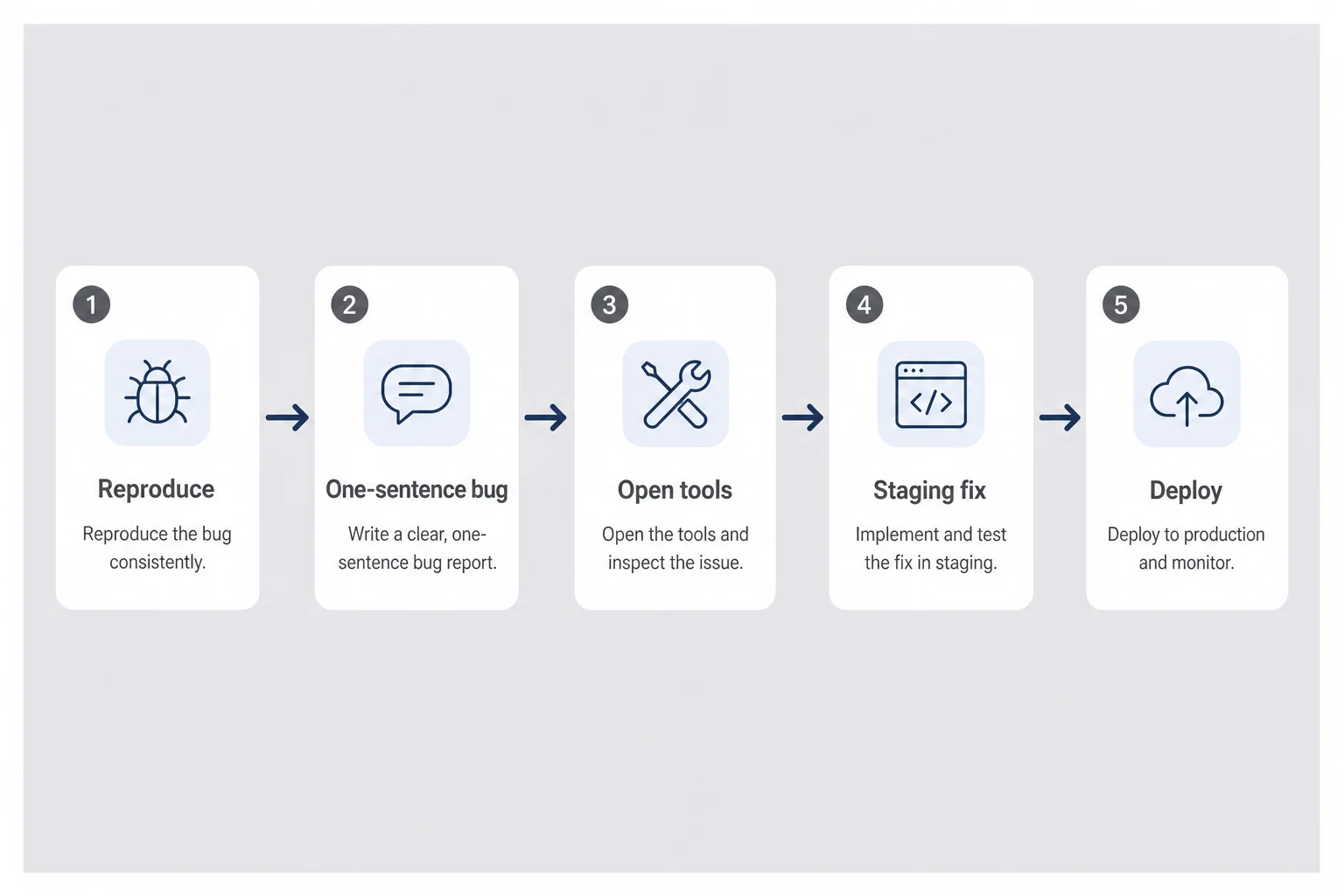
My minimum staging ritual: reproduce bug in prod, reproduce in staging, apply fix in staging, run the flow twice in staging, then deploy to prod during daylight if possible. Night deploys are for emergencies, not for "maybe this works."
Staging is especially important for Stripe and email. Test cards exist for a reason. Send test emails to yourself. Click unsubscribe in staging before you discover your live template double-sends because AI duplicated a function. I am not inventing that story. I lived a smaller version and it was enough.
Keep staging data fake. test@example.com accounts. Obvious names. You will be tempted to copy prod data for realism. Do not copy customer emails into a sloppy environment. Privacy matters even when you are small. Especially when you are small and one tweet away from looking careless.
If your host only gives you preview URLs per pull request, use that. Open the preview, run twice, merge. The habit matters more than the brand name on the dashboard.
Before you ship
Do not test payment or password-reset changes on production because staging felt annoying. That is how you email twelve strangers at 1 a.m.
Staging also gives you a place to practice debugging without adrenaline. Adrenaline makes you accept bad diffs. Calm staging makes you ask for smaller fixes. I debug better after lunch. You probably do too.
Rollback and backups when you cannot read the diff
Git scares non-coders until you need it. Then git is a time machine you pray still works. I do not understand rebasing. I understand "revert last deploy" and "go back to yesterday." That is enough for most micro-SaaS fires.
Before any risky fix, note what deploy was live. Vercel and Netlify show commit hashes in the dashboard. Screenshot them. If the fix makes things worse, roll back first, apologize second, think third. Rolling back is not failure. It is hygiene.
I keep automatic deploys from main but I pause auto-deploy when I am debugging something nasty. Manual promote after staging passes. Yes, that slows you down. Slow is how you avoid emailing everyone about a regression you caused while fixing a typo.
Database backups are the other rollback. Supabase has backups on paid tiers. Know where yours live before you need them. AI will occasionally suggest a migration that sounds confident and is wrong. If you cannot read migrations, treat them like venomous snakes. Staging first. Backup first. One migration at a time.
When a deploy is bad but not catastrophic, feature flags are luxury solo founders rarely have. Your rollback is revert commit or toggle off the new route in your host. Keep changes small so revert is painless. Another reason to reject forty-file diffs.
Document what you rolled back in a single line in your notes. "Rolled back commit abc123 because second save still broken plus login flaked." Future you will thank present you. Future you is also tired.
Version control is part of the micro-SaaS tools for non-developers stack even if you only use three git commands. Debugging without rollback is hope. Hope is not a strategy. It is marketing copy.
When to stop debugging and hire a human for one hour
There is a point where my pride costs more than a contractor. I hit it when the bug touches money moving wrong, auth letting strangers into the wrong account, or data deletion. If you cannot explain the proposed fix in one plain sentence, pause. Hire.
I use Upwork and founder Discords for one-hour debug sessions, not full rebuilds. Send the video, the reproduction doc, the Network screenshot, and the one-sentence bug. Ask for a diagnosis call first. Some contractors will try to upsell a rewrite. Walk away. You need a surgeon, not a demolition crew.
Budget fifty to one hundred fifty dollars for a focused hour when you have paying users. Compare that to churn from a broken checkout. Math gets humble quickly.
Also hire when you have spent three focused hours without a reproducible test. That means your problem is still fuzzy, not that you are dumb. A fresh pair of eyes finds the missing step in your reproduction. Happens to me quarterly.
Do not hire to avoid learning operator debugging. Hire for sharp edges you should not sand alone. Payments, auth, security, migrations on live data. Everything else, try symptom language and second-run testing first. You will get faster. Your bills stay smaller.
Max's hire a developer post covers when outsourcing makes sense for growth. This section is the emergency room version: you are on fire now, not planning next quarter's roadmap.
One honest caveat. Contractors vary. Read reviews. Prefer someone who explains in plain language on the call. If they shame you for using AI, leave. You are building a business, not auditioning for a computer science department.
Questions I get when prod breaks at night
Can I debug AI-generated code if I cannot read TypeScript?
Yes, if you treat debugging as operations, not engineering. Describe symptoms in plain language, reproduce the bug on purpose, test fixes in staging, and review what changed in one-sentence summaries. You are not reading every line. You are directing tools and people toward the right file.
Should I ask the AI to fix the bug directly?
Only after you can reproduce the bug twice and name the expected versus actual behavior. Blind fix requests often create new bugs. Give the model the symptom, the steps, and what should have happened. Ask for the smallest change. Deploy to staging first.
What is the first thing to check when my Bolt or v0 app breaks?
Run the same user flow twice in a clean browser session. Many AI bugs only show on the second click, second save, or second upload. If it works once and fails once, you have a state or reset bug, not a random glitch.
When should a non-coder hire a developer to debug?
When the bug touches payments, auth, or customer data and you cannot explain the fix in one plain sentence after two AI attempts. Or when you have spent more than three focused hours without a reproducible test. One hour of a patient contractor beats a week of vibe-coding roulette.
Do I need staging to debug AI-generated SaaS?
You need somewhere that is not production. Staging can be a duplicate project, a preview deploy, or a branch URL your host gives you. Never test payment or email changes on live users because you are tired and hopeful.
Broken prod is tuition if you learn from it
I fixed the Thursday save bug before midnight. Not because I suddenly became a developer. Because I reproduced twice, saw duplicate POST in Network, pasted that into Cursor with a narrow prompt, tested in staging, ran twice again, deployed, and emailed the customer with specifics instead of vibes. She replied "works now, thanks." That email is worth more than a GitHub star.
You will break prod again. So will engineers with ten years of experience. The difference between a hobby and a business is whether you build habits after the fire. Reproduction docs. Second-run testing. Staging. Rollback screenshots. One-sentence bugs. Boring words. Real leverage.
AI removed the gate that said only credentialed people could ship software. It did not remove the gate that says you owe paying strangers working software. Debugging is how you pay that debt without pretending you read every line.
If you are still choosing tools, read micro-SaaS tools for non-developers and pick a stack you can operate when it misbehaves. If you are still pre-revenue, read validation without coding before you optimize debug workflows for a product nobody wants yet.
The product does not care who wrote the code. It cares whether someone pays and stays. Debug like an operator. Ship like you mean it. Sleep like you tested the flow twice.
Comments