The Pay Button Worked in Test Mode. Real Money Didn't.
Stripe payments for micro-SaaS when you build without coding: Checkout, test vs live mode, webhooks, and the Supabase rows that turn a successful charge into access your app actually honors.
 By Imani28 min read
Listen to this article
AI-generated podcast-style overview of this article (not a word-for-word narration).
My cousin sent me twenty-nine dollars on a Sunday.
Not as a gift. As a customer. She clicked Upgrade on my little client-reminder tool, typed her real card, and waited for the dashboard to change. Stripe's dashboard showed the charge within seconds. Green checkmark. Happy path. She texted me a screenshot with a heart emoji.
My app still showed her on the free plan.
I was standing in my Austin kitchen holding a coffee I had reheated twice, staring at two tabs that disagreed about reality. Stripe said paid. Supabase said free. My Bolt UI said "Upgrade to Pro" like she had never tried. I had wired Checkout on a Thursday night with Cursor open and Hermes nagging me on Telegram to "remember webhooks eventually." Eventually arrived while someone I actually knew had just given me real money.
That is the stripe payments micro saas without coding wall in one screenshot. Building the product felt creative. Auth felt like paperwork. Payments feel like paperwork until they work, and then they feel like a trapdoor the moment live money moves and your database does not notice.
I am not a developer. I still cannot debug a webhook signature from memory. What I can do now is run a payment smoke test before I quote a price, know which Stripe mode I am in, and make sure one row in Supabase flips when checkout succeeds. That operator skill matters more than reading the Node SDK cover to cover.
This post is for people who already built without coding, survived auth, and maybe even deployed something that strangers can log into. You are at the moment where "add Stripe" stopped being a checkbox and became the difference between a demo and a business. Max owns the engineer's cut in stripe billing for micro-SaaS. I own the path for founders who direct Cursor instead of typing TypeScript from scratch.
Some numbers here are round examples. Some scenes are composite. Real incidents involved worse timing and less picturesque kitchens.
Stripe payments micro saas without coding: what you are renting
When founders search stripe payments micro saas without coding, they usually want a yes-or-no answer. Yes, you can take money without becoming a payments engineer. No, Stripe does not replace the thinking about what happens after the charge.
Here is what you are actually renting. Stripe owns card numbers, PCI compliance, the hosted checkout page, receipts, disputes, and the terrifyingly good dashboard that makes you feel like a CFO for forty-five seconds. You own entitlement: what this logged-in person can do inside your app right now. The gap between those two jobs is where non-coders get humbled.
I treat Stripe like a very competent finance department I cannot afford to hire. They handle the part where touching card data wrong gets you sued. I handle the part where my customer paid nineteen dollars a month and still cannot export the PDF I promised on the pricing page. Both jobs matter. Only one of them shows up in a Product Hunt screenshot.
The no-code path does not mean no configuration. It means you configure through dashboards and AI-assisted code snippets instead of inventing billing from scratch. Stripe Checkout is a hosted page. Payment Links are hosted pages with URLs you can share like a Google Doc link. Supabase holds the row that says user 4821 is active. Your frontend reads Supabase, not Stripe, on every page load. That separation is the whole mental model.
If you came from micro-SaaS tools for non-developers, you already know Stripe sits in the "do not build this yourself" bucket next to auth. Same energy. Different failure mode. Auth failures bounce people at the door. Payment failures take money and leave them standing in the lobby confused.
Say you ship a tiny invoice reminder at twelve dollars a month. Twenty-five customers is three hundred a month. Not retirement money, but enough that a cousin texting "I paid, why am I still free?" becomes a trust problem instead of a shrug. Stripe payments micro saas without coding is not about installing an npm package with confidence. It is about closing the loop between charge succeeded and Pro access in your app before someone you know becomes your first support ticket.
What Stripe does not do for you
Stripe will not write your pricing page. It will not decide whether you charge monthly or annual. It will not fix your onboarding email that still says "welcome, free user" after a successful checkout. It will not automatically tell Supabase that checkout.session.completed fired unless you or your AI wire that path. The dashboard will look authoritative forever. Your app only becomes authoritative if your database updates.
I learned this the expensive way emotionally, not financially, because my cousin did get access eventually. I manually flipped her row at 10 p.m. like a fraudster with admin keys. That is not a business. That is a favor with extra steps.
The three pieces you are connecting
Think of three boxes. Stripe moves money and stores customer objects with ids like cus_something. Your app shows buttons and redirects people to Checkout. Supabase (or whatever backend you use) stores subscription_status your features trust. Arrows between the boxes are API keys, redirect URLs, and webhooks. Non-coders win when they can name all three boxes before they paste the first key into Vercel.
If your data layer is still fuzzy, read Supabase micro saas without coding first. Payments on top of a leaking database is still a leak with a credit card attached.
Why payments feel easier than auth until live mode
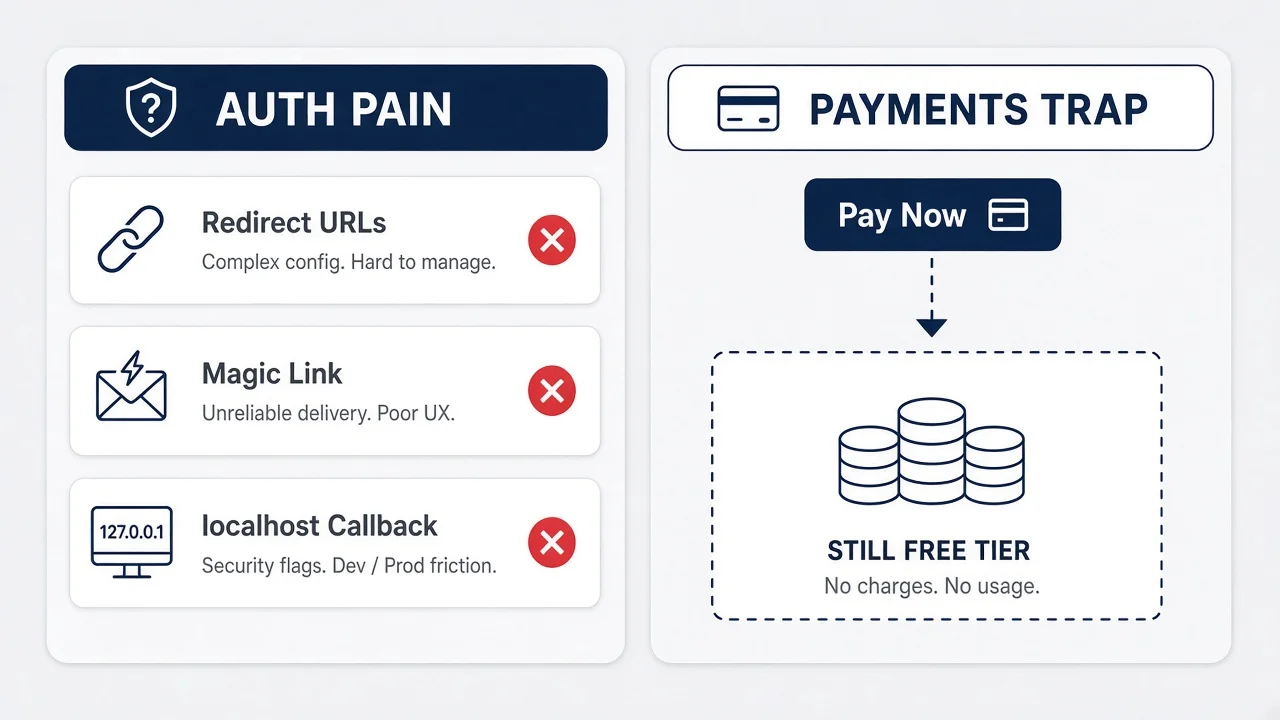
Auth broke my soul on a Tuesday. Payments felt like a victory lap on a Thursday.
That emotional sequence is a trap and I wish someone had warned me louder. Login has obvious pain. Redirect URLs, magic links, session cookies, protected routes. You expect friction. Stripe test mode is seductive. You create a product, copy a price id, click a button, type 4242424242424242, and money appears in a fake dashboard. Cursor celebrates. Hermes sends a congratulatory emoji. You post in a group chat that you "integrated payments." You have not. You have integrated a redirect to a page Stripe hosts. The integration that matters is what happens after the redirect.
In test mode, I have absolutely shipped apps where I manually upgraded users because webhooks were "next week." Test mode forgives that laziness because the only person paying is you with a fake card. Live mode does not forgive. Live mode is your cousin with a real Wells Fargo debit card and a group chat screenshot ready.
Auth and payments share a dirty secret. Both look done when the happy path works once on localhost. Auth fails when production redirect URLs still say localhost. Payments fail when live keys point at test webhooks, or when success_url brings the user back but nobody told the database. Same class of bug. Different emotional punch because one is embarrassment and the other is "I took your money and did not deliver."
I still google "stripe test card" sometimes. The 4242 card is muscle memory now. What took longer to muscle-memorize is the question I ask before any demo: "If this payment succeeds, which row changes, and how do I verify it without refreshing Stripe's dashboard?" If I cannot answer, I am not ready to quote a price publicly.
Why Checkout feels like cheating (in a good way)
Stripe Checkout is the reason non-coders can ship billing at all. You are not building card fields. You are not storing PANs. You are not explaining PCI scope to yourself at midnight. You create a session or link, redirect, and Stripe handles the ugly parts. That is genuine progress compared to 2019 when indie founders copied PHP snippets and prayed.
The cheat is only half the game. Checkout gets money into Stripe. Your product lives elsewhere. The handoff from Stripe back to your app is where bootstrapping founders without CS degrees either learn one webhook or become part-time database editors for every new customer. I have been the editor. It does not scale past five people you personally know.
The lie your demo tells
Demo videos love the pay button moment. Click, redirect, success page, confetti emoji in Slack. Cut before the founder opens Supabase and checks whether subscription_status changed. If you are evaluating your own progress, watch the boring part. Open the database. Refresh the protected feature. Log out and back in. That is the product. The Checkout success screen is Stripe's product.
When someone asks if I "have Stripe working," I ask what they mean. Working like the redirect loads? Or working like a stranger pays while I sleep and wakes up to correct entitlements? Those are different milestones separated by one boring evening of webhook wiring.
Test mode vs live mode: the flip nobody rehearses
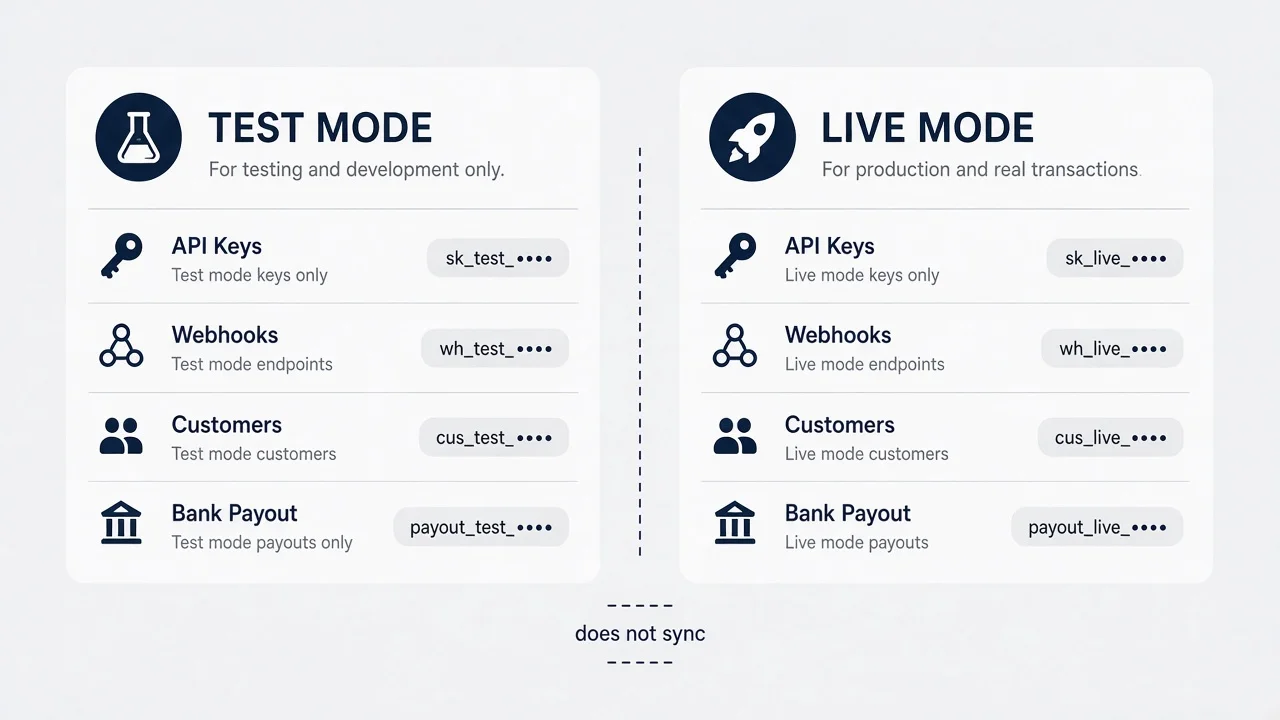
Stripe test mode and live mode are parallel universes. Same dashboard layout. Different keys. Different webhooks. Different customers. Different money. The toggle at the top right looks cosmetic. It is not cosmetic. It is the difference between practice and payroll.
I rehearsed test mode like a play. Create product, create price, run Checkout, type 4242, see success, screenshot for Twitter. I did not rehearse the flip. Going live means business verification, connecting a bank account, copying live publishable and secret keys into production environment variables, re-registering webhook endpoints under live mode, and running the entire smoke test again with a real card charge you will refund immediately. Nobody warns you that webhooks you configured in test do not automatically exist in live. They do not. Ask me how I know.
The first live charge I ever processed was one dollar. I refunded it. That is still my recommendation. Run a real live transaction for the smallest amount Stripe allows on your price, confirm the database row updates, confirm the feature gate opens, refund, confirm cancellation still behaves. You lose a few cents in fees. You gain the confidence to send a pricing link to someone who is not related to you.
Test cards have personalities. 4242424242424242 succeeds. 4000000000000341 fails in useful ways. Spend twenty minutes in test mode triggering failures before you go live. Failed payments that leave users in limbo are support tickets you earn by skipping practice.
Environment variables are where non-coders lose the plot. You need STRIPE_SECRET_KEY and STRIPE_PUBLISHABLE_KEY in your host, and which pair you pasted last matters. I have shipped with test secret keys in production because I copied from the wrong dashboard tab. The app "worked" for test cards only, which is a special kind of useless. Label your password manager entries Test Stripe and Live Stripe like they are poison and medicine.
The business verification pause
Live mode sometimes stalls on identity or business verification. Stripe asks questions. You upload an ID. You wait. That waiting day is not dead time. It is webhook rehearsal day. If you are blocked on live keys, you can still write the handler, deploy the route, and forward test events with Stripe CLI or a Supabase Edge Function scaffold Cursor generates. Do not treat verification as a Netflix day unless you enjoy launching broken.
Refunds, disputes, and the dashboard you will live in
Once live money moves, you will live in Stripe's dashboard more than you expect. Refunds are clicks. Disputes are emails that sound legal. Test mode teaches none of that emotional texture. I check payouts weekly even at small MRR because a missed bank connection is a silent failure. Payments are not set-and-forget. They are set-and-monitor until boring.
Stripe Checkout vs Payment Links when you are one person
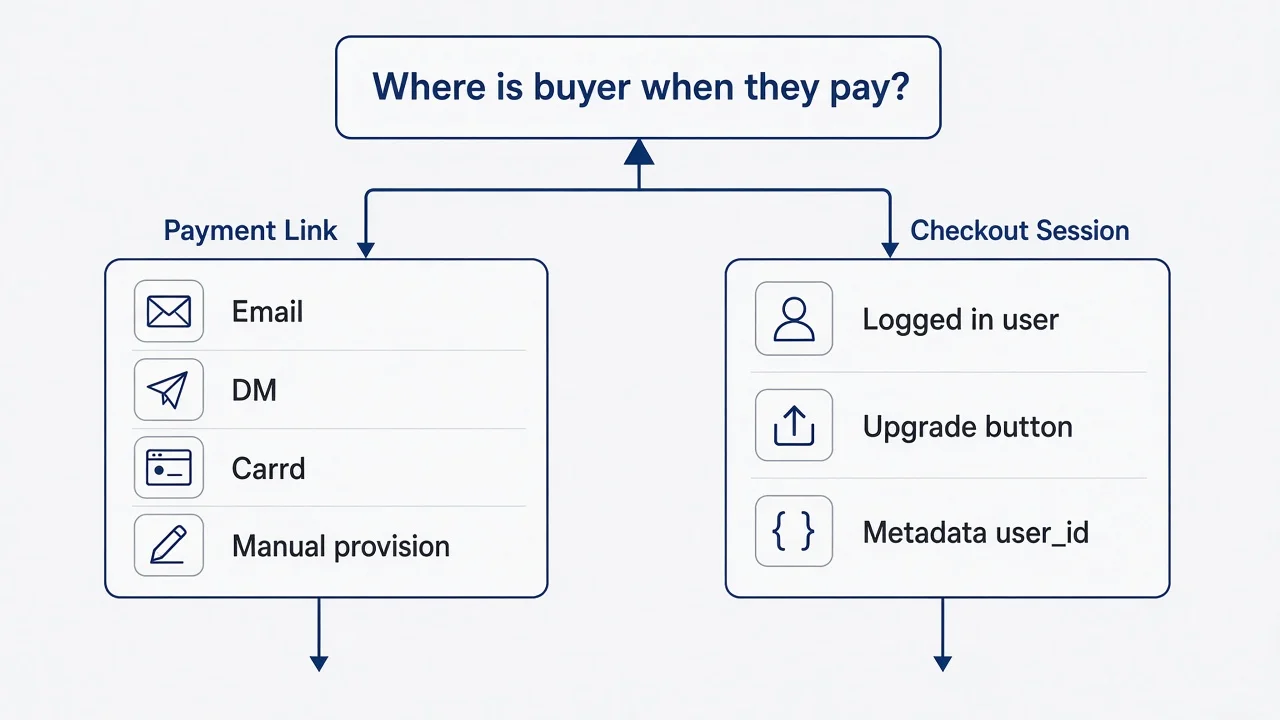
If you are one person with no backend confidence yet, the Checkout vs Payment Links decision is really a "where is your buyer when they decide to pay?" decision.
Payment Links are URLs Stripe generates. You create a link in the dashboard, set a price, copy the URL, paste it in an email, a Notion doc, a DM, a Carrd button. The buyer pays on Stripe's page. You get notified. Your app might not know yet unless you wired webhooks or you manually provision. That sounds primitive. For customer one through five, it can be correct. You are learning what people pay for before you automate pridefully.
Checkout Sessions are what you use when the buyer is already inside your product. They logged in through auth you configured. They hit a paywall. They click Upgrade. Your app calls an API route that creates a session with their email or existing Stripe customer id, returns a URL, redirects them to Checkout, and brings them back to success_url on your domain. That flow feels like software. It requires more wiring. It scales past your phone contacts.
I started with Payment Links for an early tool because I was selling to three freelancers from a Twitter thread. I did not have onboarding. I had a Loom and a link. They paid. I manually created accounts. Crude? Yes. Faster than pretending I had a self-serve funnel? Also yes. Within a month I moved to Checkout because manually creating accounts at midnight is how founders burn out before product-market fit even gets a chance to arrive.
Both paths use the same Stripe primitives underneath: Products, Prices, Customers, Checkout. The difference is who creates the session and whether the buyer was authenticated in your app first. Non-coders should pick based on today's sales motion, not the sales motion you pitch in your head.
Here is my honest split. Payment Links when you are validating willingness to pay with people you can email directly. Checkout Sessions when strangers need to self-serve after signup. If you are pre-launch with ten waitlist emails, a Payment Link in the first outreach email is fine. If you have a login screen and a dashboard, Payment Links alone will feel duct-taped unless your product is intentionally manual.
Metadata is how you connect anonymous payments to users
When you graduate to Checkout, use metadata. Stripe lets you attach key-value pairs to sessions. Put your internal user id there. When the webhook fires, read metadata and update the correct row. AI tools know this pattern if you describe it in plain English: "When checkout completes, read user_id from metadata and set subscription_status to active." That sentence saves you from upgrading the wrong person.
Payment Links can carry metadata too, but prefilled customer email is often enough for early sales. Match email to user row. Messy at scale. Fine for ten customers.
Subscriptions vs one-time payments
Most micro-SaaS is recurring. Make sure your Price object is recurring in the dashboard, not one-time, unless you genuinely sell lifetime deals or single exports. I accidentally created a one-time price once because the dashboard toggle is easy to miss when you are moving fast. A customer "paid" once and expected monthly access. We fixed it. I still think about it when I create prices now.
The minimum Stripe dashboard setup I actually use
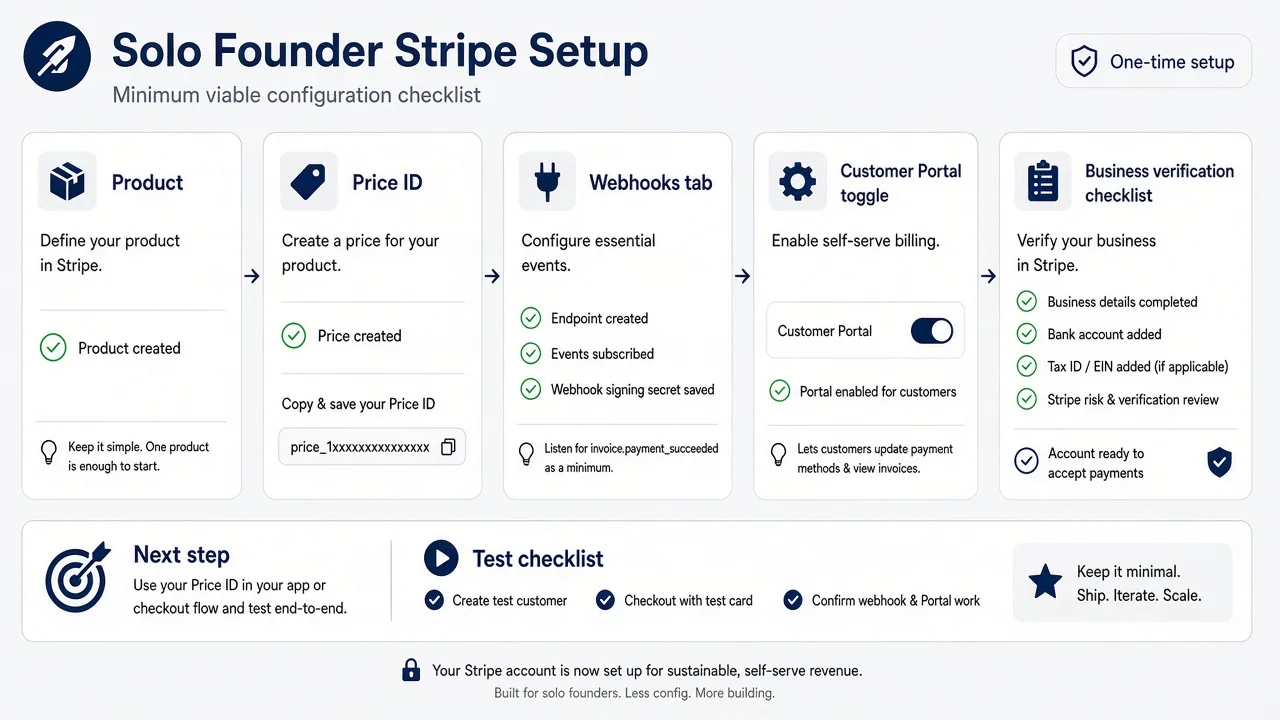
The Stripe dashboard can feel like an airplane cockpit designed for a fintech team. Ignore most tabs early. Here is the minimum I actually touch before I tell anyone a price.
Account in test mode first. Click around until the test toggle feels familiar. You will live here for days or weeks.
One Product. Name it what your customer sees, not your internal codename. "Client Reminder Pro" beats "project_alpha_v2."
One Price. Recurring, monthly, amount you already decided. Copy the price id that starts with price_. That string goes into environment variables and into the code Cursor writes. Not hardcoded in three files. One env var.
Customer emails on. Stripe sends receipts. Your support load drops.
Business settings started early if live is within two weeks. Bank account, identity, business address. Live mode stalls here more often than founders expect.
Webhooks tab bookmarked. Even if the endpoint is stubbed, know where it lives.
Customer Portal configured lightly. Cancel and update payment method enabled. Plan switching disabled until you have multiple plans worth switching between. More on that later.
I do not touch Tax, Radar rules, Connect, or Billing Metering on week one. I do not deserve them yet. Neither do you, probably, and that is fine.
Products and Prices are not the same thing. Product is the thing you sell. Price is how much and how often. You can add a second price later for annual billing. Start with one monthly price until someone asks for annual loudly enough to matter. Complexity is a tax solo founders pay in support time.
When AI scaffolds your integration, give it the price id explicitly in the prompt. "Use STRIPE_PRICE_ID from env for the Pro monthly plan at twelve dollars." Specificity beats "add Stripe" and hoping the model guesses your intent.
Keys you need and where they go
Publishable key goes in frontend code if the scaffold requires it. Secret key never touches the browser. Ever. If Cursor puts sk_live in a client component, delete that, redeploy, rotate the key in Stripe, and pour a small drink. Service role keys and Stripe secret keys in public repos are how indie horror stories start.
Your host needs env vars: STRIPE_SECRET_KEY, STRIPE_PUBLISHABLE_KEY, STRIPE_WEBHOOK_SECRET once webhooks exist, STRIPE_PRICE_ID for your first plan. Redeploy after changing them. Vercel does not psychically notice dashboard edits.
Test clock and simulating time (optional, later)
Stripe has test clocks for subscription renewals in test mode. Useful when you want to see what happens thirty days later without waiting. I ignored this until my second product. For product one, manual testing of subscribe and cancel was enough. Do not let optional features block your first live dollar.
Wiring checkout into your app without reading SDK docs
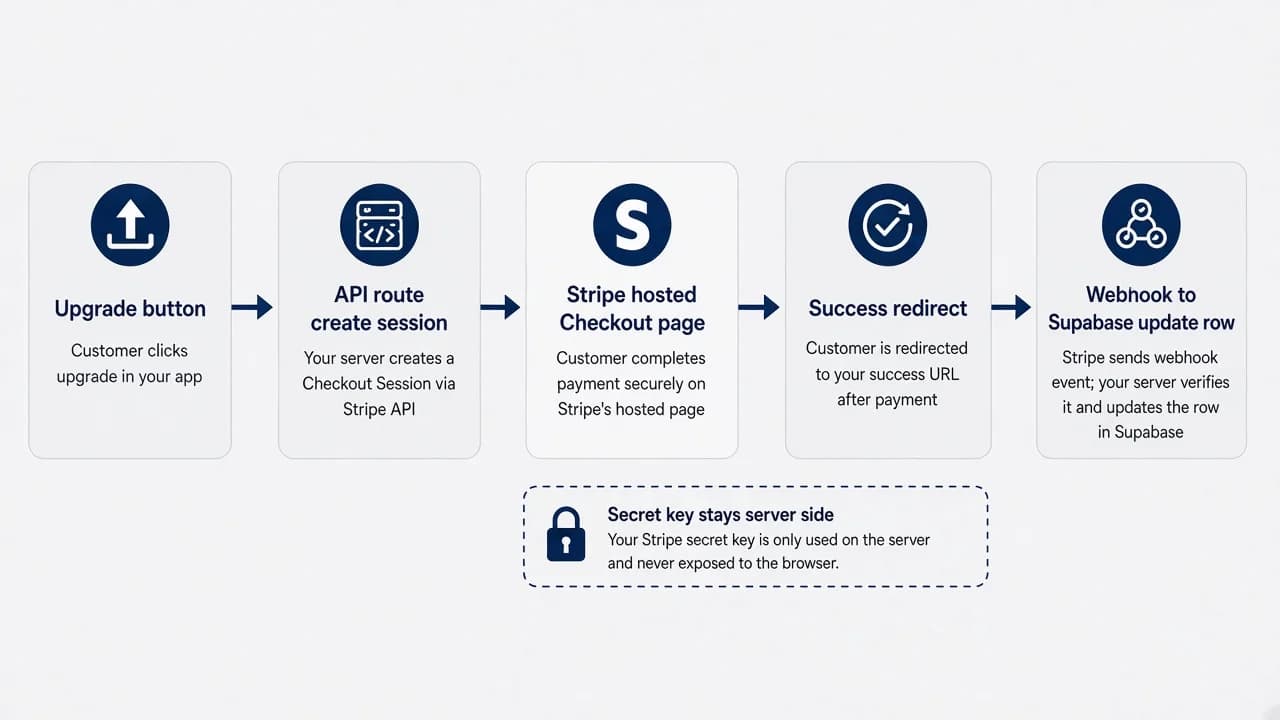
I have never read the Stripe Node SDK cover to cover. I have shipped Checkout multiple times by describing the flow to Cursor in plain English and pasting errors back until the redirect works. That is the non-coder integration method. It is less glamorous than senior-engineer elegance. It works at micro-SaaS scale.
The user-facing flow is simple to narrate and hard to get right on the first try. User clicks Upgrade. Frontend calls your API route, not Stripe directly with the secret key. API route creates a Checkout Session with mode subscription, line items pointing at your price id, customer email from the logged-in user, success_url and cancel_url on your domain, and metadata with your internal user id. Route returns session.url. Frontend redirects window.location to that URL. User pays on Stripe. Stripe redirects to success_url. Your app shows a thank-you page that hopefully does not lie about access yet.
The lying thank-you page is a personal pet peeve. Do not say "You are now Pro!" on success_url unless your webhook already ran or you poll session status server-side. I prefer honest copy: "Payment received. Your account updates in a minute." Boring. Trustworthy. Saves angry emails when webhooks lag thirty seconds.
Where does the API route live? Supabase Edge Function, Next.js route handler, whatever your deploy stack uses. Non-coders do not need to debate serverless theology. They need one server-side place the secret key lives. Ask AI to match your repo structure. Paste the Stripe quickstart for Checkout Sessions and say "adapt this to my auth user object."
Bolt projects sometimes want a different shape than Cursor Next.js repos. Same story, different file paths. When something breaks, the error is usually one of: wrong key, wrong price id, success_url not allowlisted, session created in test mode while frontend uses live publishable key, or API route not deployed. Check those five before you rewrite everything.
The prompt I reuse
I keep a note in my Hermes workspace that says: create checkout session for logged-in Supabase user, pass user.id in metadata, use env STRIPE_PRICE_ID, success URL /billing/success, cancel URL /billing/cancel, return session URL only, never expose secret key. That paragraph saves twenty minutes every new project.
Success page without false promises
If you want instant gratification UX, you can retrieve the session on the success page with the session id in the query string and verify payment status server-side. That is one extra API call. Webhooks are still the durable sync for renewals and failures. For the first launch, honest loading copy plus a webhook is enough. Perfect instant upgrade is polish, not survival.
Webhooks for founders who cannot debug signatures yet
Webhooks are Stripe knocking on your server's door saying "something happened." Your server must verify the knock is really Stripe, then update your database. Non-coders hear "signature verification" and freeze. I froze too. Then I copied the official pattern into a Supabase Edge Function and stopped touching it.
You need one public HTTPS URL Stripe can reach. Localhost does not count unless you use Stripe CLI forwarding during development. After deploy, your webhook URL looks like https://yourdomain.com/api/stripe/webhook or a Supabase function URL. Register it in Stripe dashboard under Developers, Webhooks, Add endpoint. Select events. Start with checkout.session.completed for first purchase. Add customer.subscription.updated and customer.subscription.deleted when recurring billing matters. Add invoice.payment_failed when you care about dunning.
The signature part exists because the internet is rude. Anyone could POST fake JSON to your webhook URL and grant themselves free Pro if you blindly trust bodies. Stripe signs payloads. Your code verifies with STRIPE_WEBHOOK_SECRET. AI-generated code sometimes parses JSON before verifying. That fails in subtle ways. Ask Cursor explicitly: "Use raw body for webhook verification per Stripe docs."
When a webhook handler fails, Stripe retries. Retries are good and dangerous. Good because transient errors heal. Dangerous because a buggy handler that partially updates rows can run twice. For your first version, log the event id, check if you already processed it, then update. Max explains idempotency properly in stripe billing for micro-SaaS. My non-coder version is: keep a processed_events table or a last_event_id column and do not double-upgrade people.
Return 200 quickly when you handle an event. Return 200 for events you intentionally ignore so Stripe stops retrying. Return 500 only when you want Stripe to retry because something actually broke.
Testing webhooks without live traffic: Stripe dashboard has "Send test webhook." Stripe CLI can forward to localhost while you develop. I use dashboard test sends once deployed because CLI felt like one more terminal window I did not need in my life. Pick your poison. Test something before you announce pricing.
When webhooks lag and users panic
Thirty seconds feels like an hour to a new paying customer staring at a paywall. A thank-you page that explains the delay reduces support pings. A manual admin override button reduces them further until automation is solid. I built a janky "refresh my plan" button once that re-fetched subscription from Stripe server-side. Ugly. Effective. Removed it after webhooks were reliable.
Edge Functions vs app routes
Supabase Edge Functions are popular in AI-built stacks because the word "server" is abstracted. Next.js API routes work if your app is Next. The webhook must run where the secret key and database credentials live. Non-coders should follow whatever pattern their scaffold already started rather than importing a second hosting model for pride.
What belongs in Supabase when someone pays
Stripe is the source of truth for money. Supabase should be the source of truth your app reads for access. Those statements sound obvious until you meet a founder who checks Stripe manually before letting someone export a CSV.
Minimum columns I care about on my users table or a subscriptions table linked to users: stripe_customer_id, stripe_subscription_id for recurring, subscription_status, price_id, current_period_end. Optional soon: cancel_at_period_end, trial_end. Your middleware or row-level checks gate features on subscription_status being active or trialing, whatever your pricing promises.
When checkout.session.completed fires, read metadata user_id, fetch the session, grab customer and subscription ids, write them to the row, set subscription_status active, set current_period_end from the subscription object if recurring. Cursor can map fields if you paste the webhook payload example from Stripe docs.
Never store full card numbers. Never. Stripe owns PAN. You own entitlement.
If you have not configured Supabase for your micro-SaaS yet, do that before you obsess over Stripe fields. Payments on a database you do not understand is stress with interest.
Row Level Security still matters after payments. Being paid does not mean other users can read your rows. Payment and auth security are cousins. Treat both as release blockers.
Matching Stripe customer to Supabase user
First payment creates a Stripe Customer. Store cus_ id on first checkout. Second checkout should reuse that customer id instead of creating duplicates. Duplicate customers in Stripe are messy accounting cosplay. Pass customer id when creating sessions if it already exists on the user row.
Email matching alone works for Payment Link era manual provisioning. Metadata user id works better for self-serve. Pick one strategy and stick with it until you have a reason to change.
What your app should check on protected pages
Your feature gate reads Supabase subscription_status, not a client-side flag someone can toggle in devtools. Server components or API routes should enforce paid access for expensive actions. Client-only gating is fine for UX hints. Server enforcement is the real lock. AI scaffolds love client-only checks because they look done faster. Ask for server verification explicitly.
The payment smoke test I run before I quote a price
I will not put a public price on a landing page until I run this sequence twice: once in test, once in live with a refundable real charge. No exceptions anymore. The cousin incident burned that rule in.
Test mode first. Create a fresh user account through real signup, not your admin account. Click Upgrade. Complete Checkout with 4242424242424242, any future expiry, any CVC, any ZIP. Land on success page. Wait sixty seconds. Refresh the protected feature. subscription_status in Supabase should be active. Log out. Log back in. Still active. Open incognito. Free user still blocked appropriately.
Cancel test in Stripe dashboard or run Customer Portal cancel if configured. Confirm subscription_status updates to canceled or active_until_period_end depending on your logic. Run failure card 4000000000000341 if you handle failures. Confirm user sees a clear message, not a infinite spinner.
Flip to live keys in production env vars. Redeploy. Register live webhook endpoint pointing at production URL. Send test webhook from live dashboard if available. Run live one-dollar charge with your real card. Confirm database row. Confirm feature. Refund in dashboard. Document the time you did it in a note so future you remembers live mode is real.
Only then do I tweet a price. Only then do I email waitlist people. Only then do I tell Hermes to update the marketing site copy with confidence.
This checklist sounds paranoid. It is less paranoid than manually editing rows while someone waits on iMessage.
The questions I ask out loud while testing
Who is the user before pay? Who are they after pay? What breaks if webhook arrives twice? What breaks if webhook arrives never? What do I tell support to do for one stuck user without giving them SQL access to production? If I cannot answer the last one, I am not ready.
Pricing page alignment
Your public price should match your Stripe Price object exactly. Twelve dollars on the site and fourteen in Checkout destroys trust in one click. Stripe fee calculator math belongs in your notebook, not in customer-facing surprises. Confirm currency, interval, and trial settings match marketing copy.
Billing portal and cancel links without building admin
Solo founders do not need to build a billing settings page on day one. Stripe Customer Portal is a hosted page where customers update cards, view invoices, and cancel subscriptions. You enable it in Stripe dashboard settings, configure allowed actions, copy the portal link pattern or generate portal sessions from an API route, and put a "Manage billing" link in your app footer or settings.
I enable cancel from day one because hiding cancel creates chargebacks and angry tweets. Make cancel easy. Retention happens in the product, not in dark patterns. If your tool saves someone two hours a week, they stay. If it does not, let them leave cleanly.
Portal session creation needs a stripe_customer_id on the user row. Another reason first checkout must store that id. Cursor can wire a button: click Manage billing, call API route with user id, create portal session, redirect.
For early products I sometimes linked directly to Stripe's email receipts and told users "reply if you need help canceling" before portal existed. That scales to maybe twenty users. Portal scales past your inbox.
Cancellation flow emotionally hurts when you are small. Watching someone cancel stings. Still better than them disputing a charge because they could not find the off switch.
Invoices and receipts as support deflection
Stripe emails receipts automatically if configured. Mention that in onboarding. "Receipts come from Stripe@stripe.com" saves weird spam accusations. Small thing. Real support win.
Plan changes you are not ready for
Disable plan switching in portal until you have multiple prices and tested upgrade/downgrade proration behavior. Early micro-SaaS has one plan. Portal with cancel and update card is enough. Upgrade paths can wait until someone asks to move from monthly to annual with math you understand.
When Max's engineering post owns the room
I write for people who build with AI and operate with checklists. Max writes for people who want the plumbing diagram with idempotency keys and event matrices. Both posts belong in your bookmarks. Different depths, same Stripe account.
Read Max's stripe billing for micro-SaaS when you are ready to treat webhooks as production infrastructure, not a scary word. He covers signature verification details, which events matter for subscriptions, database columns with migration thinking, and the 2 a.m. failure modes that repeat across founders. I read it after my cousin incident. I should have read it before. Typical sequencing for me.
My post owns the handoff board: what to click, what to test, what to store, how to describe flows to Cursor without pretending you read source code for fun. Max's post owns the room when you are debugging duplicate webhook processing or designing reconciliation jobs. You might not need reconciliation at thirty MRR. You will need correct webhook verification at three MRR if real money moves.
Non-coders should not feel ashamed to live in my layer for months. Engineers should not feel ashamed to skip straight to Max. The product does not care who wrote the webhook handler. It cares that paid users get what they paid for.
When Hermes or Cursor generates webhook code, paste Max's event list into the chat and ask "handle these idempotently." That collaboration between posts is how I actually work. Imani voice for momentum, Max voice for correctness under retry storms.
If you are deciding whether to read further engineering detail today, ask whether you have taken live money yet. No live money yet: finish smoke tests here. Live money and weird duplicate rows: go to Max. Live money and everything works: ignore both of us and go talk to customers until something breaks.
Questions I get about Stripe without coding
People DM me variations of the same five questions after they watch a Bolt demo where payments look finished in four minutes. The answers are in the FAQ below. Read the sections above for the stories behind them.
Can I accept Stripe payments on a micro-SaaS if I do not know how to code?
Yes, if you use Stripe Checkout or Payment Links instead of building your own card form. You configure products and prices in the Stripe dashboard, paste API keys into environment variables, and let AI wire a redirect flow. You still need to understand test mode, live mode, and what happens after someone pays. Coding skill helps. Operator discipline matters more for your first ten customers.
Should I use Stripe Checkout or Payment Links first?
Payment Links when you want a URL you can email or drop on a landing page without touching your app code. Checkout Sessions when someone is already logged in and you want pay to feel like part of the product. Many solo founders sell the first five customers with a Payment Link, then move to Checkout once auth and onboarding exist. Both are fine. Pick the one that matches where your buyer clicks today.
Why did my Stripe test payment work but live payments fail?
Usually you flipped to live mode keys without updating webhooks, success URLs, or business verification. Test mode and live mode are separate universes in Stripe. Live mode needs real bank details, sometimes identity verification, and webhook endpoints registered again under live. Run your smoke test checklist again after every live toggle. Never assume test success transfers automatically.
Do I need webhooks if I am a non-coder with Stripe Checkout?
Yes, if your app must change after payment. Checkout alone collects money. Your database still needs to know this user is paid. Webhooks are how Stripe tells your backend that checkout finished. Without them you get charges in the dashboard and free-tier users inside your app. You can start with one event, checkout.session.completed, and expand later.
What should I store in Supabase when someone pays through Stripe?
At minimum store stripe_customer_id, stripe_subscription_id if recurring, subscription_status, price_id, and current_period_end. Gate features on subscription_status in your database, not on hoping the Stripe dashboard is open in another tab. Never store full card numbers. Stripe owns card data. You own the entitlement row that your app reads on every protected page.
The pay button is not the product
I still build with AI every week. Bolt for first screens, Cursor for fixes, Hermes for reminders I would otherwise ignore. The tools get faster. The emotional sequence stays the same: demo high, configuration hangover, live money reality check.
Stripe payments micro saas without coding was never about skipping understanding. It was about skipping the parts that get you sued while you learn the parts that get you paid. Checkout is the easy screenshot. Supabase rows updating after webhooks are the business. Test mode is dress rehearsal. Live mode is opening night with no understudy.
My cousin still uses that reminder tool. She teases me about the free-plan screenshot sometimes. Fair. I keep it in a folder next to my first auth localhost bug because both images remind me the same thing: strangers do not care how fast I scaffolded. They care whether the thing works after they trust me with money.
You do not need a CS degree to run that smoke test. You need an evening where you refuse to announce a price until the database agrees with Stripe. Take the evening. The timeline from googling APIs to someone paying you real money still confuses me too. At least now the money and the access show up in the same story.




Comments