Bolt Got Me to Version One. Cursor Got Me to Version Two.
When to leave Bolt or v0 for Cursor as a non-coder solo founder — the signals, migration checklist, and honest tradeoffs of switching AI build tools.
 By Imani22 min read
Listen to this article
21:59AI-generated podcast-style overview of this article (not a word-for-word narration).
Bolt gave me a login page, a dashboard, and a Stripe button in one afternoon. I remember refreshing the preview like the UI was a magic trick. I had not written a line of TypeScript. I had described a workflow in plain English and watched files appear. For a week I felt like the main character of a tech startup montage.
Then I wanted to change one email template. Bolt wanted to regenerate half the settings screen. I wanted to add a webhook endpoint Max kept mentioning. Bolt's answer was basically "export and hire someone." I was not ready to hire anyone. I was ready to stop fighting the tool.
That is the hinge this article is about. Leave bolt for cursor micro saas is not a flex move. It is an admission that your product graduated from prototype to something you maintain. Bolt and v0 are incredible for version one. Cursor is where I live when version one needs surgery every Tuesday.
I am writing as someone who builds with AI agents and builders, not a CS degree. I still google error messages. I run Hermes on a VPS and Cursor on my laptop and sometimes they disagree about what "fixed" means. If you have never shipped anything, read how to build a micro-SaaS without coding first. If you are stuck debugging prod, my debug AI-generated code post is the companion. This one is the switch moment between them.
The product does not care which logo was on the screen when you clicked deploy. It cares whether you can ship a fix before a paying user notices. Sometimes that means staying on Bolt another month. Sometimes it means exporting to GitHub and opening Cursor before you talk yourself out of it.
I am not going to give you a day-by-day migration calendar. Tools change too fast for that. What I can give you is a decision filter and a checklist that survived three of my own switches and one rollback. If you are comparing stacks for the first time, the prompt AI to build article is about first prompts, not tool divorce. This one assumes you already have something worth maintaining.
Leave bolt for cursor micro saas: what the switch actually means
Leaving Bolt for Cursor is not "learning to code properly" in the bootcamp sense. It is changing who owns the files.
On Bolt or v0, the builder is the source of truth. You prompt, it generates, you preview. The repo is a side effect. On Cursor, the repo is the source of truth. You prompt, it edits files, you run the app and see if you believed the AI. The mental model flips from generate pages to maintain a product.
That flip has consequences you should want before you make it. You become responsible for git branches, merge conflicts, package updates, and the occasional terrifying terminal command you paste because the AI said it was safe. You also stop paying the "full regen tax" every time you need a button moved six pixels left.
I use a simple test. If your last five change requests were all wording, colors, or one new field on an existing form, Bolt might still be fine. If your last five requests were "connect this to Supabase RLS," "add a webhook," "split this component," or "why does prod behave differently," you are already trying to be a maintainer. Maintainers need file-level tools.
Cursor does not replace thinking. It replaces the fiction that you can prompt your way out of architecture forever. At some point your micro-SaaS has state: users, subscriptions, rows in a database. Bolt can start that story. Cursor helps you edit chapter four without burning chapter one.
Think about ownership the way you think about bank accounts. Bolt is like cash in your wallet for small daily spends — fast, low ceremony, not great for audit trails. Cursor is like a business checking account with statements. More paperwork. Better when strangers send you money and ask where it went. Neither is morally superior. They match different seasons.
I have seen founders switch too early and spend two weeks in dependency hell before they had a single user. I have seen founders switch too late and abandon a working product because Bolt regen fatigue made every improvement feel impossible. Both are waste. The goal is switch when iteration pain exceeds learning pain.
Caveat for honesty. Some founders should never make this switch alone. If you are building something regulated, multi-tenant, or deeply custom on the backend, you might skip straight to hiring Max-style help. This article is for the typical indie micro-SaaS: auth, CRUD, Stripe, one core workflow, built with AI assistance.
The question is not "which tool is better"
The question is which tool matches the phase. Phase one is prove the workflow. Phase two is iterate without rewiring the whole house. Bolt is optimized for phase one. Cursor is optimized for phase two. Using Cursor in phase one often means drowning in files before you know what the product is. Using Bolt in phase two means paying in regeneration time and frustration.
Say you are building a client portal for freelancers to upload files and get status updates. Week one, Bolt is perfect: login, upload form, table of jobs. Week six, a paying customer wants email when status changes, an admin view, and CSV export. Each request is a surgical edit on shared state. That is the shape of a Cursor product even if Bolt birthed it.
Another lens: who needs to touch the repo? If the answer is "only the AI through Bolt," you are still in phase one. If the answer is "me, with AI assistance, between customer support tickets," welcome to phase two.
Why Bolt still wins for your first ugly version
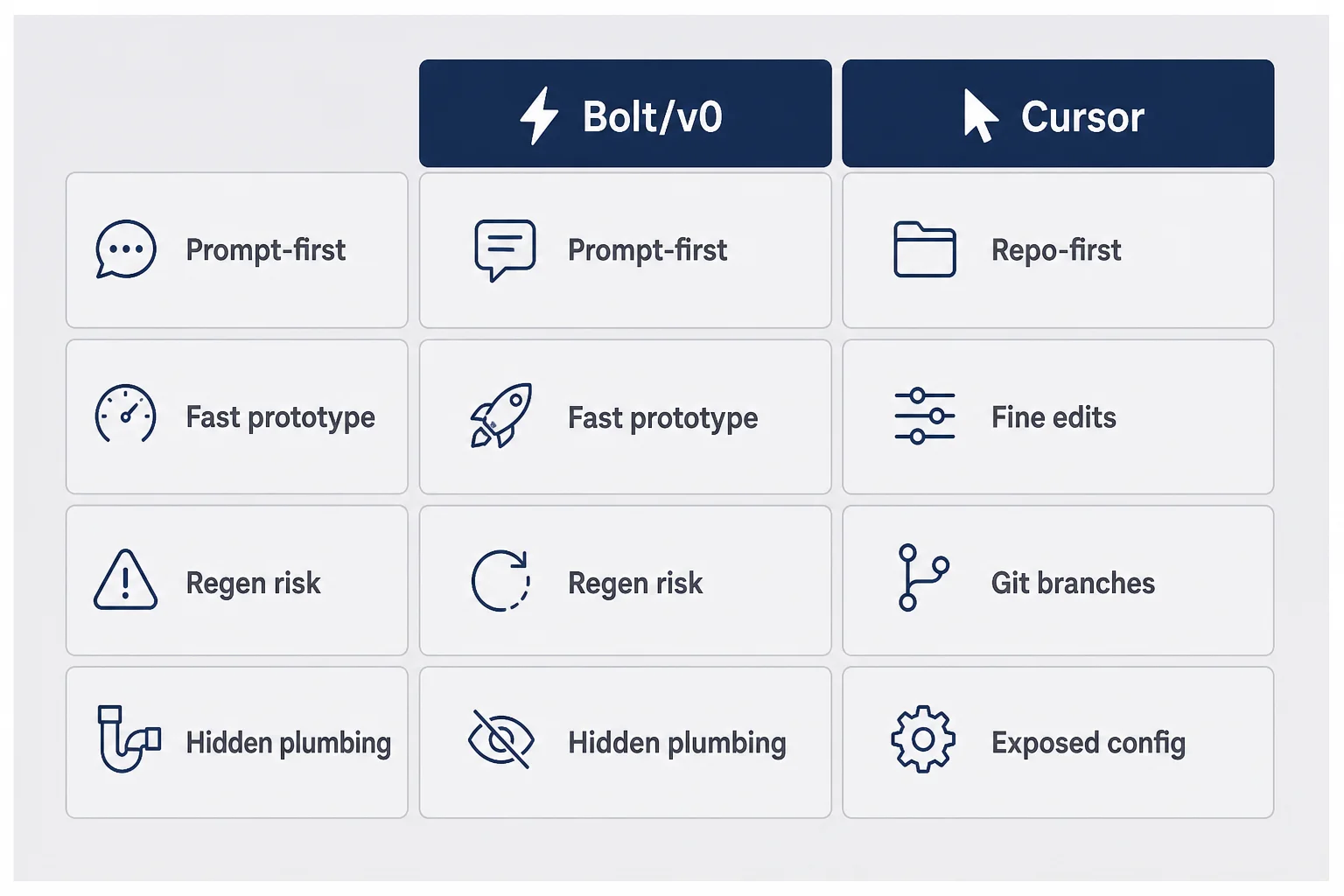
I am not here to dunk on Bolt. I would not have four dead projects and one paying one without it.
Bolt wins when you do not know what you are building yet. You can try three onboarding flows in an afternoon. You can show a friend a URL without explaining git. You can fail fast in the best sense: cheap, visible, embarrassing in a useful way.
v0 fits a similar lane for UI-heavy experiments. If your risk is "does this screen make sense," not "can we scale webhooks," stay in the builder. The build path picker tool exists because this decision is real, not because one stack wins every time.
Bolt also wins when you are solo and allergic to terminal windows. There is dignity in that. Not everyone wants to be a part-time engineer. If your goal is validate and sell before you touch a repo, Bolt is a feature, not a crutch.
Where Bolt stops winning is subtle at first. You notice you are afraid to ask for a small change because the AI might rewrite unrelated pages. You start duplicating projects instead of versioning. You have three near-copies called "invoice-tool-final" and "invoice-tool-final-v2-real." That is a signal.
I once spent a Thursday rebuilding the same pricing section in Bolt because I could not get the AI to touch only the middle card. Three hours gone. The section was fine on Monday. My stubbornness was the bug. That was still cheaper than migrating mid-prototype, because I did not have paying users yet. Context matters.
Bolt also shines when your validation is still fake-door level. You are testing headlines, not webhooks. You are emailing ten people a Loom, not running dunning emails. Stay in the builder until the experiment graduates from "would anyone want this" to "can this run every day without me."
v0 is the same conversation with different clothes
v0 from Vercel is incredible for landing pages and component experiments. The leave Bolt for Cursor decision applies to v0 exports the same way: when you are iterating on production logic, not mockups. I have copied v0 JSX into a Cursor repo for a marketing hero and kept Bolt for nothing. Hybrid workflows are normal.
Non-coders sometimes hear "just learn Cursor" like it is a moral upgrade. It is not. It is a workflow upgrade when your product has obligations. Until then, Bolt is the kinder tool. I would rather a founder ship ugly in Bolt than stall in Cursor reading about package.json while competitors talk to users.
The how to build without coding series exists because the path is not linear. You might use Bolt for product one, Cursor for product one version two, and something else entirely for product two. Flexibility beats loyalty to logos.
The signals that told me it was time to switch
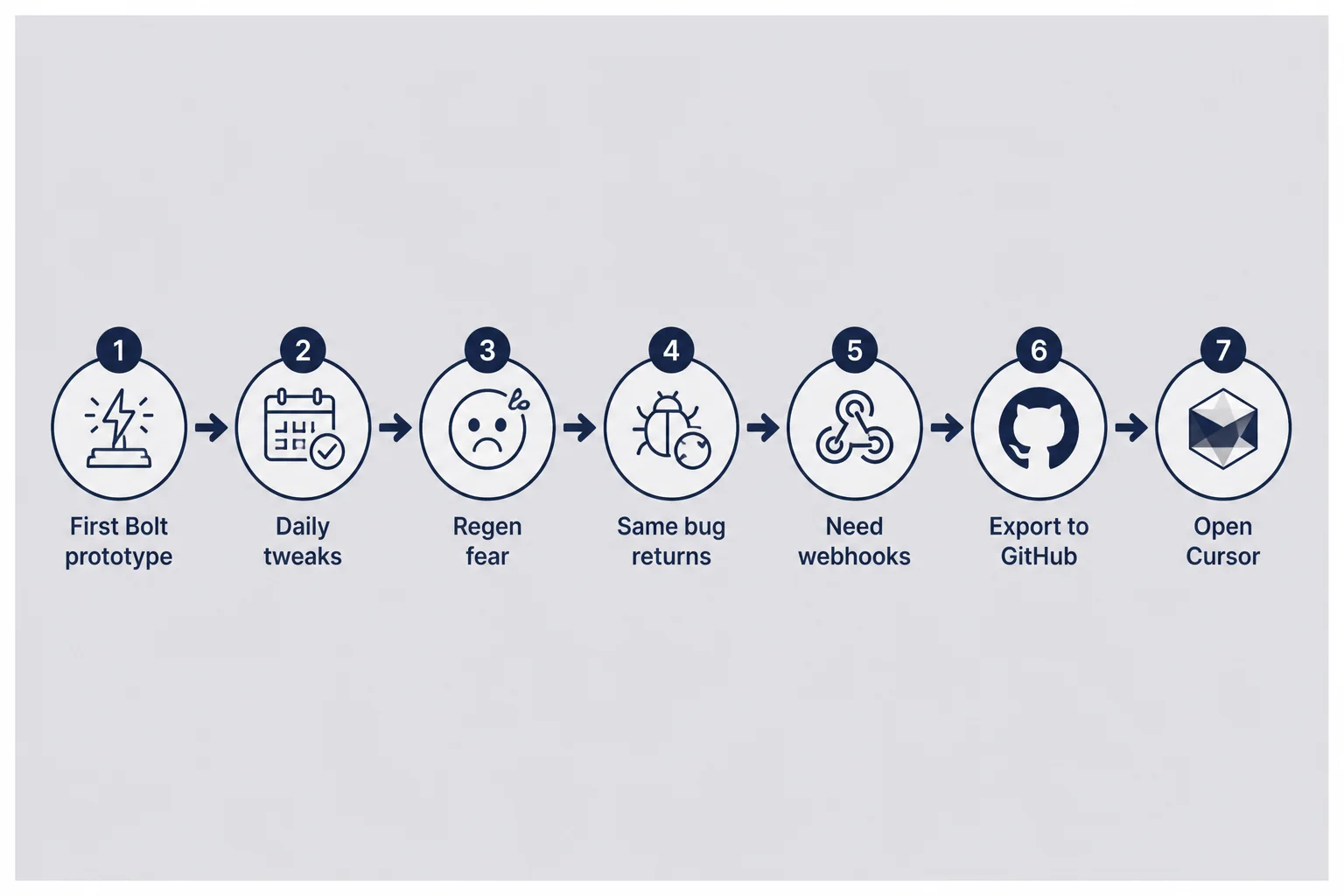
I did not switch because Twitter said Cursor was cool. I switched because the pain crossed a line.
Signal one: regen fear. I wanted to edit a settings toggle. Bolt suggested regenerating a parent component. I hesitated for ten minutes because last time that erased a custom footer. When you fear your build tool, you stop shipping improvements.
Signal two: the same bug three times. A date field kept saving wrong. Bolt fixed it twice. It came back after a unrelated prompt. In Cursor I opened the file, read the diff, and saw a timezone helper duplicated. File-level tools fix root causes. Prompt-level tools sometimes wallpaper over them.
Signal three: integrations outgrew the UI builder. Webhooks, cron jobs, admin-only routes. Bolt can do some of this. My patience for coaxing it could not. Cursor plus AI could add an API route in the same session I discovered I needed one.
Signal four: GitHub became real. The moment I cared about branches, preview deploys, and CI/CD without pretending to be an engineer, Bolt felt like a sandbox I was outgrowing. Cursor sits naturally on top of a repo other tools can touch.
Signal five: revenue. Strangers paid $12/month. I owed them fixes on a schedule, not when Bolt felt cooperative. Revenue raises the cost of "wait until the AI regen works."
None of these signals alone is law. Together they mean the bottleneck is tooling, not ideas.
Signal six: support tickets repeat. When users report the same confusion and your fix requires touching three screens Bolt keeps merging, you need file-level control. Support is a product function. Your editor should not fight it.
Signal seven: you hired or contracted help. If a freelancer asks for repo access and Bolt makes that awkward, you are already in git land mentally. Cursor is where collaborators expect to work.
I switched my reminder tool after signal two and four collided on the same Tuesday. A timezone bug came back, and I needed a webhook for a customer integration. Bolt could do pieces. Cursor could do the Tuesday.
False signals (do not switch yet)
Switching because you are bored is expensive. Switching because one influencer said Cursor is the only serious tool is worse. A single hard bug is not always a migration trigger. Sometimes it is a debugging session away from resolution.
If you have not deployed to production yet, finish deploy without coding before you reorganize your entire stack. Production teaches problems localhost hides.
Also watch for shame-driven switching. "Real founders use repos" is not a business reason. Revenue, retention, and support load are business reasons. I almost switched early because I felt embarrassed in a Discord thread. Embarrassment builds nothing. Ship metrics instead.
What you keep from Bolt when you move to Cursor
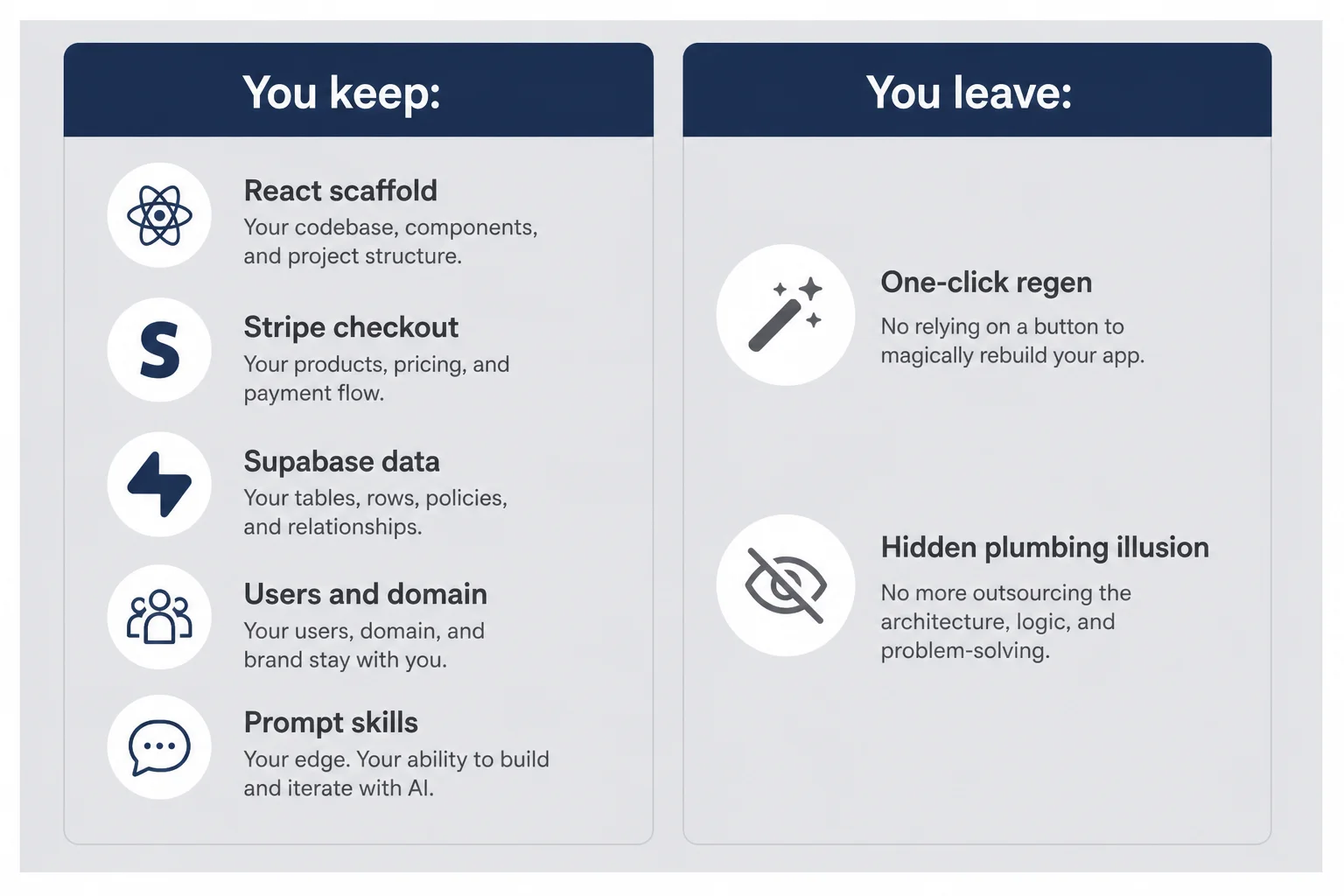
You are not starting over. You are changing editors.
You keep the React or Next scaffold, the routes, the component tree, the Tailwind classes Bolt chose, the Stripe checkout you finally got working. You keep the design decisions embedded in files even if you cannot articulate them as design principles.
You keep the muscle memory of describing outcomes in plain language. Cursor rewards the same skill with more precision. Instead of "make settings better," you learn to say "add a toggle on SettingsPage.tsx that writes email_digest to the profiles table."
You keep your users, your domain, your Stripe products, your Supabase project. Migration is not a relaunch unless you break checkout. Treat it like surgery, not a rebrand.
What you leave behind is the illusion that the tool will always guess your intent holistically. Cursor will edit exactly what you ask for, including the wrong file if you are vague. That is the trade.
Concrete example. I kept the Stripe price IDs, the Supabase profiles table, and the onboarding copy Bolt generated. I lost the comfort of clicking "regenerate app" when I got nervous. Nervousness is not a migration strategy. Backups are.
If you used Bolt's integrated hosting, you still move the repo to Vercel or similar. The deploy without coding steps apply. Your domain follows the app, not the builder brand.
What breaks (and what AI helps you fix)
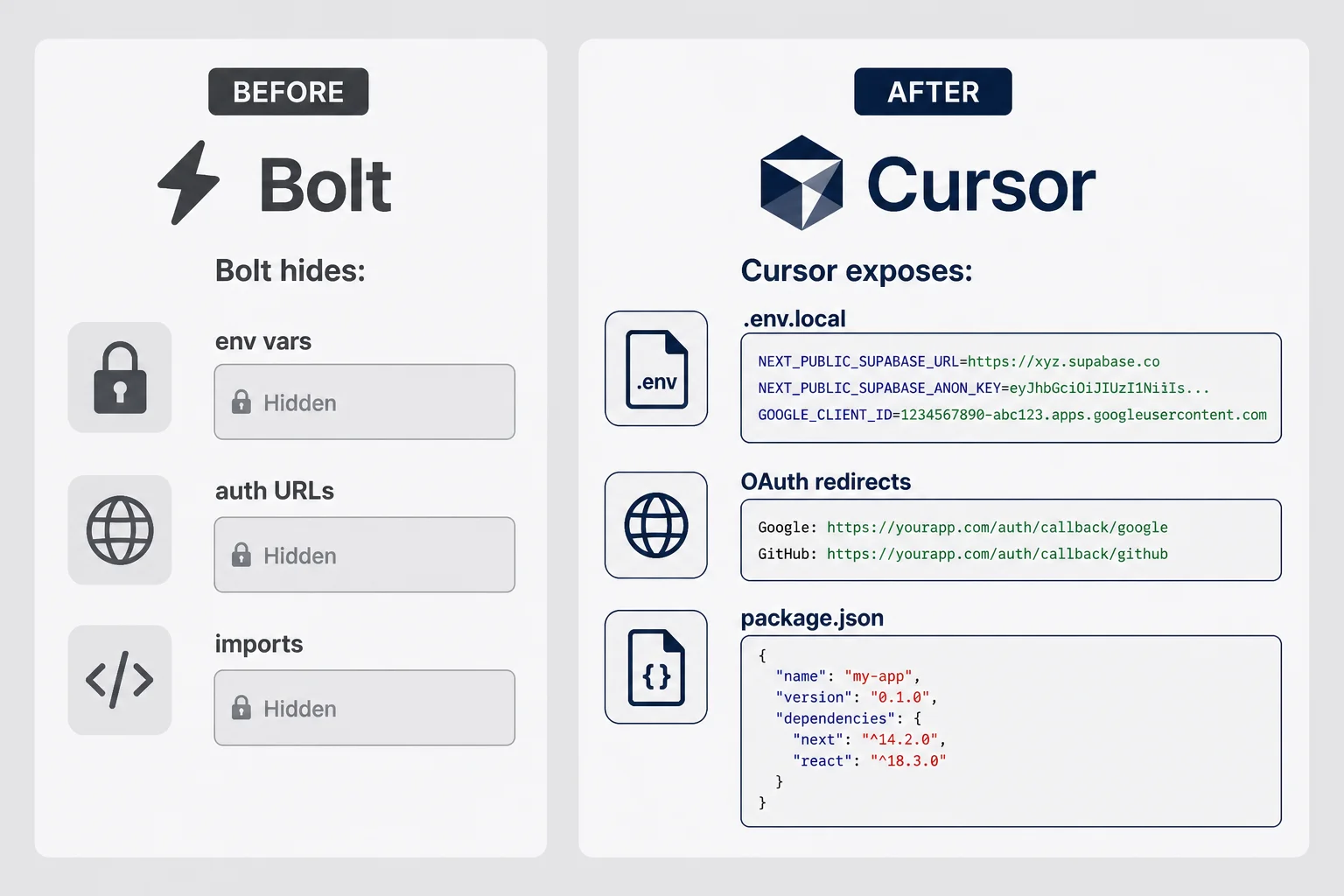
The first week in Cursor is humbling. Not because the editor is hostile. Because Bolt hid the plumbing.
Environment variables stop being abstract. They live in .env.local and your host dashboard. Miss one letter and auth dies. AI can paste the right names if you show it your host settings and error log.
Imports and paths break when AI adds a file in the wrong folder. You learn what @/ means because the build yells at you. Run the dev server after every non-trivial change. I learned that rule after shipping a broken import at 11 p.m.
Dependency drift appears when you ask for a feature that needs a package Bolt used to bundle silently. Cursor might add date-fns twice. Read the diff. Say no to duplicate installs.
Auth redirects are the classic prod-only wound. Localhost URLs in Google OAuth settings survived Bolt because Bolt managed them. In Cursor you own the list. Update providers the same day you change domains.
Database migrations show up when you add columns Bolt previously abstracted. Supabase SQL editor plus Cursor is a common combo. Run migrations on staging first. I learned that after adding a timezone column to the wrong table in prod. Backup before ALTER. Always.
Preview vs production drift happens when env vars differ between Vercel environments. Preview might work while prod fails because you pasted keys only in one tab. Check both. Check twice.
AI helps with all of this if you operate like an operator. Paste the error. Say what you clicked. Ask for the smallest fix. Do not accept a twenty-file refactor when you wanted one line changed. I reject aggressive diffs the way I reject aggressive Bolt regens.
When something scares me, I ask Hermes for a second opinion on Telegram. Two agents disagreeing is still better than me guessing.
The first deploy after migration is not the time to refactor. I made that mistake once: "while we are here, let's clean up folders." The app broke in three places I did not know existed. Now I ship the parity version first. Make prod match what Bolt had. Improve on Tuesday.
Auth and Stripe are where non-coders learn fast
Auth without coding gets harder to ignore in Cursor because you see callback URLs in files. Stripe webhooks show up as route handlers you can break with a typo. That visibility is the point. Bolt's kindness becomes Cursor's homework. Do the homework once and you stop fearing it.
Setting up Cursor when you cannot read the whole repo
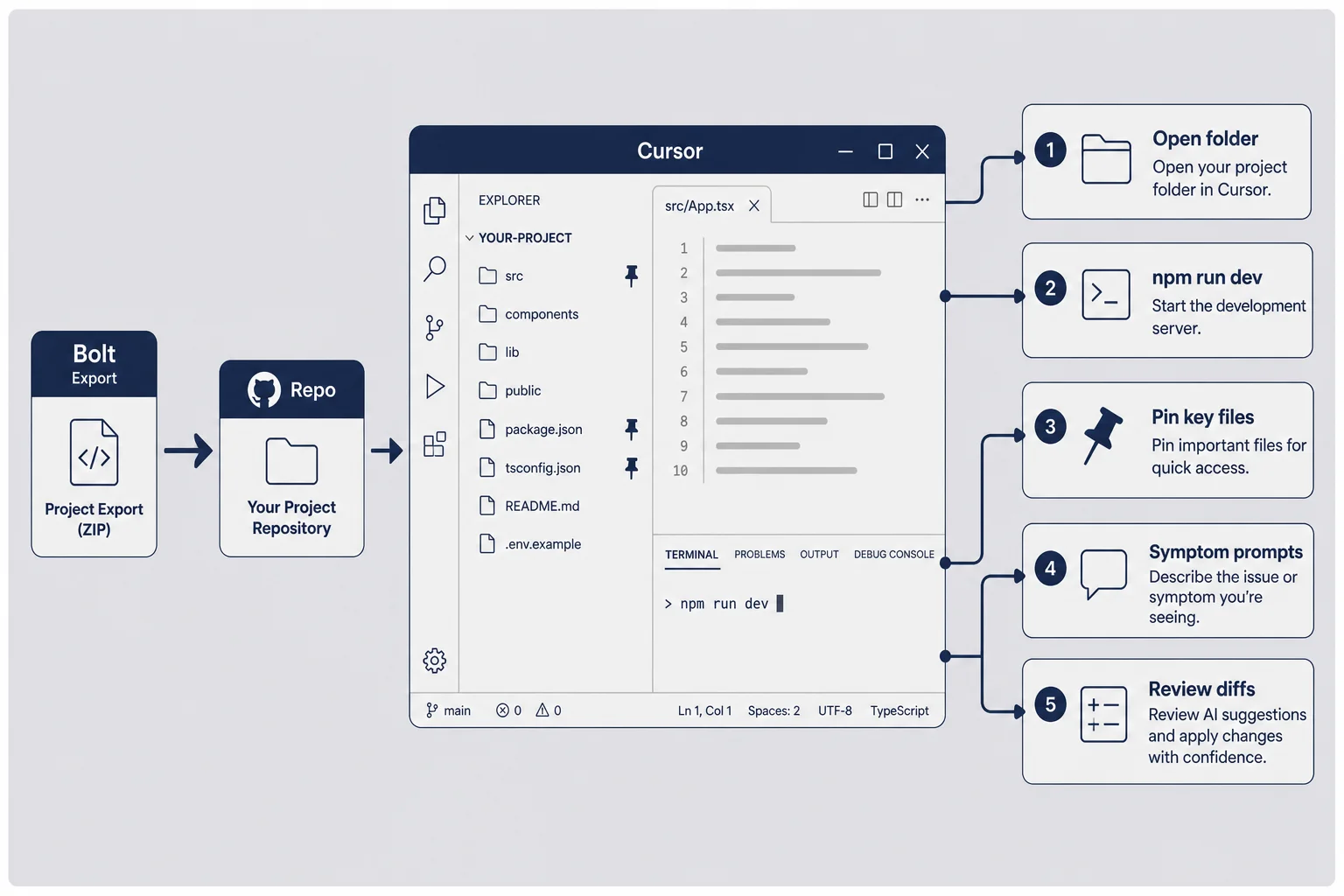
You do not read the whole repo. Neither do I.
My Cursor setup for non-coders:
Open the folder Bolt exported. Install dependencies the README or AI mentions once. Run npm run dev until localhost loads. Pin the three files that matter for your core workflow. Ignore the rest until you need them.
Use chat with context. Highlight the broken component. Ask what changed last. Use Composer for multi-file edits only when you understand the goal.
Keep prompts symptom-first: "After signup, dashboard is blank. No console errors. Here is the network tab." That language gets better fixes than "fix my app."
Turn on format on save if you want. Turn off auto-accept for large diffs. You are the editor-in-chief.
My first Cursor session lasted four hours and produced one visible change: a footer link. That is normal. The hours went to npm install, figuring out which terminal tab was the server, and teaching myself to read red text without closing the laptop. Week two was faster. Week four I shipped a webhook. Do not judge the switch on day one productivity.
If Supabase is in the stack, keep the Supabase without coding article open. Cursor edits policies faster than Bolt once you know table names.
Prompt patterns that work in Cursor for non-coders
I still write prompts like I am briefing a contractor. Context, expected behavior, what I already tried, what I am afraid of breaking. "Do not refactor unrelated files" is a sentence worth typing every time.
When Cursor suggests deleting a file I do not recognize, I ask what it does before accepting. Bolt rarely offered that choice. Ignorance was cozy. Cozy does not scale.
The skills that transfer from prompting Bolt
Bolt trained you to describe user-visible outcomes. Cursor rewards the same habit with file names and acceptance criteria. "When the user clicks Save, show a toast and persist to reminders" beats "improve save."
You already know how to review UI. Now review diffs. Green lines are suggestions, not gospel.
I name three files on a sticky note next to my monitor: the page users land on after login, the API route that touches money, and the settings screen I edit most. Everything else is searchable when it breaks. That trick stopped me from pretending I understood the whole tree.
Pair Cursor with the tools you already use
If you run an AI agent, let it open PRs while you edit in Cursor. If you only use Cursor, fine. The switch is not an either-or on AI. It is about where the canonical code lives. Agents without a repo are chatbots. Repos without agents are still workable for solo founders who check in daily.
The migration checklist I actually use
Before I tell Cursor to touch production logic, I run this list. Boring on purpose.
Export or sync Bolt to GitHub. Confirm the repo is private. Clone locally. Run the app. Click signup, core action, logout. If local fails, fix before you celebrate migration.
Create a branch named something you will recognize later. cursor-migration is fine. Do not edit main on day one like a hero.
Copy environment variables from Bolt or your host into .env.local. Never commit them. Redeploy preview with the same keys.
Wire preview deploy on Vercel or Netlify if you have not. CI/CD for solo founders is the safety net when you break main at midnight.
Make one small change in Cursor. Change copy on the homepage. Ship to preview. If that works, you have a pipeline.
Then tackle the real backlog: webhook, email template, admin route, whatever made you switch.
Smoke test in incognito every time. Logged-in browser sessions lie. Cookies hide broken auth. I have shipped "fixed" login three times while still logged in from yesterday. Incognito is rude and useful.
Document env var names in a password manager note or host dashboard comment. Future you at 1 a.m. will not remember whether Stripe key was STRIPE_SECRET or STRIPE_SECRET_KEY. Consistency beats cleverness.
Keep Bolt project read-only for a week. Rollback fantasy is comforting. You might not need it. Having it calms the lizard brain.
After parity ships, I schedule the first real Cursor feature as something a user asked for, not something Twitter suggested. Migration feels real when it connects to revenue or retention, not when it connects to guilt about not being technical enough.
When migration fails
If local run fails immediately, compare Node version and package lockfile. If preview works but prod does not, compare env vars character by character. If AI spirals, revert the branch and ask a narrower question. Migration failing is data, not identity.
I once rolled back to Bolt for forty-eight hours because a Cursor session duplicated a middleware file. Embarrassing. Instructive. The rollback worked because I had not deleted the Bolt project. Then I fixed the repo with a calmer prompt and switched again. Tools serve you. Not the other way around.
When you should go back to Bolt (yes, really)
Cursor is not a marriage. It is a tool.
Go back to Bolt when you are prototyping a second product while maintaining the first. Some founders keep Bolt for new ideas and Cursor for the revenue product. That is allowed.
Go back when the change is a new marketing page you want in an hour. Spin a v0 screen, steal the JSX, paste into your repo if you want the best of both.
Go back when Cursor turned you into a full-time dependency debugger and you have not talked to a customer in two weeks. Tooling is not progress.
I still open Bolt for quick UI experiments. I just do not pretend it is my production editor once webhooks matter.
Some teams run Bolt for internal admin tools forever while Cursor maintains the customer app. That is a valid split. Your future product two might start in Bolt while product one lives in Cursor. The rule is revenue follows the maintained repo, not nostalgia for the builder where you had your first aha moment.
Hybrid weeks are normal
Do not assume migration is a single weekend. My last switch was two weeks of evenings: export Monday, parity deploy Wednesday, first real feature the following Tuesday. I told paying users nothing because nothing broke visibly. Silent migrations are the best migrations.
Cost and time: honest math for solo founders
Say Bolt costs you $25/month and Cursor costs $20/month. Negligible difference. The real cost is hours.
If Bolt regen costs you three hours a week and Cursor saves two of those after a rocky first month, Cursor wins. If you spend four hours a week fighting npm in Cursor, stay on Bolt until the product stabilizes.
Track one week before and one week after. Count hours to ship the same type of change. Your numbers beat my examples.
API costs for AI models sit on top. Cursor uses models. Bolt uses models. Hermes uses models. Budget for the stack, not a single subscription.
Time math example, illustrative: say a founder spends six hours a week fighting Bolt regens at $50/hour opportunity cost. That is $300/week of invisible tax. Cursor learning curve might cost ten hours upfront, then save three hours a week. Break-even in a month if the product is stable enough to need weekly edits. If you are still pivoting weekly, the tax is cheaper than migration.
How this fits the build-path-picker decision
The site has a build path picker because "what should I use" is a real question. My answer after shipping multiple times: start where friction to first URL is lowest, move when friction to iteration is highest.
Bolt → Cursor is the common path for web micro-SaaS. Not the only path. Max's world often starts closer to code. Imani world often starts closer to prompts. Know which world you are in.
Document your switch date and why. Future you will forget and try to regen your way out of a webhook problem again.
If you are still choosing a first tool, run the build path picker and be honest about whether you have shipped before. The answer changes the recommendation. First-time builders need speed to first URL. Second-time builders need speed to second fix.
What I tell friends who ask in DMs
Stay on Bolt until you hate it for the right reasons, not because Cursor is trending. Switch when you can name the last three changes that cost more than an hour because of regen. If you cannot name them, you are not ready. If you can name them and you have paying users, export this week.
Questions I get about leaving Bolt for Cursor
When should I leave Bolt for Cursor?
When you are editing the same files repeatedly, hitting export limits, or needing changes Bolt cannot make without rebuilding from scratch. If you are still proving the idea and changing screens every day, stay on Bolt longer. Switch when maintenance and iteration cost more than learning a new workflow.
Can I use Cursor if I do not know how to code?
Yes, with the right expectations. Cursor is a code editor with AI that edits real files in a repo. You do not need to write syntax from memory, but you need to describe symptoms clearly, run the app locally or on preview, and accept that you are now responsible for a codebase. It is operator work, not CS homework.
Do I lose my Bolt project when I move to Cursor?
You export or sync to GitHub first, then open that repo in Cursor. The UI scaffold and routes usually come with you. What you lose is Bolt one-click magic for every change. What you gain is fine-grained edits without regenerating whole pages. Back up before you touch anything.
Is Cursor more expensive than Bolt for a solo founder?
Bolt has subscription tiers for building. Cursor has its own subscription plus whatever you pay for hosting and APIs. For many founders the total is similar once you are shipping for real. The cost shift is time: Cursor saves hours on tweaks that used to mean a full Bolt regen. Run your own math for one month before you decide.
Should I start with Cursor instead of Bolt?
Usually no for your first product if you have never shipped. Bolt gets something clickable in an afternoon. Cursor rewards you after you know what you are building. Start Bolt or v0 to learn the problem, switch to Cursor when the problem is stable and the tool is the bottleneck.
What breaks most often when migrating from Bolt to Cursor?
Environment variables, auth redirect URLs, and dependency versions. Bolt hid those details. Cursor exposes them. Also broken imports after manual edits and AI suggesting packages that conflict. Fix by deploying to a preview branch, testing signup and one core action, and reading error messages out loud to the AI instead of panicking.
The switch is a phase change, not a personality upgrade
I did not leave Bolt because I became a developer. I left because my product stopped being a demo and started being an obligation to strangers who paid.
Cursor did not make me smarter. It made small edits cheaper. That is enough.
If you are still hunting for a problem worth solving, stay in the builder. Ship ugly. Talk to users. If you are fixing the same screen for the third time and flinching at regen, export the repo. Open Cursor. Make one copy change. Deploy preview. Breathe.
You will feel like an impostor for a week. Non-coders in Cursor forums are not faking it — they are operating. Operating is a learnable skill the same way Bolt prompting was. The industry moved the gate again. You already moved once when you stopped waiting for permission to build.
The stack is allowed to change. Your job does not: describe the problem clearly, test like a customer, ship before you feel ready. Bolt got me to version one. Cursor got me to version two. Version three is probably a mess I have not met yet. I will use whatever tool makes fixing it fastest.




Comments