Your Push Notification Got Ignored. Good.
When to ask, what to send, and how to re-engage iOS users without sounding desperate — from a solo founder who learned permission prompts are trust screens.
 By Iryna24 min read
Listen to this article
22:45AI-generated podcast-style overview of this article (not a word-for-word narration).
The notification banner slid down while I was standing in line for coffee. Some app I downloaded once wanted me to know it existed. I stared at the lock screen for half a second, felt vaguely annoyed, and swiped it away without opening anything. The app had not done anything wrong in a legal sense. It had just sounded like every other app that mistakes my attention for a growth metric.
That moment is why I am careful about push now. Not because notifications are evil. Because on a consumer app, especially a personal one, a push is an interruption in someone's actual life. A dating-reply helper, a budget panic button, a habit nudge for something embarrassing: you are knocking on their pocket. If the knock does not match a need they already felt inside your product, you are training them to mute you.
I once turned on notifications for a habit app that promised gentle reminders. By week two it was congratulating me for breathing. That is the energy you are competing with: apps that treat attention like oxygen. Your advantage as a solo founder is not volume. It is specificity. You can write one sentence that sounds like you actually built the thing for a human moment, not for a dashboard metric called DAU.
I shipped Finish Him Replies knowing screenshots and replies were the core loop. Push was an afterthought until I realized how many people used the app once, got value, and then forgot the icon existed until the next awkward text thread. That is a solvable problem. It is also easy to solve badly. Push notifications consumer app solo founder work sits right on the line between helpful reminder and needy ex. This piece is about staying on the right side when you do not have a lifecycle marketing team, a CRM, or anyone to blame for a misfired blast.
If you have not nailed first-session trust yet, read consumer app retention for solo founders and iOS app onboarding first. Push amplifies what already works. It does not rescue a product that felt creepy on open one.
Also worth saying upfront: I am not going to hand you a calendar that says "send message four on day nine." Consumer apps are too personal for paint-by-numbers lifecycle maps. What I can give you is a decision filter. When you are tempted to schedule another blast because downloads dipped, you will have something to check against besides panic.
Push notifications consumer app solo founder: what re-engagement actually means
Re-engagement is not "remind them we exist." That is the fastest way to earn a denied permission prompt and a home-screen deletion. Re-engagement, for a personal consumer app, means connecting a future moment of need to a return path you already proved once.
Think about the last app you kept on your phone for something private. You did not stay because it emailed you a discount. You stayed because the second time the problem showed up, the app was still the obvious fix. Push is useful when it shortens the gap between "I need that thing again" and "oh right, it is right here." It is useless when it tries to manufacture urgency you never earned.
I split notification jobs into three buckets. Transactional pushes tied to something the user did or asked for: "your export is ready," "your streak resets tonight if you skip today," "new reply styles unlocked after your trial." Contextual reminders tied to a pattern you have seen in the product: "rough week for spending? open your envelope," "still drafting that message?" Broadcast announcements about you: new features, press, generic "we miss you" copy. Solo founders reach for broadcast because it is easy to schedule. Consumers punish broadcast because it sounds like a brand talking at them, not a tool waiting quietly.
The position I will hold throughout this article: one good contextual push beats five clever growth hacks. Your job is not to maximize sends. It is to maximize the chance that the next send feels fair.
Caveat for honesty. Some consumer apps are inherently low-frequency. A tax helper might ping once a year. A travel packing list might ping before a trip. Low frequency is fine if the push matches a real cycle. High frequency pretending to be a daily habit when your activation data says weekly use is where founders get embarrassed by their own metrics.
Say you ship a journaling app and your honest activation event is "wrote three sentences and saved." A push that fires twenty-four hours later asking "how are you feeling today?" might help someone who already built the habit. The same push to someone who bounced after the signup wall is noise. Same text, different fairness. Re-engagement copy without activation context is guesswork with a send button.
I learned this the annoying way with Finish Him. Early builds nagged about premium before strangers understood the free win. Notifications would have been the same mistake with a different transport layer. I had to know what "worked once" meant before I had any business reminding anyone.
The three buckets in practice
Transactional pushes are the easiest to defend because the user triggered the contract. They started an export, set a reminder toggle, or began a trial countdown. Your job is reliability: send when you said you would, link to the right place, stop when the job is done.
Contextual reminders need the most product taste. They work when the app already knows something the user would admit is true. "Still thinking about that reply?" after they generated options but did not copy one. "Weekly spend snapshot is ready" after they linked an account. They fail when you infer feelings from silence. Silence might mean satisfaction, not abandonment.
Broadcast is where founders hide when they want growth chart movement without fixing product. Resist it. If you must announce something big, tie it to user benefit in the same breath. "New offline mode" matters only to people who complained about planes. Everyone else experiences that as you talking about yourself.
Why B2B notification playbooks will wreck your iOS app
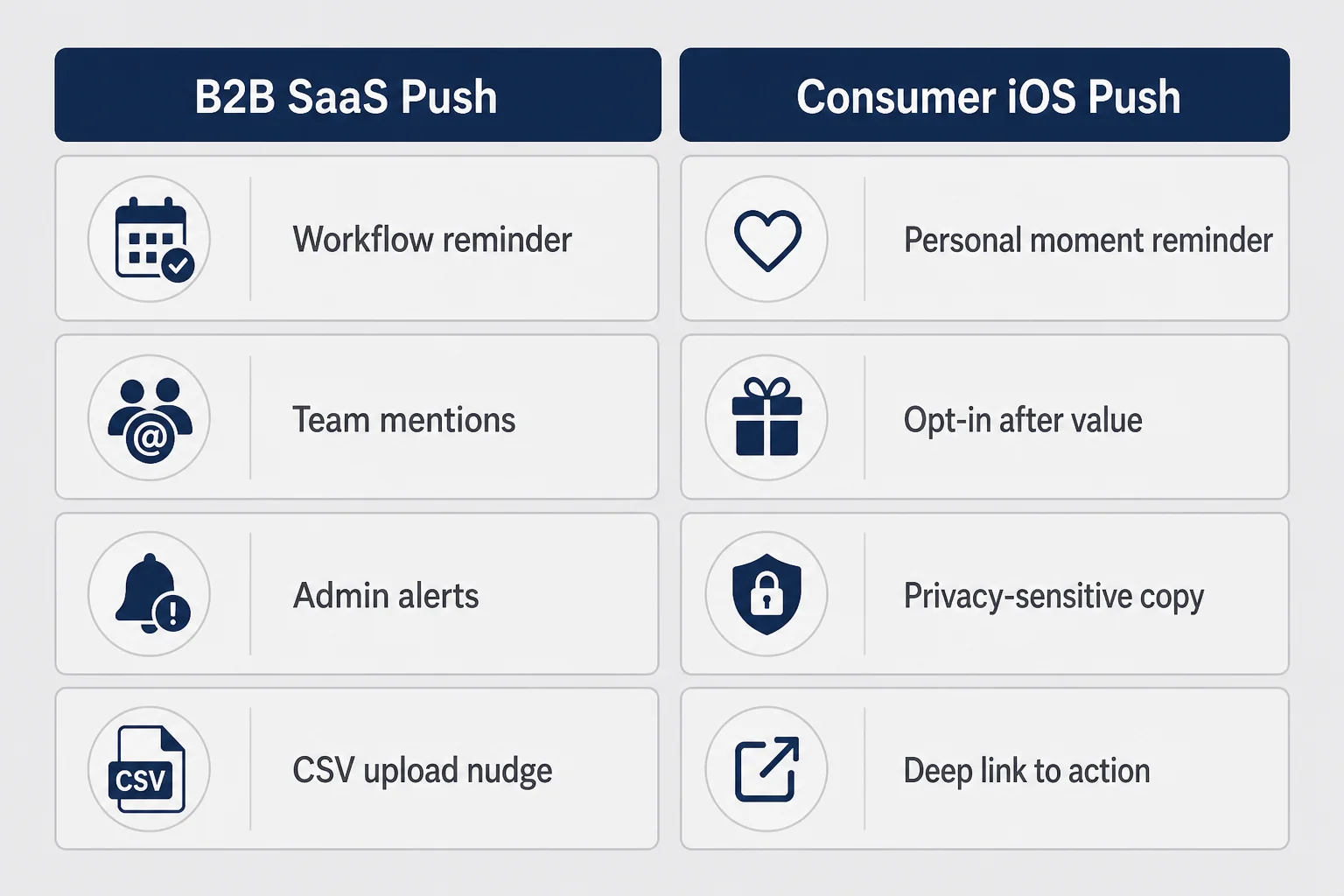
Most notification advice online was written for products with work email, admin dashboards, and someone whose job includes clearing an inbox. B2B lifecycle emails talk about "activation campaigns" and "revenue recovery sequences." The vocabulary sounds smart in a Notion doc. On a lock screen next to a text from someone's mom, it sounds like spam with better design.
B2B pushes often assume the user opted into a workflow. They already connected Slack, invited a teammate, or uploaded a CSV. The notification reminds them to finish a step in a system they chose for work. Consumer apps frequently win on a single emotional moment before any account exists. The permission ask lands while trust is still fragile. Copy that assumes professional patience reads as creepy urgency in personal contexts.
Another mismatch: B2B teams measure push as a funnel lever with owned benchmarks and dedicated tooling. You might have App Store Connect retention charts and a free analytics tier. Copying enterprise cadence ("day 1, day 3, day 7 drip") without the same activation definition just sends seven reasons to ignore you. The mechanics rhyme. The psychology does not.
I am not saying never study B2B retention writing. Max covers churn math beautifully for subscription businesses. Reese knows launch sequences. When the topic is a person alone with their phone deciding whether to trust you with a screenshot, stay in consumer product language. Remind, do not campaign. Name their situation, not your roadmap.
If your app touches money, dating, health, or anything someone would not want read over their shoulder, every push is also a privacy signal. "We noticed you have not opened the app" feels surveillance-adjacent even when it is just a SQL query. "Ready for three reply options?" names the product job without implying you watched them sleep.
Here is a concrete contrast. A project management tool can push "Jordan commented on the Q3 deck" because work norms include async pings. A breakup-text coaching app pushing "You have not practiced today" sounds like a disappointed parent. Same notification plumbing. Different social contract. Consumer solo founders have to internalize that contract because nobody on your team will catch the creepy line in a growth meeting you are not having.
Reese writes brilliantly about landing pages and warm traffic. The parallel for push is intent temperature. A user who opted in after a win is warm. A user who allowed notifications on screen one because your pre-permission card guilted them is cold wearing a permission flag. Cold users do not forgive needy copy.
The permission prompt is a trust screen, not a growth hack
Apple's system dialog is blunt: Allow or Don't Allow. No maybe. No "only important ones." You get one clean shot in context, and after a denial you are begging them to dig through Settings like a sysadmin. That means the screen before the dialog matters more than the dialog copy Apple writes.
I treat the pre-permission moment like a paywall cousin. Not because you charge for notifications. Because both are asks that land better after value. A full-screen card that says "stay updated" without saying updated about what is how apps train users to tap Don't Allow on reflex. The user has not learned what you do yet. You are asking for mailbox keys.
What works better, in my experience and in the apps I actually keep, is tying the ask to a concrete future event the user already understands from using the product once. "Notify me when my weekly summary is ready." "Remind me before my trial ends." "Ping me if I leave a draft half-finished." You are not requesting marketing access. You are offering to remember something they would otherwise forget.
Design the pre-permission screen like product copy, not like a growth experiment. One sentence of benefit. One primary button that leads to the system dialog. One honest skip. No dark patterns that fake a system alert. Apple notices. Users notice faster.
If they deny, do not nag inside the app every session. Surface a quiet settings link where the feature naturally lives. Some people will enable notifications later when they lose a streak or miss a trial deadline. That is a better conversion than bullying them on launch number two.
Apple's App Privacy labels and your in-app copy should agree on what notifications are for. If you say "reminders you opt into" and then blast marketing, you deserve the one-star review that calls you out. I treat mismatch between promise and send as a product bug, not a marketing optimization.
The paywall UX article talks about trust screens disguised as pricing pages. Notification pre-permission is the same species. Pretty illustration, vague headline, big enable button: converts short-term, poisons long-term. Ugly honesty converts slower and retains better.
What the system dialog cannot fix
You cannot customize Apple's alert. No brand color, no extra checkbox, no "only important stuff." That constraint pushes all your persuasion into the moment before the dialog and into the product behavior after approval. Founders who complain about Apple's copy are often trying to outsource a product decision they have not made yet: what will we actually notify about?
Provisional authorization and notification summaries exist for some use cases, but most indie consumer apps live in the standard permission world. Learn it. Design for one chance.
When to ask for notification access (timing beats copy)
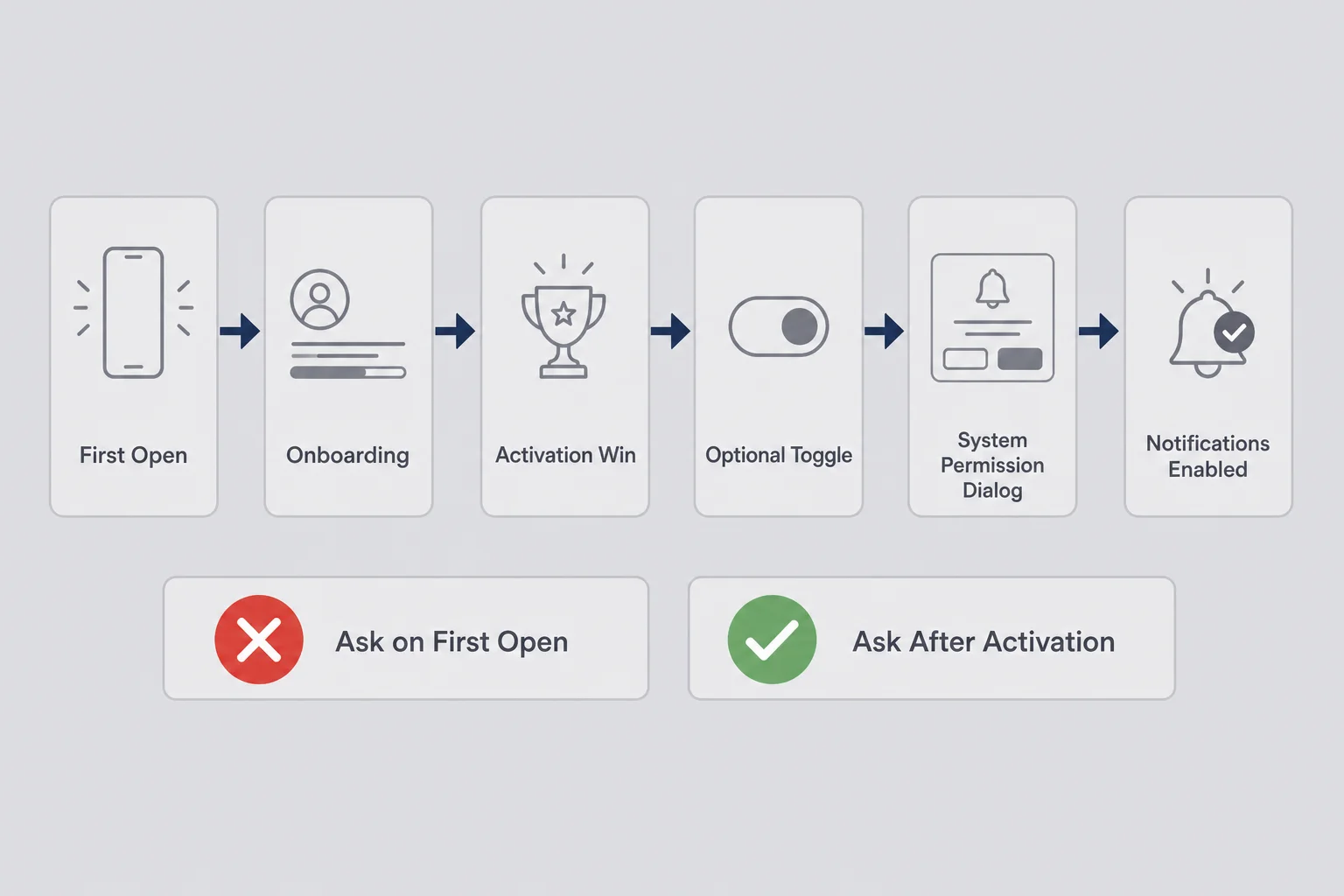
Timing is the whole game. Ask on first open and you optimize for denial rate. Ask after someone screenshots a chat, picks a reply, and sends it once, and you are asking in context. They know what you might remind them about.
My rough order for personal apps
Wait until after the activation moment you defined in retention work. If you cannot name that moment in plain language, you are not ready to ask. If activation is "uploaded first screenshot and copied a reply," the ask belongs after that success state, not before the upload permission angst.
Pair the ask with a user choice when possible. Toggle for "remind me about drafts" or "weekly recap" that then triggers the system dialog. Voluntary specificity converts better than generic "enable notifications."
Never interrupt an emotionally tense flow. Mid-upload, mid-payment, mid-permission for photo access: terrible moments. Success screens and natural pauses: better moments.
Respect seasonal quiet. Someone who only uses your app during dating season or tax season should not get winter re-engagement spam. Your analytics might show dormancy. Their life might show "not my problem this month."
Copy on the pre-permission card matters less than placement. I have seen beautiful copy fail on screen two and mediocre copy work after a win. Founders want to A/B test words. Fix timing first.
TestFlight friends lie gently here. They already like you. They allow notifications to be nice. Strangers in production are the truth. Watch opt-in rate by onboarding version, not by friendship.
Scenes where the ask actually fits
After a completed task they might repeat: sent a reply, logged a mood, saved a budget snapshot. Before a known future deadline they opted into: trial end, subscription renewal, streak reset. Inside settings when they explicitly hunt for reminder controls. Not on the splash screen. Not sandwiched between two other permission dialogs unless you enjoy triple denial.
If your onboarding still has three carousel slides nobody reads, fix that before you add a fourth slide about bells. Every screen before the ask is either building trust or spending it.
Picture two onboarding paths. Path A asks on launch with a cute bell illustration. Path B asks after the first successful screenshot upload with a toggle labeled "remind me before drafts expire." I will bet your lunch Path B wins on opt-in and on thirty-day mute rate. Not because illustration is evil. Because context is everything.
Seasonality matters more than growth Twitter admits. Dating apps spike around holidays and weekends. Finance apps spike around paychecks and rent weeks. Fitness apps spike on Mondays and die by Thursday. A dormant user in August might be a happy user in January. Before you interpret silence as churn, ask whether your category has a pulse. If it does, align pushes to the pulse instead of fighting it.
What to send when someone actually said yes
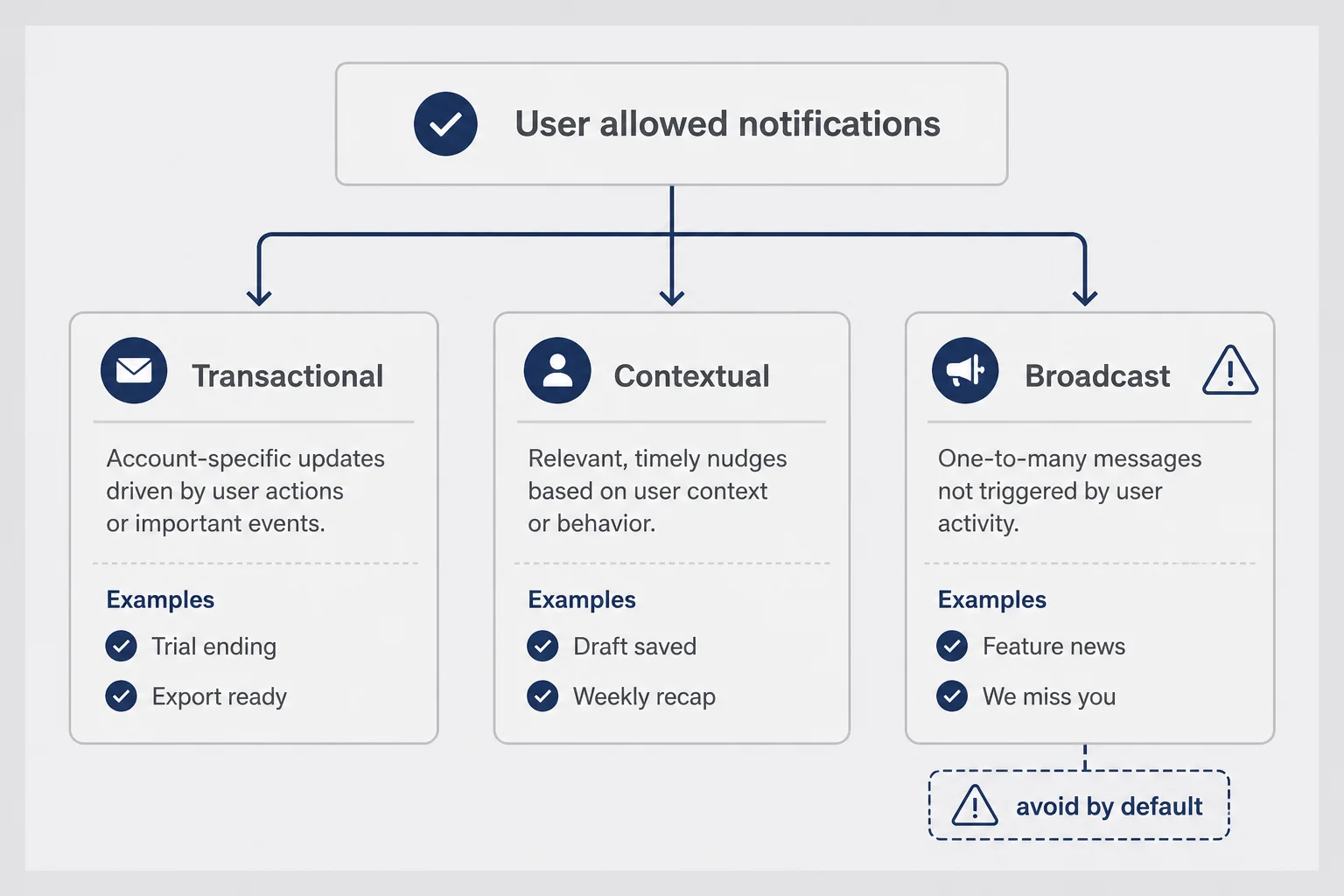
Allowed notifications are not a license to broadcast. They are a contract. The user has a mental model of what you promised. Break it and they disable you in Settings without telling you why.
Start with one transactional push you can defend in one sentence. Trial ending. Export ready. Streak at risk if that is a real product concept. Ship that path end-to-end before you fantasize about a twelve-message win-back sequence.
Add contextual reminders only when you can tie them to in-app state without feeling surveillance-y. "You saved a draft yesterday" works if they saved a draft. "We miss you" does not work for anyone with self-respect.
Kill broadcast instincts early. Feature announcements belong in release notes and optional email. Changelog pushes are for power users who opted into developer energy, not for a personal utility trying to feel human.
Segment by behavior even when your segment sizes are tiny. People who activated but did not subscribe are not the same as people who subscribed and went quiet. Same copy to both groups is lazy and obvious. You do not need sophisticated tooling. You need two templates and the discipline to use them.
Default to silence when data is ambiguous. If you are not sure a push helps, do not send it. Consumer apps compete with every other app that discovered push in 2016. Scarcity of contact is a brand choice.
Start with one push type
Ship a single transactional notification end-to-end before you brainstorm a lifecycle. Trial ending, export ready, draft reminder: pick one tied to real state. If you cannot implement that reliably, a re-engagement calendar is fantasy infrastructure.
For subscription apps, coordinate with iOS subscription pricing decisions. Trial reminder copy that surprises someone about renewal timing destroys trust faster than any competitor feature. Tell them when the trial ends in plain language, link to manage subscription, and stop.
Win-back pushes are the seductive failure mode. "We miss you" feels like doing something when retention dips. Unless you pair it with a concrete reason to return, you are just audible wallpaper. If you run win-back, limit to one message, name a specific unfinished state, and measure mute rate harder than opens.
Copy that sounds human on a lock screen
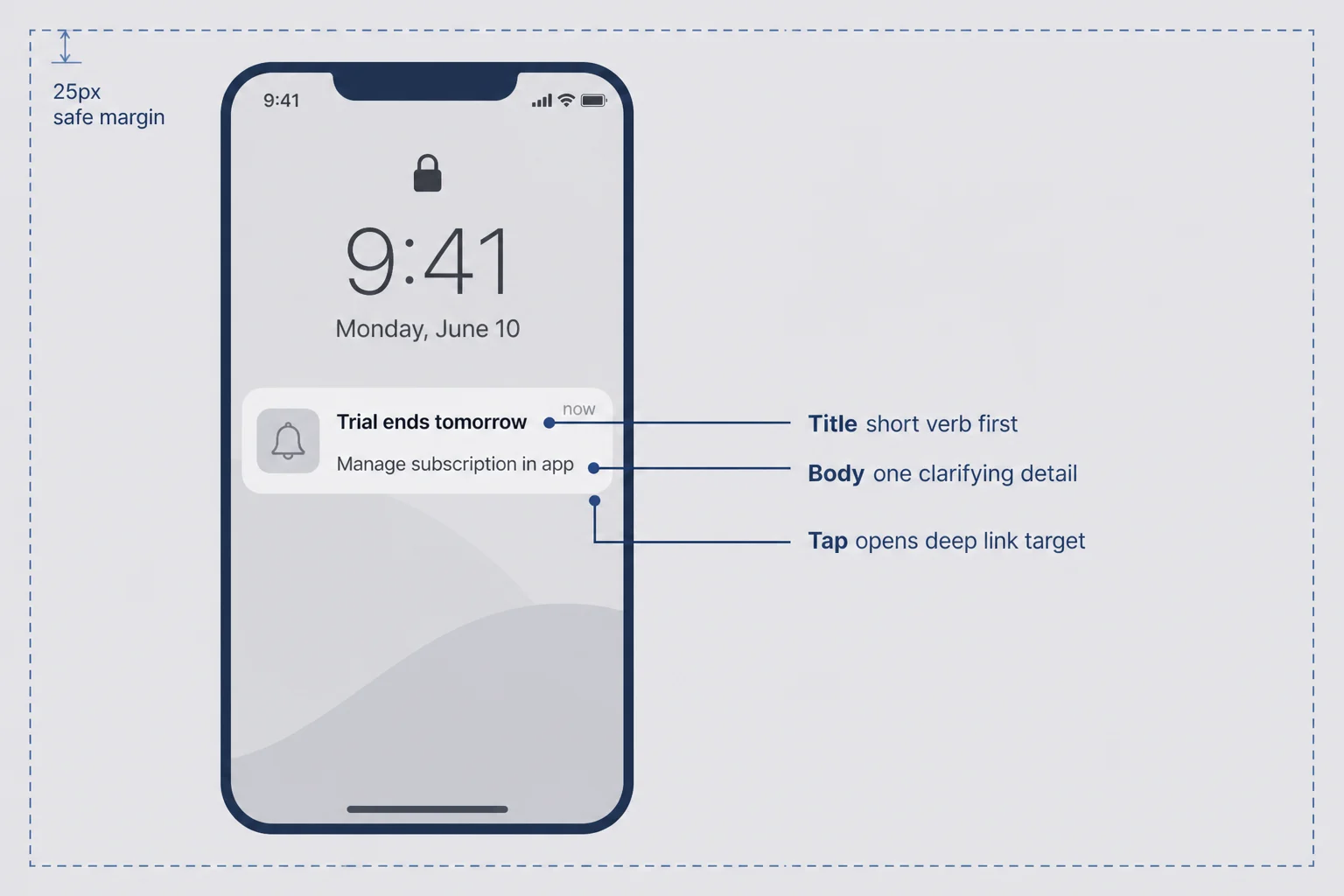
You have about one glance. Title and body. Maybe a thumbnail. The user decides in a heartbeat whether this is for them or whether it is noise. Write like you are texting a friend who asked for a reminder, not like you are performing marketing.
Good pushes name the situation or the object. "Draft still open" beats "Come back to AppName." "Trial ends tomorrow" beats "Don't miss out." "Three new reply tones" only works if they know what reply tones are and asked for them.
Bad pushes use guilt, fake urgency, or empty enthusiasm. "We miss you!" makes me want to miss you harder. "Last chance" when it is not last anything trains distrust. Emoji-heavy hype reads juvenile for personal problems. You are not running a fast-food chain.
Keep titles short. Put the verb or noun that matters first. Body copy can add one clarifying detail, not a paragraph. If you need a paragraph, the notification is doing a job email should do.
Deep link to the exact screen, not the home tab. Landing on the right context is part of copy keeping its promise. Nothing erodes trust faster than tapping a reminder and landing somewhere unrelated.
Read pushes out loud before you ship. If you would not send the sentence to someone you know, do not send it to thousands of strangers. I keep a note called "would I swipe this away" and delete more than I publish.
Match tone to the app. A finance panic button should not sound flirtatious. A dating helper should not sound like HR. Consistency matters because the lock screen has no room for brand disclaimers.
Examples I would ship versus examples I would delete:
Ship: "Trial ends tomorrow — manage in Settings." Delete: "Don't lose access to premium vibes."
Ship: "Draft reply still saved." Delete: "We noticed you're quiet."
Ship: "New tone pack for savage replies." Delete only if they opted into product updates. Otherwise delete anyway.
Localization note for solo founders: if you only ship English, write English that sounds spoken, not translated. Short sentences. No corporate nouns. You are not legally required to sound like a bank.
Rich notifications with images can help for visual products if the image adds information. For personal apps, a screenshot thumbnail of user content on a lock screen is a privacy nightmare. Default to text unless you have a non-creepy asset.
Frequency caps and the needy-app test
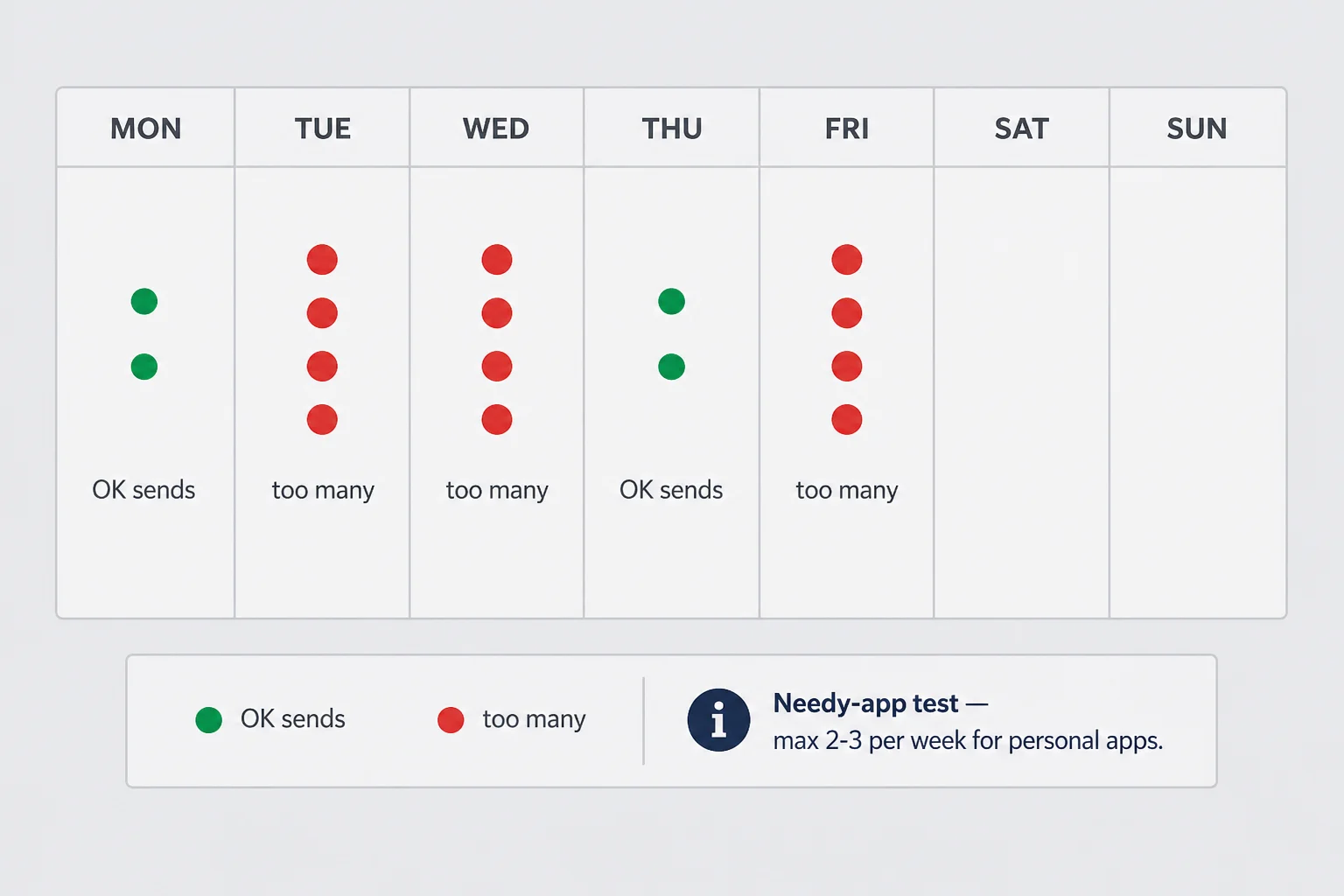
Frequency is where solo founders overcorrect after reading growth blogs. You ship three messages in week one, watch a spike, declare push "works," and do not notice the slow bleed of settings toggles.
I use a simple rule: the needy-app test. Before scheduling a send, ask whether a thoughtful friend would send this many texts about the same topic. If the answer is no, your app should not either. Friends have social shame. Apps sometimes lack it until users mute them.
Cap by category, not just by week. One trial reminder plus one value reminder in seven days might be fine. Three variations on "you have not opened us" in seven days is harassment with analytics.
Watch quiet metrics, not just opens. Rising opens on guilt copy sometimes mean people are annoyed into tapping. Falling retention after a push campaign means you bought short-term clicks with long-term distrust. Opt-out rate per message type is the honest scoreboard.
Build quiet hours even if your user base is small. Late-night pushes for non-urgent personal apps are how you lose someone forever. Default to daytime local time unless the product is explicitly nocturnal.
When in doubt, remove a scheduled message. The founders who panic about "going quiet" often have not measured how many users they annoy into disabling notifications entirely. Silence is data too.
Imagine a week where your app sends Monday motivation, Wednesday feature hype, Friday "still there?", and Sunday streak guilt. Opens might look fine on Wednesday because annoyance taps exist. By the following week half your allow list quietly died in Settings. You will not get a survey. You will get a lower return rate and blame the algorithm.
Frequency caps should be documented even if you are the only employee. One page in Notion: max sends per user per week, forbidden copy patterns, quiet hours, and who approves new templates (also you). Future you at 2 a.m. will try to ship "one quick blast." Future you needs guardrails.
Deep links and the one-tap return path
A push is an invitation to continue a story. If tapping it opens the generic home screen, you wasted the invitation. Deep linking is not a nice-to-have for consumer re-engagement. It is the difference between "helpful" and "why did I bother."
Map every push type to a destination before you write copy. Draft reminder goes to the draft. Trial reminder goes to subscription management or the paywall you already use. Weekly recap opens the recap screen, not settings.
Test cold start paths. App killed, user taps notification, does your state restore or do they land confused? Solo founders skip this because Simulator felt fine. Real users have aggressive battery settings.
Universal links and custom URL schemes are engineering details I will not pretend I mastered on day one. I knew enough to ask "where does this tap land" and to file bugs when the answer was "nowhere useful." If you need backend help for routing, that is a Max conversation. The product decision is still yours: the push must finish a job.
The return path checklist
Before you ship any push template, walk this list on a physical device with the app force-quit. Tap the notification from the lock screen. Confirm you land on the screen the copy promised. Confirm back navigation does not trap the user. Confirm logged-out users see a sane path if session expired. Confirm the screen loads faster than the user loses patience.
If any step fails, the push is not ready. Better to delay a campaign than to train people that tapping you is pointless.
Fallback gracefully. If the deep link target is gone, show a human message in-app instead of a blank screen. Edge cases are rare at small scale until they happen to your most loyal user.
Notification categories and thread identifiers on iOS can help group related alerts so users mute one thread instead of your entire app. I am not deep enough in implementation to teach the API line by line. I know the product goal: do not spam twelve separate banners for one logical event.
If your app uses widgets or Live Activities, decide how push interacts with them. Redundant ping plus widget update feels chaotic. Pick a primary surface for a given state change.
Measuring push without a growth squad
You do not need a warehouse. You need a handful of counters that answer whether notifications are earning their social cost.
Track permission opt-in rate by onboarding version. If a UI change drops opt-in, you saved future mutes. Track delivery and open by message type, not blended. "Trial ending" and "we miss you" should not share one average. Track uninstalls or notification disables in the seven days after a campaign if your tooling allows it. Track return to the specific screen you linked.
App Store Connect will not tell you push performance. Neither will staring at downloads. Use whatever lightweight analytics you already chose for retention work. Plausible, PostHog free tier, Firebase if you already installed it for other reasons. Consistency beats perfection.
Define success per message. Transactional trial reminder: did they open and manage subscription? Draft nudge: did they finish the draft? Generic re-engagement: did they activate again within forty-eight hours? Without a definition, you optimize opens, which is a vanity metric for guilt copy.
Review monthly, not daily. Push anxiety looks like checking send stats every hour. Trends matter. One quiet Tuesday does not mean rewrite everything.
Build a simple table. Rows are message types. Columns are sent, delivered, opened, downstream activation, mutes or unsubscribes if visible. Update weekly. You will see fast which lines earn their place.
Correlate with App Store optimization work separately. Listing traffic brings new people with zero notification history. Blaming push for retention drops that are actually onboarding regressions is a common solo-founder trap. Version your onboarding and your permission timing together.
Testing messages when your audience is fifty people
Formal A/B testing is a luxury at micro scale. You can still learn without pretending you are Netflix.
Ship one message to everyone and read replies support sends you. At fifty users, a single angry email is statistically significant emotionally.
Alternate copy week over week for the same trigger, not random blast variants the same day. Compare opens and downstream activation for each version. Keep a log in a notebook like a civilized person.
Use TestFlight for plumbing, not for tone. Friends approve everything. Production strangers swipe away.
When numbers are tiny, qualitative beats quantitative. Watch session recordings if you use them. Ask one user in a DM what a push felt like. You will learn more than a pie chart.
Do not test guilt against more guilt. Test specific against vague. Test situational against generic. That is the trade worth running.
When you have fewer than a hundred active users, talk to ten of them. Not a survey. A conversation. Ask what would have felt fair to receive. You will hear things analytics cannot, like "I thought you read my screenshots" when your copy implied monitoring. Fix that before you optimize open rate.
Document every push you send for a month in a shared note with the hypothesis attached. "Hypothesis: trial reminder three days out reduces surprise cancellations." After the month, mark keep, tweak, or kill. Discipline beats dashboards at micro scale.
Questions I keep getting about consumer app pushes
When should I ask for push notification permission in a consumer iOS app?
After the user has felt the core value at least once, never on the splash screen. Tie the pre-permission screen to a specific future benefit they already understand. If you cannot explain in one sentence what you will notify them about, you are not ready to ask. Most first-session permission prompts get denied and you do not get a second chance without a settings detour.
How many push notifications per week is too many for a consumer app?
There is no universal number. The test is whether each message would feel reasonable if a friend sent it. For a personal utility app, one to three well-timed messages per week is often plenty. Daily nags unless the app is genuinely daily-use will train people to mute you. Track opt-out and open rates per message type and kill the losers fast.
Should I use push notifications to announce new features?
Rarely, and only when the feature solves a problem they already had in your app. Feature launch broadcasts read like marketing email on a lock screen. Personal apps win when pushes remind someone of a moment they wanted help with, not when they announce your changelog. Save feature news for in-app modals or email if you collect it.
What is a good push notification open rate for a solo founder consumer app?
Benchmarks from B2B blogs will mislead you. Consumer open rates swing wildly by category and how warm your install base is. Compare your own message types week over week instead of chasing a number from a meditation app case study. A small list that opens because the copy names their actual situation beats a large list trained to ignore you.
Can push notifications fix bad retention?
No. Push can remind someone to return when the product already worked for them once. It cannot invent trust, fix a confusing first session, or replace an activation moment that never happened. If people bounce on day one, fix onboarding and time-to-value before you tune notification copy. Re-engagement is a layer on top of retention, not a substitute.
Do I need a backend service to send iOS push notifications?
You need Apple push infrastructure and some way to store device tokens, but you do not need enterprise marketing automation on day one. Many solo founders start with a lightweight provider or a small serverless function triggered by real events. Start with one or two transactional pushes tied to user actions, not a twelve-message drip calendar dreamed up before you have fifty users.
Silence is sometimes the right notification strategy
The most mature push strategy I have seen solo founders adopt is boring. One transactional type. One contextual reminder. Everything else deleted from the calendar. They stopped treating notifications like a growth channel and started treating them like a promise keeper.
That is the bar. Not maximum reach. Minimum annoyance with real utility. Your app is not the main character of someone's day. It is a tool they reach for when life repeats an awkward moment. Push should make that reach slightly more likely, not remind them you have KPIs.
If you take one thing from this: earn the ask after activation, send fewer messages than your anxiety wants, and write copy you would not swipe away on a coffee line. The rest is tooling and patience.
Ship the reminder path. Then go fix something in the first session that still loses people before notifications ever matter. The best push in the world cannot make a stranger trust you with their screenshot. It can only bring them back when they already did once.
I still delete more notification ideas than I ship. That is the job. The apps I respect on my own phone barely speak. When they do, it is because I asked them to remember something real. Build toward that. Your future users will not thank you in a review. They will simply keep you installed, which is the whole compliment consumer apps get.


Comments