I Thought Expo Go Meant I Was Done. EAS Disagreed.
Expo EAS Build for solo founders who do not live in Xcode: Apple setup, eas.json profiles, first iOS cloud build, credentials, TestFlight, and the failures I actually hit.
 By Imani26 min read
It was past midnight in Austin and my Expo app finally looked right on my phone. Green checkmark in the terminal. Hot reload working. I screenshot the home screen, sent it to a friend, and typed "we're basically in the App Store now." That was a lie I told myself because the UI part was done and my brain wanted a win.
What I had was a development build on my device, signed for my Apple ID, living in a world where Hermes and Cursor could still patch things over Wi‑Fi. What I did not have was a distribution binary that Apple would accept for TestFlight or review. That gap is where most non-coders stall. Not because the product idea is bad. Because expo eas build ios without coding sounds like a spell, and the first time you run it you are staring at credentials vocabulary that feels designed to make you quit.
I am Imani. I build micro-products with AI tools and agents, not a CS degree. I have shipped web SaaS with Bolt, Cursor, and Stripe. Mobile was the wall I hit last: Xcode as a concept, provisioning profiles as a mood, and the fear that one wrong click in App Store Connect would brick a month of work. EAS Build (Expo Application Services) is the part of the Expo stack that let me stay in operator mode. I still describe features in plain English. I still ask Claude what an error means. But the compile step that used to require a Mac wizard in a Discord server happens in Expo's cloud, and the output is a real .ipa you can upload.
This guide is for you if you already have (or are building) an Expo app with AI help and you want iOS shipping without pretending you became an iOS engineer over a weekend. I will not teach Swift. I will not walk every React Native screen. I will walk the build and ship path: Apple Developer setup, eas.json profiles, the first cloud build, credentials choices, TestFlight handoff, and the failure modes I actually hit. Iryna's first consumer iOS app piece covers product and stack. Reese owns launch theater once you have a binary. You are in the build lane: get something installable on someone else's phone through Apple's rules.
If you are still choosing between web and mobile, read how to build a micro-SaaS without coding first. Mobile adds Apple tax in time and attention. Revenue can still validate the bet. A $12/month web tool and a $4.99/month app are both real businesses. Pick the surface where your user already lives. This article assumes you picked the pocket computer.
Expo EAS Build iOS without coding when Xcode is not your personality
The promise of Expo for solo founders is not "never touch native." The promise is defer native pain until the pain is worth it. You write (or AI writes) JavaScript and TypeScript in a managed workflow. You test on your phone with Expo Go or a dev client. You iterate fast. Then, when you need Apple-grade packaging, you run EAS Build and let Expo's infrastructure produce the signed artifact.
Expo eas build ios without coding is a slightly misleading keyword and I want to honor what it actually means. You will copy commands. You will paste JSON. You will click through Apple portals with your real ID and credit card. That is not "coding" in the sense of hand-writing Swift, but it is also not passive. You are the project owner. EAS is the factory line. Apple is the regulator. All three have to agree.
Here is the opinion I stand behind: if you are a non-coder founder and your MVP is mobile-first, Expo + EAS is the most realistic path to TestFlight in 2026 without hiring a contractor for every build. Native Swift is better if you are committing to iOS as a craft. Flutter is fine if you already know Dart. For the person who learned "what is an API" two years ago and ships with Cursor today, Expo's docs and CLI errors are at least written in human language sometimes.
The trade-off is dependency. You live inside Expo's release train, their build images, their interpretation of Apple rule changes. When something breaks at the ecosystem level, you wait like everyone else. I accept that trade because the alternative for me was not shipping iOS at all, and an unshipped app has zero learning value.
One more framing before we touch commands. Building and shipping are different projects in your head. Building is screens, copy, the core loop, the thing you demo in a Loom. Shipping is bundle IDs, version numbers, encryption export compliance questions, and the quiet terror of uploading a binary you cannot "hot fix" with refresh. Non-coders often conflate them because AI makes building feel fast. Shipping remains procedural. EAS does not remove the procedure. It moves the worst step (local compile) off your laptop.
I learned that distinction on a small habit tracker I never launched publicly. The UI was gorgeous for three days. I showed it in Expo Go to everyone at a coworking table. Then I opened Apple's enrollment page, saw the word "identifier," and closed the tab. The app died in dev-client purgatory not because React Native failed, but because I treated distribution like a bonus level instead of the main quest. EAS would not have saved a bad idea, but it would have forced me to decide whether I was serious enough to pay Apple $99 and type a bundle ID. That decision filter is underrated.
What EAS Build actually buys you on a Tuesday night
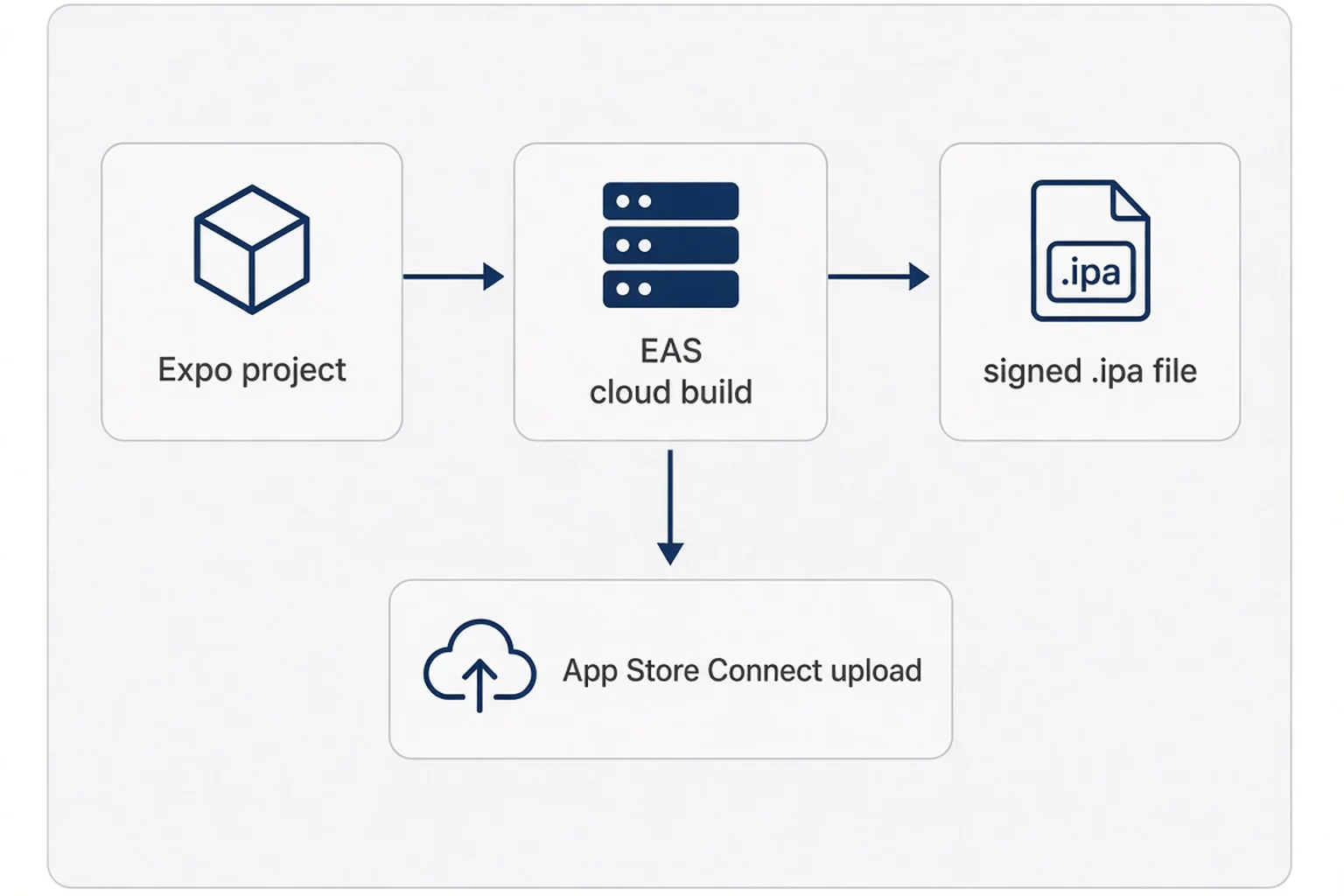
Before you create an Expo account or install the CLI, it helps to know what you are buying with EAS Build so you do not treat it like a magic deploy button (that is closer to web deploy without coding, a different animal).
EAS Build is cloud compilation for your Expo/React Native project. You push your project config and source. Expo's Mac builders run the native iOS compile steps, apply signing credentials, and give you back an installable artifact. For iOS that is typically an .ipa. You can download it, or use EAS Submit to send it toward App Store Connect. You can also combine profiles so "production" builds auto-increment version numbers. None of that requires Xcode open on your desk.
What it does not do: it does not replace App Store Connect. It does not write your privacy nutrition labels. It does not guarantee App Review approval. It does not fix a broken onboarding flow. It does not validate your idea. It is infrastructure, the same way Stripe is infrastructure for payments. You still need a product worth installing.
Compare three stages side by side in your head. Expo Go is the fastest preview and the least like production. Great for early UI. Wrong for testing push notification entitlements you added last week. A development build (dev client) is your app shell with native modules, still aimed at iteration. A preview or production profile build is what you send to testers and reviewers. Non-coders stop after stage two because stage two feels like an app icon on the home screen. Stage three is where TestFlight beta work begins.
EAS also gives you build logs in a dashboard. When a build fails, you get a URL with stderr that looks hostile. That is still better than a local Xcode failure, because at least the environment is consistent. I paste log chunks into Cursor with the question "what did I miss in plain English?" Same playbook as debugging AI-generated code, except the stack trace mentions pod install and you learn what CocoaPods is by accident.
If you come from web CI, think of EAS Build as CI/CD for the binary, not for your marketing site. The unit that passes or fails is not "tests green." It is "Apple will accept this signed bundle." That mindset shift matters when you are staring at a red build badge at 1 a.m.
Expo also tracks build history per project. That sounds boring until you need to know which commit produced the build that crashed on your friend's iPhone 13. Tag builds in your notes with the git hash. I name internal TestFlight groups after the week ("sept-w4-build3") so I am not guessing which artifact matched which bug report. Organization is not glamorous. It beats rebuilding blindly because you lost track.
The checklist I run before the first cloud build
My first failed EAS build was embarrassing because the fix was boring. I had not set a bundle identifier consistently. The app.json said one thing, an old experiment said another, and I had been renaming the project in Cursor without understanding that Apple treats the bundle ID like a passport number. The cloud builder did not care about my UI polish. It cared that the identity of the app was coherent.
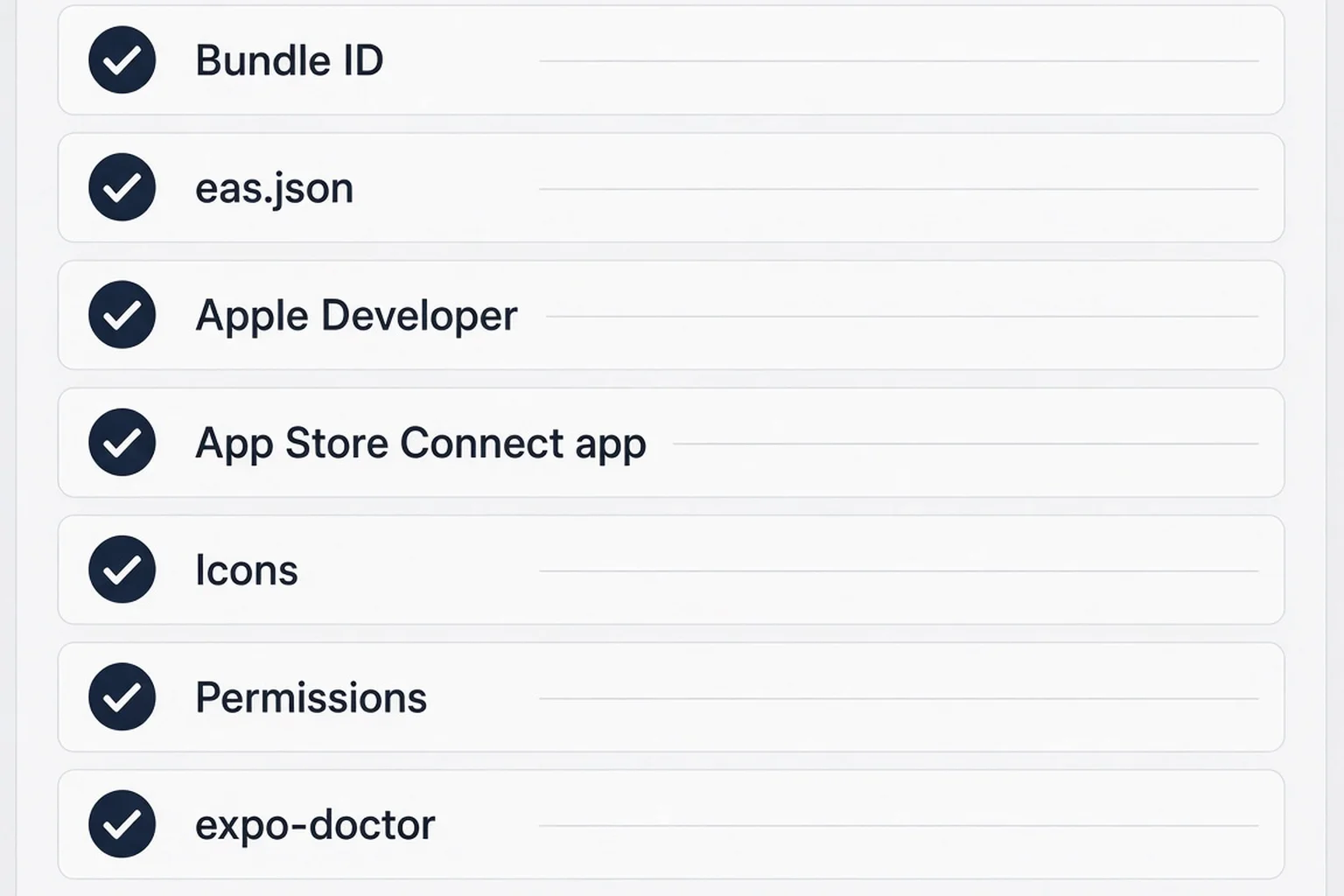
Run this checklist before you spend a build minute (Expo gives free tier builds, but your patience is not unlimited):
Your Expo project is linked to EAS (eas init or the flow in Expo docs). You have an eas.json file even if it is mostly defaults at first. Your app.json or app.config.js has a stable ios.bundleIdentifier in reverse-DNS form (com.yourname.product). Pick something you can live with; changing it later is pain. Your version and iOS build number strategy makes sense: marketing version users see (1.0.0) versus buildNumber Apple uses to distinguish uploads (1, 2, 3).
Icons and splash screens exist at required sizes, or you accept Expo defaults for beta (not for brand launch, but fine for first TestFlight). You know which permissions your app requests (camera, photos, microphone, tracking). Apple will ask in review and in privacy labels. If you added a library because AI suggested it and you do not know why, find out before building. Mystery entitlements are how you get rejection notes you cannot parse.
Your Apple Developer Program membership is active ($99/year individual). You have access to App Store Connect. You created an App Store Connect app record that matches your bundle ID. Non-coders skip the App Store Connect record and then wonder why submit fails. Create the shell early. Name can change somewhat. Bundle ID should not.
Source control matters more than you think. EAS builds from a tarball of your project state. If your local folder is a graveyard of uncommitted experiments, you are shipping roulette. I am not your git coach, but commit before build is a rule I follow religiously since the day I built from a directory that still had a commented-out payment screen AI left in place.
Finally, run npx expo-doctor and fix red items that mention incompatible packages. Doctor is not perfect. It catches obvious footguns. When doctor and your AI assistant disagree, trust doctor for version mismatches and trust your product judgment for scope.
If your app uses config plugins because AI added a native module, read the plugin's Expo SDK compatibility line out loud. Plugins are where "it works in Expo Go" lies. A dev client build might be mandatory before your first production build. Budget an extra build day for that transition. I once burned two builds because I added notifications before I wrote a single push campaign. The module demanded entitlements I had not planned for in App Store Connect. Scope creep has a compile cost on mobile.
Apple Developer account setup without losing a whole weekend
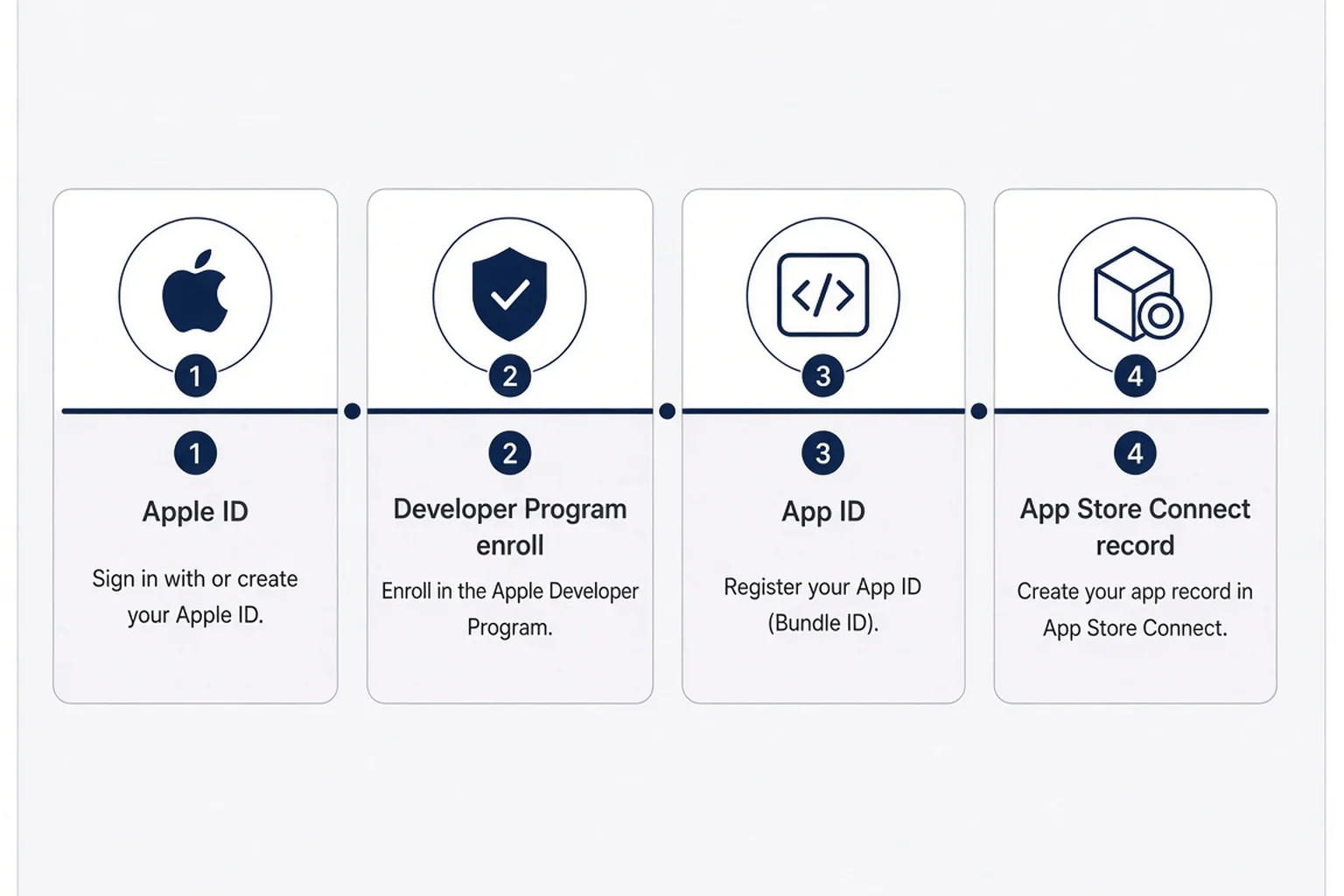
Apple's developer onboarding is not hard because any one step is impossible. It is hard because the steps are scattered across websites, email confirmations, two-factor codes, and legal agreements that reset when Apple updates a sentence. As a non-coder, you will feel like you did something wrong when the UI just waits. Often you are waiting on Apple.
Start with a clean Apple ID you control (not a shared family account). Enroll in the Apple Developer Program as an individual unless you already have an LLC and want the org path. Individual is simpler for first apps. Pay the annual fee. Approval can be quick or take a day or two. Do not schedule your launch party around instant approval.
Once enrolled, open App Store Connect and Certificates, Identifiers & Profiles in the developer portal. You will hear about App IDs, certificates, provisioning profiles, and distribution. Here is the non-coder translation: Apple wants cryptographic proof that the binary uploading is yours and matches the app record. EAS can manage credentials for you, which I recommend until you have a reason not to. Manual credential management is a hobby for people who enjoy pain.
Create an identifier for your app if the wizard asks early. Match the bundle ID exactly. Create the App Store Connect application: platform iOS, name users will see, primary language, bundle ID selection. You can fill SKU with something internal (finishhim2026). You are not launching yet. You are reserving a parking spot.
Team roles matter if you collaborate. Solo founders use one role: Account Holder / Admin on everything. If a contractor asks for Admin, think twice. App Manager is often enough for upload help. I have not hired for iOS yet; when I do, I will follow the same paranoia I use for Stripe dashboard access in payments without coding.
Enable two-factor authentication on the Apple ID and store backup codes somewhere boring (password manager, not a sticky on your monitor). Losing access mid-review is a special kind of stress. Also use a real phone number for trusted device prompts. Apple security is good until you are on a trip without your usual device.
If you are building a consumer app with subscriptions, create sandbox testers in App Store Connect later for purchase testing. That is not EAS-specific, but your first production build will fail emotionally if the paywall never got tested on device. Iryna covers paywall UX elsewhere. Your job in the EAS phase is to produce a binary that can reach TestFlight so sandbox testing is possible.
eas.json and build profiles in language you can paste into ChatGPT
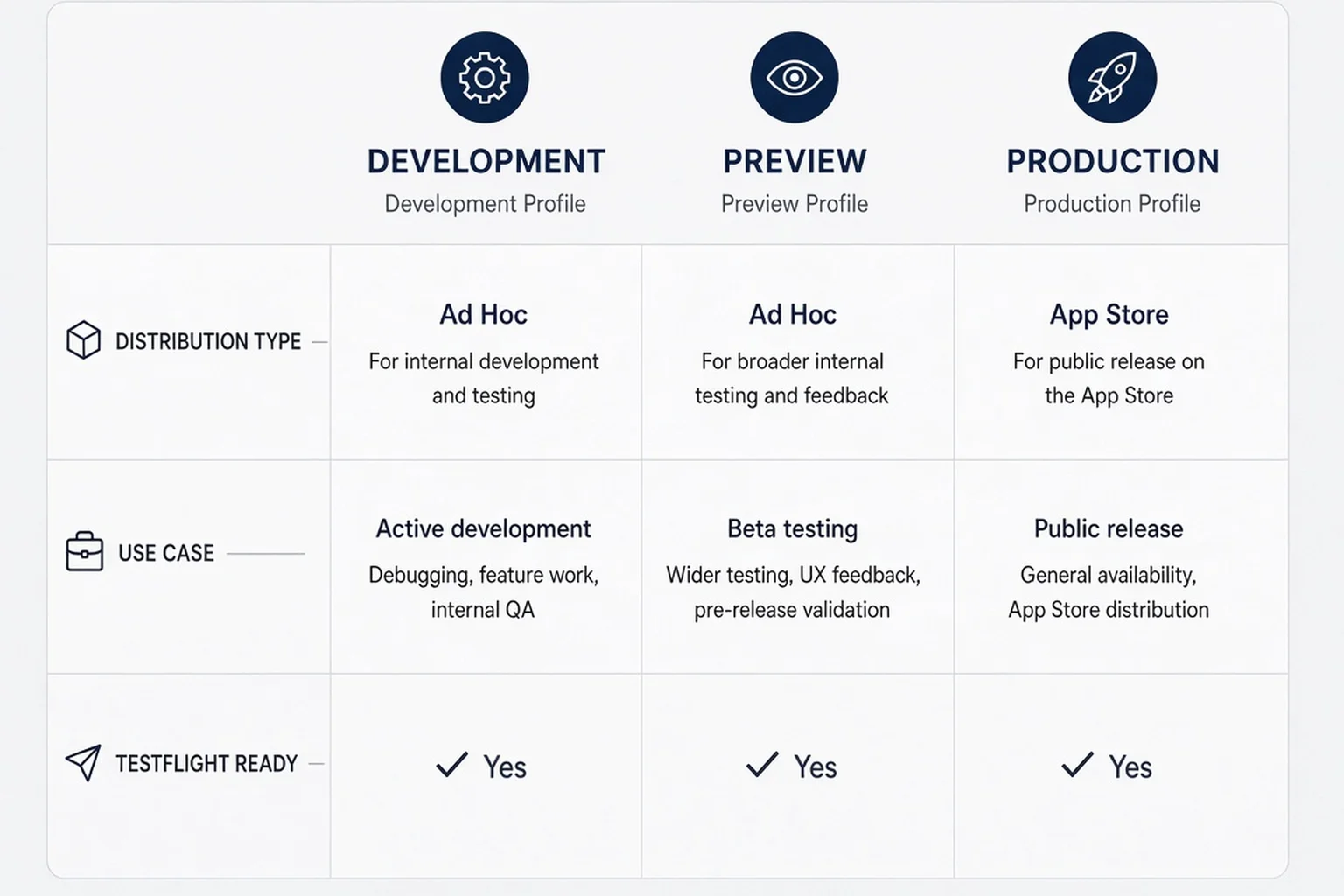
The eas.json file is the control panel for EAS Build. It lives at your project root next to app.json. If AI scaffolded your Expo app, you might already have a minimal file. If not, Expo's docs provide a starter. You do not need to memorize every key. You need to understand profiles.
A profile is a named recipe: which distribution type (internal, store, simulator), which channel for updates if you use EAS Update, whether to auto-increment build numbers, and iOS-specific options like simulator builds for Apple Silicon Macs (you might not need that if you are cloud-only). Typical starter names are development, preview, and production.
Development builds produce a dev client: your native shell with debugging affordances. Use this when you added native modules and Expo Go is not enough. Preview builds are often ad hoc or internal distribution for teammates. Production builds target App Store / TestFlight distribution with store signing. Names vary by tutorial; read your file's comments.
When I say expo eas build ios without coding, the command you will actually type is usually:
eas build --platform ios --profile productionSwap production for whatever profile your template defines. The CLI asks you to log in to Expo, confirm the project, and often offers to generate credentials. Say yes unless you know why no.
Important keys you will see explained in docs: cli.version pins EAS CLI compatibility; build.production.ios.autoIncrement saves you from forgetting to bump buildNumber; submit blocks configure EAS Submit. You can add submit later. First goal: a green build badge.
Environment variables belong in EAS secrets, not hard-coded in git, same energy as not committing Stripe keys. If your app reads a public Supabase URL, that is fine exposed. If it reads a service role key, it should not ship in client code at all. Mobile does not magically fix auth mistakes. EAS just packages whatever you gave it.
Here is a minimal illustrative eas.json shape (adjust to your project):
{
  "cli": {
    "version": ">= 12.0.0"
  },
  "build": {
    "development": {
      "developmentClient": true,
      "distribution": "internal"
    },
    "preview": {
      "distribution": "internal"
    },
    "production": {
      "autoIncrement": true
    }
  }
}
Do not copy-paste blindly. Run eas build:configure if Expo offers it in your SDK version. The point is conceptual: profiles separate iteration from store-ready binaries. Non-coders get into trouble when they TestFlight-upload a development profile build and wonder why TestFlight acts weird. Match profile intent to destination.
Running your first iOS build when the terminal looks like a threat
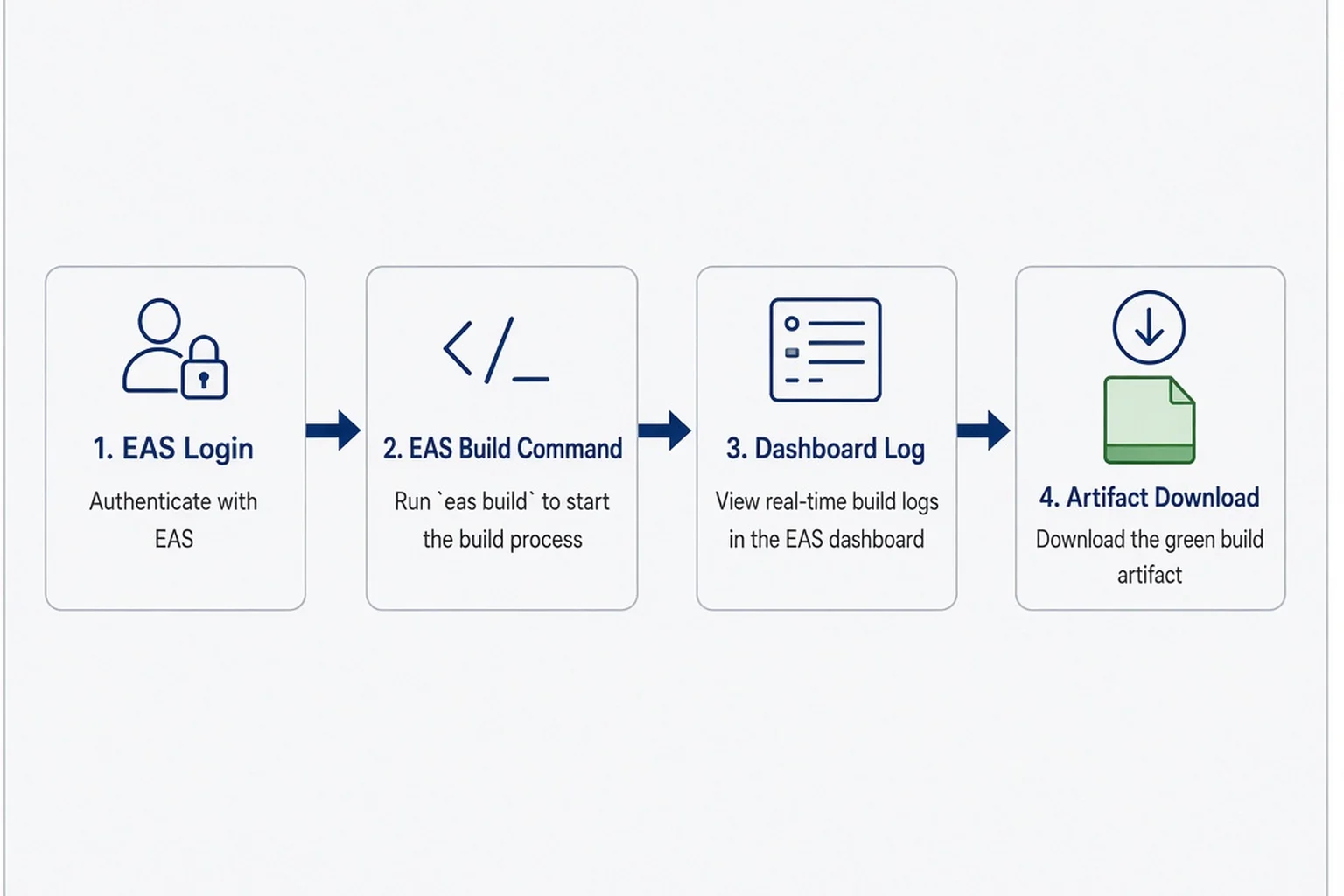
Install the EAS CLI globally or use npx eas-cli if you prefer not to install. Log in with eas login. In your project directory, run eas build:configure if you have not. Connect the GitHub repo if you use EAS workflows later; optional for first manual build.
When you kick off eas build -p ios --profile production, the CLI uploads your project. You choose credential handling: Let Expo handle it is the right default for most solo founders. The build queues. You get a URL. Open it on your phone browser too so you are not chained to the desk. Builds can take ten to thirty minutes depending on queue and project size. That is normal. It is not broken because you refreshed four times.
While waiting, read the log tail even if you do not understand half the lines. Search for error before panicking at yellow warnings. Warnings about deprecated APIs might not fail the build today. Red Error: lines fail the build. Copy the last forty lines into your AI tool with context: Expo SDK version, whether you use prebuild, plugins list.
Success looks like a green check and an Artifact section with .ipa. Download once for your records. You might not need the file locally if you use EAS Submit, but having it feels psychologically important the first time. Like holding a printed book proof.
If the build fails with credentials errors, do not immediately rotate every Apple cert. Read the message. Often it is "provisioning profile does not include entitlement X." Entitlement X is the push notification you enabled in app.json without enabling in the identifier. Fix the identifier in Apple portal or remove the entitlement until you need it. Then rebuild. Rebuilds cost time, not moral failure.
Simulator builds (ios.simulator: true in a profile) are useful if you have a Mac and want a fast loop without device signing. As a non-coder on Windows or a Mac-less setup, cloud device builds are the point. Do not let Twitter convince you that you are less serious without a local Xcode. You are serious if testers can install your app.
After green, run eas submit -p ios when ready, or upload via Transporter. Submit asks App Store Connect API key or Apple ID login depending on setup. API keys are nicer for repeat submits. First time, Apple ID login might be simpler emotionally. Pick your poison once, document the choice in a private note, move on.
The first successful submit is a good time to screenshot App Store Connect's Activity tab. You will want proof later that build 7 uploaded when a tester insists they never got the invite. Apple email notifications lag. Connect UI is the source of truth. I keep a private Notion row: build number, EAS log URL, date, "what changed." Future me treats past me like a slightly unreliable contractor. Documentation is how non-coders compensate for not carrying the whole stack in memory.
Credentials and certificates: let Expo hold the bag (until you cannot)
Apple's credential system is the historical reason non-developers avoided iOS. Certificates expire. Profiles mismatch bundle IDs. You download a .mobileprovision file and double-click it like it is 2011. EAS managed credentials exist so you can defer learning that archaeology.
When Expo manages credentials, EAS stores signing assets tied to your Expo account and applies them during builds. Rotations happen through CLI prompts. You still must keep your Apple Developer membership paid. Expired membership breaks builds even if Expo has old certs cached.
When should you manage credentials manually? Almost never at the start. Consider manual if an enterprise client demands custody, if you hit a weird multi-app setup, or if Expo's manager fails repeatedly and a contractor needs to import existing profiles. I have not hit case three yet. Case one is Derek's world more than mine.
App Store Connect API keys (Issuer ID, Key ID, .p8 file) power automated submit and some CI flows. Treat the .p8 like a password. Expo docs walk through creating a key with App Manager access. You upload it once to EAS secrets. Then submit commands skip interactive Apple ID 2FA at 2 a.m., which is worth the fifteen-minute setup.
Push notifications, Sign in with Apple, associated domains, iCloud, HealthKit: each entitlement expands the credential graph. Add entitlements when the feature ships, not when a tutorial mentions them. AI loves adding expo-notifications because push sounds professional. If you are not sending pushes yet, delay the module. Fewer entitlements, fewer surprise portal toggles.
If you rotate your Apple ID password, expect to re-auth flows. If you leave a team, revoke old certs on purpose. Mystery certs from a forgotten freelancer are a security smell. Solo founders forget past selves count as freelancers.
Document a credential owner: you. Store Apple ID, Expo login, and backup codes in a password manager entry named something you will search under stress ("iOS ship creds"). Future you during App Store review will not have spare brain cells.
When the build fails and you do not read Swift
Failed builds feel personal because you already invested weeks in UI. Separate product failure from packaging failure. Packaging failure means the app might be fine; the factory line choked. Packaging errors I see often as an AI-native builder:
CocoaPods / pod install errors when a native module version disagrees with your Expo SDK. Fix path: align package versions to Expo's compatibility table, run doctor, rebuild. Do not randomly upgrade React Native because a blog post said to.
Bundle identifier mismatch between app config and App Store Connect record. Fix path: make them identical, recreate the App Store record if you truly need a new ID (avoid if possible).
Missing icon or splash assets referenced in config. Fix path: add files or remove references.
Encryption export compliance questions you answered wrong in App Store Connect metadata later, not always at build time. Still read Apple's export compliance prompts honestly. Most apps using HTTPS only qualify for exemptions. Do not guess "yes we use custom encryption" because you heard the word encryption.
Out of memory or timeout on huge assets. Fix path: compress images, remove accidental video files from the repo, exclude junk from upload via .easignore.
My debug ritual is boring and works: copy error, ask AI for one likely fix, apply, commit, rebuild. If the same error hits three times, stop and read Expo forums or docs for that exact string. Debug AI-generated code discipline applies: AI will confidently suggest deleting node_modules forever. Sometimes that helps. Sometimes you need a targeted version pin.
Keep a build diary note: date, profile, error snippet, fix. You will see patterns. "Oh, every time I add a new native library I need to rebuild dev client." That is learning without becoming Swift literate.
From EAS artifact to TestFlight upload (where beta actually starts)
A green EAS build is a halfway party. TestFlight is where your app meets other people's Home screens under Apple's beta rules. You can eas submit with a production profile build, or download the .ipa and use Transporter on Mac. If you lack a Mac, EAS Submit is your friend. Many solo founders are Mac-adjacent (borrowed MacBook, old laptop) but build in the cloud daily.
In App Store Connect, open your app, go to TestFlight, wait for processing. Apple scans the binary. Processing can take ten minutes to an hour. "Missing Compliance" prompts appear: answer export compliance, content rights, advertising identifier usage. Answer truthfully. Beta builds still need privacy policy URLs if you collect data.
Add internal testers first (your Apple ID team). Install TestFlight on your phone, accept invite, install build. Run the core loop cold: delete app, reinstall, fresh session. Then add external testers when you are ready for beta that is not your mom. External requires Beta App Review for the first build of a version.
Versioning discipline: each TestFlight upload needs a higher build number. autoIncrement in eas.json helps. Marketing version (1.0.0) can stay until you ship features worth 1.1.0. Apple cares about monotonic build numbers, not your feelings.
If TestFlight install fails on a tester's device, check device OS version against your deployment target in app config. If you set iOS 17 minimum and they are on 16, the install fails with user-hostile errors. That is not EAS fault. Lower minimum if your app truly supports it, or accept narrower audience.
Crash logs in TestFlight and Xcode Organizer (if you have Mac access) beat console.log on your dev client. Turn on sensible logging before beta. Not passwords. Not raw user content if privacy-sensitive.
When beta looks stable, you promote the same build type toward App Store review or upload a polished production build. Review is a different essay. Your EAS job ended when a trustworthy binary existed. Marketing job starts after.
What EAS costs, build quotas, and when defaults stop fitting
Expo pricing changes; check their site for current numbers. Conceptually: free tier includes a limited number of builds per month; paid plans raise limits and add priority. A solo founder in validation might live on free tier for weeks if you batch changes instead of rebuilding every typo. A founder iterating native modules daily might pay without blinking because contractor hours cost more.
Time cost matters more than dollar cost early. A thirty-minute queue plus a thirty-minute failed rebuild is an hour gone. Batching "build nights" helped me mentally: Wednesday is EAS day, not every save. Web founders spoiled by instant Vercel deploys need that adjustment.
EAS Update (OTA JavaScript updates) is powerful and risky. You can push JS fixes without a full store review for many changes. Apple forbids using OTA to change app purpose dramatically. Do not ship a gambling app update over the air because you read OTA is fast. Use OTA for copy tweaks and bug fixes within the same app scope. Native changes still need a new binary and a new build profile run.
When do you outgrow defaults? If you need custom native code not in Expo modules, you may eject to prebuild workflows or add config plugins. Still EAS-compatible often, but errors get sharper. If you need multiple white-label apps from one repo, profiles multiply. If enterprise customers ask for on-prem signing, you are past Imani's lane; hire Max or a specialist.
Compare monthly EAS spend to one hour of contractor time. If $29 or $99 plan saves you four hours of cryptic signing errors, it is cheap. If you have never validated the app idea, do not buy annual everything at once. Validate with micro-SaaS validation moves even when the product is mobile-shaped.
Questions people ask me after their first green build
People DM me screenshots of green EAS badges like they won the lottery. They did win a lottery. Not the whole game. The questions repeat.
"Do I need a Mac?" Not for EAS Build itself. Helpful for Transporter and some debugging. Borrow if you can.
"Can I ship iOS from Windows?" Build yes, with cloud. Local Xcode no. Many non-coders are Windows-first. Expo's cloud story is partly for you.
"Expo Go vs TestFlight?" Expo Go is demo and dev. TestFlight is distribution testing. Never confuse them in user research.
"How long until App Store?" Review varies. Beta review is usually faster than full review. Neither is instant.
"Will Apple reject AI apps?" Policy evolves. Disclose data use honestly. Follow AI consent patterns for iOS if third-party models touch user content.
A few honest answers before you run the command
Can I use EAS Build if I do not know Swift or Xcode?
Yes. EAS Build runs the native compile in Expo's cloud and returns a signed iOS artifact. You still handle Apple Developer enrollment, bundle IDs, and App Store Connect records, but you do not need to compile locally in Xcode. You should understand what your app permissions and privacy labels claim.
What is the difference between Expo Go and an EAS production build?
Expo Go is a shared sandbox app for fast development. It is not your standalone App Store binary. A production profile EAS build packages your app with your bundle ID and signing for TestFlight or App Store review. Testers install through TestFlight, not Expo Go.
Should I let Expo manage my iOS credentials?
For most solo founders, yes. Managed credentials avoid manual certificate and provisioning profile juggling. Move to manual control only if a client requires it or you repeatedly hit edge cases Expo cannot resolve. Keep Apple Developer membership active either way.
How long does the first EAS iOS build take?
Queue plus compile often lands between fifteen and forty minutes depending on project size and Expo load. Failures that require fixes and rebuilds add more wall clock time. Batch changes instead of rebuilding every small tweak to save patience and free-tier minutes.
Do I need a Mac to ship iOS with EAS?
You do not need a Mac to run EAS Build itself. A Mac helps for Transporter uploads and some debugging tools. Many founders use eas submit from the CLI to avoid Transporter entirely. Borrow a Mac occasionally if you want local Simulator testing.
What should I do right after a successful EAS iOS build?
Submit to TestFlight or download the ipa, wait for App Store Connect processing, install on your phone through TestFlight, and run a cold install test of the core loop. Fix crashes before inviting external testers. Green cloud build is halfway, not launch day.
The product does not care who compiled the binary
Green EAS badge dopamine fades by morning. What stays is whether someone who is not you can install your app, tap through the first session, and feel the problem ease. Expo eas build ios without coding is not a flex. It is a permission slip for operators who will never enjoy Xcode dark mode.
I still google certificate errors. I still lean on agents to translate logs. The difference between the version of me that screenshot Expo Go and called it "shipped" and the version that uploaded TestFlight builds is simply that second version accepted procedural work as part of creativity. Building is expressive. Shipping is administrative. Both belong to founders who want paying users, not portfolio screenshots.
Run the build this week while the UI is fresh enough that you still care about bugs. Batch your fixes. Commit your repo. Let Expo's Mac farm do what you should not have to learn twice. Then go read Iryna on TestFlight and come back when you have a crash log that only happens on a stranger's phone. That is when you are really building mobile.
If you want a structured nudge on stack choice before you commit to EAS nights, the build path picker still helps. Mobile is not morally superior to web micro-SaaS. It is closer to pockets. Pick pockets if your user lives there, compile in the cloud, and keep going.
Comments