Your Friends Saying It Works Is Not a TestFlight Beta
How to run a TestFlight beta as a solo consumer-app founder: internal vs external testers, Beta App Review, who to invite, and when to leave beta for App Store submission.
 By Iryna26 min read
Listen to this article
22:44AI-generated podcast-style overview of this article (not a word-for-word narration).
My mom installed the build on a Sunday. She opened it, tapped around for ninety seconds, and texted me a thumbs-up. I treated that like proof. It was not proof. It was a parent being kind on a family chat.
That is the soft trap of a first consumer app. You finish something that finally runs on a real phone, you hand it to people who love you, and their politeness masquerades as product validation. TestFlight beta solo founder work is the opposite of that comfort. It is putting a distribution build on phones that do not already know your story, through Apple's own beta system, before App Review and before strangers start paying. If you are still deciding whether the idea deserves a binary at all, start with how to validate a consumer app idea. If you are still assembling the stack, read how to build your first consumer iOS app. This piece sits in the uncomfortable middle: you have a build, and you need humans who are not you.
I ran Finish Him Replies through TestFlight before I ever hit Submit for sale. Not because Apple demanded it. Because my own device lied to me. Permissions I had already granted. Photos I already knew to pick. Sandbox purchases that behaved like a trained pet. A beta week will not make your app famous. It will tell you whether the first session feels safe on someone else's phone, whether the paywall path survives a clean install, and whether your "obvious" flow is only obvious to you.
Here is the part the Xcode tutorials skip. You will feel silly asking people to install a second app called TestFlight just to help you. You will over-explain in the invite text. You will refresh App Store Connect while the build processes like it owes you emotional support. That awkwardness is normal. What is not normal (and not helpful) is skipping the whole step because it feels bureaucratic compared with texting a .ipa to your group chat (which you should not do anyway).
I am going to be blunt. Friends saying it works is not a TestFlight beta. A real beta is a process: upload a distribution build, invite the right people, survive Beta App Review if you go external, collect feedback you can act on, and decide when to leave for full App Store review. Treat it like product work. Not like a participation trophy.
TestFlight beta solo founder: why your mom's phone is not a launch plan
The first time someone installs your app through TestFlight, the emotional pitch is weird. They are not buying. They are not leaving a star rating that the world can see. They are doing you a favor, and favors come with soft language. "Cute." "Cool idea." "Works for me." Those words feel like oxygen when you have been debugging alone. They are also almost useless as evidence.
A testflight beta solo founder mindset starts with a harder question: does a stranger with the embarrassing problem you claim to solve complete the core loop without you sitting next to them? Mom does not have that problem, or she does and will not admit it to you, or she has it and will not upload a real screenshot because you are her kid. Love is a bias. Design for it.
I am not anti-family testing. Early installs from people who will not flame you in public are how you catch the crash on launch. Use them. Just do not stop there and call it a beta program. A launch plan needs at least a few installs from people who can disappoint you. That is the difference between rehearsal with your cast and opening night with an audience.
The difference between "it works for me" and "it works for a stranger"
On your phone, the app is a spoiled houseguest. It remembers camera permission. It remembers the photo you always pick for demos. It remembers that you know to tap the tiny Restore Purchases link. A stranger gets a cold install, a noisy notification shade, a half-charged battery, and zero context about your Figma intentions.
I once watched a friend open my beta, stare at the first screen for a long beat, and ask what they were supposed to do. I wanted to reach through the call and tap for them. That urge is the product problem. If you have to narrate the first thirty seconds, the first thirty seconds are broken. TestFlight exists so you can watch that failure happen when the cost is still a polite message, not a one-star review.
Say you ship a reply helper. On your phone you open Photos, pick the chat screenshot you prepared last week, and get three tones back in seconds. On a tester's phone they deny Photos access because the system sheet appeared before they understood why you needed it. Your empty state says nothing useful. They close the app and text you "couldn't get it to work." That message is worth more than ten compliments. It is a map of the first session failure.
"It works for me" also hides StoreKit and signing issues that only appear in distribution builds. Debug installs on your device skip an entire class of pain. The first upload to App Store Connect is often when you learn a capability is missing, a subscription product is not attached, or the binary you thought was ready is not ready for anyone else. That lesson is cheaper in beta than in Waiting for Review.
There is a social version of the same lie. You FaceTime someone through the flow. They succeed because you are narrating. Then you tell yourself the product is clear. Remote coaching is not clarity. Clarity is a stranger alone on a bus completing the loop while half-watching a podcast. Design for the bus. Test for the bus.
What you are actually buying with a beta week
You are buying three things. First, proof the distribution pipeline works: certificates, uploads, TestFlight installs, update prompts. Second, real-device coverage: older iPhones, older iOS versions, spotty Wi-Fi, Low Power Mode, someone who refuses to grant photo access. Third, qualitative signal on trust. For a personal consumer app, trust is the product. If testers hesitate before uploading a chat screenshot, that hesitation is data. Fix the copy, the permission prompt, or the privacy story before you charge money for the same moment.
You are not buying growth theater. Ten thousand external tester slots sound impressive in Apple's marketing. Most solo founders do not need a fraction of that. You need a handful of people who will open the app twice, complete the core loop, and tell you the true sentence: where they got stuck, what felt creepy, what felt like magic.
A useful beta week also buys you a calmer App Store submission. When you have already watched five people hit the same wall, you stop guessing which bug is imaginary. You fix the wall. You write Notes for Review with a path that actually exists. You stop treating Submit like a coin flip. The queue will still mess with your head. The binary will be more honest.
One job for beta week
Pick a single question before you invite anyone. Example: "Can a stranger get from install to first useful output in under sixty seconds without me?" Every note you collect should serve that question. Everything else is optional color.
What TestFlight is for (and what it will not save you from)
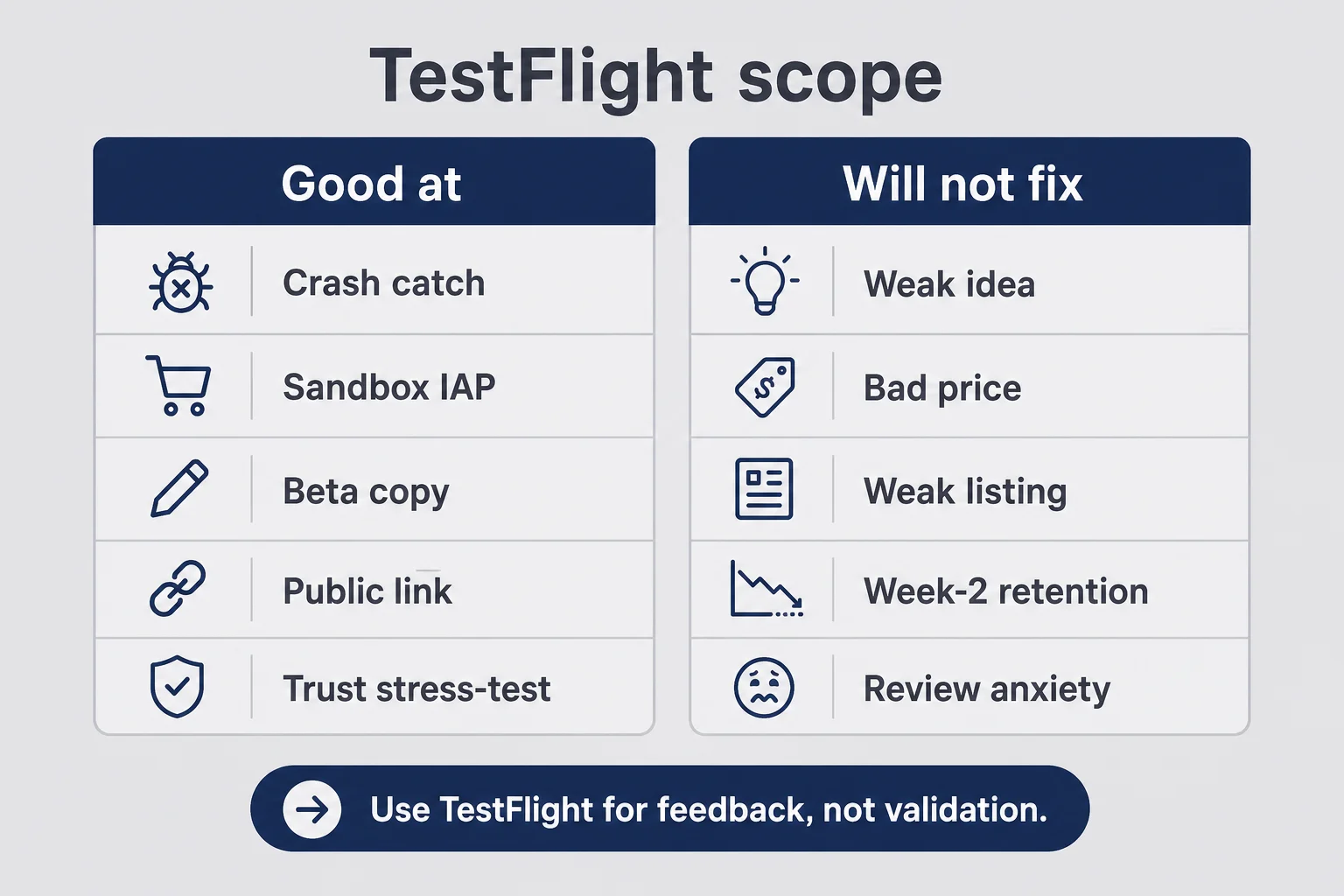
TestFlight is Apple's beta distribution system for apps already in App Store Connect. You upload a build, fill in test information, and invite people who install through the TestFlight app on their iPhone. Internal testers on your team can get builds quickly. External testers can join after Beta App Review clears the first build of a version. Builds expire after ninety days. That expiry is annoying and also a gift: it forces you to keep shipping instead of freezing a "final" beta forever.
Think of it as a rehearsal stage attached to the same theater as the App Store. Same account. Same app record. Different audience rules. You are not sideloading chaos. You are practicing the distribution path Apple already expects you to use.
What TestFlight is good at is practical and boring in the best way. It catches crashes and hangs on devices that are not yours. It lets you exercise StoreKit sandbox purchases, restores, and entitlement unlocks. It forces you to write a short beta description a stranger can understand. It gives you a public link when you want invites without collecting every email by hand. And it stress-tests onboarding, permissions, and the "does this feel invasive" moment.
What TestFlight will not save you from is the hard product work. A weak idea that nobody needs stays weak. A paywall price you pulled from a competitor without thinking still needs real judgment (pricing still matters). An App Store listing that sells features instead of relief still fails in the store. Retention problems that only show up after week two of real usage still show up later. The emotional hangover of Waiting for Review still arrives on schedule.
I see founders treat beta like a substitute for validation. It is not. If nobody wanted the awkward problem solved before you built, strangers installing a beta will not invent demand. Beta tests the product experience and the distribution plumbing. Validation tests whether the problem is worth solving. Do both. Do not confuse them.
Another myth: "I will keep the app in TestFlight until it feels perfect." Perfect is a stall. Consumer apps ship while something still bothers you. The beta's job is to remove the failures that make a first session untrustworthy or a purchase path broken. Polish that only you notice can wait for version 1.1.
There is also a quieter myth among designer-founders like me: "Once the UI feels finished, beta is just a formality." Finished UI on your phone is not finished product on theirs. TestFlight is where the UI meets denied permissions, slow networks, and people who will not read your carefully kerned subtitle. If that sentence stresses you out, good. That stress is the point of testflight beta testing before money is involved.
One more boundary. TestFlight is not your analytics suite, your support desk, or your marketing site. Pair it with a simple feedback channel and, if you care about returns, light instrumentation you already trust. Do not build a second product called "beta ops." You are one person. Keep the system boring so the learning stays sharp.
Internal vs external testers: two doors, one binary
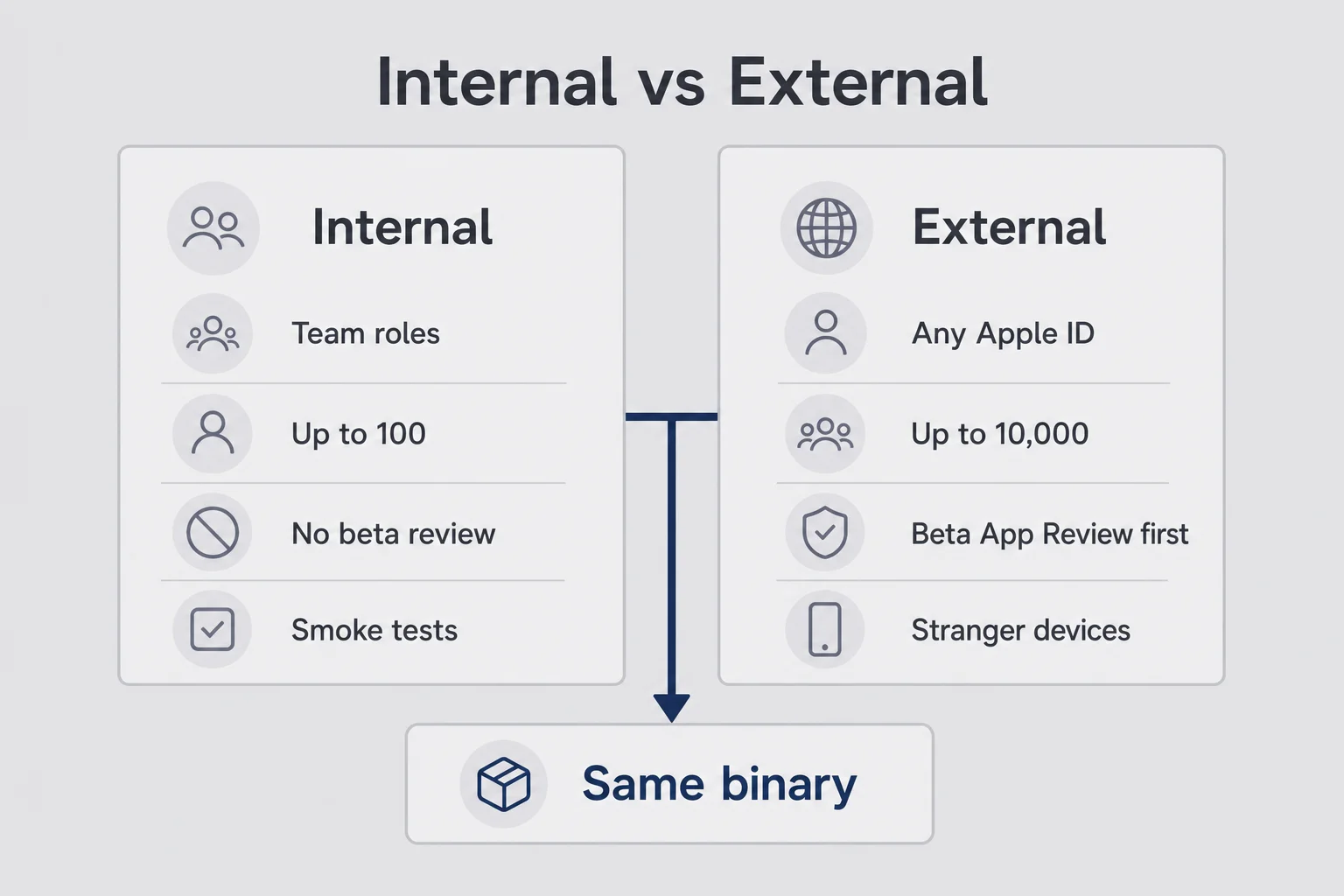
Apple gives you two lanes. Mixing them up is how solo founders either overcomplicate week one or invite the public before the app can survive a cold open. The binary can be the same. The people and the gates are not.
Internal: fast, small, still useful
Internal testers are people already on your App Store Connect team (roles like Admin, Developer, Marketing, and so on), up to one hundred. They can install without waiting on Beta App Review. For a solo founder, "team" often means you plus one trusted friend you added so you are not completely alone in the portal.
Use internal for smoke tests. Does the build install? Does it launch? Does the core button do the thing? Does the crash reporter light up on the one screen you were afraid of? Internal is also where you put the person who will yell at you honestly: a designer friend, a partner who hates fluff, someone who will say "I still do not know what to tap."
Do not confuse internal access with representative users. Your teammate already knows the product pitch. They will forgive missing empty states. They will grant every permission because they know you personally. Internal is plumbing and first-pass QA. It is not the same as ios beta testing solo founder work with real strangers.
A practical rhythm: upload, invite internal, wait for two people to open it once, fix anything that bricks the install, then move on. Do not spend two weeks collecting internal compliments. Internal is a filter, not a destination.
External: the first stranger with a real device
External testers can be anyone with an Apple ID, up to ten thousand per app. To invite them, you create a group, add a build, and clear Beta App Review on the first build of that version. After that, later builds for the same version usually move faster. External is where you learn whether your permission copy scares people, whether the paywall is incomprehensible, and whether "upload a screenshot" feels like a trust violation.
If your app touches dating chats, money, health-adjacent framing, or anything a person would hide from a coworker on the train, external testers are non-negotiable before you charge. You need at least a few people who feel the embarrassment for real. Polite teammates will not give you that signal.
External testers TestFlight invites also teach you operational manners. You will write clearer instructions because nobody will Slack you "wait how do I install." You will learn that some people never open the email. You will learn that a public link converts curiosity into installs faster than individual invites, and that installs are not the same as completed loops.
You can run both lanes at once. I did. Internal for "did this build brick the login," external for "does a stranger trust the upload step." One binary. Two jobs. If you only have energy for one lane in week one, start internal for ninety minutes of smoke, then open a small external group the same week. Waiting a month for "the perfect cohort" is how betas never start.
Your first build upload without rewriting half the app
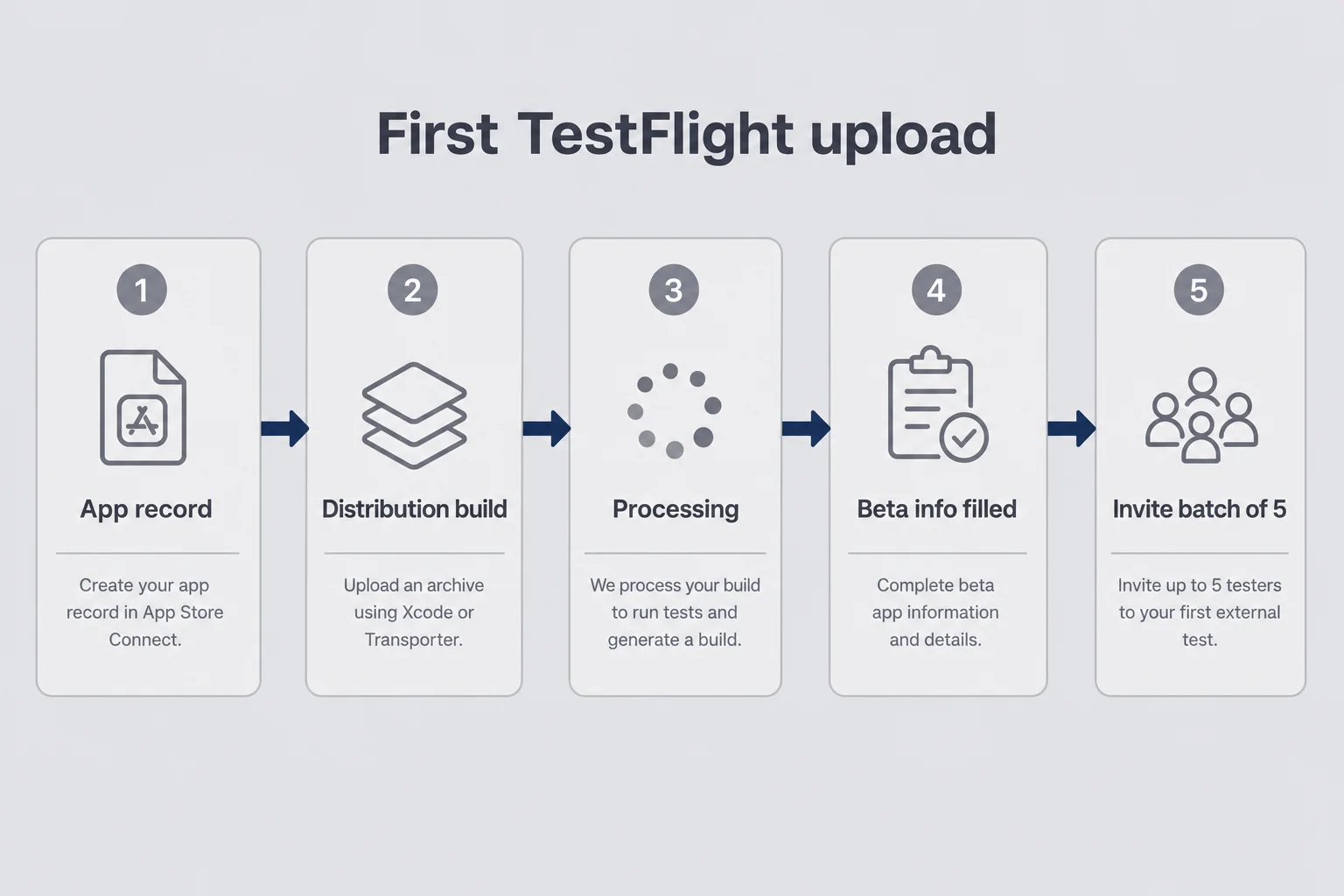
The night before my first TestFlight upload, I almost rewrote onboarding because a button label bothered me. That is fear dressed up as craft. Upload the build that answers your beta question. You can ship another build in days. You cannot learn anything from a binary that never leaves your laptop.
Practically, you need an App Store Connect app record, a distribution-ready build from Xcode (or your Expo/EAS pipeline if that is how you ship), and the patience to watch processing finish. Processing is another quiet personality test. The build sits in a weird limbo while Apple does Apple things. Refreshing does not help. Go make tea.
Before you invite anyone, fill in TestFlight information like a human will read it. One plain sentence on what the app does. One specific task for the week ("complete one screenshot-to-reply flow" beats "try everything"). A real email you will check. Account or demo notes if login exists.
External groups will not see a useful install experience if your beta description reads like a pitch deck. Write for a tired friend who agreed to help between meetings. "This app turns a chat screenshot into three reply options. Please try one full flow and tell me where you stalled." That is enough. Save the brand story for the App Store listing.
Also test the boring path yourself on a second device or a clean profile if you can. Sign out. Reset permissions. Pretend you are mean. If you only ever dogfood as the founder account, you will miss the restore-purchases hole and the permission-deny empty state. Those two failures show up constantly in first consumer apps.
Checklist energy is fine here, because upload week is plumbing. Confirm the version and build number you think you uploaded is the one TestFlight shows. Confirm subscription products exist in App Store Connect if you will test paywalls. Confirm your privacy policy URL loads on a phone browser, not only on your laptop where you have it bookmarked. Tiny mismatches become big confusion when a tester asks "is this the new one?" and you are not sure.
When the build is ready, send invites in batches. Five people first. Fix the install friction. Then ten more. Blasting fifty cold invites on a build that fails to launch teaches you nothing except how to apologize.
Sandbox purchases are not real revenue
TestFlight purchases use Apple's sandbox. Testers should know they are not buying a live subscription with real money. You should still walk the full paywall path: purchase, unlock, kill the app, relaunch, restore. A pretty paywall that fails on restore is a future one-star review.
Beta App Review: the mini-gate before App Store review
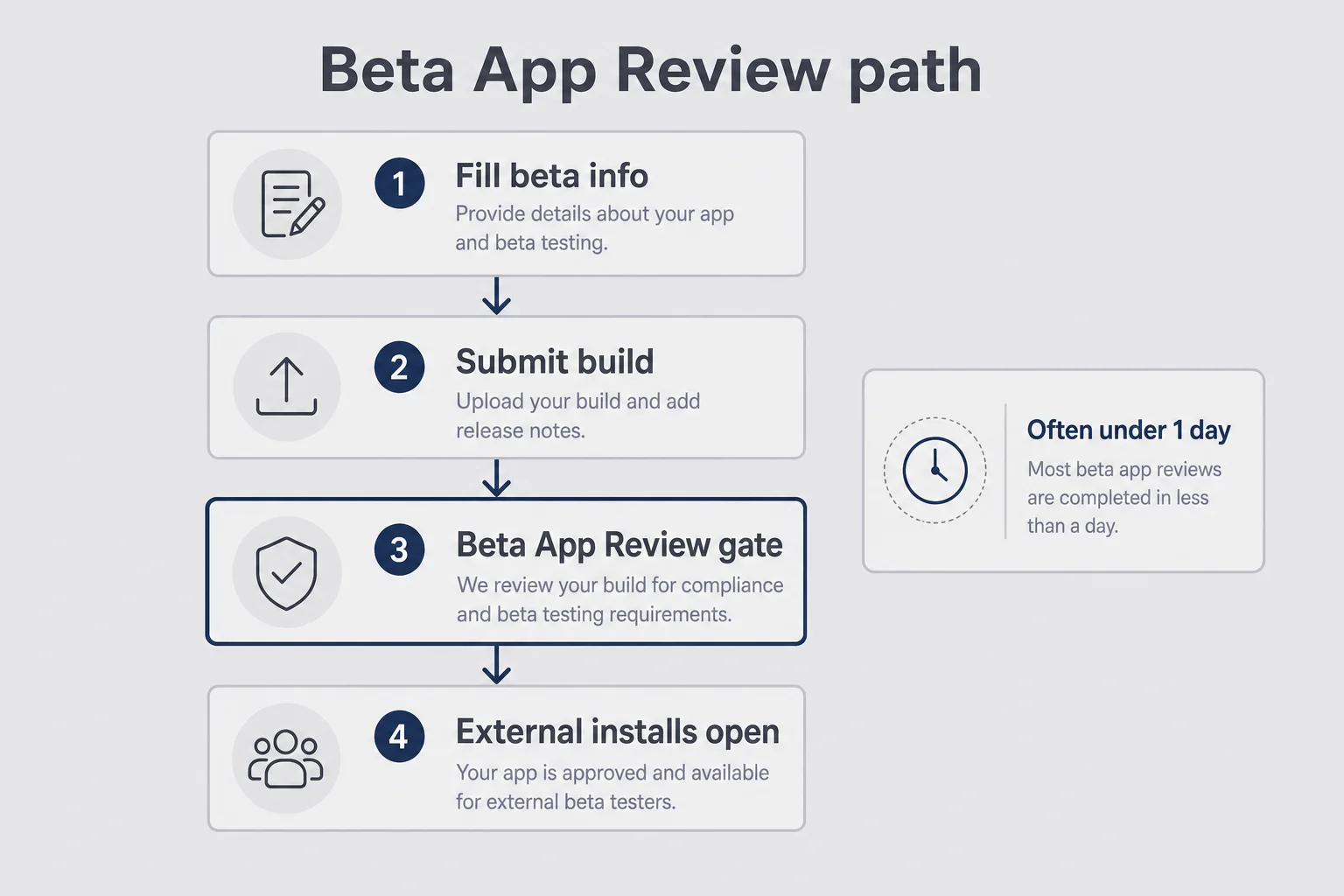
External testing adds a gate called Beta App Review. It is usually faster and lighter than full App Store review, but it is still a stranger looking at your binary and metadata. Treat it with respect. Empty beta notes and a broken first screen can stall your invites the same week you planned to "just get feedback."
Beta App Review sits in a weird emotional category for first-time founders. It feels smaller than "real" review, so people half-prepare. Then a delay hits, friends ask where the link is, and you spiral. Prepare it like a short version of the real submission. Same honesty. Less ceremony.
What helps is simple: a clear beta app description, contact information that works, a build that launches and reaches the core loop, privacy disclosures that match what the app actually does, and no placeholder "Coming Soon" traps on critical paths.
What does not help is treating Beta App Review approval as proof you are ready for sale, panic-changing your whole product because review took longer than a YouTube tutorial promised, or submitting a half-dead build "just to get the link."
Think of Beta App Review as dress rehearsal for the real App Store review process. Same family of nerves. Lower stakes. If something fails here, you get to fix it while nobody is trying to pay you yet. That is a gift. Take it.
Turnaround is often under a day. Sometimes a few hours. There is no SLA you can quote to your anxiety. Plan a buffer. If you promised friends "Friday beta," upload Thursday morning, not Thursday at 11pm. Over-communicate with testers if the gate slips. "Build is in beta review, link tomorrow" is better than silence followed by a defensive essay.
One more thing founders forget: once external is approved for a version, keep shipping builds into that group. A single stale build that expires in ninety days is how betas quietly die. Fresh builds signal you are listening. Stale builds signal you got what you wanted and disappeared.
If Beta App Review rejects or stalls for a metadata reason, fix the specific issue. Do not rewrite your entire onboarding out of superstition. The same discipline you will need for Resolution Center starts here: read what they said, change that thing, resubmit calmly.
Who to invite when you only know twelve people
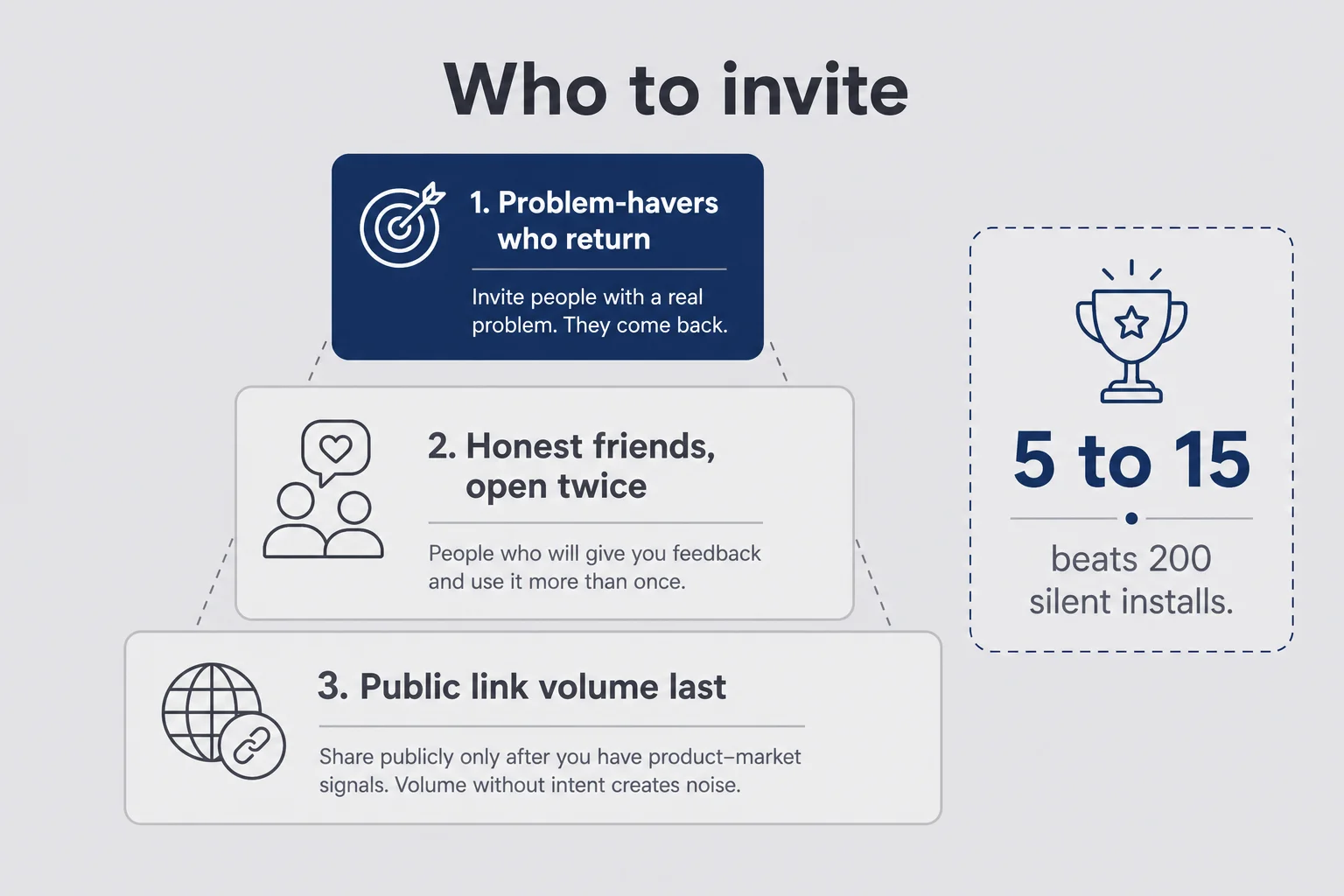
You do not need a waitlist of thousands to run a useful beta. You need the right twelve, or the right five, if five is all you have. Scarcity of contacts is not a disqualifier. It is a forcing function to be picky.
Friends who will actually open it twice
Prioritize people who have the problem your app solves (or a close cousin of it), will open the app more than once without daily nagging, can send a short concrete note ("I stalled on photo permission" beats "nice UI"), and are not so close that they will lie to protect your feelings.
I would rather have seven testers who live the awkward moment than seventy who install for social obligation and never return. Consumer apps especially. If your product helps with private texting anxiety, invite people who text anxiously. If it helps with budgeting shame, invite people who feel that shame. Random tech Twitter will give you feature requests. Problem-havers give you trust signal.
Set expectations in the invite. Tell them how long you want them to try (five days, not forever). Tell them the one task. Tell them how to send feedback (email reply, a form, a shared note: pick one channel and stick to it). Ambiguous invites produce ghost installs.
A sample invite that is not weird: "I built a small iOS app that helps with [specific awkward moment]. It is in TestFlight, so you install Apple's TestFlight app first, then my build. Could you try [one task] this week and reply with where you got stuck? Sandbox purchases are fake money. No pressure to be nice." Short. Honest. Specific.
Public links without turning beta into a vanity download race
TestFlight public links are powerful. You can share a URL on social, in a newsletter, or in a community without collecting emails one by one. You can also drown in silent installs from people who were never going to complete your core loop.
Use a public link when you already fixed the obvious crashes with a small invite-only group, you want broader device coverage, you have a way to ask for structured feedback after install, and you can stomach that many people will install and vanish.
Avoid a public link when your first session still requires a founder walkthrough, your privacy story is unfinished, or you are emotionally unready to read blunt comments from strangers. There is no prize for filling ten thousand slots. There is a prize for learning.
If you use a public link, set criteria where it helps (device type, OS version) and cap expectations. A testflight public link is a distribution tool, not a launch campaign. Keep your App Store optimization and launch plan separate. Beta is rehearsal. Launch is the show.
I have seen founders celebrate "400 TestFlight installs" the way other founders celebrate waitlist emails. Installs without completed loops are a mood, not a metric. If you need a number, track how many people finished the core task and sent a note. That number will be smaller and more useful. It will also hurt less when the public link underperforms your fantasy.
Feedback that helps vs feedback that feels like homework
Unstructured "let me know what you think" produces essays about icon color and silence about the broken restore button. Ask for less, learn more.
Ask useful prompts. Where did you stop the first time? What felt unclear or creepy? Did you complete the specific core task, and if not, what blocked you? Did anything crash, hang, or look empty after a permission deny?
Skip the less useful ones. "What features should I add?" invites a product roadmap from someone who has not felt the value yet. "Would you pay $X?" asked too early is fantasy pricing. UI scores from one to ten are soft noise. "Any feedback welcome!" is how you get nothing.
I like a two-line report format. Line one: what they tried. Line two: what broke or confused them. If they want to add praise, fine. Praise is optional. Blockers are mandatory.
Watch behavior more than compliments. Did they return the next day? Did they grant the sensitive permission? Did they reach the paywall and bounce with a confused face on the call? For personal apps, the permission moment is often the whole game. If three testers refuse photo access and bounce, your prompt copy and your empty state need work more than your gradient does.
Crash logs matter. Read them. Reproduce them. A crash on first launch for one device model is not a vibe issue. It is a ship blocker. Qualitative notes tell you about trust and clarity. Crashes tell you about reality.
Also protect your attention. You will get feature requests that belong in a later version, or in a different product. Thank people. Write the idea down. Do not rebuild the app mid-beta around the loudest friend. Your beta question is still the filter.
When feedback conflicts, look for repeats. One person hating your accent color is taste. Four people stalling on the same screen is a design bug. Solo founders burn weeks chasing singular opinions because those opinions arrive with warmth and urgency. Warmth is nice. Patterns ship products.
Close the loop with testers when you fix something they reported. A one-line "you were right about the permission empty state; fixed in the new build" keeps people opening updates. Silence teaches them their notes vanished into a void. You cannot pay most testers. Respect is the currency.
Privacy when someone else's phone holds your awkward problem
This is the section B2B SaaS guides skip, and it is the section consumer founders cannot skip.
If your app asks someone to upload a chat screenshot, a photo of their body, a bank balance, a voice note, or anything they would hide at work, beta is where trust gets tested for real. Testers will tell you with their hesitation even when they do not say the word "creepy."
Be specific in the beta about what leaves the device, what is processed, what is stored, and what is not. Vague "we take privacy seriously" copy fails the moment someone stares at a system permission sheet. Name the behavior: ephemeral processing, no chat history retained, no training on user content, anonymous sessions, whatever is actually true for your stack. If it is not true, do not write it. Fix the product or narrow the promise.
I care about this because Finish Him lives in that awkward zone. Asking someone to trust you with a dating-app conversation is not a small ask. In beta, watch for long pauses before the upload or permission tap, testers using fake or cropped screenshots instead of real ones, questions about whether you can see their stuff, and people who complete every other flow but skip the sensitive one.
Those signals are gold. They tell you the UI is asking for intimacy before it has earned it. Maybe you need a clearer preview of what happens next. Maybe you need a sample flow with a fake screenshot first. Maybe your privacy policy and in-app copy disagree. Fix that before App Store review and before paid users show up angry.
Also remember: testers' devices hold your beta build, crash logs, and whatever content they put through the feature. Be careful with screenshots they send you in feedback. Do not paste their private chats into a public Discord "for debugging." Treat beta feedback with the same respect you promise in the product. Hypocrisy here is unforgivable.
If a tester says "I would use this with a fake chat but not my real one," believe them. That sentence is not a soft maybe. It is a trust failure with a polite wrapper. Your job is to reduce the perceived risk until a real chat feels survivable. Sometimes that is copy. Sometimes that is architecture. Sometimes that is admitting the first version asks for too much too soon.
If you need deeper policy and App Privacy label help, the legal-adjacent product work lives in terms of service and privacy for micro-SaaS. Beta is where those words meet a human thumb hovering over Allow.
How long to stay in TestFlight before you submit for real
There is no sacred number of days. There is a readiness check.
You are closer to ready when the core loop works on at least a few stranger devices without live coaching, crashes are rare and understood, sandbox purchase-unlock-relaunch-restore all work, permission deny paths show a humane empty state, privacy copy matches the binary, you can write Notes for Review without inventing a fake demo path, and you are iterating on clarity instead of reinventing the product every forty-eight hours.
You are not ready when only friends who already know the pitch can complete the flow, the paywall is untested in sandbox, you are waiting for "one more feature" that is really fear of rejection, beta feedback keeps repeating the same blocker you have not fixed, or your listing screenshots still show UI you deleted two builds ago.
A practical solo-founder pattern looks like this. Three to seven days of internal smoke tests and brutal friend feedback. Then external invites for one to two weeks with a tight question. Then a freeze: stop adding features, fix blockers, prepare App Store metadata, submit. Some apps need longer. Few first apps need a three-month beta "until it feels right." Feeling right is often just delay.
Builds expire in ninety days. Use that as a backstop, not a goal. If you are still in the same beta build at day eighty with no submission plan, you are hiding. Ship the smallest complete product. Keep a TestFlight group warm after launch for the next version. Beta does not end your relationship with testers. It changes the job from "can this launch" to "what should version 1.1 fix."
When you do leave for submission, keep the emotional lessons. Waiting for Review will still mess with your head. The difference is you will submit a binary that already survived strangers. That does not make the queue shorter. It makes the binary more honest.
One last readiness tell I trust: you can explain the core loop in two sentences and a tester can complete it without those sentences. If you still need a voiceover, stay in beta. If the voiceover is just you soothing your own nerves, submit.
The questions I get every time someone asks about beta
Do I need TestFlight before my first App Store submission?
Apple does not require it, but skipping beta is how you discover crashes, broken StoreKit flows, and confusing onboarding on paying strangers instead of free testers. A short TestFlight pass catches distribution and real-device problems that never show up on your own phone. For a first consumer app, treat beta as cheap insurance, not optional theater.
What is the difference between internal and external TestFlight testers?
Internal testers are people already on your App Store Connect team, up to one hundred, and they get builds without Beta App Review. External testers can be anyone with an Apple ID, up to ten thousand, but the first build of a version needs Beta App Review before they can install. Start internal for smoke tests, then open external when you want strangers on real devices.
How long does Beta App Review usually take?
Often under a day, sometimes a few hours, with no guaranteed SLA. It is usually faster and lighter than full App Store review, but it is still a real gate. Fill in beta information, contact email, and a clear description of what to test so a stranger can install without guessing. Do not treat approval as proof your product is done.
How many TestFlight testers does a solo founder actually need?
Five to fifteen people who will open the app more than once beats two hundred silent installs. For a personal consumer app, prioritize people who have the awkward problem your product solves. Add a public link later if you want volume, but volume without feedback is just another vanity metric. Read every crash and every short note before you chase headcount.
Can testers buy my subscription inside TestFlight?
Purchases in TestFlight run through Apple sandbox accounts, not real money hitting your bank. You can and should test the paywall, restore purchases, and entitlement unlocks before launch. Tell testers clearly that they are in a beta sandbox so they do not expect a live charge or a production receipt. Confirm premium survives relaunch on a clean install path.
When should I leave TestFlight and submit to the App Store?
Leave when the core loop works on stranger phones, crashes are rare, privacy copy matches the binary, and you can write honest Notes for Review. A fixed calendar date with a broken paywall is not readiness. One more polish week is fine. Endless beta to avoid rejection anxiety is not. Ship the smallest complete product and keep the next build for after launch.
Ship the build that teaches you something
TestFlight will not make you brave. It will make you informed. That is better.
Hand the app to people who do not owe you kindness, ask one sharp question, and listen when the first session feels weird on their face. Fix the trust gaps. Fix the crashes. Walk the sandbox purchase path until it bores you. Then submit. Not when the Figma file is finally perfect. When a stranger can get the moment of relief without you narrating it.
Your friends can still cheer. Just do not confuse cheering with a beta. The App Store does not grade on parental thumbs-ups. It grades on a cold open. So does every person who might pay you $4.99 for help with something they would rather not admit out loud.
If this feels like a lot of process for a small personal app, remember what you are protecting: the first stranger who trusts you with an awkward moment. They will never know you ran a careful TestFlight week. They will only know whether the app felt safe in the first minute. That is enough reason to do the boring distribution work.
Upload the build. Invite the right few. Learn fast. Leave when the core loop is real. That is the whole job.




Comments