Waiting for Review Is a Personality Test
What App Store review actually checks, how to write Notes for Review, and what to do when a rejection lands, from someone who sat through a first submission.
 By Iryna26 min read
Listen to this article
19:50AI-generated podcast-style overview of this article (not a word-for-word narration).
I refreshed App Store Connect on a Tuesday afternoon like it was a group chat I was waiting on. Status still said Waiting for Review. Nothing had changed in eleven minutes. I knew that. I refreshed anyway.
That is the part nobody puts in the build tutorials. You can finish your first consumer app, upload a binary, fill out privacy labels until your eyes blur, and still feel like a teenager refreshing a portal. App store review solo founder reality is not a checklist you ace once and forget. It is a human process with rules, queues, and a stranger on the other end who has never heard of your embarrassing problem. They open your app cold. They do not care that you stayed up polishing the paywall. They care whether the thing works, whether your metadata matches the build, and whether your privacy story holds up when they actually tap around.
I shipped Finish Him Replies through that gauntlet as a designer who codes with help, not as a career iOS engineer. This is the guide I wish I had before my first app store submission: what review is actually for, how to pass app store review without performing confidence you do not feel, and how to handle an app store rejection fix without rewriting half the product out of panic. If you are still building the core loop, start with how to build your first consumer iOS app. If your listing is the weak link, read App Store optimization for solo founders. This piece is about the gate between those two.
I am not going to pretend Apple's process is always fair or always fast. I am going to tell you what you can control: a complete binary, honest metadata, Notes for Review that treat the reviewer like a human, and a rejection reply that fixes one problem at a time. That is enough to get most solo founders through. The rest is queue time and nerves.
App store review solo founder: what "Waiting for Review" actually means
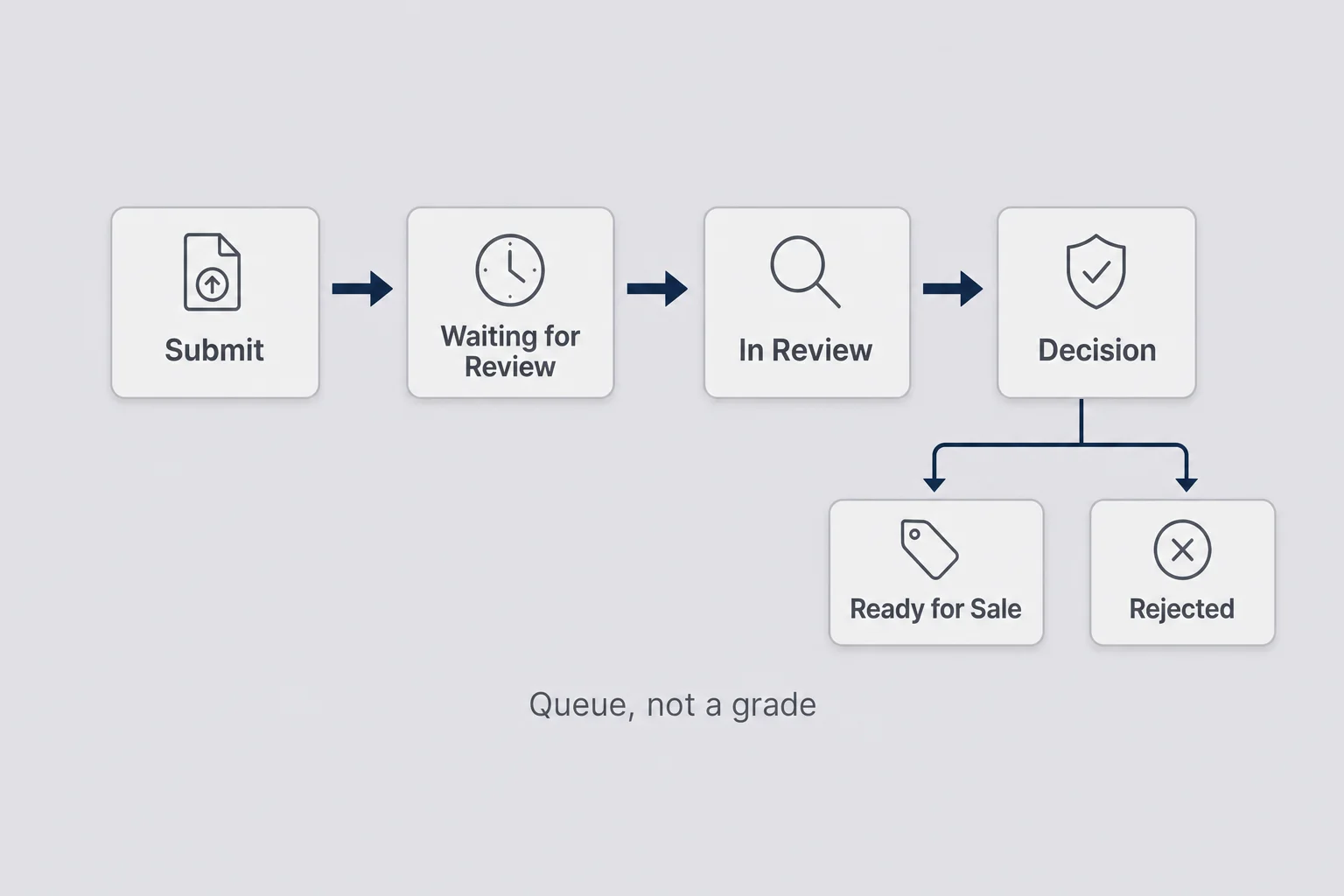
Waiting for Review is not Apple judging your worth as a founder. It is a queue. Your binary and metadata sit in line while a reviewer (or an automated pass first) decides whether the app complies with the App Store Review Guidelines. That sounds boring on purpose. The emotional version is louder: you imagine someone frowning at your onboarding, misunderstanding your AI feature, or bouncing because the demo account expired.
For a solo founder, the useful mental model is this. Review is a product QA pass run by people who do not know your story. They will not sit through a five-minute explanation of why your screenshot upload feels safe. They will not invent a happy path if your first screen asks for an account and your Notes for Review field is empty. They will try the obvious path, hit the obvious walls, and write you up against a guideline number if something fails.
That is why app store review solo founder advice that only says "read the guidelines" is incomplete. Reading helps. Designing the submission so a stranger can complete your core loop in under two minutes helps more. Your job before you hit Submit is to remove every reason a tired reviewer would bounce: dead links, mismatched screenshots, a paywall with no restore path, a privacy label that contradicts what the binary does, a crash on cold launch.
I used to think "the app works for me" was enough evidence. It is not. Your phone is a spoiled environment. It remembers permissions you granted months ago. It has your sandbox purchase history. It has the photo you already know to pick. A reviewer gets a clean device, a short attention span, and a checklist. If your first screen assumes context, you lose.
Time in review varies. Sometimes it is a couple of days. Sometimes it stretches long enough that you start inventing theories. Holiday weeks are worse. Apps that touch AI, user-generated content, health-adjacent framing, or payments get extra attention. Plan for a week so a three-day approval feels like luck, not destiny. While you wait, do not spam tiny resubmits. Keep a TestFlight build warm with people who will actually send feedback. Use the quiet to fix copy and onboarding, not to invent a second product.
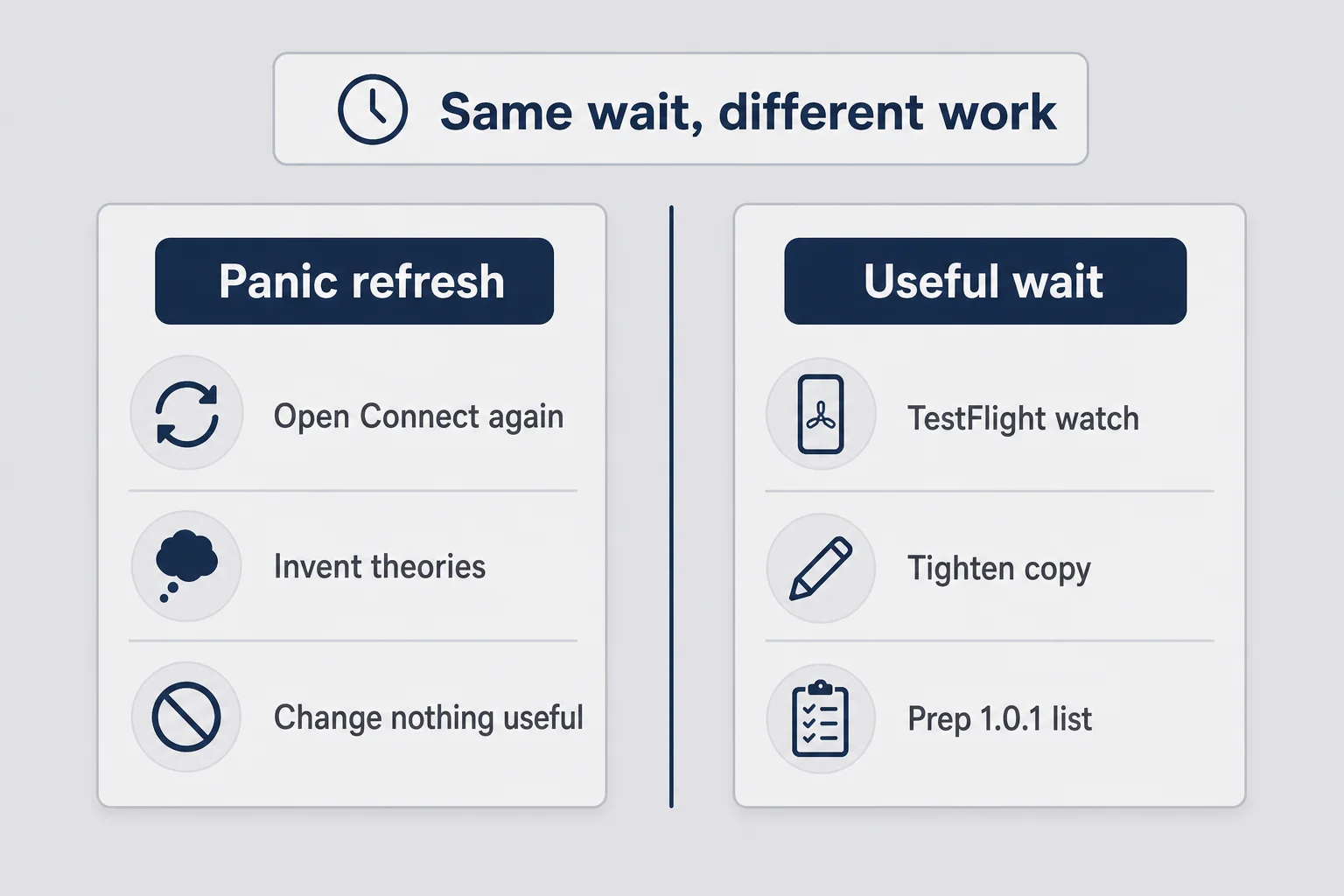
Say you submit on a Thursday night because you wanted the week to end with progress. Friday you check twice. Saturday you check from brunch. Sunday you invent a story that Apple hates consumer AI wrappers. Monday the status has not moved and you have burned a weekend on a portal. That story is common. The fix is not more refreshing. The fix is deciding ahead of time what you will do with the wait: one TestFlight interview, one privacy policy pass, one screenshot that still shows an old button label.
One more reframe that saved my nerves: Ready for Sale is permission to sell, not proof you built something people love. Review can approve a mediocre app. It can also bounce a good one for a missing privacy URL. Treat approval as a gate, not a grade.
I checked App Store Connect more than I checked my own chats
I am not proud of this, but I will say it because someone needs to. In the days after I submitted, I opened App Store Connect more often than I opened the chats Finish Him was supposed to help with. Priorities were confused. Every status change felt like a verdict. Waiting for Review. In Review. Then the silence between In Review and a decision, which is somehow louder than Waiting.
If you are a first-time submitter, that spiral is normal. It is also useless. Refreshing does not move the queue. What does help is separating the emotional wait from the operational wait. Emotionally, expect discomfort. Operationally, assume the binary you submitted is frozen theater: you cannot keep polishing the live review build the way you polish a website. That is why the night before Submit matters more than the night after.
I also learned that "Waiting for Review" is when founders invent unnecessary changes. A button color. A new onboarding tip. A second subscription tier you suddenly decide you need. Resist that. Every change after Submit is either a wasted urge or a new submission cycle. If you find a real crash, that is different. If you find a preference, write it down for the next version.
Here is a practical rule that kept me slightly saner on later builds. Two scheduled checks a day. Morning coffee and end of workday. Outside those windows, the portal is closed on purpose. If that sounds dramatic, remember what the alternative feels like: thumb on refresh while you are supposed to be present in a conversation your own app exists to help you finish.
Consumer apps make this worse because the product is personal. You are not waiting on invoice software. You are waiting on something that touches dating chats, money anxiety, body image, or whatever private moment your app helps with. Rejection can feel like Apple saying the awkward problem is not allowed. Usually they are saying your support URL 404s or your demo path is broken. Keep those two feelings separate. One is identity. One is plumbing.
I told a friend I was "almost live" the day I submitted. That was a mistake. Almost live is not a status Apple offers. Waiting for Review is. In Review is. Rejected is. Ready for Sale is. Talking like you are live before you are live creates a second audience for your anxiety: people politely asking if it is out yet while you are still staring at a yellow status pill.
What App Review is actually looking for (and what it is not)
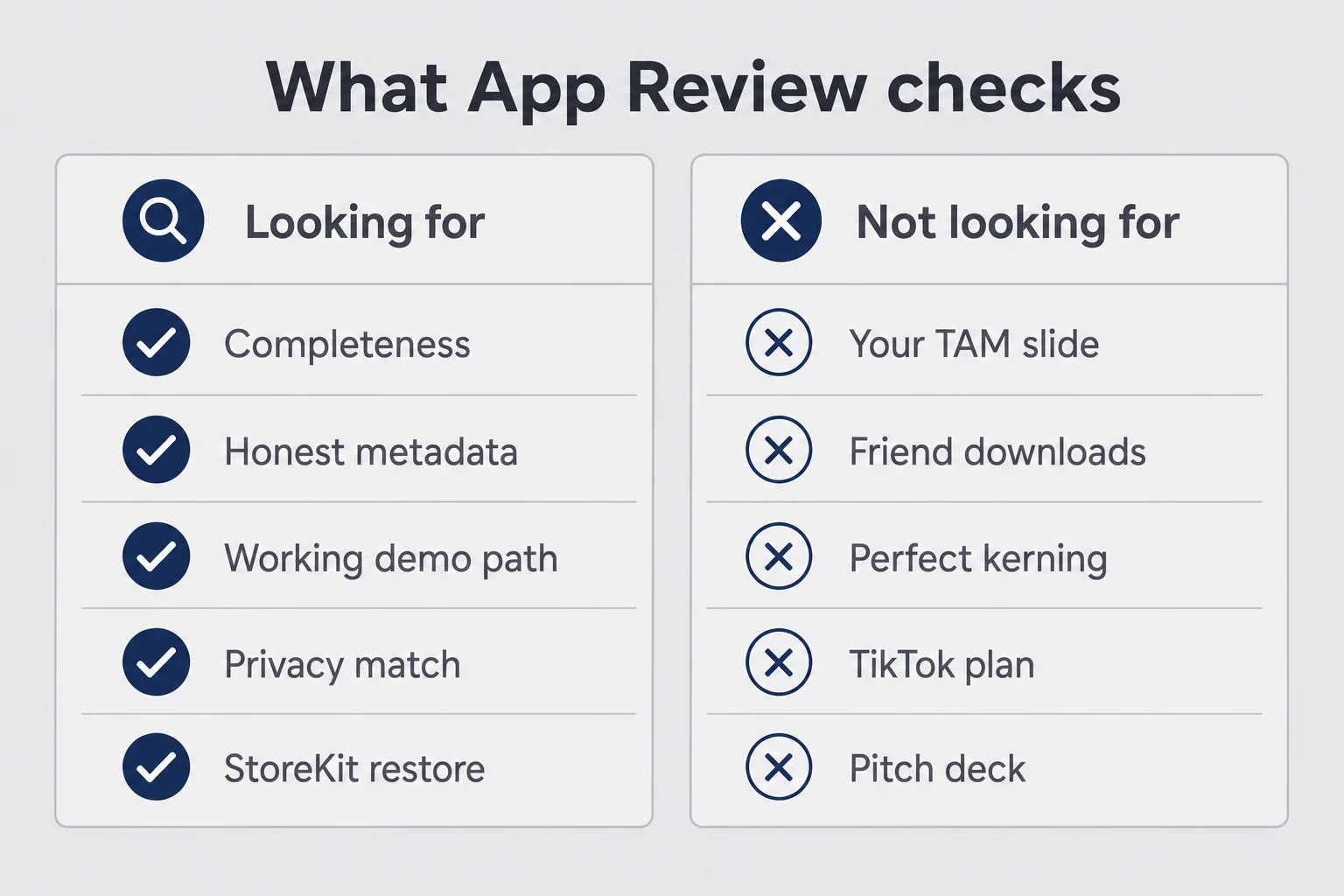
App Review is not a design critique. Nobody is grading your kerning. They are checking policy posture and basic completeness. Does the app do what the listing claims. Can a reviewer exercise the core features. Are payments going through Apple where required. Do privacy labels match reality. Is there a live privacy policy URL. Does the app crash on a clean install. Are you asking for permissions you never use.
They are also looking for honesty in the boring places. Screenshots that show features the binary does not have. Descriptions that promise "AI therapist" energy when you built a reply helper. Age ratings that ignore what users can generate. Placeholder text. Buttons that go nowhere. A paywall that cannot restore purchases. Those are not aesthetic notes. Those are rejection triggers.
Think of the reviewer as a careful stranger with a clipboard, not a mentor. They are not trying to love your idea. They are trying to confirm the app is real, finished enough to use, and not lying in the listing. That framing is freeing. You stop auditioning. You start preparing evidence.
What review is not looking for: your TAM slide, your TikTok plan, or whether forty friends said they would download it. Download love is not a guideline. Completeness is. If you want distribution advice for B2B web products, Reese owns that lane. For consumer iOS, the store listing and the first session are your distribution. Review is the bouncer before either of those get a fair fight.
Here is my blunt position. Most first rejections I have seen (mine included, in spirit if not in every detail) are preventable with a cold-install walkthrough the night before. Not a genius-level App Store strategy. A boring walkthrough where you pretend you have never heard of your own app. If you cannot reach value without tribal knowledge, the reviewer will not either.
I once watched a founder friend demo their app for review prep and get stuck on their own onboarding because the "skip" affordance only made sense if you already knew the joke in the copy. They laughed. Then they fixed it. That is the energy you want: slight embarrassment now, fewer Resolution Center evenings later.
Caveat: some apps sit in gray areas. AI that processes personal content, apps adjacent to dating or health language, anything with user-generated text. Those can get extra questions even when you did everything right. That is not a reason to ship sloppy. It is a reason to write better Notes for Review and keep your privacy story precise. I wrote about the privacy side in more depth in terms of service and App Privacy labels for solo founders. Review will still poke the same spots.
The night-before checklist I wish someone had handed me
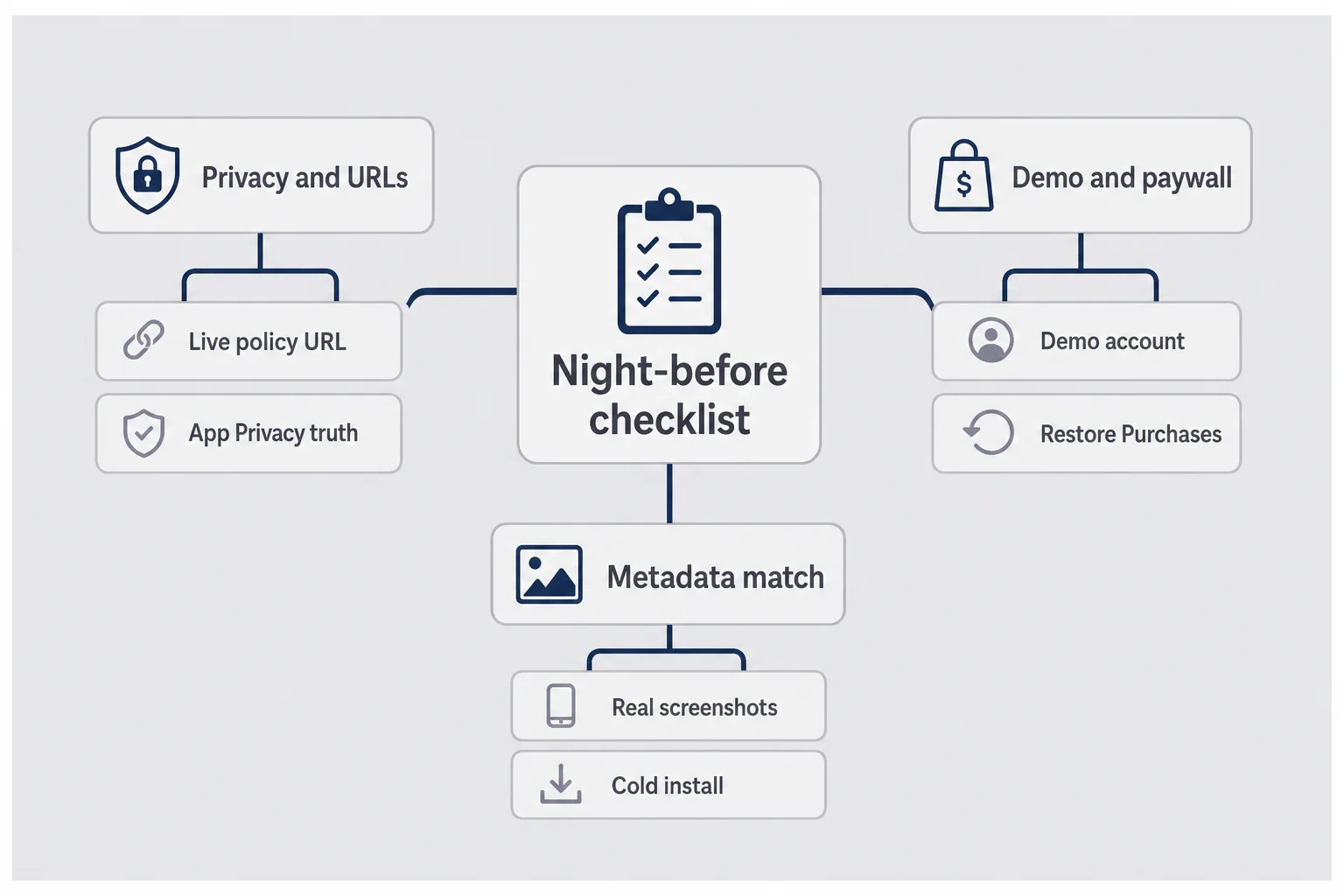
The night before my first real submission, I thought I was ready because the app "worked on my phone." My phone knew my accounts, my photo library permissions, my subscription sandbox history. Reviewers do not. Treat the night before like a dress rehearsal for a stranger.
I run three buckets: privacy and URLs, access and purchases, metadata that matches the build. Miss one bucket and you can still get a clean binary rejected for paperwork. Put the checklist in a note you can reuse. First submissions feel unique. The failure modes are not.
Privacy, labels, and the URLs that get you bounced
Open your privacy policy URL in a private browser window. If it 404s, redirects into a login, or loads a homepage with no policy text, fix it before you submit. Same for the support URL. Reviewers and users both hit these. A dead support link is a classic rejection and a classic one-star review later.
Then open App Store Connect App Privacy and tell the truth about what you collect. Third-party SDKs count. Analytics SDKs count. Crash reporters count. If your binary talks to OpenAI through your server, say what leaves the device and what you retain. For Finish Him, the product decision was ephemeral processing and no chat history stored for training theater. Your labels have to match whatever you actually built, not the story you wish you built.
If you create accounts, you need an account deletion path. If you offer third-party login, Sign in with Apple usually has to come along. These are not optional niceties for big companies. Solo founders get bounced for them constantly.
One more privacy habit that saves resubmits: generate Xcode's privacy report before you upload, and skim it like a suspicious auditor. If a library shows up that you forgot you added during a late-night Cursor session, deal with it now. Review will not be impressed that you "meant to remove analytics later."
Demo accounts, paywalls, and Restore Purchases
If anything requires login, put a working demo account in Notes for Review. Test that account on a fresh install the same day you submit. Expired passwords, email verification gates, and OTP walls are how you fail a review you could have passed. If your app has no login, say so explicitly and describe the two-tap path to the core loop.
If you sell subscriptions, the reviewer needs a way to understand premium without becoming a paying customer in the weirdest way possible. Explain the free path. Make Restore Purchases visible on the paywall. Confirm your in-app purchase products are not stuck in Missing Metadata. Pricing for consumer apps is its own rabbit hole. I covered the money side in iOS app subscription pricing for solo founders. Review cares that StoreKit is wired correctly and that the paywall is not a dead end.
Sandbox purchases can lull you into false confidence. The night before, walk the paywall as if you have never subscribed. Can you see prices. Can you start a purchase. Can you restore. Can you dismiss without feeling trapped. If any of those answers is "sort of," fix it before you submit.
Screenshots and metadata that match the build
Take screenshots from the real app, not from a Figma file that is three iterations ahead. If the listing shows a feature, the binary needs that feature. If you renamed a button, update the screenshots. Guideline 2.3 is not theoretical. Mismatched metadata is one of the most avoidable ways to waste a review cycle.
Also check the boring App Store Connect fields: age rating answers, category, subtitle, promotional text if you use it, and whether your IAP review screenshots are uploaded. Count title and subtitle characters in the App Store title character counter before you paste into Connect — a thirty-one-character subtitle is how you create busywork for yourself. Then install the candidate build on a physical device, delete the app, reinstall from TestFlight or a clean state, and walk the first session with one hand while you pretend you are annoyed. If you get stuck, the reviewer will get stuck faster.
I like to do that cold install while standing in the kitchen, not sitting at the desk where I built the thing. Different room, different posture, less autopilot. It sounds silly until you notice yourself tapping a button that only makes sense because you remember last week's flow.
Cold install rule
Delete the app. Turn off muscle memory. Follow only what Notes for Review would tell a stranger. If you need a second brain to finish onboarding, rewrite the notes or simplify the first screen.
Notes for review app store: the field most founders leave blank
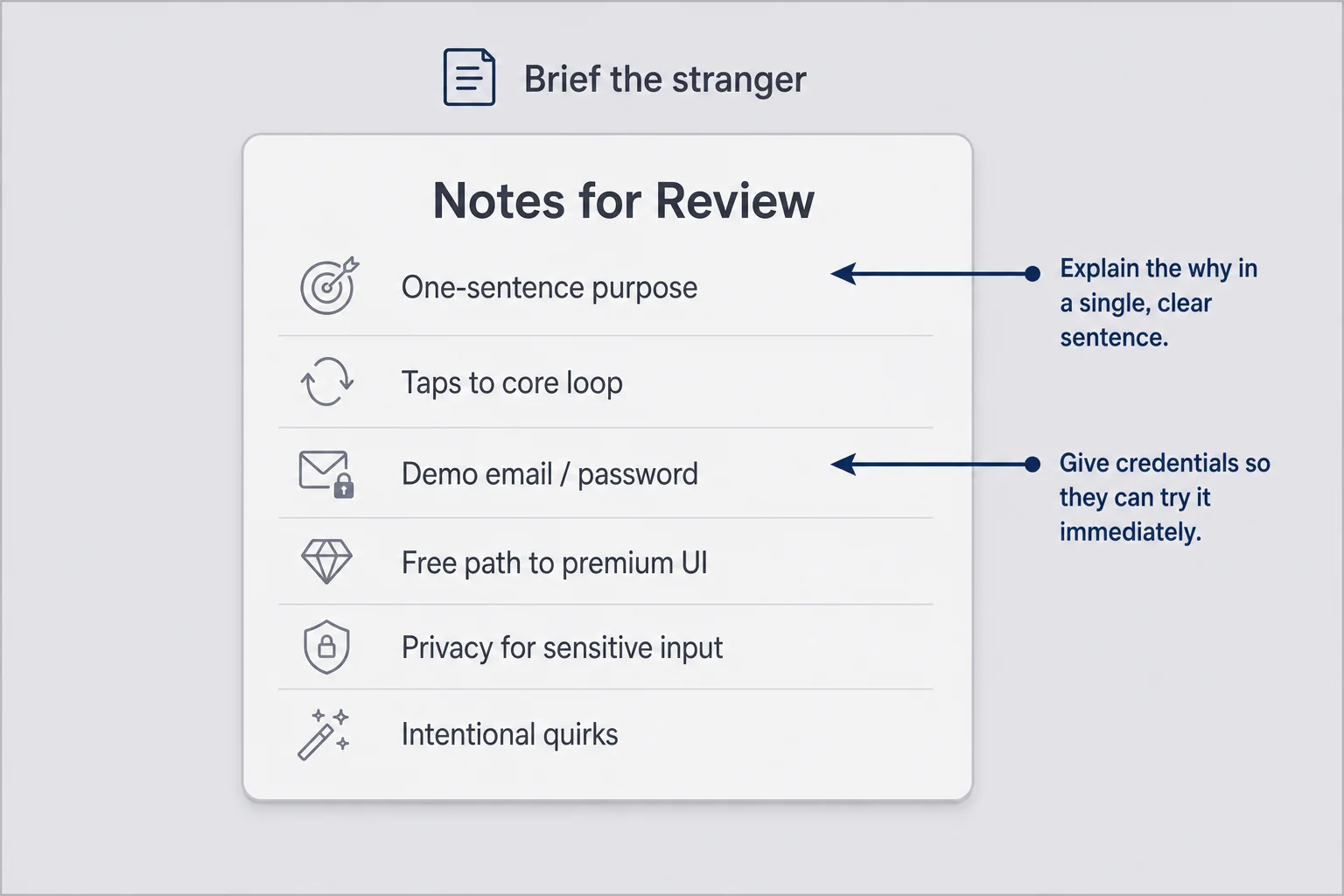
Notes for Review is the most underused product surface in App Store Connect. Founders leave the notes for review app store field blank because it feels optional. It is optional the way seatbelts are optional until you need them.
Write like you are briefing a smart person who has never seen your app and has ninety seconds of patience. What does the app do in one sentence. How do they reach the core loop. If there is a demo account, put username and password on their own lines. If a feature needs a screenshot or a specific screen, say tap Settings, then Premium, then Restore. If your AI feature processes sensitive content, say what happens to the image after generation. If something looks gated, explain the free path.
I draft Notes for Review in a plain text file before I paste them into App Store Connect. Start with a one-sentence purpose, then the exact taps to the core loop, then demo credentials if needed, then how to see premium without buying, then a short privacy note for sensitive inputs, then anything that looks broken but is intentional. That keeps me from writing novel-length anxiety. Short beats clever. Specific beats charming. You are not pitching investors. You are preventing a misunderstanding.
For Finish Him, the notes have to make the screenshot upload feel intentional, not shady. Something in the spirit of: the app generates three reply tones from a chat screenshot the user chooses; images are processed and not kept as a chat archive; here is how to complete one generation on the free path. Exact wording will match whatever you actually built. The point is clarity under time pressure.
Good notes also protect weird-but-legitimate products. A reply helper that asks for a chat screenshot can look invasive if nobody explains the privacy model. A paywall after a free generation limit can look broken if nobody explains how to see premium UI. A consumer app that skips account creation on purpose can look incomplete if nobody says anonymity is the point.
Update the notes every time you resubmit. Reviewers do not carry your previous explanation in their pocket. And never put secrets you would not want sitting in a ticket forever without thinking. Demo accounts should be disposable. Passwords should be changeable. Treat Notes for Review as production copy for one very important user: the person who can reject you.
If you only do one thing from this article, do this field. Empty notes are how complete apps get incomplete reviews.
How to pass app store review when your app feels "weird" to strangers
Consumer apps that solve embarrassing problems have a special review risk. The product makes sense if you have lived the moment. To a stranger, it can look odd, sensitive, or incomplete. That is not a reason to sand off the personality. It is a reason to make the first session self-explanatory.
Start on the first screen. Can someone tell what the app does before they grant a scary permission. Do you ask for camera, photos, or notifications before value is obvious. For personal apps, early permission prompts feel like a trap. Show the relief, then ask for access in context. Finish Him needs a screenshot to work. The upload moment has to feel chosen, not ambushed.
Imagine the reviewer is slightly suspicious in a healthy way. They have seen apps that harvest photos, overclaim AI therapy, or hide the paywall behind fake urgency. Your job is not to perform innocence. Your job is to make the honest path obvious. Label the upload. Explain the output. Make cancel easy. Make premium understandable. Make restore visible.
Then check the trust cues. Privacy copy in-product. Clear free vs premium. No dark patterns that force an account before someone can try the loop. Review guidelines care about honesty and functionality. Users care about whether the app feels creepy. Those two audiences overlap more than founders admit. If your privacy policy says ephemeral and your UI hoards chat history, you have a product problem and a review problem.
AI features need extra clarity. Say what the model does. Say what you store. Do not market magic if the output is a draft the user still has to edit. Reviewers and users both punish overclaiming. Your validation work should already have proven that strangers want the awkward moment fixed. Review is where you prove the shipped version is complete enough to try.
How to pass app store review for a personal app is often the same as how to earn trust from a first-time user. That overlap is the point. You are not writing two products: one for Apple and one for humans. You are writing one clear product and documenting it for a hurried stranger.
My take: polish the first sixty seconds harder than you polish the settings screen. Reviewers live in the first sixty seconds. So do most downloaders.
First app store submission: what happens after you hit Submit
You hit Submit. The button stops being available for that version. Status moves. You feel briefly heroic, then immediately unwell. That is the normal arc of a first app store submission.
Next comes Waiting for Review, then In Review, then either approval, rejection, or a metadata rejection that feels like a riddle. Sometimes Apple asks a question in Resolution Center instead of a hard reject. Answer fast. Same-day replies often get same-day movement. Two-day silence puts you back in a slower emotional weather system.
While you wait, do not tear apart the product. Keep a changelog for version 1.0.1. Gather TestFlight feedback you deferred. Check that your privacy policy and support pages still load. Prepare your launch note for friends who asked to be told when it is live. If you are thinking about Product Hunt or a big social blast, remember Max's warning energy on launch days: a store approval is not a marketing plan. For consumer apps, the store page and word of mouth do more of the early work than a B2B cold email sequence ever will.
Also decide your personal rules for status checking. Two scheduled looks a day is healthier than forty panic refreshes. I failed this test the first time. You can do better.
A useful waiting-week project is concrete, not motivational. Re-read your App Store description out loud and cut anything that overclaims. Watch one person use TestFlight without you narrating. Confirm Restore Purchases still works after a reinstall. Write the three replies you will send when friends ask "is it live yet?" for Waiting, Rejected, and Ready for Sale. Sketch the 1.0.1 fix list so rejection does not become existential redesign.
When the status flips to Ready for Sale, breathe, then verify the public page. Open the listing on a device that is not your developer phone. Confirm price, screenshots, and the purchase flow in production with a real (small) transaction if you can stomach it. Sandbox success is not the same as production confidence. Then tell people. Not before.
App store rejection fix: read the guideline before you panic
Rejection feels personal. It usually is not. The message cites a guideline. Your job is to treat that citation like a bug report, not a character assessment.
Read the full message twice. Screenshot it for yourself. Identify whether the issue is metadata, access, binary behavior, privacy, or payments. Then reproduce the exact path on a clean install. If you cannot reproduce it, you are not ready to resubmit. You are ready to ask a clarifying question in Resolution Center with evidence of what you tried.
The emotional move is to open Xcode and change five things. The useful move is to open Notes and write: guideline number, exact symptom, path to reproduce, suspected layer, fix plan. Five minutes of clarity saves five days of thrash.
Metadata vs binary: which fix do you actually need?
Metadata problems (bad URL, wrong screenshots, incomplete IAP metadata, unclear notes) can often be fixed in App Store Connect without a new binary. Binary problems (crashes, missing restore, broken demo login, privacy manifest issues, incomplete features) need a new build and a bumped build number. Fixing the wrong layer wastes days.
Do not use rejection as an excuse to rewrite unrelated screens. Surgical fixes beat panic refactors. Every extra change is new surface area for the next reviewer. If the rejection is about a support URL, fix the URL. Do not also redesign the paywall "while you are in there." That sentence has delayed more indie launches than App Review itself.
How to reply in the Resolution Center without sounding defensive
Write short. Name the guideline. Say what you changed. Tell them where to tap to verify. Paste demo credentials again. Attach a screen recording if the flow is easy to miss. Thank them like a professional, not like someone auditioning for forgiveness.
A reply shape that works: "Thank you for the feedback on Guideline X.Y. We fixed Z by doing A. To verify, open the app, tap B, then C. Demo account: email / password. Attached is a short screen recording of the path."
Avoid "you misunderstood my visionary product." Avoid dumping your life story. Avoid arguing about whether the guideline should exist. If you truly comply and the rejection seems like a misread, then appeal with evidence. Most of the time, a calm fix is faster than a philosophical appeal.
That is the whole app store rejection fix loop: diagnose, reproduce, fix the smallest correct layer, explain the fix, resubmit. It is not glamorous. It works.
The rejection reasons that keep catching consumer apps
Patterns repeat. Solo founders building personal apps trip the same wires.
Incomplete first experience. Placeholder copy. Buttons that promise a future feature. Onboarding that dead-ends without a demo path. If the reviewer cannot complete a meaningful action, Guideline 2.1 shows up. The cruel part is that you know the finished vision in your head. The reviewer only knows the binary.
Broken or missing demo access. Account required, notes empty, OTP required, backend asleep for the weekend. Your app can be beautiful and still fail because nobody could log in. I have seen people submit on Friday and take the weekend offline, which is a fun way to discover that "works on my machine" included a local API that was not running for Apple.
Privacy mismatch. Labels say nothing collected while an SDK phones home. Policy URL is a marketing homepage. Account creation without deletion. Personal content apps get less benefit of the doubt here, and they should. If your app asks for a screenshot of a private chat, expect the privacy story to be read carefully. That is fair.
Payments mistakes. Digital features sold outside StoreKit. No Restore Purchases. IAP products not ready for review. A pretty paywall that cannot complete a purchase path. Consumer founders sometimes copy web SaaS habits and drop a Stripe link into an iOS app. That is a different product category problem. On iOS, digital unlocks usually mean Apple's purchase rails.
Metadata fiction. Screenshots from a prototype. Description claims the app does not support. Category or age rating answers that do not match content. If your screenshots show three reply cards and the build only shows one, do not hope nobody notices. Somebody will.
Permission greed. Asking for tracking, contacts, or location before the app has explained itself. Even when not an instant reject, it poisons trust and can trigger questions. Ask late. Ask in context. Ask only for what the next tap needs.
None of these require a ten-person compliance team. They require a night-before checklist and the humility to walk your own app like a stranger. If you want a broader launch mindset beyond the store gate, Max's how to launch a micro-SaaS is useful for the "nobody is waiting" emotional reality. Your distribution channel is still different. The loneliness of the wait is the same.
What I would do differently on my second submission
I would write Notes for Review first, not last. I treated them like an afterthought. They are part of the product packaging.
I would do the cold install earlier, with a friend watching, before I felt "done." Friends find the stuck points your muscle memory hides. Ask them to narrate out loud. The silence before they tap is data.
I would freeze metadata twenty-four hours before Submit. No last-minute screenshot swaps unless something is actually wrong. Panic edits create mismatches. If you must change a screenshot, re-check the description in the same sitting so the story stays coherent.
I would keep a rejection folder ready: guideline PDF bookmarks, a text template for Resolution Center replies, a disposable demo account I can reset. Hoping you will not need it is not a plan. The folder is not pessimism. It is respect for how often first submissions teach you something you missed.
I would separate launch marketing from review status. Celebrating Submit on social media and then going quiet for a week of Waiting for Review is a mood killer you do not need. Celebrate Ready for Sale, or celebrate the TestFlight that already helped someone. Status portals are not content.
I would also stop treating App Review like the main character of the launch. The main character is still the embarrassing moment your app solves. Review is a gatekeeper scene. Important. Not the plot.
And I would remember my own line more often: your first app does not need to be your life's work. It needs to solve one embarrassing problem well enough that a stranger pays. Review is how that stranger gets permission to find you. It is not the product.
Questions I still get about App Review
How long does App Store review usually take for a first submission?
Often a few days, sometimes longer during holiday spikes or when your app needs extra policy scrutiny. Plan for a week emotionally so a three-day wait feels like a gift. Do not treat every hour of silence as a personal rejection. Keep a TestFlight build warm and use the wait to tighten copy, not to rewrite the whole product.
What should Notes for Review include on a first App Store submission?
One sentence on what the app does, the exact taps to the core loop, demo credentials on their own lines if login exists, how to see premium without buying, and a short privacy note if you process personal content. Write for a smart stranger with ninety seconds. Empty notes are how complete apps get incomplete reviews.
Do I need a demo account if my app has no login?
If there is no account gate, say that clearly in Notes for Review and explain how a stranger can reach the core loop in two or three taps. If anything is paywalled, tell the reviewer how to see premium without buying, or what free path still proves the app works. Blank notes plus a gated first screen is how you earn a 2.1 rejection.
What is the fastest app store rejection fix after a Guideline message?
Read the exact guideline number twice, reproduce the reviewer path on a clean install, then fix only that issue. Metadata and review-note problems often do not need a new binary. Crashes, missing Restore Purchases, broken demo accounts, and privacy mismatches usually do. Reply in Resolution Center with what you changed and where to tap.
Can I appeal an App Store rejection instead of fixing it?
Appeal when you already comply and the rejection looks like a misunderstanding of your product. Most first-submission rejections are real compliance gaps, not philosophy debates. Fixing and resubmitting with a calm note is usually faster than arguing. If you appeal, stay factual, cite the guideline, and attach evidence.
Should I submit while I still have placeholder screens?
No. Placeholder copy, Coming Soon buttons, and unfinished flows are classic completeness rejections. Ship a small complete product, not a large half-built one. If a feature is not ready, remove it from the binary and the listing until it is. Reviewers open your app cold. They will not imagine the version you meant to ship.
Ready for Sale is not the finish line
When the status finally flips, you will want it to mean the hard part is over. It is not. Ready for Sale means strangers can install the thing. Now you find out whether the first session feels safe, whether anyone comes back tomorrow, and whether the paywall makes sense after the relief lands. Downloads without retention are still vanity. Retention without revenue is still a hobby. Review only let you start keeping score in public.
If you are stuck in Waiting for Review right now, close the tab for an hour. Your binary is either fine or it is not. Refreshing will not change the guideline math. Go fix the onboarding sentence that still sounds like a pitch deck. Go sit with one TestFlight user and watch them hesitate before the scary permission. That work compounds after approval. The portal refresh does not.
Ship the honest version. Brief the reviewer like a human. Fix rejections like bugs. Then get back to the part that actually matters: whether a stranger on a Thursday night feels less stuck because your app existed.


Comments