App Store Connect Has Better Numbers Than You Are Using
How solo founders read App Store Connect analytics and product page metrics without drowning in tabs: impressions, conversion, retention, and a Friday ritual that actually changes your listing.
 By Iryna26 min read
I refreshed App Store Connect on a Tuesday night while my cat walked across the keyboard and Safari helpfully opened a fourth analytics tab I did not mean to click. Impressions were up fourteen percent. Installs were flat. My stomach did the thing it does when a number looks like praise but behaves like a mirror. I had changed nothing on the listing in six weeks. I had not touched screenshots since launch. I had been checking the dashboard the way you check a text thread you are afraid to reply to: often, quickly, without changing the outcome.
If you want app store connect analytics solo founder habits that fit one person with evenings and a $99 developer account, you have probably already met the enterprise version of this conversation. Sensor Tower exports. Keyword rank grids. Competitive intelligence PDFs that assume you manage twelve apps and a user acquisition team. I am Iryna. I design consumer products, I shipped Finish Him Replies, and I still learn what Apple's numbers mean when nobody else is in the room to interpret them for me. This is the guide I wanted before I treated Connect like a slot machine instead of a weekly operator ritual.
App store connect analytics solo founder work is not the same as B2B micro-SaaS analytics. Max's post is about the one number that says your web business is alive. Reese will teach you marketing sprints that send traffic you can measure on a landing page. Consumer iOS apps live inside Apple's storefront. Strangers decide in seconds on a listing you do not control the layout of. Connect is where Apple tells you how that decision went, before Firebase ever sees a session. Pair this with app store optimization because metadata earns impressions; analytics tell you whether those impressions turned into trust.
I am not an ASO agency. I am someone who polished onboarding for years at other companies, then stared at my own conversion rate at midnight wondering if the problem was screenshots, stars, or the fact that my app touches private messages and people are right to hesitate. Everything below is what I would do again, what I would ignore, and what I think matters when you are the entire growth team. Some numbers are illustrative examples, not claims about my bank account.
The goal is not to memorize every report Apple ships. The goal is to build a small loop: read the store funnel, name the bottleneck, change one lever, wait long enough to learn. Connect rewards patience and punishes dashboard tourism. Downloads without retention are still vanity. Retention without revenue is still a hobby. But none of it starts until you admit the product page is a screen in your app and Apple is already A/B testing your life against competitors you have never met.
App store connect analytics solo founder: what the dashboard is actually for
Apple built App Store Connect for operators who submit builds, answer review questions, and eventually look at money. Analytics arrived in layers over the years, and the UI still feels like several products stitched together with the same blue sidebar. That is fine. You are not there to admire the information architecture. You are there to answer three questions strangers cannot answer for you: did the right people see my listing, did they install when they got there, and did they come back enough that I should keep building.
Think of Connect analytics as the storefront half of your funnel. Everything before the first open lives here. Impressions. Product page views. Conversion rate. Download totals by source. Retention curves Apple computes from opt-in data. Proceeds and subscription events tied to Apple's ledger. In-app behavior lives elsewhere: your analytics SDK, crash reports, maybe a simple event log you added because you finally admitted the paywall was invisible.
When you are solo, the failure mode is splitting attention across too many tools and trusting none of them. The other failure mode is living only inside Connect and never watching session one in your app. I did the first one for a month. I opened Trends because the line went up. I felt productive. I did not change a screenshot. The second failure mode hurts too: you fix onboarding while your listing still shows a settings screen as hero image number one. Connect exists to catch that arrogance early.
This is different from Apple Search Ads reporting, though the panels rhyme. Ads tell you what you paid for. Organic Connect data tells you what Apple gave you for free because your metadata matched a search or browse slot. Both funnel into product page views. Only Connect shows organic conversion without invoice attached. That is why I read Connect before I scale paid acquisition. Amplifying a listing that converts at nine percent is burning cash with extra steps.
You also do not need perfect data to make decisions. Apple's numbers lag slightly, cohorts wobble when you ship a bug, and seasonality hits consumer apps in weird ways (January fitness guilt, summer dating app churn, back-to-school productivity spikes). Solo founders still win because iteration compounds. A one-point conversion lift on a hundred weekly page views is ten more installs. Ten more installs with honest retention math is the difference between "my friends tried it" and "strangers came back twice."
If you have not shipped yet, read how to build your first consumer iOS app and get a baseline listing live. Analytics without traffic is an empty room. Traffic without analytics is guessing which door people used. You want both, but the reading habit starts the week after you have something to measure, not the week you fantasize about charts.
The three tabs I actually open every Friday
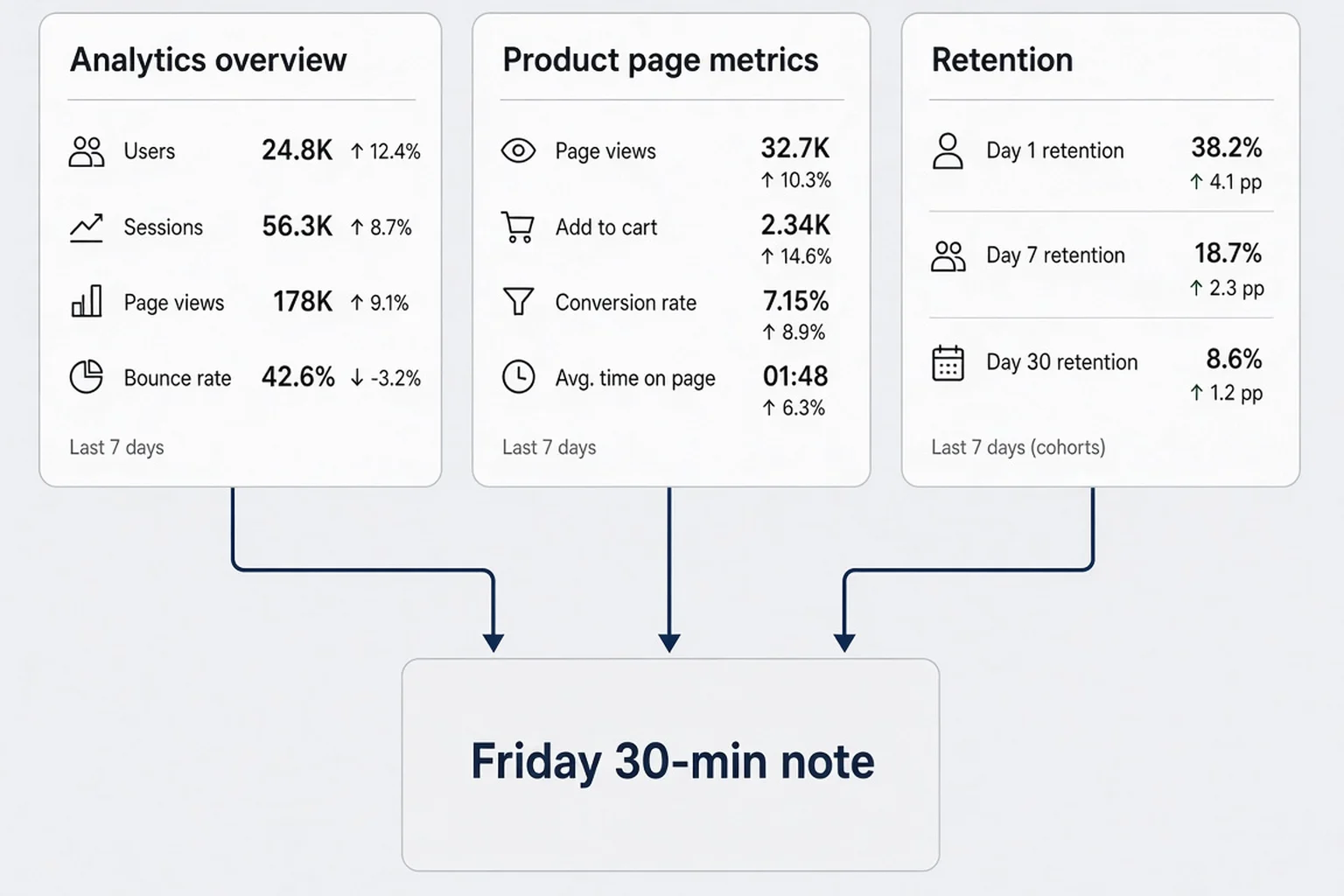
I do not open App Store Connect daily anymore. I did during my first launch week, and it made me anxious about numbers I could not act on yet. Now I block thirty minutes on Friday afternoon, coffee optional, phone in another room. Three areas, one note in a paper notebook or a single doc line. That is the whole religion.
The first stop is App Analytics at the app level, date range set to last seven days compared to the previous seven. I look at impressions, product page views, and conversion rate in one glance. Apple surfaces them in overview tiles and in the Acquisition section depending on the UI version you see. Do not get precious about which submenu label is newest. Follow the numbers: how often you appeared, how often someone opened your page, what fraction downloaded.
The second stop is Metrics filtered to retention, day one and day seven if volume allows. If installs are still tiny, I skip retention and write "sample too small" in my note so future-me does not overfit a spike from one Reddit post. Retention is a product grade, not a marketing grade. When it moves, I think about onboarding, permission timing, and whether the first win arrives before the paywall.
The third stop is Sales and Trends or Payments and Financial Reports depending on whether I need proceeds sanity. Subscriptions lag events you see in StoreKit testing. Connect proceeds include refunds and renewals Apple's way, not Stripe's way. I compare week-over-week proceeds to installs. If installs rose and proceeds flatlined, either free users grew or trial conversion broke. That sends me to in-app paywall screens, not keyword fields.
Everything else is optional until something breaks. Sources when conversion shifts and I need to know if TikTok traffic behaves differently from search. Product page optimization when I am running an Apple test. Benchmarks when I want humility. App Store Connect API when Max convinces me to automate exports. Optional does not mean useless. It means they do not get Friday time unless last week's note flagged a mystery.
I write one sentence at the bottom: "This week the bottleneck is ___ because ___." Bottleneck vocabulary stays small: visibility, conversion, activation, retention, revenue. If I cannot name one, I was tourisming again. Close the laptop. Go outside. The numbers will still be there Monday, and they will still not fix themselves while you refresh.
Why Friday and not Monday
Mondays lie. Weekends inflate consumer apps. Dating and messaging apps spike Friday night. Productivity apps spike Sunday night regret. A Monday panic about a dip you saw Sunday morning sends you into screenshot changes before you know if the dip is noise. Friday captures a full week plus the prior week for comparison. You act on weekends with a plan instead of reacting before coffee.
The notebook line that saved me from thrashing
Last month my line read: "Conversion down, impressions up, retention flat — listing problem, not product." I reordered screenshots to lead with outcome instead of feature chrome. Conversion recovered before I touched code. Without the sentence I would have refactored SwiftUI for no reason. Analytics is not about numbers. It is about forcing a diagnosis before you touch a lever.
Impressions, page views, and installs measure different things
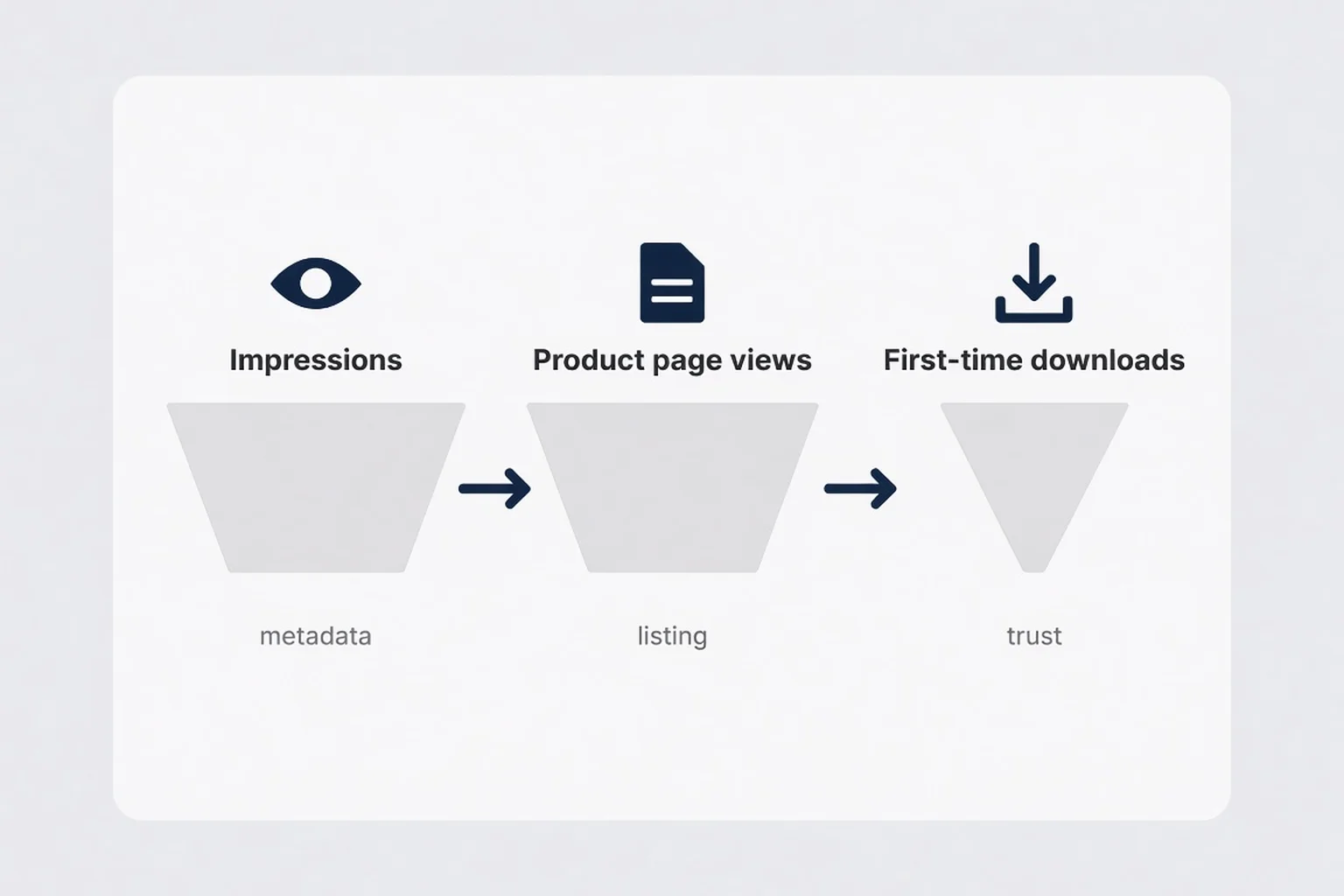
Solo founders mix these three because they all feel like success. They are sequential stages. Treating them as one metric is how you celebrate an impressions chart while installs stall.
Impressions mean your app icon and name appeared in search results, browse, or other surfaces Apple counts. Someone might not have tapped. They might not have even registered your existence if your icon blends into a grid of blue gradients. Impressions reward ASO metadata: title, subtitle, keyword field, category fit, and the slow accumulation of download velocity Apple will never fully explain.
Product page views mean someone opened your listing. That is intent. Not purchase intent yet, but curiosity with a cost: they paused their day, read your subtitle, maybe swiped screenshots. Page views bridge marketing and product design. If impressions divide by page views yields a tiny ratio, your search snippet is not compelling or your rank is low enough that only accidental taps happen. If page views are healthy, you earn the right to obsess over conversion.
Installs or first-time downloads mean they tapped Get. Apple distinguishes redownloads and updates in other reports. For growth, first-time downloads matter. Installs without opens still count as ego fuel. Installs with day-one uninstalls count as a warning label on your onboarding.
I sketch the funnel on paper when I am confused: impressions → page views → installs → day-one active → trial start → paid. Connect owns the first three tightly. You own the rest with in-app instrumentation. When Max talks about error monitoring, that is downstream of install. When I talk about paywall UX, that is downstream too. Do not optimize paywall copy when page views are zero unless you are testing with TestFlight friends only.
Illustrative math without fantasy precision
Say you get twelve thousand impressions in seven days, eight hundred product page views, and one hundred forty first-time downloads. Your impression-to-view rate is roughly six point seven percent. Your page view to install conversion is seventeen point five percent. The first ratio speaks to search visibility and snippet appeal. The second speaks to listing trust and creative. If you improve metadata and impressions double but views barely move, you might be ranking for irrelevant terms. If views grow but conversion collapses, check ratings and reviews and screenshot story before you blame the algorithm.
When totals lie gently
Connect shows totals that include updates and territories you forgot you shipped. Filter by territory when a country spike looks suspicious. Filter by device if your iPad listing is a ghost town. Compare App Store search separately from App referrer or Web referrer when Apple splits sources. A blended average hides a channel that loves you and a channel that hates you.
Product page conversion rate is your listing's report card
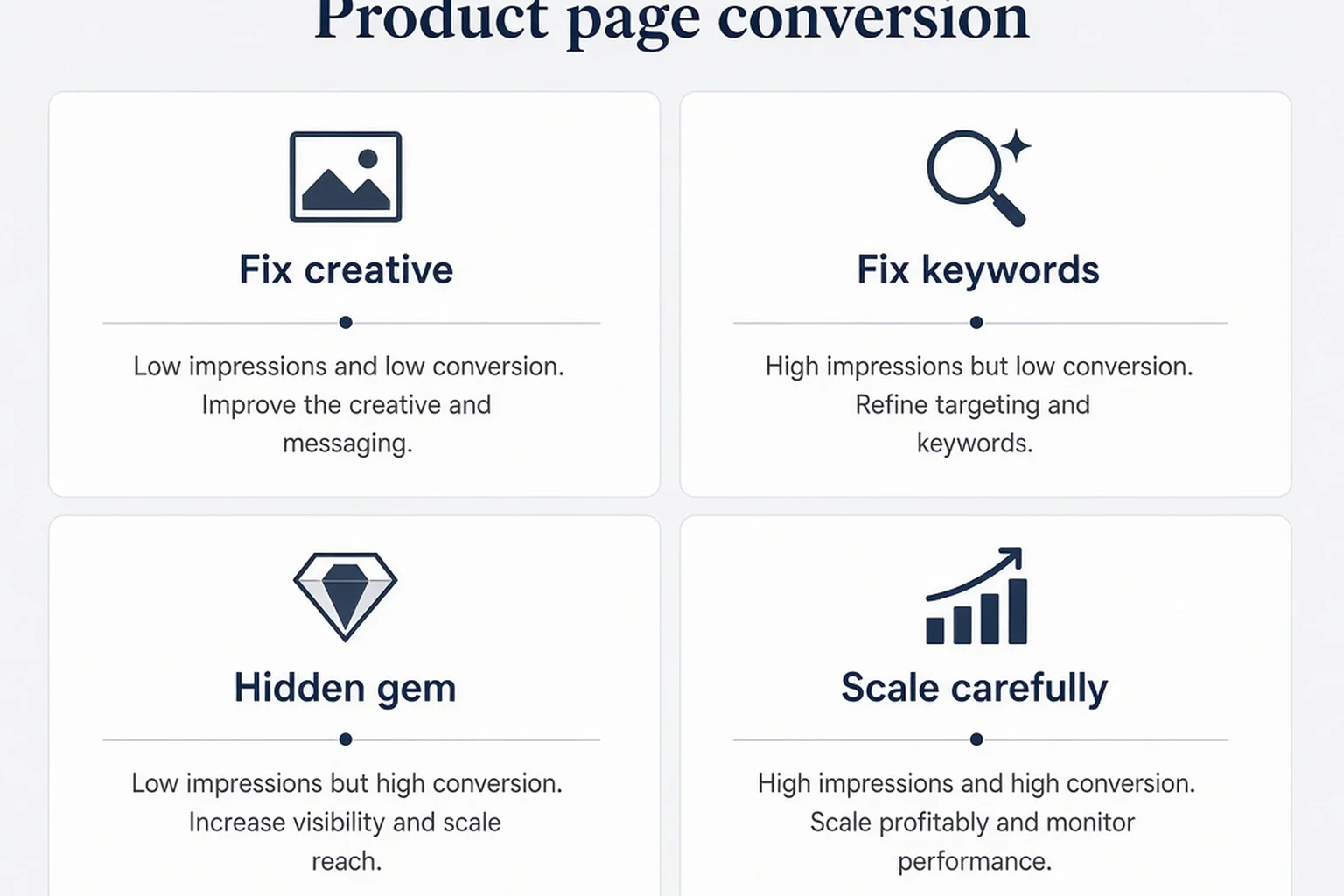
Apple exposes conversion rate as the percentage of product page views that become first-time downloads within a window they define in the help docs. Read Apple's definition once so you do not argue with the denominator in your head every Friday. Then treat the metric as a letter grade on your listing, not on your entire life.
High conversion with low impressions is a hidden gem problem. You convert the few strangers who find you, but metadata is not casting a wide net. That is common early. Fix keywords and social proof before you panic about product. Low conversion with high impressions is the painful one. Apple is showing you to the world and the world is tapping back. Your screenshots might be beautiful and your promise unclear. Or your star average is 3.2 and strangers trust strangers more than they trust your gradient icon.
I think in bands, not absolutes. Below ten percent on a consumer utility app with fewer than fifty reviews can still be fixable creative. Above twenty-five percent with meaningful volume is a signal your listing matches intent. Between those bands, trend matters more than the number itself. Two weeks down after a competitor launched a clone with more reviews is different from two months down while you did nothing.
Conversion connects directly to work you can do alone. Reorder screenshots. Rewrite subtitle in thirty characters. Refresh promo text without a full release. Run product page optimization if your app qualifies. Ask for reviews after a win so stars catch up to reality. None of that requires Swift. All of it shows up in conversion before it shows up in MRR.
One variable per month
If conversion drops, change screenshot order or subtitle, not both in the same week. Connect lags and seasonality noise will fool you into thinking the wrong fix worked.
Compare conversion on organic search traffic versus paid when you run Apple Search Ads. Paid keywords should be high intent. If paid converts worse than organic, your ad keywords might be broad or your custom product page mismatch is confusing. If paid converts better, organic queries might be informational fluff you should stop chasing in metadata.
Screenshots are analytics, not art
I used to treat screenshots like portfolio pieces. Connect taught me they are sequential arguments. Slide one is the outcome. Slide two is how it works in one thumb reach. Slide three is privacy or social proof. Analytics cannot tell you which slide failed, but A/B tests can if you use Apple's tooling. Without tests, change one slide, wait two weeks, read conversion. Boring science beats dramatic rebrands.
Sources and campaigns when Apple shows you the door
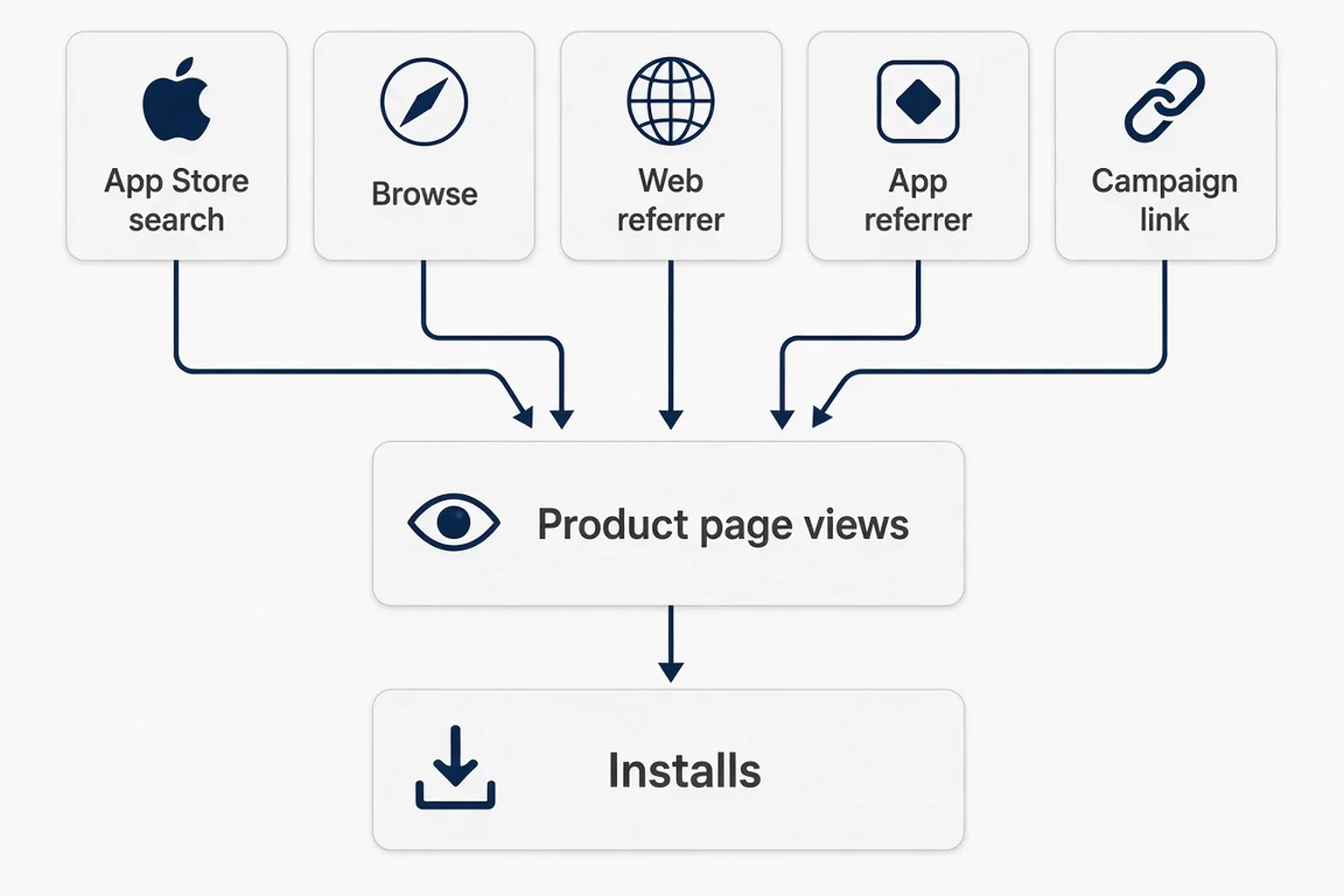
The Sources pane is where solo founders learn they accidentally built a TikTok app or a search app or a "friends shared a link once" app. Apple attributes product page views and downloads to buckets: App Store browse, App Store search, app referrer, web referrer, and campaign links if you use Apple's campaign parameters.
Search is the compounding channel. Browse is luck plus featuring you will not control at small scale. Web referrer might be your landing page or a press mention. App referrer can be another app or an ad network if configured. When a bucket spikes, read conversion inside that bucket if Apple exposes it, or infer from timing. Did you post a reel? Did you change keywords? Did a blogger link you?
Campaign links matter when you run structured tests. You generate a link in Connect, append it to a bio, and watch Campaigns data instead of guessing from total installs. Solo founders skip this because it feels enterprise. It is not. It is how you know whether your Instagram Reels experiment beat your YouTube Shorts experiment without arguing in your head.
I watch search terms when Apple provides search popularity in App Analytics. Not to chase every autocomplete, but to notice language drift. Users might search "reply suggestions text" while your subtitle says "AI messaging assistant." That mismatch hurts conversion even when impressions rise. Fix language in metadata, then re-read sources two weeks later.
Organic versus paid sanity
When you turn on Apple Search Ads, total impressions can explode while organic impressions look flat. That is fine if blended conversion and proceeds improve. If ads drive page views but organic conversion was already weak, you paid to highlight a listing problem faster. Connect sources help you separate channels so you do not credit ASO for ad spend.
Soft launch and phased release
If you use iOS soft launch tactics, sources will look weird for a while. One country, limited marketing, maybe half the metadata translated. Compare like territories to like territories. Do not compare Poland week one to United States week twelve unless you enjoy false conclusions.
Retention curves that tell on your first session
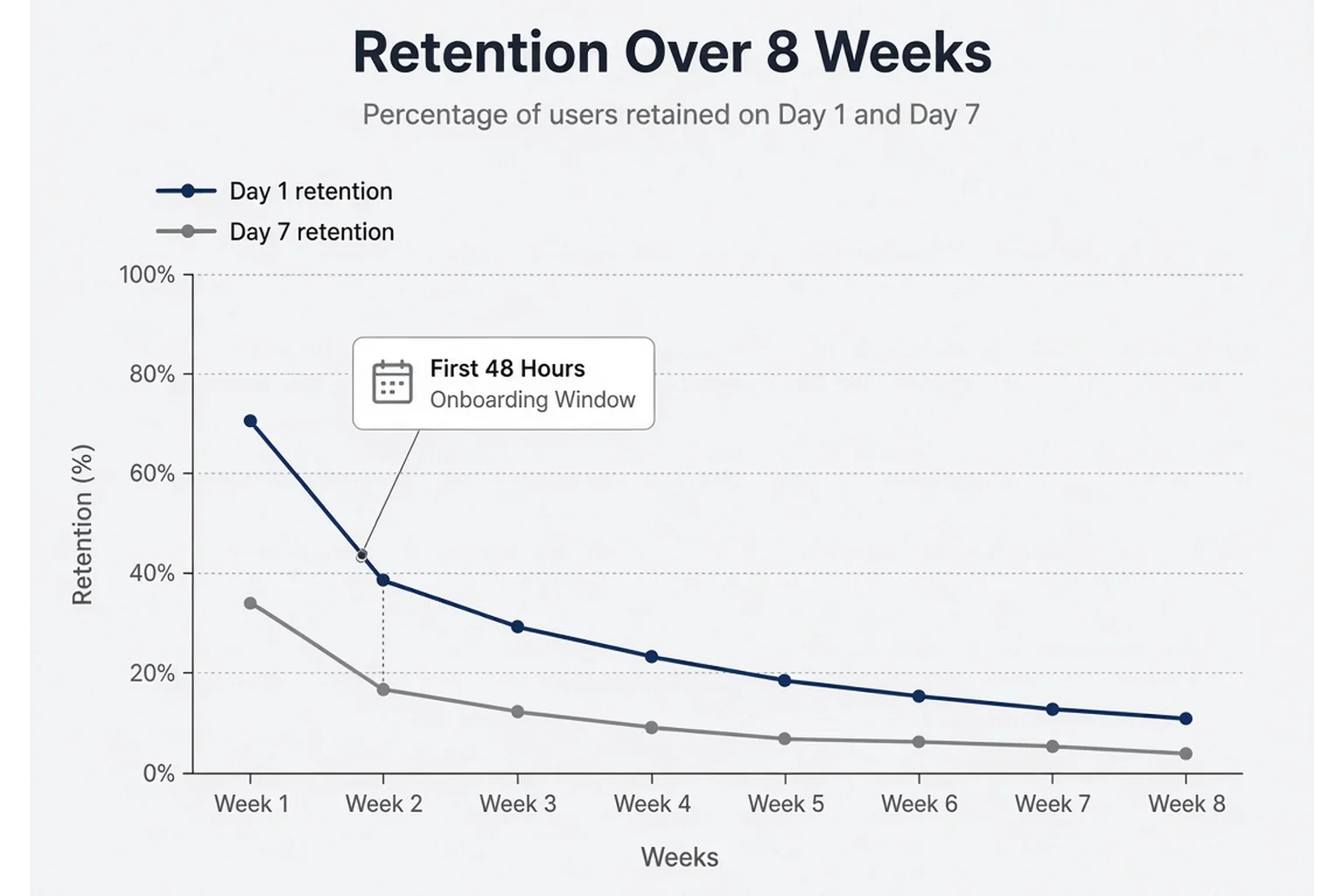
Retention in Connect is Apple's view of how many people who installed your app used it again on day one, day seven, and beyond. It is not as flexible as Mixpanel cohorts, but it is standardized and free. For solo founders, that is enough to catch catastrophic onboarding mistakes.
Day-one retention answers: did the first session feel worth repeating tomorrow? For consumer apps with emotional stakes, day one is trust, not habit. Did you ask for photo access before value? Did the paywall block the core promise? Did the app crash on launch for older phones you never tested? A cliff at day one sends you to onboarding and crash logs, not the keyword field.
Day-seven retention answers: did anything become a habit or a recurring job? Utilities might spike day one and fade day seven if the job is episodic. That is not always failure. Dating-adjacent tools might be intentionally occasional. Know your cadence before you declare churn apocalypse. Still, consumer app retention principles apply: honest reminders, no guilt trips, respect for privacy promises you made on the listing.
Sample size discipline matters. Ten installs yesterday makes day-one retention a coin flip. I ignore retention dashboards until I have a rolling week with at least a few dozen installs unless something is obviously on fire. When volume is low, qualitative signals beat charts: support emails, App Store reviews, TestFlight notes from friends who lie kindly.
Retention drops after a release point to regression. Retention drops without a release point to seasonality, competitor launches, or a marketing channel sending low-intent users. Sources plus retention together diagnose channel quality. Search retention usually beats random viral traffic. Viral traffic flatters installs and insults day seven.
Pair retention with proceeds
Subscriptions add a layer. High day-seven with flat proceeds might mean free tier satisfaction or trial users who never convert. Connect shows subscription events in sales reports; in-app analytics should show paywall impressions. Retention without monetization insight is incomplete. I am not asking you to become a data engineer. I am asking you to notice when the story forks.
The Metrics tab maze and how I stopped getting lost
Apple reorganizes Connect often enough that screenshots in old blog posts lie. I stopped bookmarking submenus and started bookmarking questions. How many saw me? How many opened the page? What fraction installed? Where did they come from? Did they return? What did Apple pay me? Those questions map to panels even when labels move. If you cannot find a metric, search Apple's help for the exact term on the day you read it, then write the path in your notebook once. You are building a personal map, not studying for an exam.
App Store Connect analytics solo founder guilt often sounds like "I should export everything to a spreadsheet." You should not, not yet. Spreadsheets shine when you have stable volume and repeat the same pivot weekly. Early on they become a graveyard of CSV files you never open. Stay in Connect until Friday notes repeat the same bottleneck three times. Then automate that one export, not the whole product.
Peer benchmarks without comparison disease
Connect offers benchmark hints in some views comparing you to similar apps. Treat them like a rude friend: sometimes useful, sometimes demoralizing. Categories mix free games with paid utilities. A benchmark says nothing about your pricing model. Glance for orders of magnitude, not for self-esteem. If you are orders of magnitude below peers on conversion but close on impressions, creative is the lever. If you are below on both, metadata and positioning need love. If you beat benchmarks on conversion with tiny impressions, go write better keywords instead of redesigning icon for the fourth time.
TestFlight is not Connect, but it trains your eyes
TestFlight beta habits teach you to read retention before the public sees your mess. Betas will not populate App Store conversion funnels. They still train you to connect qualitative feedback with quantitative drops. When a tester says "I did not know what to do after upload," expect day-one retention to cough later. Connect numbers are the public version of the same story with strangers who do not reply to your DMs.
Review velocity and the metrics you cannot A/B test easily
App Review delays compress your learning calendar. You ship a screenshot change in metadata tied to a release; review takes five days; metrics lag another week. Plan experiments on promo text and product page optimization when you can, so you are not idle while Waiting for Review owns your mood. Analytics discipline includes calendar discipline. Otherwise you change three things the day approval hits and learn nothing.
Accessibility and locale splits you might ignore
If you localize metadata, filter territories before you declare victory in Norway and failure globally. A conversion lift in one language might mean you finally wrote a subtitle that sounds human, not translated marketing. Retention differences by locale sometimes reflect payment friction or cultural tone, not product bugs. Connect will not explain culture. It will show you the split. Your job is to notice and ask one user who lives there.
What I tell myself when numbers go down
Down weeks happen because the world is not a spreadsheet. Competitors launch. Apple adjusts search. Your influencer post aged out. Summer arrives and people touch grass instead of anxiety apps. I write "down" in the notebook, note external events, and check whether the funnel broke at a specific stage. If the whole funnel shifted together, suspect market or season. If one stage broke, suspect the lever tied to that stage. Panic is optional. Tea is mandatory.
Proceeds, subscriptions, and the gap between downloads and MRR
Connect Proceeds reflect Apple's financial reality: price tiers, taxes, refunds, renewals, and the small print in subscription pricing. Downloads can rise while proceeds fall if you ran a free promo, if annual renewals dipped, or if a bug blocked purchases.
I compare seven-day proceeds to seven-day first-time downloads when I change monetization. Not as precise unit economics, but as a smoke alarm. If downloads doubled and proceeds moved ten percent, either price is wrong, trial conversion broke, or most new users are free-only regions. Each hypothesis sends you somewhere different: paywall layout, StoreKit configuration, territory availability.
Refunds show up in financial reports more clearly than in vanity download charts. A spike in refunds after a marketing push means the listing overpromised or onboarding lied. Fix copy alignment before you buy more ads. Trust is a metric Connect measures indirectly through stars, refunds, and retention.
For solo founders, MRR obsession can wait. Proceeds trend versus install trend is enough to know if growth is real. Strangers paying is validation. Strangers installing and bouncing is a product museum.
StoreKit events you will cross-check later
When Connect proceeds disagree with the number in your head, the mismatch is usually timing, not theft. Trials convert on day three while you emotionally counted them at install. Family sharing, offer codes, and introductory pricing each leave fingerprints in sales reports you will not memorize the first month. That is fine. Pick one financial report Apple labels clearly for subscriptions, open it on two Fridays, and learn what "event date" means versus "report date." You are not becoming an accountant. You are avoiding a midnight spiral where you think subscriptions broke because the dashboard lagged forty-eight hours.
Sharing numbers without sharing vanity
Indie founders post download screenshots like trophies. I get the urge. Public app store connect analytics solo founder discipline means sharing trends and lessons, not raw totals that age badly and attract the wrong feedback. If you post, post conversion movement after a listing change, or retention after onboarding work, with the caveat that sample size was small. Other builders learn more from your funnel diagnosis than from "we hit five thousand downloads." Downloads without context are applause. Diagnosis is gift.
Product page optimization without a growth squad
Apple's Product page optimization lets you test alternate icons, screenshots, or preview videos against a portion of traffic. Enterprise teams run multivariate dreams. Solo founders can run one modest test at a time if eligibility and traffic thresholds cooperate. Read Apple's current requirements; they change.
The mindset matters even when you cannot run formal tests. Hypothesis, exposure, measurement, decision. Connect conversion rate is your scoreboard. Pick a believable alternate screenshot set. Let it run long enough that Apple and statistics agree. Do not kill a test early because Twitter was quiet that day.
When PPO is unavailable, manual sequential tests still beat random thrash. Document what you changed and when. Future-you will forget. Connect will not annotate your screenshot history for you.
When a metric moves and you do not know why
Start with release correlation. Build number changed? Retention and conversion often move together after bugs. Then seasonality. Then marketing calendar. Did you post twice on TikTok? Did a competitor launch? Did Apple feature someone adjacent in browse?
Write a short timeline in the same notebook as Friday notes. Humans pattern-match with stories. Numbers without stories become superstition. "Conversion dropped starting Thursday" plus "I changed subtitle Tuesday" is a story worth testing by reverting subtitle.
If nothing external changed, split the funnel. Impressions down: metadata or rank. Views down but impressions up: snippet or relevance problem. Conversion down with stable views: listing creative or ratings. Installs up, retention down: channel quality or onboarding. Proceeds decoupled: monetization. The funnel is a checklist that stops you from fixing everything at once.
Lag is real
App Store metrics are not realtime like a web analytics live view. Decisions need at least a week of data unless the app is on fire literally or figuratively.
Pairing Connect with the rest of your stack
Connect is authoritative for the store. It is blind after install unless you instrument. Minimum viable pairing for solo founders: Connect on Fridays, in-app analytics for paywall and core action counts, crash reporting for release weeks. You do not need twenty events. You need "did they reach the aha moment" and "did the paywall show."
If you also run web marketing, Reese's world of SEO and landing pages feeds web referrer in Connect when links work. Tag campaigns. Do not argue about TikTok versus search with vibes.
Privacy-first apps should avoid creepy tracking. You can still count events you need. Connect already aggregates retention without you uploading chat contents. Keep that boundary clean in your head and in your App Privacy labels.
Questions people ask when the numbers look wrong
Friends DM me screenshots of Connect with circles drawn in red. Usually the answer is sample size or mixed channels. Sometimes the answer is "your listing promises therapy and your app delivers a spreadsheet." Be honest about positioning before you ask analytics to lie for you.
Enterprise friends will suggest warehouses and ETL. You are not there yet. Export CSV occasionally if it helps you sleep. Automate when repetition hurts. Until then, Friday notes beat a pipeline nobody maintains.
What I still get wrong on purpose
I still want impressions to mean love. They mean visibility. I still want downloads to mean product-market fit. They mean curiosity converted once. Connect keeps me humble. The humility is useful.
If you only take one habit from this article, take the Friday board: impressions to views, conversion, day-one retention if volume allows, proceeds. One sentence diagnosis. One change next month. Everything else in Connect is reference material until your note tells you to open it.
FAQ
What should a solo founder check in App Store Connect every week?
Check impressions and product page views together to see if search is sending qualified traffic, then product page conversion rate to grade your listing, then day-one retention if you have enough installs. Skim proceeds for subscriptions so revenue matches the story the funnel tells. Spend thirty minutes on Friday, write one note about what moved, and change one thing next month such as screenshot order or subtitle wording. Avoid opening twelve tabs daily with no decision attached.
What is a good App Store product page conversion rate?
There is no universal good number because category and review count matter. Many consumer apps with few reviews sit between ten and twenty-five percent from page view to first-time download. If impressions grow but conversion falls, suspect screenshots, star rating, or subtitle clarity before you blame keywords. Compare your rate week over week on the same traffic mix, not to a blog post benchmark from a game with fifty thousand reviews.
Why do my App Store impressions go up but installs stay flat?
Impressions mean Apple showed your icon and title in search or browse. Installs require someone to tap through, read your page, and trust you. Rising impressions with flat installs often means metadata earned visibility while the product page failed to convert, or traffic came from broad search terms that do not match your app. Fix listing creative and ratings before you spend on Apple Search Ads to amplify the same leaky page.
How is App Store Connect analytics different from Firebase or Mixpanel?
App Store Connect shows store funnel metrics Apple owns: impressions, product page views, downloads, conversion, retention cohorts Apple calculates, and proceeds. In-app analytics show behavior after install: screens viewed, paywall taps, crashes. You need both, but Connect is the only place that tells you whether strangers who never opened the app rejected you on the listing. Do not replace Connect with web-style pageview dashboards.
When does App Store Connect retention data become useful?
Retention charts need enough daily installs that percentages are not noise. Below roughly thirty to fifty installs per day, day-one retention swings wildly from one influencer spike or a bad build. Use retention to judge onboarding and first-session trust once baseline install volume is steady. Pair a dropping day-one line with session recordings or support messages, not panic keyword rewrites.
Do I need Sensor Tower or AppTweak for App Store analytics?
Not at solo-founder scale early on. Apple's first-party metrics cover impressions, sources, conversion, and retention for your app. Paid ASO tools help with competitor keyword estimates and market-wide ranks, which matter more when you optimize a portfolio. If you have one consumer app, master Connect's product page and acquisition reports before you pay for another dashboard that duplicates half the same numbers.
The dashboard will not fix a screenshot that lies
You can refresh App Store Connect until your trackpad gloss wears off. The numbers will keep reflecting the story your listing tells and the trust your first session earns. That is not punishment. That is feedback without a manager.
I still check Connect more often the week after I ship creative changes. I try to behave like a designer reviewing a usability test, not a gambler at a slot machine. The store is the biggest free distribution channel most consumer solo founders get. Learn its vocabulary. Respect its lag. Change one lever at a time.
Your first app does not need perfect analytics maturity. It needs honest reading of whether strangers saw you, believed you, stayed, and paid. Connect already counts most of that. You are the one who has to act like the numbers belong to you, because they do.
Next time impressions climb and installs refuse to follow, open the product page on your phone like a stranger would. Read the subtitle out loud. Swipe once. That thirty-second audit plus Connect's conversion number is usually enough to know whether this week is an ASO week or an honesty week. Both are work. Only one should happen in Xcode.

Comments