I Broke Production With a 'Tiny' Fix. Then I Learned CI/CD.
CI/CD for non-coder micro-SaaS founders: preview deploys, GitHub Actions, and automated redeploy after your first ship — without pretending you are a DevOps engineer.
 By Imani29 min read
Listen to this article
22:35AI-generated podcast-style overview of this article (not a word-for-word narration).
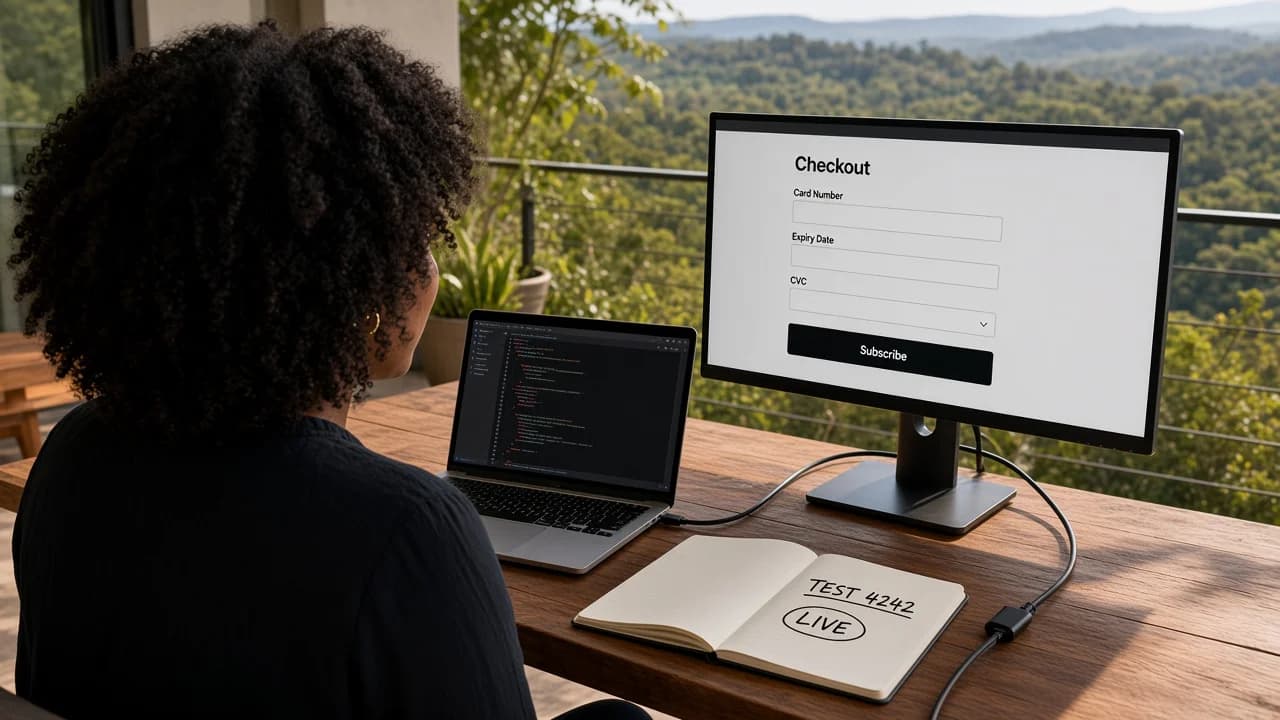
I pushed what I told myself was a tiny fix on a Tuesday night. One copy change on the pricing page. Cursor suggested a two-line edit. I merged straight to main because the app had been stable for eleven days and I felt brave. Eleven minutes later a trial user texted me: checkout was a blank white screen.
I did not have a DevOps team. I had a kitchen table in Austin, a Hermes chat open on my phone, and the specific shame of realizing "works on my machine" is not a release process. That night is why I care about CI/CD for a micro-SaaS solo founder now. Not because I suddenly became an engineer. Because I learned that shipping without a safety net is expensive when someone is already trying to pay you.
If you already deployed without coding, congratulations. You left localhost. This post is the next room: how changes get from your laptop to production without you breaking the thing strangers bookmarked. It sits next to my tools stack for non-developers and the debug AI-generated code piece, because CI/CD is where build, deploy, and debug start talking to each other.
I am not going to sell you Kubernetes. I am going to sell you preview URLs, one protected main branch, and the habit of clicking your own product before customers do. Some scenes here are composite. Round numbers are examples. The blank checkout screen was real enough to teach me the lesson. If you are still validating with a fake door, go do that first. Pipelines on an unproven idea are just expensive fidgeting.
CI/CD micro saas solo founder: what those letters mean when you did not write the pipeline
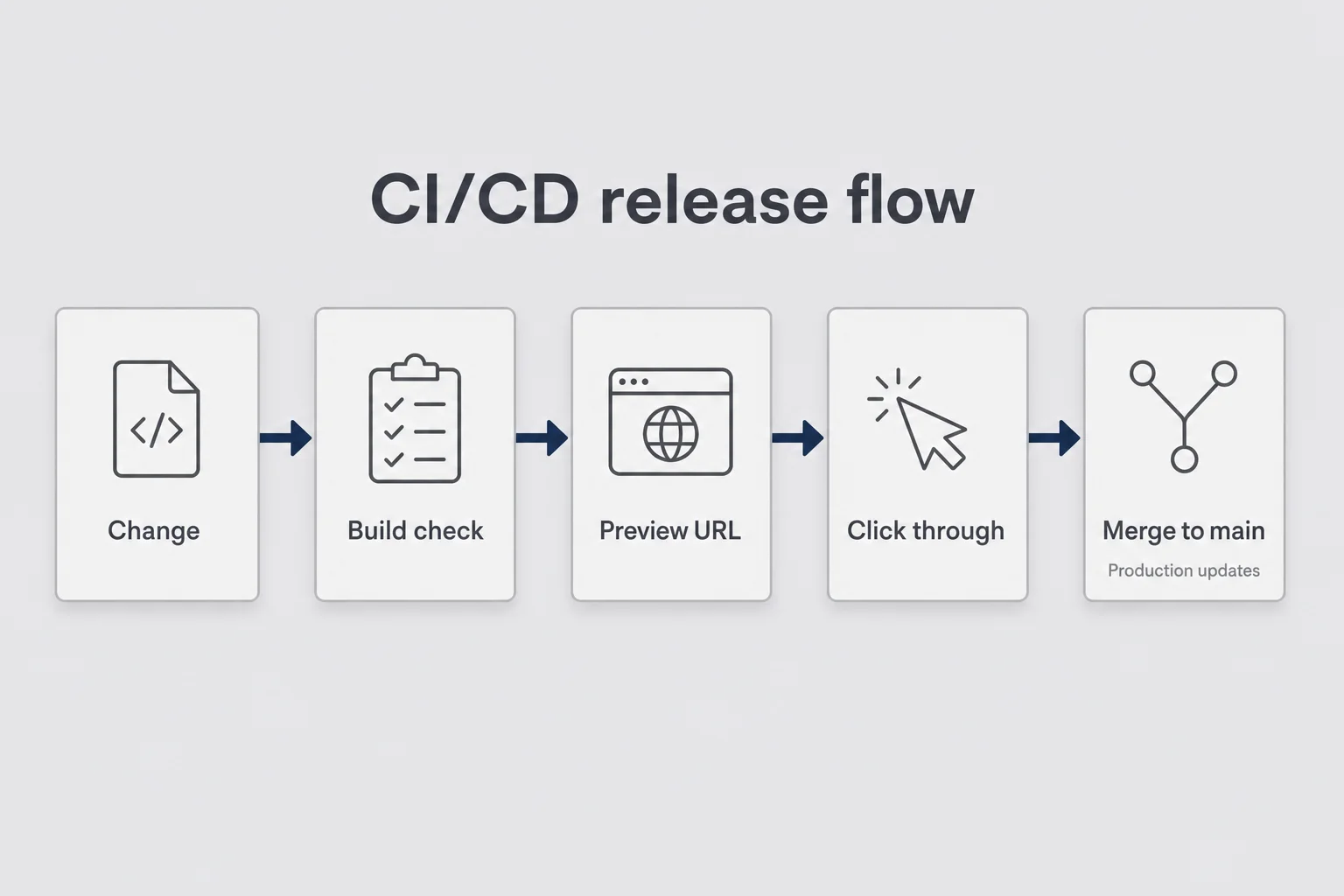
People hear CI/CD and picture a Silicon Valley org chart. Continuous Integration. Continuous Delivery. Dashboards with more colors than a festival wristband. On-call rotations. Someone named Jordan who gets paged at 3 a.m. That is not what you need for a $19/month micro-SaaS you built with Bolt and stubbornness.
For a solo non-coder, CI/CD means two practical habits. Continuous integration means every change gets checked somehow before it becomes the live site. At minimum, the host builds the branch and tells you if the build failed. At a slightly better level, a GitHub Action runs a smoke check so you see a red X before you merge. Continuous delivery (people also say continuous deployment) means when a change is approved, production updates itself from GitHub. You stop uploading zip files. You stop "remembering" which folder was the latest. The host watches main and redeploys when main moves.
That is the whole job for most of us. Fancy pipelines can wait until you have a reason that involves more than ego.
I used to think CI/CD was for people who write TypeScript for a living. Then I watched myself become the bottleneck. Every Friday I would open Cursor, ask for a fix, paste it, hit deploy manually in the host dashboard, and hope. Hope is not a process. Hope is how blank checkout pages happen while you are heating leftovers.
When someone searches for CI/CD as a micro-SaaS solo founder, they are usually not asking for a certification path. They are asking how to keep shipping without lighting the product on fire every time they touch copy. That is an operator question. Treat it like one.
The operator translation, not the textbook one
Textbooks talk about unit tests, integration suites, blue-green deploys, canary releases. Useful someday. Not day one after your first Vercel URL.
Here is the translation I actually use. A pull request is a proposed change sitting in a waiting room. A preview URL is a temporary copy of your product for that waiting room. Merging to main means you chose to make the waiting-room version real. A failed build means the host refused to publish, so you read the error before you force anything.
If you can explain those four ideas to a friend who still works a normal job, you understand enough CI/CD to protect a small product. You do not need to recite acronyms at a meetup. You need to stop treating production like a shared Google Doc that anyone (including tired you) can edit live.
I still cannot read a production codebase the way a senior developer can. I can describe boundaries. Where user data lives. Where payments happen. Which branch is sacred. Which URL customers know by heart. CI/CD is mostly boundary discipline with better buttons.
Why this belongs after first deploy, not before
Before you have a public URL, CI/CD is theater. Validate the idea. Ship something ugly. Get one stranger to try it. I already wrote about validating without coding and building without coding. Those come first. Max's validate before you build piece hits the same nerve from a more technical angle if you want a second voice.
After you have a URL, every change is a tiny risk to trust. That is when preview deploys earn their keep. You are not building a platform for a thousand engineers. You are protecting the one path that makes money. Say you have twelve people on a $12/month plan. That is $144 MRR. Not retirement. Still enough that a broken checkout is a real apology, not a funny tweet.
The order I wish someone had written on a sticky note for me: validate, build, deploy once, then put a waiting room in front of every future change. CI/CD is the waiting room. It is not the product.
Why "it works on my laptop" is not a release process
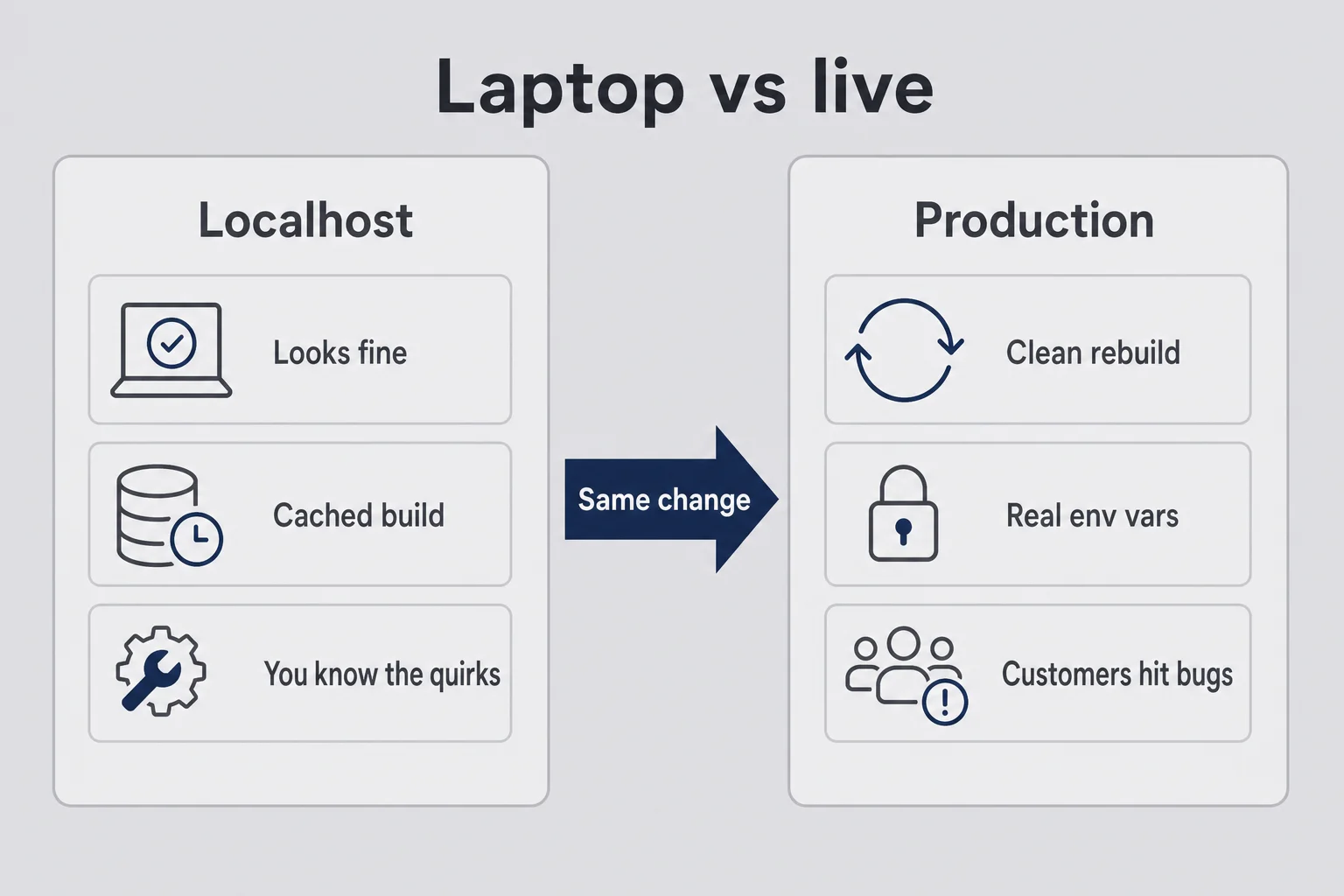
Localhost is flattering. Your database is cozy. Your Stripe keys are in test mode. Email might log to the console instead of actually sending. You know which button to mash when the spinner hangs for three seconds. Customers do not know your rituals. They refresh once, assume you are broken, and leave.
The night I broke checkout, the change looked fine locally. The pricing copy rendered. The button still said Subscribe. Production had a different environment variable for a client-side Stripe key, and my "tiny" edit had accidentally touched a shared component that loaded the payment form. Locally I still had an old build cache doing me favors I did not deserve. Production rebuilt clean and failed. I did not know enough TypeScript to spot the issue in the diff. I knew enough operator instinct to feel sick when the text came in.
"It works on my laptop" fails for boring reasons that never make conference talks. Env vars differ between local and production. You tested while logged in as yourself, not as a brand-new user in an incognito window. Build caches hide missing imports until a clean deploy. You never opened the live URL after the change because you were already celebrating. CORS behaves differently. Auth redirect URLs still whisper localhost in a config file you forgot existed.
CI/CD does not make you a senior engineer. It forces a cleaner path: change, preview, click through, merge. The clicking is still your job. The pipeline just stops you from skipping the waiting room because you are tired and the edit "only touched copy."
I have a soft spot for people who come from ops and marketing, like I did. We are used to checklists for campaigns. We schedule posts. We do not hit "send to all subscribers" without a test email. Somehow when the artifact is software, we abandon that instinct and start acting like cowboys. Bring the campaign brain back. Production is the send. Preview is the test email.
The emotional trap of the "tiny fix"
Tiny fixes feel safe. Spelling. Button color. One sentence on the pricing page. A heading that sounded too salesy at 11 p.m. Those are exactly the changes you merge without a preview because they feel too small to deserve ceremony.
Ceremony is not bureaucracy when you are alone. Ceremony is how you compensate for not having a second person to say "wait, did you check checkout?" There is no junior engineer on Slack. There is you, your agent, and whoever is about to put a card in.
I still ship small copy edits. I just do them on a branch with a preview URL. The five extra minutes have saved me more than once. The blank screen only needed to happen once for the lesson to stick, the way touching a hot pan only needs to happen once if you are paying attention.
Say you change one word in a shared layout component because AI suggested a "cleaner" import. Locally everything looks fine. Preview rebuilds from scratch and the pricing route throws. That is not bad luck. That is the difference between a cached laptop and a clean host build. Preview is how you meet the clean build before your customers do.
The myth that speed requires skipping steps
Founders love speed. I love speed. AI tools make speed feel mandatory, like if you pause to open a pull request you are already behind someone who shipped three apps this week on Twitter.
Speed without a gate is just accelerated regret. The founders I respect who ship weekly still use branches. They just do not romanticize the gate. They treat it like locking the door when you leave the apartment. Not dramatic. Not optional.
If your competitive advantage is "I merge to main from my phone in a rideshare," you do not have an advantage. You have a future support ticket.
Preview deploy micro saas: the safety net after your first ship
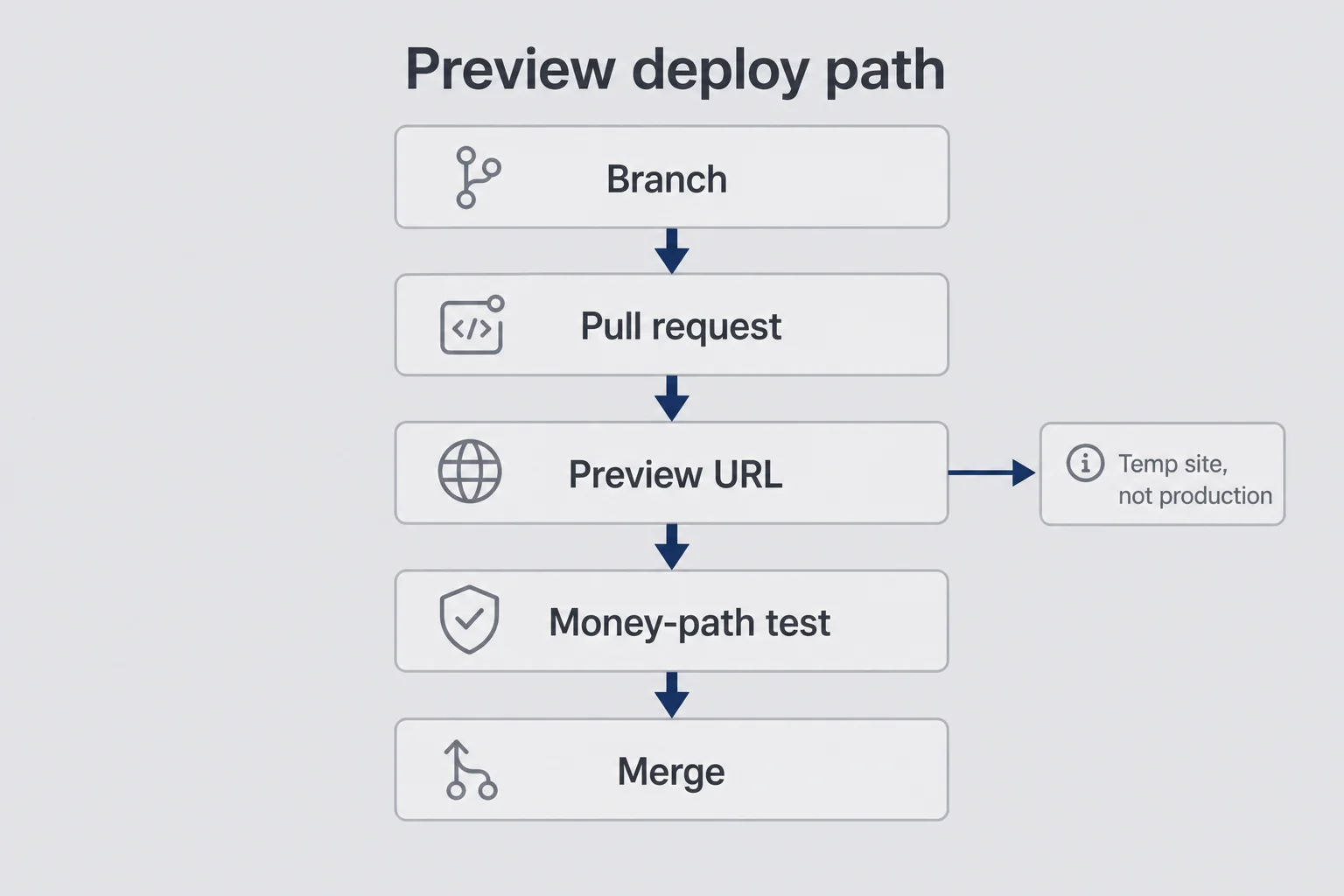
A preview deploy micro saas setup is the highest-payoff CI/CD move for non-coders. If you only do one thing from this article, do this and ignore the YAML discourse for a month.
On Vercel and Netlify, a pull request usually gets its own temporary URL. Something long and ugly, full of hash characters nobody will tattoo. That URL is a gift. It is your product as it would look if you merged, without merging. Production stays the boring URL your customers already trust.
Here is how I use it in practice. I create a branch (Cursor or the GitHub UI can do this; you do not need to memorize git poetry). I make the change with AI help. I open a pull request. I wait for the preview URL the way I used to wait for a campaign preview in my old e-commerce job. I open that URL in an incognito window. I run the money path: sign up or log in, do the core action the landing page promises, open checkout if I charge. Only then do I merge.
That is continuous delivery with training wheels. Production stays boring until you decide it should update. Boring is underrated. Boring means the person who paid you last week can still log in this week.
I once almost shipped a "quick" empty-state redesign that looked charming on my laptop and removed the only button that created a project. Preview caught it because I actually clicked through as a new user. Locally I was still logged into an account that already had data, so the empty state never appeared. Incognito is not paranoia. Incognito is honesty.
What to test on a preview (keep it short)
You do not need a twenty-page QA script. You need the path that would make a customer email you at 11 p.m. with the energy of someone who just got charged or almost got charged.
My minimum takes about five minutes when the app is healthy. Homepage loads. Sign up or login works. The one feature your landing page promises works once. Pricing page loads. Checkout opens. If you can wire Stripe test mode on preview, use it. If you cannot yet, at least confirm the page does not white-screen when you click Subscribe.
If your product has a webhook-dependent step, previews get trickier because Stripe needs a public HTTPS endpoint. For early products I sometimes verify checkout only on a preview that has test keys, and I keep production keys only on main. Ask your AI tools to explain how your host maps environment variables per environment. You do not need to invent the architecture from a blank page. You need to know which keys live where. If the payment side still feels foggy, Max's Stripe billing for micro-SaaS post goes deeper on Checkout, webhooks, and what your database should own.
When something fails on preview, celebrate a little. That is the system working. A failed preview is a gift you can open in private. A failed production is a group chat you did not want.
Preview deploys will not catch product confusion
A preview can look "fine" and still be a bad product. Smooth signup into a confusing empty state is a retention problem, not a pipeline problem. Reese covers onboarding better than I do. Use previews to catch breakage. Use customer conversations to catch confusion.
I have shipped previews that passed every click and still made me cringe because the copy sounded like a press release. CI green. Product vibe wrong. Different jobs. Do not ask the pipeline to have taste.
GitHub Actions solo founder version: you do not need a DevOps team
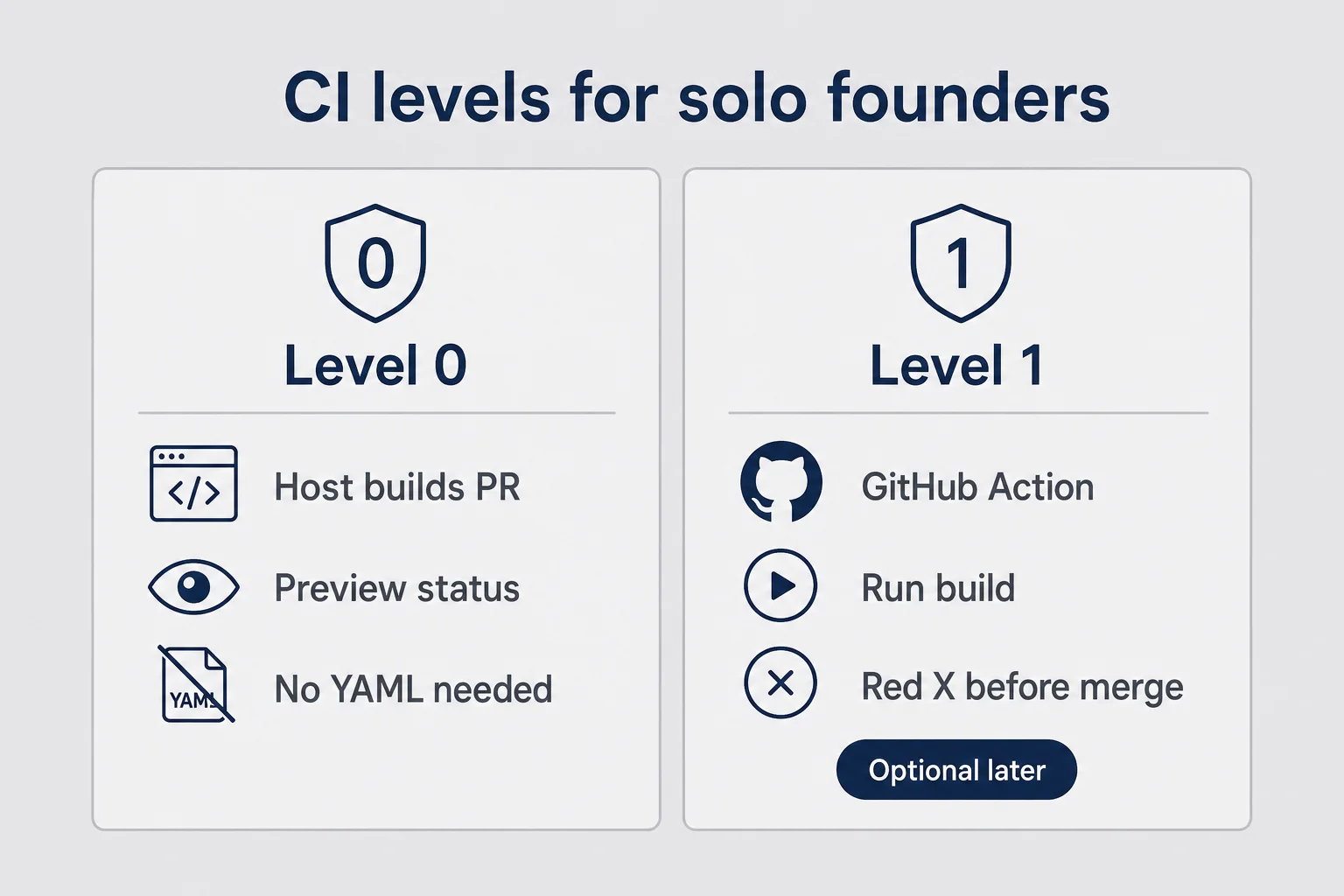
GitHub Actions solo founder setups sound scary because the YAML looks like a foreign language designed to humble you. Indentation errors. Mysterious runs-on lines. A marketplace of actions that all claim to be essential. You can still use Actions without becoming the person who writes YAML for fun on Saturdays.
Start simpler than the internet suggests. The internet is optimized for people who want to look advanced. You are optimized for not breaking checkout.
Level 0: host checks only
Vercel and Netlify already build every pull request. If the build fails, you get a failed status on the PR. For many micro-SaaS products, that is enough CI for months. You are checking one question: does this branch compile and deploy to a preview?
If your only problem so far has been runtime bugs that still build cleanly, Level 0 will not save you from logic mistakes. It still saves you from shipping a broken import that never builds. That alone is worth the habit of opening PRs.
I stayed on Level 0 longer than Twitter would respect. Fine. Twitter is not paying my Stripe fees.
Level 1: one boring Action that fails loudly
When you are ready, add one GitHub Action that runs on pull requests. Typical jobs install dependencies, run the build command your host already uses, and optionally run a tiny test suite if you have one. Many AI-built apps do not have a real test suite yet. That is fine. Do not fake a hundred tests to feel legitimate. A build that fails loudly is already an upgrade from vibes.
I do not hand-write this. I ask Cursor something like: "Add a GitHub Action that builds this Next.js app on pull requests the same way Vercel would. Explain each line like I am not a developer." Then I read the explanation. Then I open a junk PR that deliberately breaks an import so I can watch the check go red. Then I fix it and watch it go green. Trust is earned by seeing both colors.
The point of the Action is not elegance. The point is a red X you cannot ignore when you are tired and tempted to merge because dinner is ready and the change "should be fine."
If the Action fails for a reason you do not understand, do not disable it in shame. Paste the log into Cursor. Ask for the smallest fix. This is the same muscle as debugging AI-generated code, just wearing a CI badge.
What I refuse to set up early
I refuse multi-stage approval workflows with three reviewers when there is one reviewer: me. I refuse matrix builds across five Node versions for an app that only runs on one. I refuse deploy-from-Action-to-production when the host already deploys from git and I would just be inventing a second source of truth. I refuse security scanners that dump four hundred warnings on a weekend project and freeze me into doing nothing.
Complexity is a tax. Pay it when revenue or pain justifies it. Until then, one green check that means "this builds" is a luxury compared to where I started.
Automated redeploy without coding: connect GitHub and stop FTP-braining
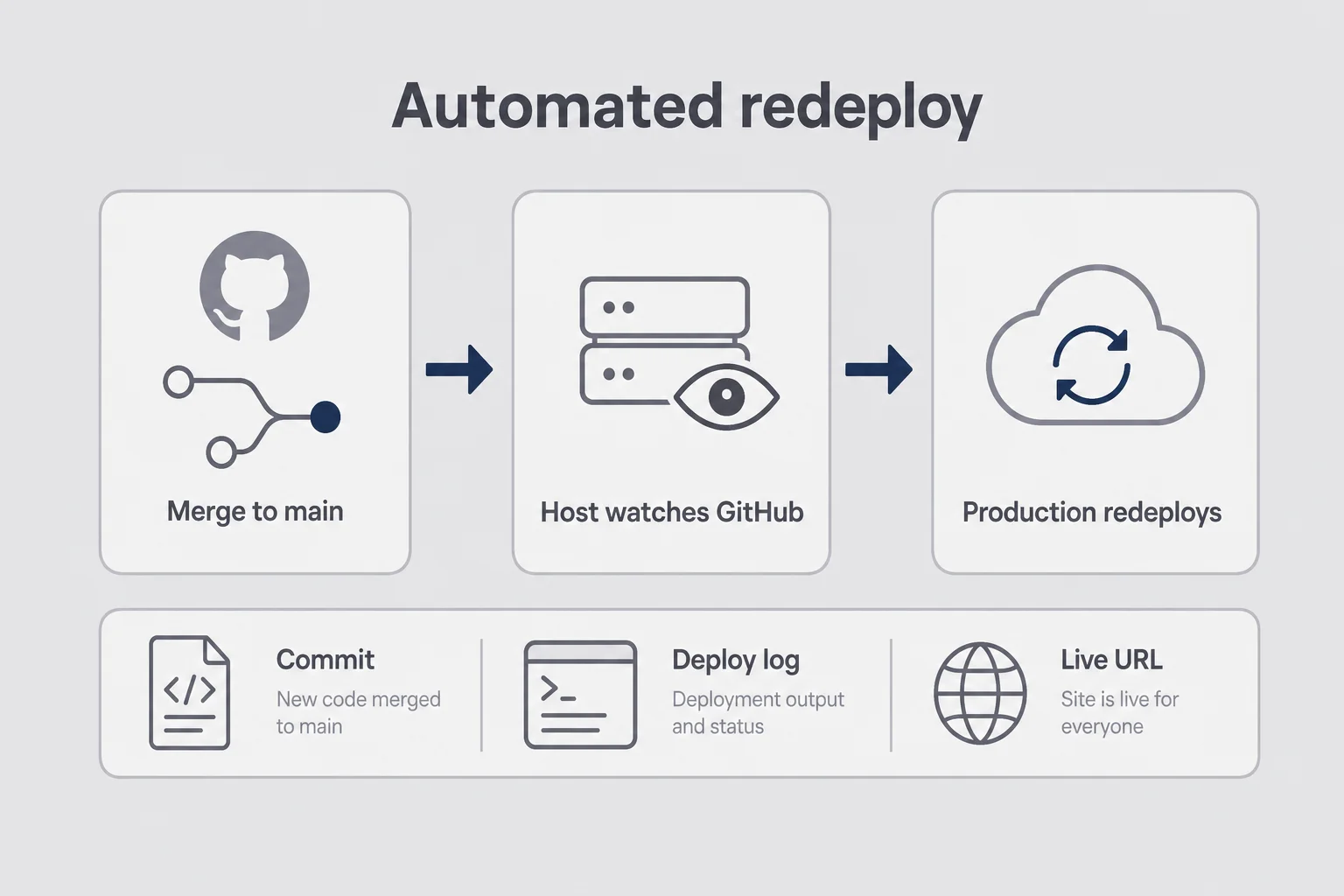
Automated redeploy without coding is the CD half most non-coders actually want. You change code, or your agent does. You merge. Production updates. You do not drag folders around like it is 2012 and you are FTPing into a shared host while whispering prayers.
If you followed a normal Vercel or Netlify path when you first deployed, you may already have this. Confirm it on a calm afternoon, not during an outage. Your project should be connected to a GitHub repository. Production branch should be main (or master if you have not renamed it yet). A merge to that branch should trigger a production deploy in the host dashboard. You should be able to see deploy history with timestamps and commit messages, which is how you answer "when did this break?" without guessing based on vibes and the last time you drank coffee.
If any of those are missing, fix that before you invent custom scripts. The host already wants to redeploy for you. Your job is to stop bypassing it with manual uploads "just this once." Just this once is how you end up with two versions of the truth and a production site that does not match GitHub.
I used to love the Deploy button in the dashboard. It felt like agency. Then I realized I was training myself to treat git as optional. Optional git is how you lose track of what shipped. Automated redeploy makes git the door. That is good. Doors are clarifying.
Why automation feels scary (and why that fear is useful)
Automation means a bad merge can go live while you are in line for coffee. That is real. I have felt the phone buzz with a deploy notification and known, before I even opened the link, that I had been careless.
The answer is not "disable automation." The answer is "make merges harder to do accidentally." Do not push straight to main from your laptop for product changes. Use pull requests even when you are the only teammate. Turn on branch protection on GitHub so main requires a PR, and optionally a passing check. Keep production env vars only in the host dashboard, never in the repo, never in a screenshot you send yourself on Telegram "for later."
Fear that makes you add a preview step is healthy. Fear that makes you avoid shipping for three weeks is not. Calibrate. The goal is protected speed, not frozen perfection.
Hermes and Cursor still fit here
I still use Hermes through Telegram for tasks like "open a PR that fixes the empty-state copy on the dashboard." Automated redeploy means I also tell the agent, in plain language, to work on a branch, not push to main, and wait for my review. Agent speed without a merge gate is how you get fast breakage. Agent speed with a preview URL is how you get fast shipping.
If your agent can open PRs, your agent can also open disasters. Give it the same waiting room you give yourself. I have spent real time on Hermes skills and tool access because I believe directing agents matters. I have also learned that "always-on" does not mean "always-merge." Always-on with a human gate is the version that keeps Stripe happy.
Vercel preview branches when you are afraid of breaking production
Preview deploys are the habit. This section is the footguns that show up once you use them weekly: branch names you can decode at 1 a.m., env vars that must not leak live keys into a temp URL, and OAuth redirects that break only on previews.
Vercel is common for Bolt, v0, and Next-style apps, so I will be concrete. Netlify is similar in spirit. Railway and others have their own flavors. The brand matters less than the pattern: production URL for customers, preview URL for you, merge as the handshake between them.
Vercel preview branches and PR previews give you a URL per change. Production is the URL customers know. Preview is the URL only you, and maybe one patient friend, should open before merge. When I am afraid of breaking production, that fear is information. It means the change deserves a preview, not a pep talk.
How I name branches so future-me is not confused
I am not precious about git poetry. I use names like fix-checkout-blank, copy-pricing-headline, and add-cancel-link. I avoid update and misc because those mean nothing at 1 a.m. when three preview URLs are open and I am trying to remember which one fixed the button.
Future-me is tired, slightly dramatic, and bad at archaeology. Present-me tries to leave her clues.
Environment variables: the quiet footgun
Previews and production can share some env vars and must not share others. This is where non-coders get burned while feeling responsible and careful.
Typical pattern for a tiny SaaS: preview and development use Stripe test keys, maybe a separate Supabase project or a careful test mode. Production uses Stripe live keys and the real database. If you point a preview at live Stripe keys, you can charge real cards while testing. Do not do that. If you are unsure which keys your preview uses, stop and check the host dashboard before you click Subscribe on a preview URL with your own debit card "just to see."
I have asked Cursor to audit env usage more than once: list every environment variable this app needs and tell me which should differ between preview and production. That prompt has saved me from mixing modes. Mixing modes is a special kind of chaos because the UI looks correct while money behaves wrong.
Also watch OAuth redirect URLs. Preview URLs change. Providers are picky. If login works on production and fails on preview, redirects are a prime suspect. Ask your tools to show you where redirect URLs are configured before you assume auth is "just broken forever."
When preview feels slow
Sometimes you want to tweak copy ten times. Opening a PR for every comma feels heavy, like wearing a suit to take out the trash. Fine. Batch copy edits on one branch. Still preview once before merge. Speed comes from fewer production fires, not from skipping the waiting room.
If your host is slow to build previews, use that time. Write the customer email you have been avoiding. Check support. Do not use build time as an excuse to merge early "because waiting is annoying." Waiting is the point.
What I actually check before a merge hits main
This section is the checklist I wish someone had texted me before the blank checkout night. It is short on purpose. Long checklists get ignored, then you feel guilty, then you ignore them harder. I want something you can run while the kettle boils.
The five-minute merge gate
Before I merge, the preview URL must open without a host error page. I must be able to sign up or log in in an incognito window. The core action must work once. The pricing page must render. The checkout UI must appear, in test mode on preview when possible. I skim the PR diff for accidental secret strings. API keys look like long random tokens. If you see one, do not merge. Rotate the key. Assume it is burned. Yes, even if you are "pretty sure" it was only in the PR for a second.
If login fails on preview, I do not negotiate with myself. I fix the preview first. Negotiation is how the blank screen returns, wearing a new outfit.
I also glance at the deploy log for the preview. Not every line. Just enough to see that the build finished and the host did not scream about a missing module. If the preview is green in the UI but the page 500s, believe the page. The UI lied politely.
When I ask a human to click too
If the change touches payments, auth, or data deletion, I send the preview link to one trusted person. Not a launch. Not a Product Hunt draft. A text that says: can you try signup and tell me if anything looks cursed? Two sets of eyes beat one tired founder who has been staring at the same button for forty minutes and can no longer see it.
When nobody is available, I still do the five-minute gate. Solo does not mean reckless. Solo means you design systems that assume you will be tired eventually.
What I do not check every time
I do not check every mobile breakpoint for a one-line copy fix. I do not open every browser ever made. I do not demand perfect Lighthouse scores before merging a cancel-link. I do not rewrite the footer year unless I am already there. Those matter eventually. They do not gate a Tuesday night fix when the money path still works.
Perfectionism loves to dress up as quality control. Sometimes it is just fear with a spreadsheet.
When CI fails and you cannot read the log
You will get a red X. The log will look like a wall built to remind you that you did not go to computer science school. This is normal. This is not a sign you should quit and go back to e-commerce spreadsheets (unless you want to; spreadsheets never 500'd on me at midnight, to be fair, they just silently wronged me in other ways).
My non-coder log ritual
I open the failed job. I scroll to the first real error, not the last noisy line where the tool is just announcing that it failed because something earlier failed. I copy the error block into Cursor or Hermes. I ask it to explain like I am an operator, not a developer: what broke, what file is involved, and what is the smallest fix? I apply the fix on the same branch. I push and wait for green.
I wrote a longer version of this mindset in debug AI-generated code. Same muscle. Different surface. CI logs are just errors with a timestamp and a red badge. The badge is helpful because it stops you before customers become your test suite.
Sometimes the explanation is "you deleted a dependency from package.json but the import remains." Sometimes it is "Node expected a different version." Sometimes it is "a type error from a half-finished refactor your agent left behind because you said ship it." None of those require you to enjoy reading stack traces. They require you to stay in the conversation until green returns.
Common failure buckets I see on AI-built apps
Missing dependency after an AI edit. Type error from a refactor that stopped halfway. Environment variable referenced in code but not set on the host for that environment. Node version mismatch, rarer on Vercel defaults, still happens when something pins an old engine. Lint rules failing the build because someone enabled treat-warnings-as-errors and then warned a lot.
You do not need to memorize solutions. You need a ritual that turns panic into a question for your tools. Panic wants you to disable the check. Ritual wants you to understand the first error line.
Do not "fix" a red build by disabling the check
When you are tired, GitHub will offer you ways to ignore required checks. The button will feel like relief. That relief is how blank checkout returns, this time with a story about how you "had to ship."
If a check is flaky, fix the flake or temporarily loosen that one rule with eyes open and a note to yourself. Do not make "skip checks" your personality. Your future customers cannot skip the broken page.
The boring minimum pipeline I recommend for a $19/month product
Here is the setup I recommend when someone asks how a micro-SaaS solo founder should handle CI/CD after they have already shipped once. It is deliberately boring. Boring is how small products stay alive while flashy architecture essays get applause.
The stack-shaped pipeline
GitHub is the source of truth. Your host is connected to that GitHub repo. main is production. Feature work happens on branches with pull requests. A preview URL is required before merge, first as a habit, then as branch protection when you trust yourself less than you should. Optionally, one GitHub Action runs build on pull requests so you get a red X even before the host finishes. Stripe test keys live on preview. Live keys live on production. Deploy notifications go to email or Telegram so you notice a failed production deploy even when you are not staring at the dashboard like it owes you money.
That is enough for a long time. I have run paying products on less ceremony than a corporate wiki page. I have also watched founders postpone launch for two weeks because they were researching "proper" CI/CD platforms. Proper is the enemy of paid.
If you want a visual for your own notes, draw three boxes on paper: branch, preview, main. Arrows only go forward when a human clicked through the money path. Tape it above your desk if you need the reminder. I am not above taped reminders. My kitchen table has hosted worse systems.
What "done" looks like for this setup
You know you are done when a friend can open a preview link and use the product without you screensharing and narrating. Merging to main updates production without a manual upload. A bad build fails before merge at least once, on purpose or by accident, so you trust the red X. You can explain your release process in four sentences without saying "I just kind of deploy when it feels ready."
If you cannot explain it, you do not have a process. You have vibes. Vibes do not survive the first week with strangers.
Cost reality check
For most solo founders on Vercel or Netlify free or low tiers, this costs $0 to about $20 a month extra in the early days. GitHub Actions minutes are usually fine at micro-SaaS volume. If your Action bill suddenly looks like a startup's coffee budget, you are probably running too much CI for your stage. Simplify. Delete the matrix. Keep the build.
Also budget time, not just money. The first afternoon you set this up will feel slow. The third week you avoid a production incident, it will feel cheap.
What CI/CD will not fix (and what to do instead)
I need to be annoying for a few paragraphs. Pipelines feel productive. Green checks feel like progress. They are not product-market fit. They are not a substitute for asking humans whether the problem hurts enough to pay.
CI/CD will not tell you if anyone wants the product. It will not fix a price that is too low to sustain support. It will not write onboarding that creates an aha moment. It will not replace talking to users. It will not make a thin AI wrapper feel valuable just because deploys are fancy.
If you are polishing deploy pipelines before you have asked ten humans whether the problem is real, you are hiding. I say that with love and recognition, because I have hidden inside tool configuration plenty. Go back to validation. Use the idea validation scorecard if you want a structured nudge. Ship the boring pipeline after strangers care, or at least after one stranger is close enough to care that a broken page would embarrass you.
When to stop tinkering with YAML
If you spent two evenings perfecting a pipeline and zero evenings talking to users that week, the pipeline won and the business lost. I say this as someone who will happily tune Hermes skills for too long, rearranging SOUL.md like furniture. The product still only cares whether someone pays.
Use CI/CD as insurance on a product that already has a pulse. Not as a substitute for the pulse. Insurance on an empty house is a weird hobby.
And if your real blocker is pricing fear or launch fear, read Max on pricing or launch. A perfect preview workflow will not make the publish button less scary. Different fear. Different medicine.
Questions I get when people hear "CI/CD" and panic
Do I need CI/CD if I already deployed my micro-SaaS once?
Yes, if you plan to change the product again. Your first deploy proves strangers can reach a URL. CI/CD proves the next change can ship without you manually babysitting every file. Preview deploys and automated redeploy are the minimum after you have paying users or even one patient trial user who will notice when checkout breaks.
What is the simplest CI/CD setup for a non-coder solo founder?
Connect your GitHub repo to Vercel or Netlify, keep one main branch for production, and open pull requests for changes so you get a preview URL before merge. That gives you automated redeploy and preview deploys without writing YAML. Add a GitHub Action later only if you need a build check that fails loudly before merge.
What is a preview deploy and why should I care?
A preview deploy is a temporary live URL built from a pull request or branch. It uses the same host as production but does not replace your real site. You click through signup, the core flow, and checkout on that URL before you merge. If something is broken, production stays untouched. That is the whole point.
Can I set up GitHub Actions without knowing how to code?
You can start with a template your AI tools generate, then verify the green check appears on pull requests. You do not need to invent YAML from memory. You do need to read the failure message when the check turns red and ask Cursor or Hermes to explain it in plain language. Operator skills matter more than writing pipelines by hand.
Will CI/CD stop me from shipping bad product decisions?
No. Pipelines catch build breaks, missing env vars, and some tests. They do not catch a confusing onboarding flow or a price nobody wants. CI/CD protects the release process. Validation, pricing, and support still protect the business.
When is CI/CD overkill for a tiny micro-SaaS?
If you are still on a fake door page or a Carrd waitlist, skip it. Once you have a GitHub repo on a host with real users or a public URL you care about, the simple host-plus-preview setup is worth an afternoon. Kubernetes-level pipelines are overkill. Preview deploys are not.
The merge button is a promise
I still feel a tiny jolt when I click merge. That jolt is useful. It means I remember the blank checkout screen and the apologetic text I had to send. It means I remember that someone else's evening got worse because I wanted to feel fast.
You do not need to become a DevOps engineer to deserve a stable product. You need a waiting room for changes, a preview URL you actually open, and the humility to let a red X stop you when you are tired. Automated redeploy without coding is available on the same hosts that already ship your AI-built app. Vercel preview branches, host checks, and one optional Action will carry a lot of $19/month products further than an architecture diagram ever will.
The product does not care who wrote the pipeline. It cares that the stranger who found you can pay without staring at a white screen. Preview first. Merge second. That is the whole habit. Keep it boring on purpose.



Comments