I Spend About $87 a Month on Tools. Here Is the Full List.
The micro-SaaS tools for non-developers I actually pay for: Bolt, v0, Cursor, Hermes, Supabase, Stripe, and the decision tree I use before adding another tab.
 By Imani27 min read
Listen to this article
24:09AI-generated podcast-style overview of this article (not a word-for-word narration).
Last Sunday I sat at my kitchen table in Austin with a printed page in front of me. Column one: tool names. Column two: what each one does in one sentence I could explain without googling. Column three: monthly cost. Column four: last time I actually opened it. Hermes pinged my phone through Telegram while I was cross-checking whether I still needed a fourth AI subscription I had signed up for during a late-night "this looks cool" moment. The total came to about eighty-seven dollars. Not nothing when you are bootstrapping. Not the part that bankrupts you either. The part that bankrupts you is still building something nobody wants for three months because picking tools felt like progress.
If you are looking for micro-SaaS tools for non-developers, you probably do not want another generic listicle that ranks forty apps by hype. You want the honest version: what a solo founder without a CS degree actually pays for, what each layer does, and how to stop adding subscriptions every time a founder on YouTube ships a demo in forty-five seconds. I am Imani. I build small products by directing AI tools and an always-on Hermes Agent setup, not by hand-writing production TypeScript. I wrote a longer piece on how to build a micro-SaaS without coding that covers validation, build paths, and launch mindset. This post owns the toolbox itself: costs, comparisons, and the decision tree I wish someone had handed me before I paid for tools I used twice.
Some numbers below are illustrative examples to show what a realistic monthly bill looks like. I will say when I am guessing. Your stack will differ. The point is not to copy my exact tabs. The point is to understand layers, trade-offs, and when demo-ware stops earning its invoice.
Micro-SaaS tools for non-developers when you are the operator
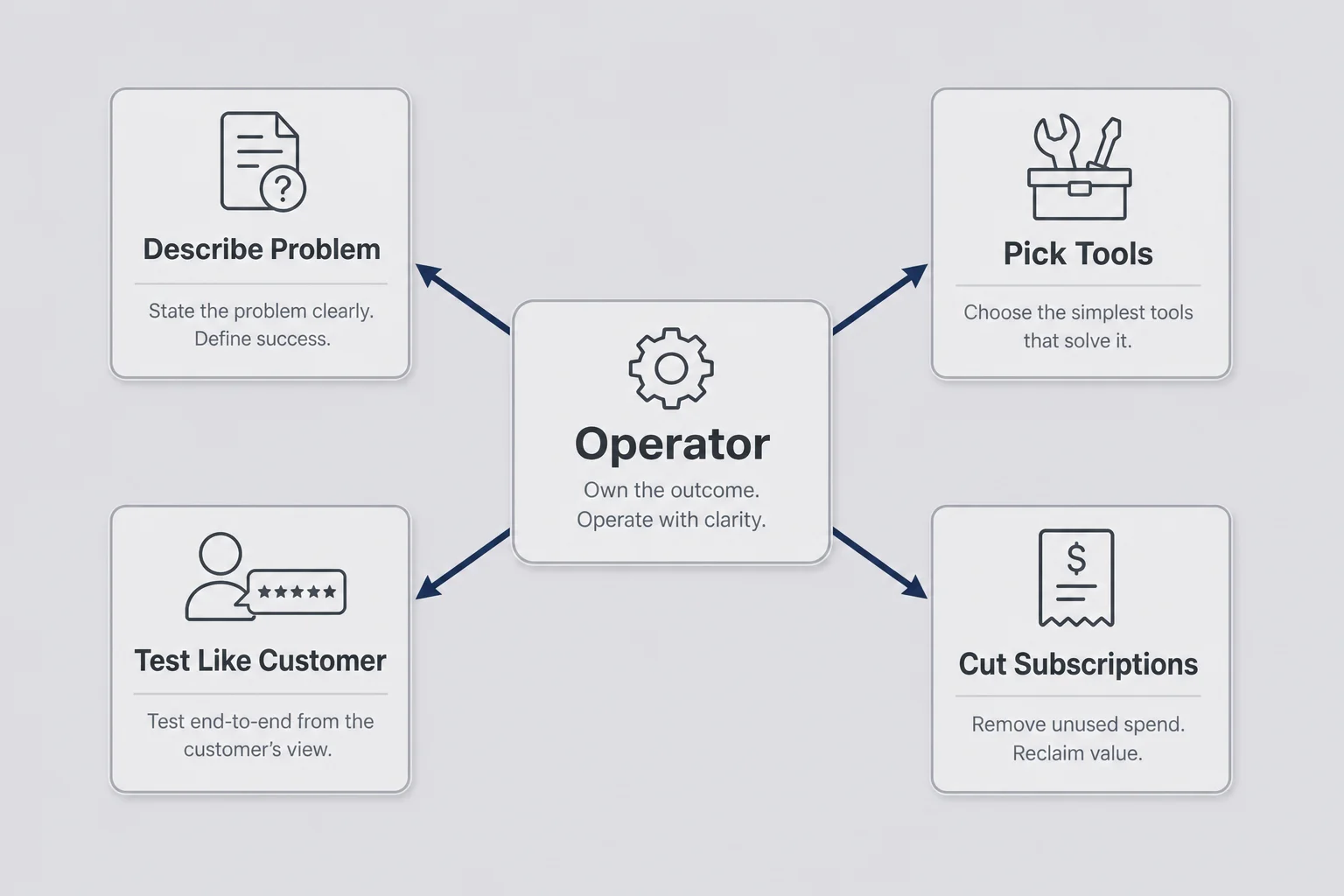
When people search for micro-SaaS tools for non-developers, they often want permission to skip computer science. You already have permission. What you still need is a mental model that keeps you from treating your browser history like a strategy.
I am not an engineer. I am the operator. My job is to describe problems clearly, pick tools that match the shape of the product, test like a customer, and cut anything that does not earn its keep. The stack is not my identity. It is rented capability, not proof you are technical. Bolt does not make me a founder. A stranger paying twelve dollars a month makes me a founder if the tool actually solves a narrow problem.
Non-coders get sold two lies at once. Lie one: you need to learn to code properly before you are allowed to ship. Lie two: AI removed all technical thinking so you can skip validation and security. Both lies waste money. You do not need a CS degree. You do need to know which layer is UI, which layer is data, and which layer is money. You need to say out loud where customer emails live before you charge for the product.
I still google basic terms sometimes. I still ask Cursor what a file does. I still cannot debug like someone with ten years of experience. That limitation keeps my products small on purpose. One workflow. One audience. One price. Small scope is how people like us stay honest about what we understand.
If you come from marketing, ops, admin, or teaching, you might already be better at tool selection than you think. You know which software your old team paid for and never used. You know which spreadsheet column actually mattered when a vendor email went wrong. Apply that same skepticism to your own subscriptions. A micro-SaaS stack for non-developers should fit in a carry-on, not a warehouse.
Three layers I think in before I open any app
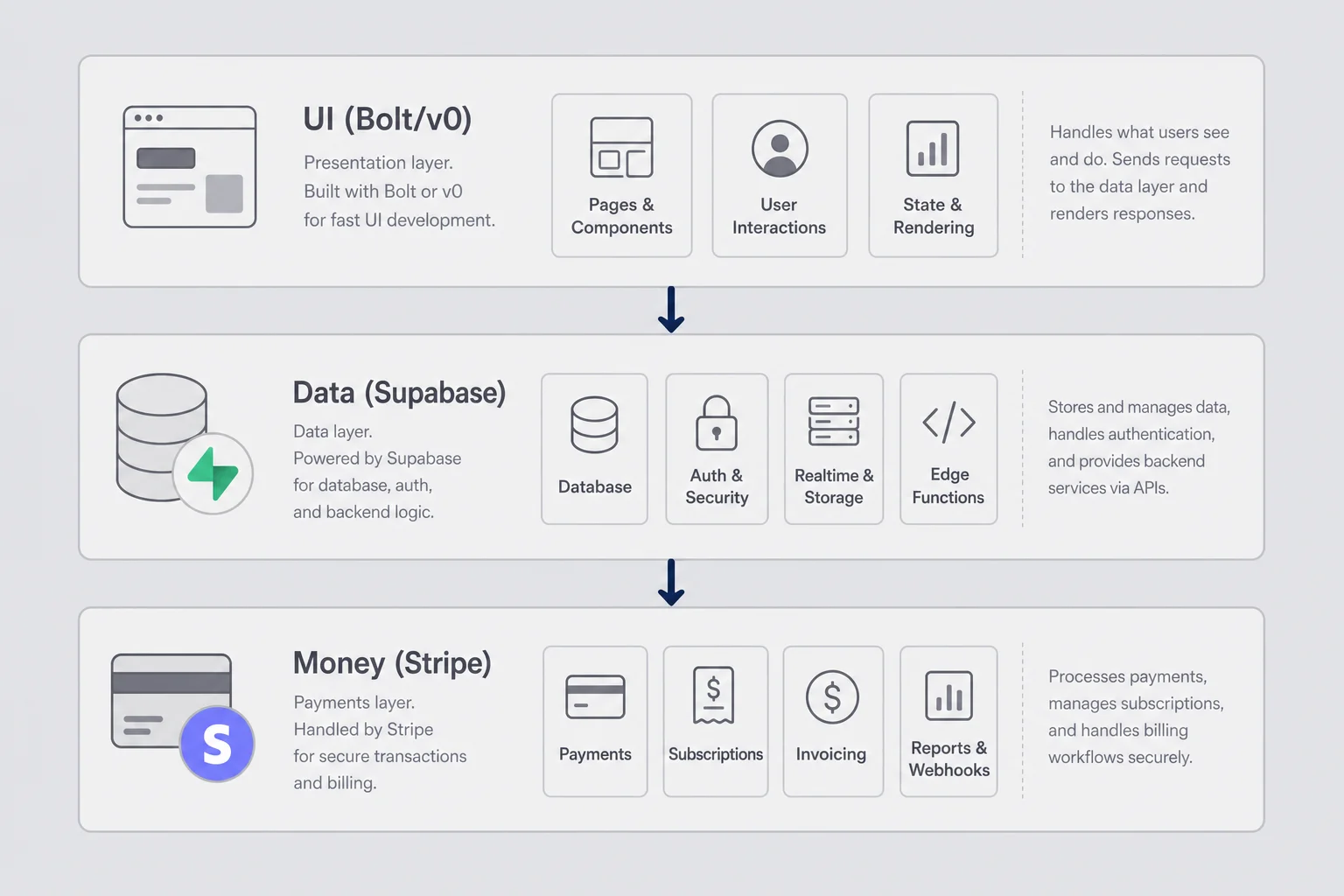
Before I compare Bolt to v0 or debate another model provider, I sort every tool into three layers. UI: what the customer sees and clicks. Data: where their account and content live. Money: how they pay and how I know it worked. If I cannot name which layer a tool serves, I do not add it yet.
This sounds obvious until you watch a non-coder install six AI apps in one weekend and still have no answer to "where does user data live?" I did that. It feels productive. It is cosplay.
The diagram is simpler than real life. Email might live in Resend. Files might live in Supabase storage. Analytics might be Plausible. Still, three layers keep me from buying two tools that do the same job because both had impressive launch tweets.
UI tools get the most attention because they are visible. Data tools get ignored until something scary happens. Money tools get wired once and then break quietly at the worst time. I test the money path after every deploy, even when I only changed a headline. Non-coders ship regressions when we assume billing still works because Stripe worked yesterday.
When I evaluate AI tools for micro-SaaS without coding, I ask one question per layer. UI: can I describe the happy path in plain language and click through it in an hour? Data: can I explain who can see which rows without saying "the AI handled it"? Money: can I complete a test charge and see the result in my dashboard without calling support? If any answer is no, I am not ready to hunt for growth channels. I am ready to fix foundations.
Max's How to Build a Micro-SaaS With AI goes deep on developer stacks like Next.js and row-level security policies. Read that if you code or want to code. This post stays at the layer I actually live in: enough understanding to direct tools, not enough to maintain a framework by hand.
Build tools: Bolt, v0, and when I pick which
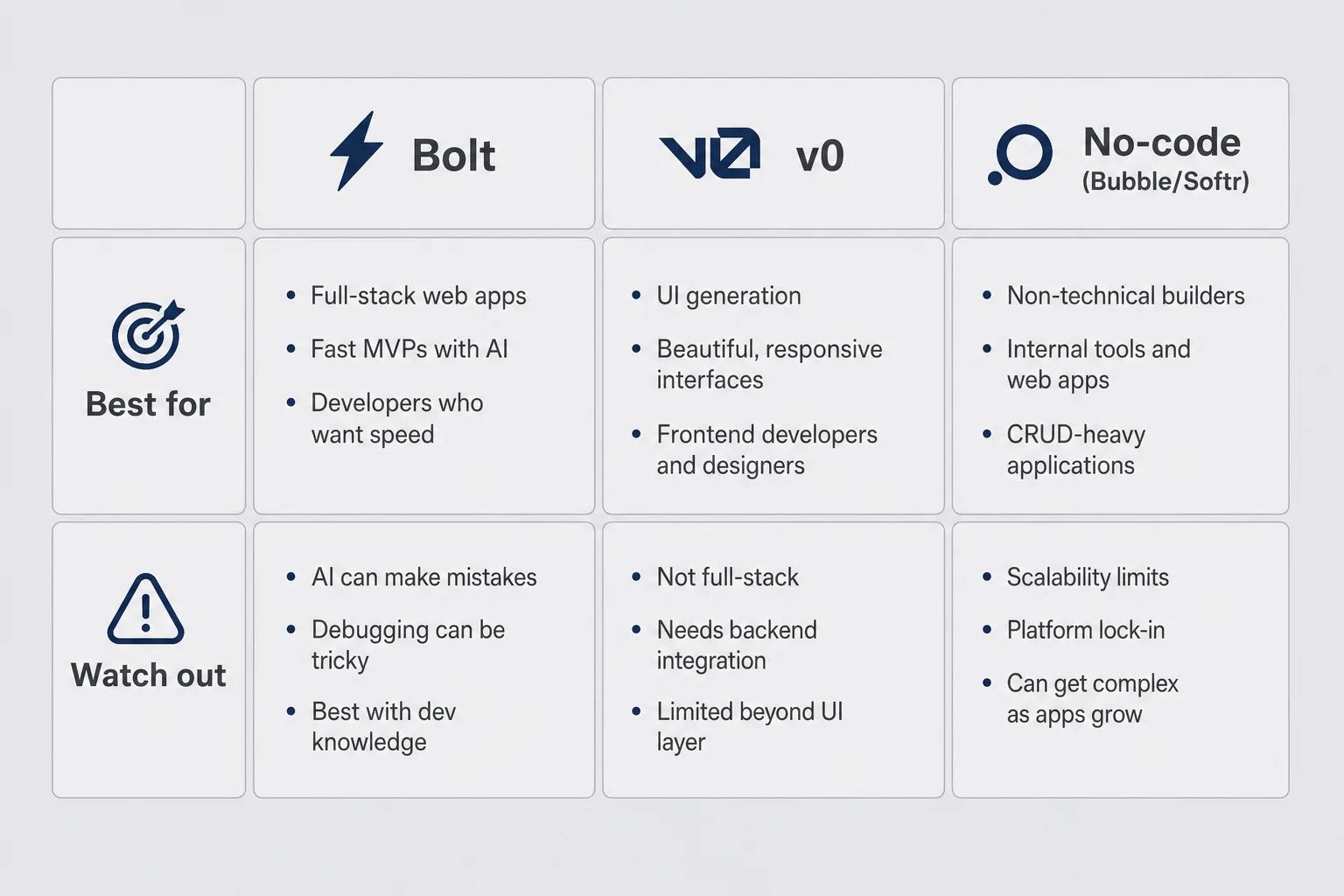
First versions happen in AI-assisted builders for me, not in a blank repo. Bolt.new and v0 are the two I reach for most. Both turn plain-language descriptions into working interfaces fast. They are not interchangeable. Picking wrong costs days.
Bolt is my default when I want something closer to a small web app: login-shaped flows, a dashboard, settings, one core feature. I describe the happy path out loud before I type anything. "User lands on a table of contacts. Columns: name, email, last contacted. Button opens mailto." Ugly is fine on day one. Confusion is not.
v0 is where I go when the product is mostly interface polish on a known layout, or when I want a sharp marketing page fast and I will wire backend elsewhere. v0 excels at front-end scaffolds. It will not carry your whole business logic on its back. Pair it with Supabase and accept that you still need to connect the pieces, often with Cursor or an agent helping.
Pure no-code like Bubble or Softr still has a place. I used Softr plus Airtable for an internal-style reporting tool for a friend's agency. She paid forty-nine dollars a month for four months because it saved her four hours a week. That is a valid micro-SaaS outcome. I pick pure no-code when the product is forms, portals, or workflows and I accept platform limits upfront.
Here is how I compare the build tools I actually switch between:
| Tool | Best for | Typical cost | What I watch out for |
|---|---|---|---|
| Bolt.new | Full-ish MVP: auth-shaped app, dashboard, one core workflow | Free tier; paid around $20–25/mo when you ship | Scope creep when prompts get vague; verify auth and data wiring |
| v0 | UI-heavy pages, marketing site, component polish | Free tier; paid around $20/mo | Frontend-first; you still own backend connections |
| Bubble / Softr | Workflow apps, portals, internal tools | ~$25–50/mo depending on tier | Platform lock-in; logic ceilings on weird edge cases |
| Hermes Agent | Ongoing edits in an existing repo, repeat chores | VPS ~$12/mo + model usage | Too much autonomy too early; not your first landing page |
The bolt vs v0 decision for solo founders usually comes down to product shape, not brand loyalty. Need a billable app skeleton this week? Bolt. Need a beautiful page or component set and you already know where data lives? v0. Need a form-heavy workflow and you hate code entirely? Softr or Bubble. Need someone to keep working while you walk the dog? That is Hermes, not your first Tuesday with a blank prompt.
I migrated once from a Bubble prototype to a Bolt app because I hit a logic ceiling. That cost four days I had not planned. Better to match the ugly edge case upfront, not just the happy-path demo. When a builder proposes a clever shortcut, I ask what I lose. Open permissions. Skipped email verification. Password storage I do not understand. Non-coders get hurt by shortcuts we did not know were shortcuts.
My first screens are gray, literal, and clear. Pretty comes after strangers pay. I learned that after eleven days tuning colors on a reminder tool nobody converted on. Hermes rewrote my onboarding copy and was right, which was rude. The tool worked. I had not validated demand. Building felt like progress. Validation felt like rejection. Tools cannot fix that ordering mistake.
Say you are choosing between Bolt and v0 for a client portal with file uploads and a simple status column. Bolt gets my vote because the whole shape is app-like and I want auth and a dashboard in one conversational pass. Say you only need a polished landing page with a waitlist form that posts to an email tool you already use. v0 gets my vote because you are not pretending the product is finished; you are testing copy and layout before backend depth earns its place. The wrong choice is not picking the less popular tool. The wrong choice is picking the tool that matches the demo you wish you were giving on YouTube instead of the product you can maintain alone.
Cursor when you cannot read the repo but need to ask what changed
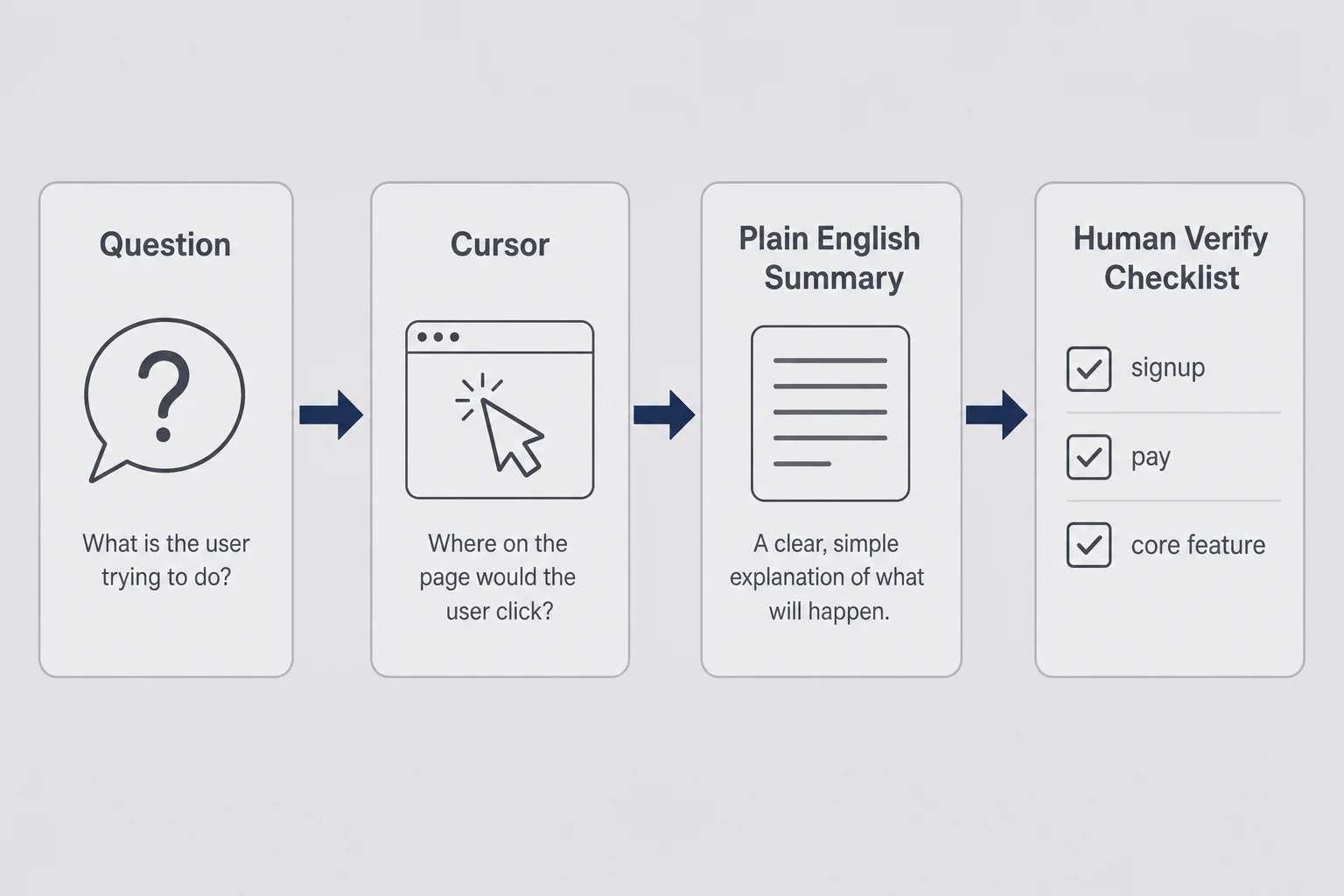
Cursor is not where my products begin. Cursor is where I go when something already exists and I need a translator. "What does this file do?" "What changed after the last deploy?" "Why would signup fail only on mobile?" I prompt like I am briefing a patient contractor, not like I am performing engineer cosplay.
I do not live in the codebase the way Max does. I live at the boundary between user behavior and files I partially understand. That is enough for micro-SaaS scope if I test like a user after every session. Click the way a tired customer clicks. Skip the tutorial. Try to break the happy path on purpose. If I only test while admiring the code panel, I ship confusion.
Cursor shines when Bolt or an agent generates a repo I did not write by hand. I open the project, ask for plain-English summaries, and request the smallest fix that solves one reproducible bug. Bad pattern: "fix everything." Good pattern: "signup fails when email has a plus sign; here is the exact error; change only what is needed; explain what you changed in plain English."
I keep a human-must-verify checklist before any deploy: sign up, sign in, pay, use core feature, cancel or delete account. Cursor helps me close gaps on that list. It does not replace the list. AI will confidently do the wrong thing while sounding confident. That combination is dangerous for non-coders who want to believe.
Typical cost: around twenty dollars a month for the tier I use. It earns its keep if I open it weekly during an active product. If I have not opened it in thirty days, I ask whether the product is alive or whether I am avoiding support emails. Either answer is useful.
One habit that saved me: record your screen once a week and watch without sound. You will see hesitation clicks and places you assumed were obvious because you built them. Developers use session replay tools for this. Non-coders can use a free screen recorder and brutal honesty.
Cursor is also where I learn just enough to ask better questions of Hermes later. If I cannot describe what I want changed in file-level terms, my agent sessions turn into vague midnight messages that produce vague midnight repos. The tools do not replace judgment. Judgment comes from testing like a customer and knowing what "done" means before you call it shipped.
Hermes Agent as my always-on co-builder
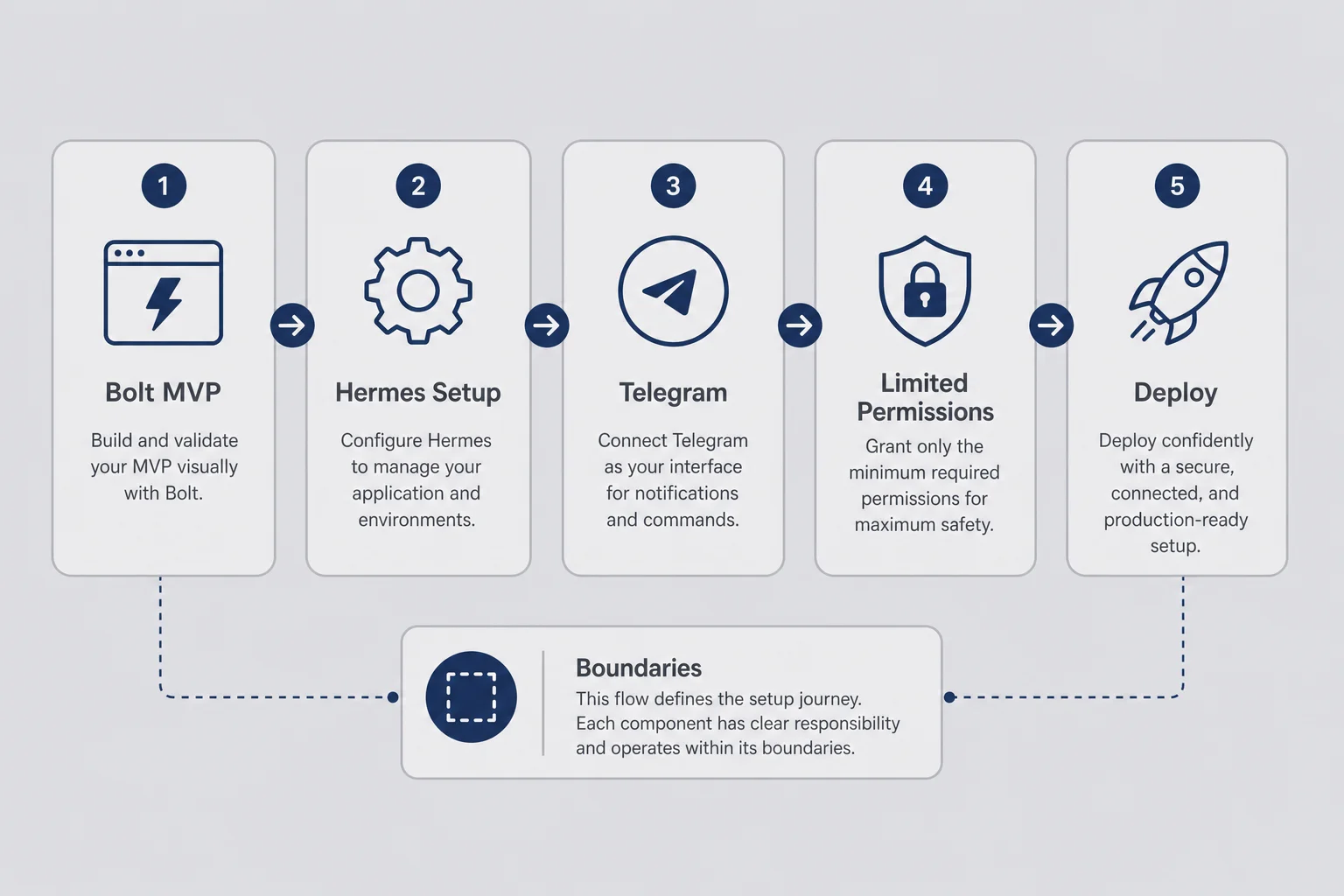
Hermes is the tool I deferred in my build-without-coding post because it deserves its own room. Hermes Agent is not magic fairy dust. It is a very capable intern with shell access if you give it shell access, which means boundaries matter more than prompts.
I run Hermes on a small VPS and talk to it through Telegram while I am doing other things. Add a settings page. Wire Stripe checkout from a template. Explain this error in human language. Run the deploy steps I always forget. That is the dream. The nightmare is an agent with permission to change anything on the server while you are vague and tired. I lived a version of that when an onboarding flow gained three extra steps nobody asked for.
Setup starts closer to infrastructure than non-coders expect. After I had a Bolt MVP worth keeping, I ran hermes setup --portal in the terminal. That wizard links the agent to Nous Portal so it can call models without me hardcoding API keys in a dozen places. OpenRouter sits behind that for me so I am not locked to one model vendor. I am still learning skills configuration and which tools the agent is allowed to touch. You do not need any of this on day one. You need it when you want an always-on co-builder, not your first landing page.
hermes setup --portal
hermes model
hermes tools
Treat agent sessions like meetings. Start with an agenda. End with a recap of what changed and what is still broken. Unstructured "just fix it" messages at midnight produce unstructured repos. I configure skills for repetitive workflows so I am not re-explaining context every time. I limit tools when experimenting because autonomy without judgment is a story that ends badly.
Hermes handles boring CRUD, onboarding copy rewrites, checkout wiring from templates, error explanations, and deploy steps I always forget. It does not choose your ideal customer, pick twelve versus twenty-nine dollars, or tell you to kill an idea. I tried outsourcing those decisions to a model once. It agreed with whatever I said last. Useless.
I spent one weekend tuning a Hermes skill for a workflow I ran twice. That was ego, not economics. Skills shine when a task repeats weekly and context stays stable. One-off heroics are still cheaper in Bolt with your eyes on the screen.
Concrete weekly workflow: I paste customer support emails that mention confusion. I ask for patterns, not fixes yet. Then I ask for the smallest UI copy change that would prevent the next three emails. That loop keeps me out of the codebase for problems that are actually communication problems. Non-coders should fix copy before architecture nine times out of ten.
The part of Hermes setup that tripped me was not the Telegram bot token. It was permissions. I gave the agent too many tools early because wide access felt like power. Power without scope is how you get surprise refactors. Now I start with read access and one write path at a time. Deploy only after I can summarize the diff in a sentence I would send to a friend who does not code. If I cannot summarize it, I should not have deployed it.
I am still learning agent configuration beyond the basics: SOUL.md, which tools the agent can touch, how much autonomy is safe. That learning curve is real.
If you are not ready for agents, skip Hermes. Cursor and Bolt will carry you further than most people admit. Agents reward people who already know what good enough looks like. That is why this tool sits in my stack after validation, not before it.
Supabase and Stripe without pretending I am a backend developer
This is the unglamorous section. Read it anyway. Payments and user data are where non-coders cosplay security expertise and wake up to support emails they do not understand.
Supabase is where user data usually lives for me: accounts, rows, sometimes files. I set it up with AI holding my hand through database permission rules I only half understand. Half is enough if I am honest about which half. I need to explain, without reading every policy line, that users should only see their own rows. Max's post on building with AI shows what row-level security looks like in SQL. I do not write those policies from memory. I ask for them, read the plain-English explanation, and test with two test accounts. If account A can see account B's data, nothing else ships that day.
Stripe is payments. Also AI-assisted setup, with me manually clicking through test mode until charges look right. I know what a webhook is in concept: Stripe telling my app that money happened. I do not fully understand every edge case. I do understand that I must complete a test purchase after every deploy and see the event in both dashboards. If that chain fails, strangers should not pay yet.
Lines I will not cross
I will not store health info, government IDs, children's data, or full card numbers in a stack I do not understand. If your product needs that, you need a real engineer and probably compliance advice. Micro-SaaS for solo non-coders should not start there.
Documentation for yourself sounds corporate until you are fixing the same Stripe webhook question for the third time. I keep a running doc per product: Supabase project name, Stripe product ID, environment variables, deploy steps. AI can regenerate code. It cannot regenerate your memory of which dashboard you clicked in.
Hosting stays boring. Small VPS for Hermes. Managed hosting for the app however Bolt or your builder deploys. I do not optimize infra for imaginary scale. Two hundred paying users at nineteen dollars a month is a good problem. I will deal with it when I have it, not while I debate Kubernetes at zero revenue.
When something breaks at 2 a.m., I troubleshoot like an operator. Reproduce the bug. Tell the agent exactly what I clicked. Ask for the smallest fix. Retest the payment path. I do not rewrite the whole app because I panic. Panic is how non-coders ship regressions.
Testing Supabase and Stripe as a non-coder is repetitive on purpose. I create two test accounts with different emails. I add a row or record as user A and confirm user B cannot see it. I run a test card payment, then a failed payment, then a cancellation if the product supports it. I check both dashboards for the event trail. That is not senior engineering. It is operator discipline. The first time you skip it because the UI looks fine is usually the week before a support email ruins your afternoon.
I also write down what "delete my account" is supposed to do before I advertise it. If delete only removes a profile row but leaves billing active, you have a product problem and a trust problem. AI builders love happy-path demos. Customers live in edge cases. Your stack is only as trustworthy as the edge cases you tested yourself.
What I actually spend each month
People want a number. Here is an honest illustrative stack, not a flex. Say you are actively shipping one small product and experimenting on a second. Your monthly micro-SaaS tool cost might look like this:
The eighty-seven-dollar figure in the title is my lean baseline: one AI builder, Cursor, Hermes hosting, domain, and model access. Optional tabs stack on top when revenue justifies them.
| Tool | Role | Tier I use | Illustrative $/mo |
|---|---|---|---|
| Bolt.new | First versions, core app UI | Starter | $20 |
| Cursor | Repo questions, small fixes | Pro | $20 |
| OpenRouter via Hermes | Model access for agent | Usage-based | $25 |
| VPS (Hermes host) | Always-on agent | Small instance | $12 |
| Domain + email | Resend or similar | Starter | ~$10 |
| Lean baseline | ~$87 | ||
| ChatGPT or Claude | Writing, pricing checks, support drafts | Plus / Pro | +$20 |
| Supabase | Database + auth | Free or Pro | $0–25 |
| Stripe | Payments | Per transaction | ~2.9% + $0.30 |
| Typical fixed total | ~$87–$132 |
Stripe is not a subscription line item. It is a success tax. I include it because founders forget it when they compare "my stack costs eighty-seven dollars" to "I made four hundred dollars MRR." Both numbers matter — net them in a Stripe fee calculator after you pick a price, not after you panic about tool spend.
Many tools have free tiers while you validate. I keep subscriptions lean until validation shows strangers might pay. Paying for six AI apps while your landing page has twelve visitors is not a stack problem. It is an avoidance problem dressed up as productivity.
Personal rule: every tool must earn its invoice monthly. If I have not opened it in thirty days, it gets cut. Bootstrapping means stack tax is real money, not Monopoly money. The expensive part is not eighty-seven dollars a month. It is eighty-seven dollars a month plus three months building the wrong thing because tool shopping felt like work.
When revenue appears, I renegotiate with my stack. Maybe Supabase moves to Pro. Maybe I add Plausible for analytics. Maybe I stop paying for a second builder I kept "just in case." Revenue is permission to add complexity. Absence of revenue is permission to subtract tabs.
The decision tree I use before adding another subscription
I add tools too easily when I am anxious about shipping. This tree slows me down on purpose.
The tree is not philosophy. It is invoice protection. Demo-ware loves founders who confuse motion with progress. I have paid for tools because a demo video looked clean at 1.5x speed. I used them twice.
If a tool promises to replace thinking, I distrust it. If a tool promises to replace one repetitive chore I can name in one sentence, I trial it. "Rewrite onboarding copy from support themes" counts. "Replace your entire go-to-market brain" does not count.
Kill dates matter. I put a calendar reminder fourteen days out: keep or cancel. Without that, subscriptions become wallpaper. Wallpaper is how eighty-seven dollars becomes a hundred and forty while MRR stays flat.
Say a founder in a community I am in asks about a new "AI co-founder" tool with a slick demo. Layer check: UI plus agent, overlaps with Hermes and Cursor. Overlap yes. Paying users: zero. Free trial: yes, fourteen days. I tell them to time-box it with a written chore: must wire waitlist to email and deploy a landing page without touching code. They cancel on day eleven because the tool did not save time on that chore. That is a good outcome. The tree worked. They kept eighty-seven dollars and their sanity.
Tools I cut, tools I keep, and demo-ware I stopped chasing
I am not loyal to brands. I am loyal to products that survive my attention span and budget.
What stays open month after month is boring on purpose. One primary builder, Bolt most months. Cursor while a repo is active. Supabase and Stripe on anything I charge for. Hermes when repeat chores exceed my patience. One model routing path so I am not babysitting five API dashboards. I also keep ChatGPT or Claude around for writing, pricing gut-checks, and support replies that do not sound like a robot wrote them. Those are not build tools. They are thinking tools. Confusing the two is how you end up asking a chat window to pick your price.
What gets canceled is anything I opened for comparison theater. A second AI builder I used once for a hero section that v0 could have handled. An SEO suite before I had a page worth ranking. Analytics I never checked. An automation platform I spent three hours debugging because a zap sent the same email twice. Any subscription I copied from a thread without a named weekly chore attached.
Demo-ware I stopped chasing has a look. Homepages that are mostly model badges. Setup videos longer than my first user interview. Platforms that make deleting your account harder than signing up. If offboarding is hard, trust the product less.
I also stopped pretending I need the same stack as Max. His developer stack makes sense for someone who reads TypeScript for fun. Mine makes sense for someone who reads support emails for clues. Both can ship micro-SaaS. Different paths, same bar: strangers pay for something narrow that works.
When a new AI tool launches every month, rigidity is expensive and so is FOMO. I stay flexible without staying distracted. One weekend test is fine. Twelve open tabs is not a strategy. I keep a note on my phone called "stack graveyard" with tools I canceled and why. Bubble for a logic ceiling. A second builder for a hero section. An automation tool for a zap that emailed the same person twice. Reading your own graveyard before a new signup is humbling. The problem is rarely that you lack one more subscription.
How this stack connects to the rest of the build path
Tools sit in the middle of a sequence, not at the start. I wish I had learned that before I bought subscriptions like charms.
Validate before you optimize your stack. How to validate a micro-SaaS idea owns that stage. Fake doors, interviews, pre-sales. AI made building cheap, which made skipping validation even more expensive emotionally. Tools cannot tell you whether forty-seven people in a subreddit would pay twelve dollars a month. They can only build the thing faster once you have a clue.
Build path and tool choice overlap but are not the same topic. My build without coding post covers three paths: pure no-code, AI-assisted code you do not write by hand, and agents as builders. The build path picker is the interactive version when you need a recommendation before you buy another tab. This post is the zoom-in on what I actually pay for on path two and three once validation exists.
Price before you panic-market. Micro-SaaS pricing for solo founders helps you pick a number that does not trap you in support hell. Tools do not set your price. Customers do, by paying or not.
Launch is habit, not a day. How to launch a micro-SaaS covers warm outreach and quiet launches. Your stack should be stable enough that launch week is about people, not about debugging a new subscription you added because you were nervous.
If you want the full funnel in order, the Micro-SaaS From Zero series ties the pieces together. This article is standalone on purpose. You can read it without reading the series first if your only question is what to pay for and what to skip.
One mistake I see constantly in non-coder communities is stack shopping as procrastination. Someone has a landing page with fourteen visitors and a Notion doc full of tool comparisons. They ask which AI builder is "best" the way people ask which camera is best before they have taken a hundred photos. The camera is not the bottleneck. The bottleneck is whether anyone wants the photo album. Tools matter after you have a narrow problem and at least one weak signal that strangers might pay. Before that, your stack can be almost free: a landing page builder, email capture, and your own willingness to send uncomfortable outreach.
Another mistake is copying a developer stack because it sounds serious. If you cannot maintain Next.js middleware comments, you do not need Next.js yet. Serious is shipping something small that survives your own support inbox for ninety days. My stack looks less impressive on Twitter than a thirty-tool diagram. It is more impressive when a customer renews and you know which dashboard to open when they ask a billing question.
Questions I get about tools when you do not code
What is the best micro-SaaS stack for non-developers?
There is no universal best stack. For most solo non-coders in 2026, a realistic default is Bolt or v0 for the first UI, Supabase for data and auth, Stripe for payments, Cursor for asking what changed in the repo, and Hermes only after you already ship and want an always-on co-builder. Pick three or four tools you can explain out loud, not twelve you saw on Twitter.
How much do micro-SaaS tools cost per month for a solo founder?
Say you pay twenty dollars for an AI builder like Bolt, twenty for Cursor, twenty-five for model access through OpenRouter, twelve for a small VPS, and ten for domain and email. That is roughly eighty-seven dollars before Stripe fees and optional add-ons like ChatGPT or Supabase Pro. Plug your own invoices into the [stack cost calculator](/tools/stack-cost-calculator) to see monthly total, annual burn, and how many customers cover the tools. Estimate the payment cut with a [Stripe fee calculator](/tools/stripe-fee-calculator) once you have a price. Many tools have free tiers while you validate. The expensive mistake is paying for six subscriptions while building the wrong product, not the subscriptions themselves.
Should I use Hermes Agent or Bolt first?
Bolt first for almost everyone. Bolt gives you a visible app fast while you are still learning what good enough looks like. Hermes shines when you already have a repo, repeat chores, and enough judgment to limit what the agent can touch. Starting with an always-on agent before your first ship is how you wake up to a repo you do not recognize. Still choosing between Bolt, Cursor, Expo, or custom code? Use the [build path picker](/tools/build-path-picker) before you pay for another subscription.
Can non-developers safely use Supabase and Stripe?
Yes, with limits. You can set up Supabase and Stripe with AI assistance if you understand where user data lives, who can log in, and what happens when someone pays or cancels. You are not safe if you treat auth and billing as magic because a model said it handled them. Test sign up, pay, use the core feature, and delete an account yourself before strangers see it.
When should a non-coder hire a developer instead of using AI tools?
Hire help when the product touches sensitive data you cannot protect, when the same bug survives three AI fix attempts, or when a paying customer needs reliability you cannot test yourself. A scoped audit or a small fixed-price fix is cheaper than pretending you understand production security because the dashboard looks green.
Is AI-generated code safe to ship for a paid micro-SaaS?
Sometimes, if scope stays small and you verify the scary paths yourself. AI-generated code is fine for early MVPs when you test auth, billing, and permissions like a tired customer would. It is not fine to launch blind on webhooks and row-level security because the builder said done. Read enough to ask good questions, or pay someone for the parts that can hurt people.
You do not need twelve tabs open to ship one thing
I still have nights where I rearrange my tool list instead of sending five outreach emails. The list feels productive. Email feels like rejection waiting to happen. Tools are comforting that way. They let you stay busy while avoiding the question that matters: will someone pay?
Micro-SaaS tools for non-developers are not a personality. They are three layers you rent: what customers see, where their data lives, how money moves. Pick three or four you can explain out loud. Cut the rest without guilt. Add complexity when revenue pays for it, not when anxiety shops for it.
I googled "what is an API" in 2023. By 2024 someone was paying me nineteen dollars a month for a small tool. The timeline still confuses me. The stack mattered less than I thought on day one and more than I thought on day ninety, when billing broke and I was glad I had written down which dashboard to open.
You do not need permission from a bootcamp. You need a narrow problem, an honest test, and a stack small enough that you can maintain it alone for six months. The product does not care who wrote the code, you or your agent. It cares whether someone pays. Close a tab. Ship the embarrassing version. Then let tools earn their column in your spreadsheet, not the other way around.




Comments