"Build Me an App" Is Not a Prompt
How to prompt AI to build a micro-SaaS when you are not a developer: product briefs, scaffold vs feature prompts, Bolt and Cursor habits, and where to slow down on auth and Stripe.
 By Imani26 min read
Listen to this article
21:35AI-generated podcast-style overview of this article (not a word-for-word narration).
Last Tuesday I typed "build me a SaaS for freelancers" into Bolt, sat back, and watched it invent a whole product I had not asked for. Dashboards. Team invites. A calendar. Three pricing tiers. It looked impressive for about twelve minutes. Then I clicked around and realized none of it matched the one annoying problem I actually wanted to solve: helping solo freelancers chase unpaid invoices without opening five tabs. The builder did exactly what I said. The problem was what I said.
That is the whole article, if I am honest. Learning how to prompt AI to build micro saas is not a secret syntax. It is learning to talk like a product manager who happens to use chat windows instead of Jira tickets. Max already wrote the developer version of building with AI. I wrote the without-coding overview. This piece sits in the gap between them: the words you type when the tool is waiting and you are not sure what to say next.
I am not a software developer. I am an ops-and-marketing person who moved from Atlanta to Austin, googled "what is an API" more than once, and shipped a few small products by directing AI tools and a Hermes Agent on a cheap VPS. Some of those products made money. Some did not. The ones that worked had clearer prompts. The ones that died usually started with a vague "build me an app" moment like Tuesday night.
If you already write production TypeScript for fun, this will feel basic. Good. Go read Max. If you are a marketer, teacher, designer, or career switcher trying to ship something strangers will pay for, stay here. Your job is judgment. The model does the typing. The quality of that typing is mostly a mirror of how specifically you ask.
One more honesty check before we get into templates. Prompting will not invent demand. If nobody cares about unpaid invoices, a perfect Bolt session just gets you to that truth faster. I still think that is a win. Fast wrong is cheaper than slow wrong. Just do not confuse a sharp prompt with a validated market.
Prompt AI to build micro saas when "build me an app" is not a plan
The first mistake is treating the chat box like a wish. Wishes produce demos. Specs produce products you can charge for.
AI builders are obedient in a dangerous way. They fill every blank you leave open. Leave the audience vague and you get "for everyone." Leave the feature list open and you get a platform. Leave the constraints blank and you get dark mode, a blog, and a referral program before you have a login that works. That is not the model being creative. That is the model guessing because you did not decide.
I used to think better models would fix vague prompts. They do not. Stronger models just invent more confident wrong products, faster. The fix is upstream of the tool. You decide who it is for, what pain you kill, and what you refuse to build this month. Then you say that out loud in the prompt. Boring. Effective.
Vague prompts build vague products
Compare these two opening messages.
Bad: "Build a micro-SaaS that helps freelancers with invoices."
Better: "Build a web app for solo freelancers who chase unpaid invoices by hand. One core action: paste a client email and overdue amount, then send a polite reminder sequence. Stack: Next.js, Supabase auth, Stripe Checkout for a single $19/month plan. Do not build team accounts, dashboards with charts, or a public blog. First screen after login should be a list of outstanding invoices with a Send reminder button."
The second one is longer because it is doing work. It names the user, the job, the stack, the price shape, and a hard no-list. The model still might mess up. It will mess up in a smaller radius.
I keep a sticky note near my laptop that says "what did I leave for the model to invent?" If I cannot answer that in one sentence, I am not ready to open Bolt.
There is a social version of the same mistake. You watch a Twitter thread where someone shipped in four hours, so you open a builder with the energy of a highlight reel and none of the boring prep. Their four hours sat on top of a clear customer and a narrow scope. Your four hours sat on top of vibes. Same tools. Different brief. Different outcome.
You are the product manager. The model is the contractor.
This framing saved me from a lot of spirals. A contractor asks clarifying questions when a brief is thin. An AI builder often will not. It will just start pouring concrete. Your job is to write the brief tightly enough that pouring concrete in the wrong place becomes hard.
That means you own the decisions AI is bad at: which customer, which problem, which one feature is the product, what "done" looks like for tonight, and what you are willing to support for the next six months. The model owns the typing inside those fences.
If that sounds like product management, it is. You do not need a title. You need the habit. People who treat prompting like magic spells keep shipping demos. People who treat prompting like a brief keep shipping small paid tools. I prefer the second group, and I say that as someone who has spent whole weekends in the first one.
When Hermes is running on my VPS and I message it from Telegram, the same rule holds. An always-on agent with a fuzzy task will happily spend tokens polishing the wrong thing. A tight task with a definition of done will still occasionally fail, but it fails in a direction I can correct. Agents do not replace clarity. They punish the lack of it with a bigger bill.
What a good first prompt actually contains
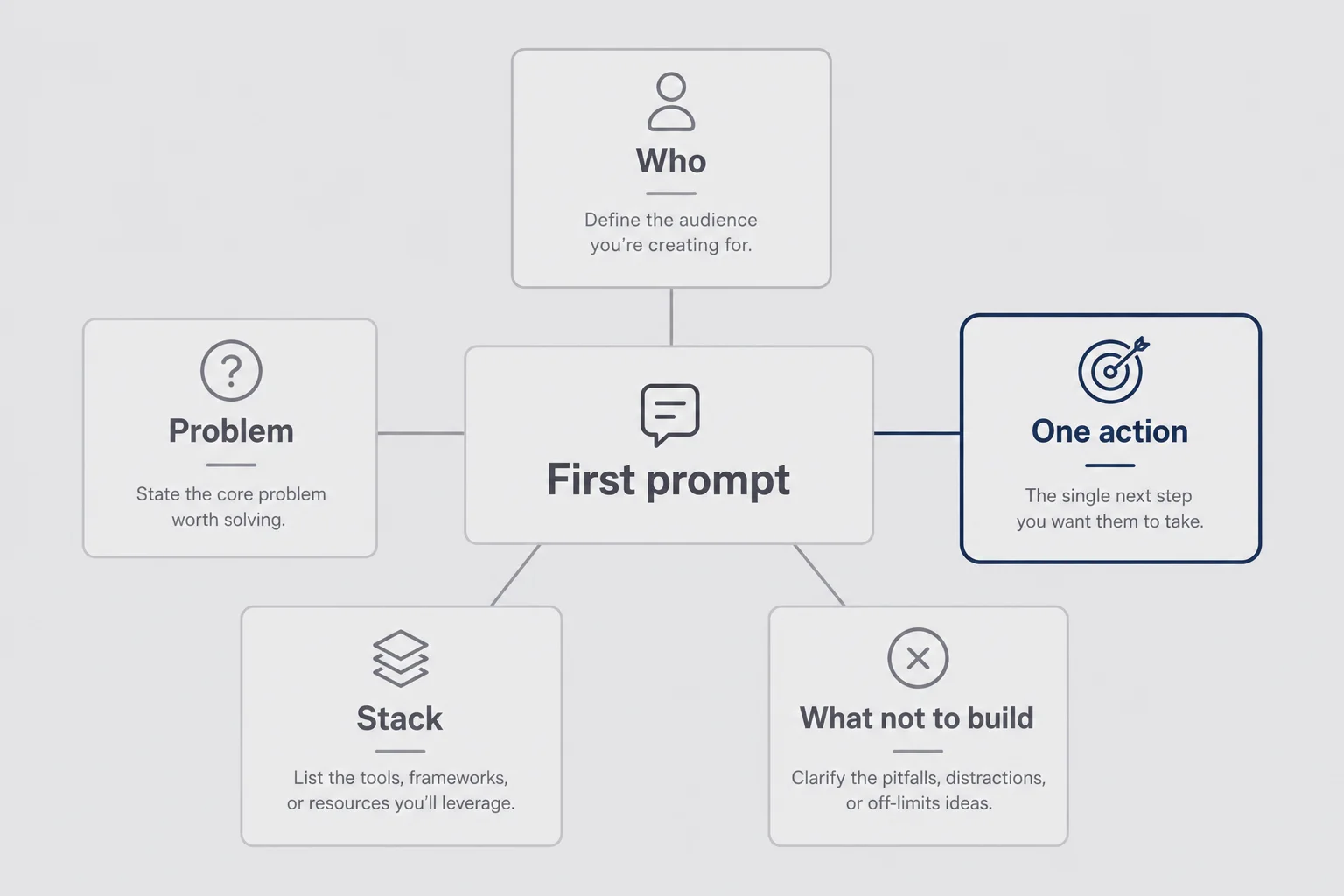
I do not start a build with a clever system prompt. I start with five boring ingredients. Miss one and the first generation usually wastes an hour.
Who, problem, one action
Who: the narrowest customer you can name without lying. "Freelance bookkeepers who invoice on their phone" beats "small businesses."
Problem: the recurring friction in their words, not yours. "I forget to follow up on unpaid invoices until cash gets tight" is better than "invoice management is hard."
One action: the single thing a paid user does that makes the product worth $19 or $39 a month. If you cannot name that action, you are not ready to prompt a build. You are still in idea land. Go do the validation work first. AI will happily build a beautiful distraction.
I write those three lines in Notes before I touch any builder. Sometimes the whole first prompt is basically those three lines plus stack and constraints. That is enough for a scaffold. It is not enough for a company, but it is enough for tonight.
If you cannot name the one action, try this test. Sit with a timer for five minutes and write the sentence a customer would text a friend: "I finally found a tool that just ___." If the blank is "manages my freelance business," you are still too wide. If the blank is "nudges clients about overdue invoices without me sounding rude," you have a product shape. Prompt from that sentence.
Stack, constraints, and what not to build
Stack tells the model which patterns to reach for. If you say nothing, Bolt or Cursor will pick something popular and you might not know how to maintain it. I usually say something like: "Use Next.js and Supabase. Auth with email magic links. Stripe Checkout for one monthly plan. Hosting on Vercel later." If I am staying inside Bolt for longer, I still name Supabase and Stripe so the integrations are intentional.
Constraints are the adult in the room. "Mobile responsive is fine. Native apps are out of scope." "English only." "One user role for now: the account owner."
What not to build is the section beginners skip and then regret. AI loves to help by adding. Your job is to subtract in advance. "No admin panel. No team invites. No AI chatbot in the product. No dark mode toggle unless it comes free with the UI kit." Saying no in the prompt is cheaper than deleting features for three nights.
If you are stuck choosing between Bolt, Cursor, Expo, or owning more of the code yourself, run the build path picker before you write a single prompt. The prompt quality cannot fix the wrong path.
I also name the environment early when secrets are involved. "Put Stripe and Supabase keys in env vars. Never hardcode secrets in client files." That line has saved me from pasting a live key into a prompt like it was a grocery list. Keys are not plot points. Keep them out of the story you tell the model when you can, and point the model at env names instead.
The one-page product brief I write before I open Bolt
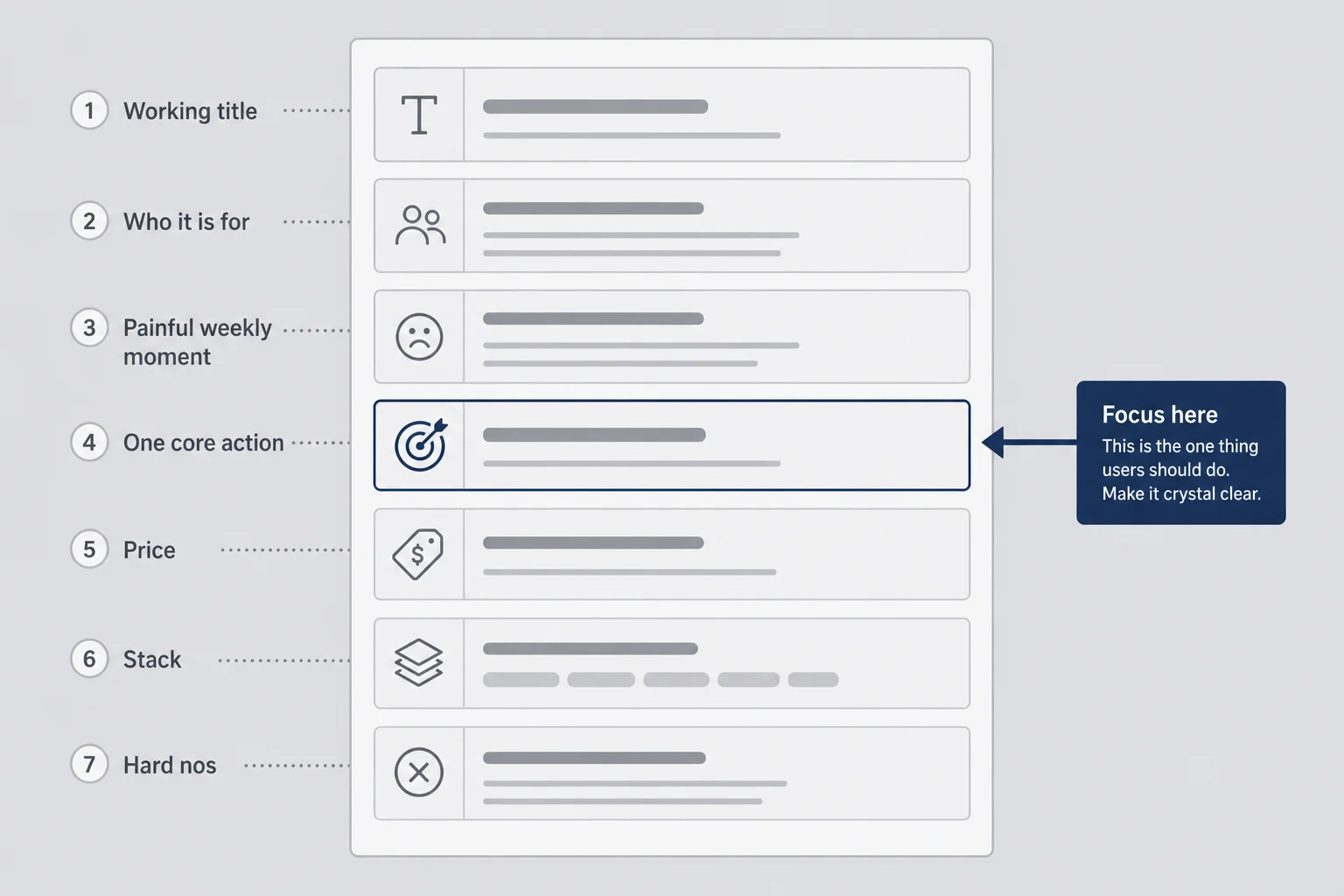
This is the unsexy habit that made my prompting suddenly work. I write a one-page brief in plain English, like I am explaining the product to a tired contractor on a Friday. Then I paste pieces of that brief into the builder. I do not ask the AI to invent the brief for me first. That is how you get a confident product for a market you never chose.
The brief template I actually reuse
I keep a short template. It is not sacred. It is reusable.
Name (working title is fine). Who it is for. The painful moment in their week. The one core action after login. What success looks like in the first session. Price and what the free trial unlocks, if any. Stack. Hard nos. Out of scope until ten paying users.
That is it. Half a page is plenty. Two pages means I am overthinking and should go talk to a customer instead.
Say I am building the invoice reminder tool. The brief might say: "Solo freelancers who invoice from Gmail. Pain: unpaid invoices sit for weeks because follow-up feels awkward. Core action: create an overdue invoice record and send a three-email reminder sequence. Success: first reminder sent in under two minutes after signup. Price: $19/month, seven-day trial with card. Stack: Next.js, Supabase, Stripe. Hard nos: no multi-user agencies, no PDF invoice designer, no CRM."
When I paste into Bolt, I do not dump the whole brief every message. I put the durable parts in the first scaffold prompt, then reference the brief when the model drifts. Drift is normal. The brief is how you notice.
Why writing it by hand beats prompting it into existence
I tried the other way. "ChatGPT, write me a PRD for a freelancer SaaS." It wrote a beautiful PRD for a generic product. I felt productive. I had not decided anything. The document was a mirror of average internet advice, not of a real person's unpaid invoices.
Writing the brief yourself forces the uncomfortable choices. If you cannot fill the "one core action" line, that is information. If your hard-nos list is empty, you will build a platform by accident. Handwriting (or typing in Notes) is slower in a good way. It is the last slow step before the tools make everything feel fast again.
I still use AI to poke holes in the brief after I draft it. "What is ambiguous here for an engineer?" is a great follow-up. Letting the model author the brief from scratch is how you outsource the only part of the job that is actually yours.
Sometimes I read the brief out loud to a friend who is not in tech. If they can repeat the product back in one sentence, the brief is ready. If they say "so it's like a CRM?", I go rewrite the who and the one action until the CRM fog clears. Friends are ruthless in a useful way. Models are polite in a useless way.
Scaffold prompts vs feature prompts
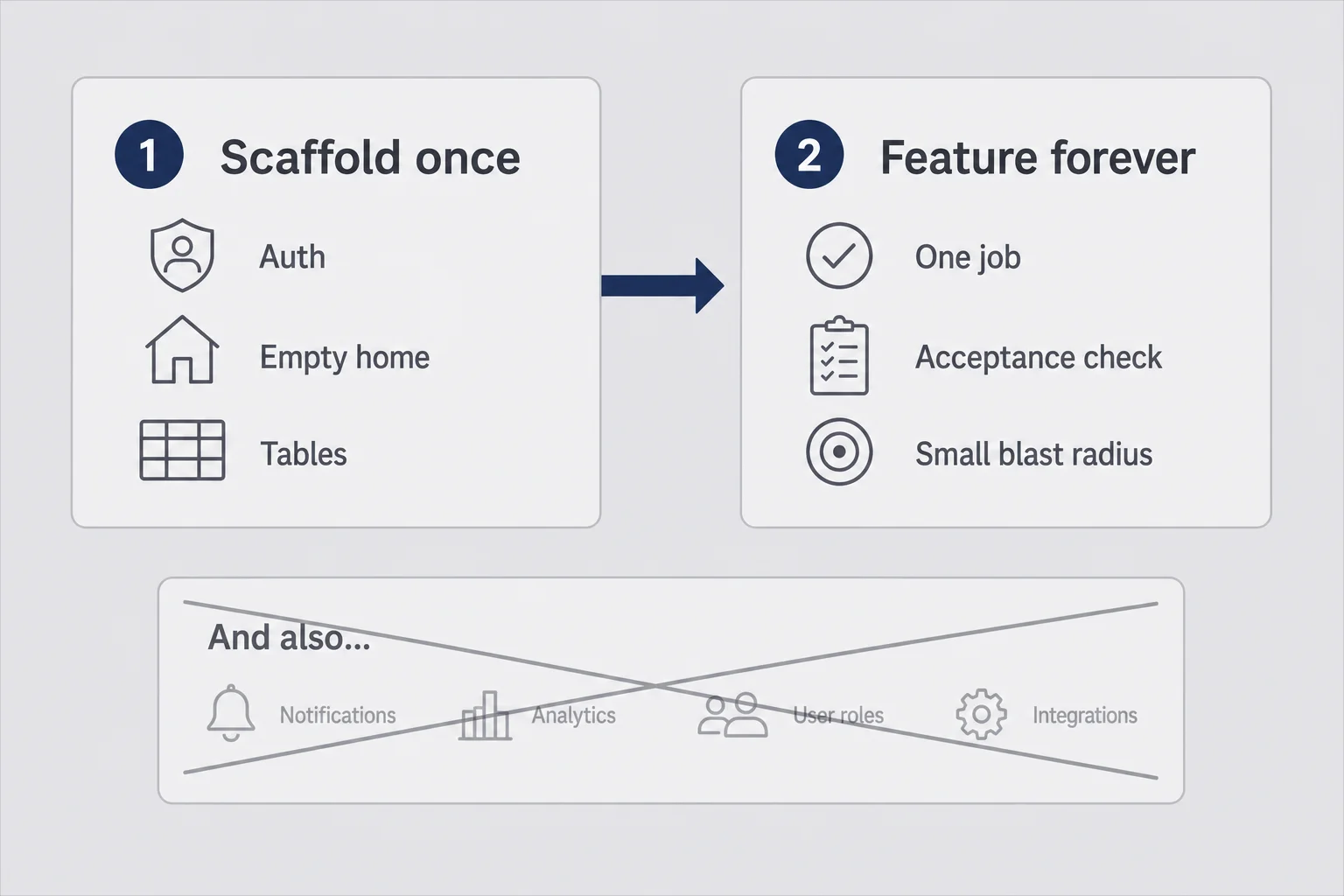
Mixing these two is how I got a tangled third product. Scaffold prompts create the empty house. Feature prompts furnish one room. If you ask for a furnished mansion in message one, you get rooms that share walls in weird ways and a kitchen that only works on Tuesdays.
Scaffold once. Feature forever.
My scaffold prompt usually asks for: project setup, auth, an empty authenticated home screen, a settings stub, and the database tables I already named in the brief. No clever features. No billing yet if I can help it. I want a door that locks and a room I can stand in.
Then I stop. I sign up. I log out. I log in again. I confirm the empty state makes sense. Only then do I write a feature prompt: "Add an invoices table with client_email, amount_cents, due_date, status. On the home screen, show a form to create one and a list of existing ones. Do not change auth. Do not add Stripe yet."
That second prompt has boundaries. "Do not change auth" matters. Models love to "improve" login while they are in the neighborhood. You will spend an evening undoing helpfulness.
I treat scaffold as a one-time event per product. Everything after that is a feature prompt with a tiny blast radius. If I need a second scaffold because I blew up the project, that is a smell. Usually I exported chaos too early or I asked for five features at once.
The "and also" trap that bloated my third product
I once wrote a prompt that ended with "and also add a simple CRM view, and also a weekly email digest, and also a dark mode." It felt efficient. It was a donation of my weekend to entropy. Each "and also" multiplies the ways the generation can be half-right. Half-right across three features is a full mess.
Now my rule is one job per prompt message. If I catch myself typing "and also," I split the message. Sometimes I literally send "Stop. Ignore the digest. Only ship the invoice list." The model does not get offended. Your future self will thank you.
This is also where ai builder prompts differ from chatting with ChatGPT about ideas. Idea chat can meander. Builder chat should be closer to tickets: title, scope, acceptance check. "Done means I can create an invoice and see it in the list after refresh." Write that sentence. Paste it. Test that sentence.
Another pattern that works: paste a short before/after. "Before this change, the home screen is empty. After this change, I can add an invoice and see it in a list. Nothing else should change." Models respond well to delta language. They respond poorly to novels about your five-year vision.
I keep a running note of prompts that worked so I can steal from myself later. Not a fancy library. Just a Notes file titled "prompts that did not lie to me." When a session goes well, I copy the exact message. When a session goes badly, I write one line about what I left vague. That file has taught me more than any prompt pack I downloaded and never opened.
Bolt prompts for saas: what I say in the browser builder
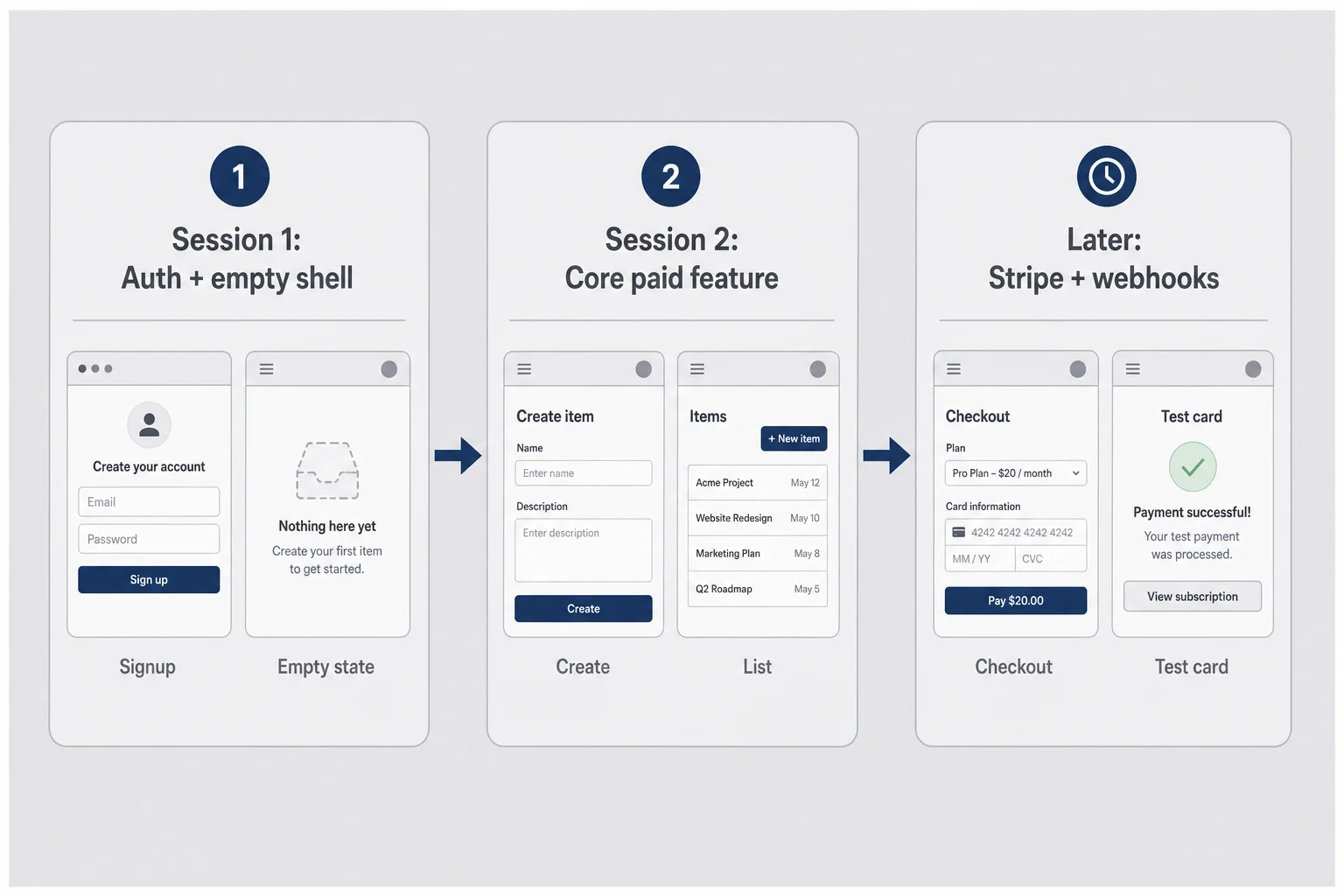
Bolt is where I still start a lot of first versions because I can see the UI while I talk. The prompting style is conversational, but it should not be sloppy. Think out loud, then constrain.
First session: auth, empty shell, one core screen
Session one goal: a URL I can open, an account I can create, and one screen that proves the product shape. Not payments. Not polish. Shape.
I paste the who/problem/one-action lines, the stack, and the hard nos. I ask for magic-link or email auth through Supabase if that is the path. I ask for a home screen with a clear empty state: "No invoices yet. Create your first one." I tell it not to invent marketing pages beyond a minimal landing if I already have Carrd. Sometimes I say "skip the marketing site entirely; this project is the app."
Then I use the preview like a suspicious customer. Can I sign up? Does the empty state make sense? Does anything ask me for a team name I never wanted? If yes, I prompt a removal, not an addition. Removals are underrated prompts. "Delete the Teams nav item and any team tables you created. This product is single-player."
I also pin durable rules when the tool allows project context: "Always keep changes minimal. Prefer editing existing files over creating parallel implementations. Ask me before adding new dependencies." You will not remember to say that every time. The project memory should.
Second session: the feature people are paying for
Session two is the product. In the invoice example, that means create, list, and send reminder. I describe the email copy tone in one sentence. I describe failure cases I care about: "If client_email is empty, show an error. Do not pretend the send succeeded."
I still do not add Stripe in the same breath if I can avoid it. Money is a separate session with a slower brain. Feature session is about the workflow feeling real enough that I could demo it on a call without apologizing every thirty seconds.
If Bolt starts thrashing (big regenerations, unrelated files changing), I export to GitHub sooner and move the careful work to Cursor. Bolt is excellent at speed. Cursor is better when I need to point at a file and say "only this." Knowing when to switch is part of prompting, even if the prompt happens in a different window. For the wider tool picture, I keep a living list in micro-SaaS tools for non-developers.
A small Bolt-specific tip: when the preview looks right but feels hollow, prompt for empty states and error states on purpose. "Show a clear empty state when there are zero invoices. If send fails, show the error on the page. Do not fail silently." Silent failures are how non-coders lose a weekend. Loud failures are how you learn what to fix next.
Cursor prompts non coder: talking to an editor when you cannot read the repo
Cursor is where non-coders either level up or get humbled. You can feel the codebase staring at you. That is fine. You do not need to read all of it. You need a prompting style that assumes you will verify by behavior, not by elegance.
Point at files. Paste errors. Ask for small diffs.
My Cursor habit is almost rude in its specificity. I @-mention the file I care about. I paste the error text in full. I say what I clicked when it broke. I ask for the smallest change that fixes it.
Weak: "The invoices page is broken. Fix it."
Stronger: "On /invoices, clicking Save shows a 500. Terminal error pasted below. Only change the route handler that creates invoices. Do not refactor the UI. Explain the cause in two sentences before you edit."
That last line matters for me. If the explanation sounds like nonsense, I do not accept the edit. I ask again in smaller scope. Cursor prompts non coder style is less about sounding technical and more about bounding blast radius.
I also ask for checklists after a change: "Give me three clicks I should try to confirm this worked." Then I do those clicks. If I skip the clicks, I am not building. I am collecting diffs like trading cards.
When I ask Cursor to explain before I ask it to change
Anything touching auth, billing, or permissions gets an explain-first rule. "Walk me through how a user is allowed to read only their own invoices. Use plain language. Quote the policy or check that enforces it." If Cursor cannot show me the fence, I do not add features on top of a hope.
This is slower than vibe-accepting everything. It is also how I sleep when a stranger's card is on file. I am not trying to become a senior engineer in the chat pane. I am trying to stay an honest operator. Operators ask where the levers are before they pull them.
When production breaks and I cannot read the fix, I follow the same operator path I wrote about in debugging AI-generated code: symptom language, reproduce twice, then ask for a narrow patch. Prompting and debugging are the same skill wearing different shirts.
I also keep a "translation" prompt for moments when Cursor answers in senior-dev dialect. "Explain that again like I am an ops person who can follow clicks but not TypeScript." There is no shame in that ask. There is shame in nodding along and shipping confusion.
Auth, Stripe, and data: prompts where I slow all the way down
Speed is a drug in these tools. Auth and money are where I put the drug down. A pretty dashboard with a leaky permission model is not a cute MVP. It is a trust problem waiting for its first customer.
Prompting payments without shipping a silent billing bug
My Stripe prompts are boring on purpose. "Add Stripe Checkout for one product price ID I will paste from the Stripe dashboard. After successful payment, set is_subscribed true for that user in Supabase. Handle the webhook for checkout.session.completed. Use test keys from env vars. Do not put secret keys in client code. Give me a test checklist with a test card."
I create the product in Stripe myself. I copy the price ID myself. I do not ask the model to invent pricing structure mid-prompt. Pricing is a business decision. The prompt should implement a decision you already made. If you are still unsure what to charge, read Max on pricing for solo founders before you generate checkout UI.
Then I run the checklist in test mode like a ritual. Pay. Confirm the flag flipped. Cancel. Confirm access drops the way I expect. If any step is magical ("it just works, trust me"), I ask Cursor to show me where the flag is written and read. Magical billing becomes support email at 1 a.m.
Row-level security in plain English
I do not pretend I write elegant SQL for fun. I do ask for row-level security in language I can verify. "Every invoices row must have user_id. Users can only select, insert, update, and delete their own rows. Generate the policies. Explain each policy in one sentence. Do not disable RLS to make the demo work."
That last sentence exists because AI will sometimes "help" by opening the gate so the UI stops erroring. A demo that works because security is off is not a demo. It is a trap.
If the model suggests turning RLS off temporarily, I treat that like a warning light. Fix the policy. Do not remove the fence. This is one of those places where being a non-coder does not mean being careless. It means you ask blunter questions until the answer is something you can repeat back.
Same energy for deletions. "Add a confirm step before deleting an invoice. Soft-delete is fine if you explain it. Do not hard-delete without asking." Tiny prompts like that keep you from discovering data loss through a customer email.
When the AI loops and how I break the spiral
You will know the loop when you feel it. Fourth message. Same bug. The model apologizes with confidence and rewrites half the file again. Your shoulders are up by your ears. That is not progress. That is a slot machine.
Three rounds of "try again" is my hard stop
I give a broken flow three focused attempts. Attempt one: paste error, ask for minimal fix. Attempt two: restate the acceptance check and forbid unrelated edits. Attempt three: ask for a diagnosis only, no code, then decide.
If it still fails, I stop prompting for a fix. More tokens will not create understanding you skipped. The loop is usually my fault for asking for too much at once, or for never stating what "fixed" means in click language.
Close the chat. Write the steps. Reopen smaller.
My reset ritual is almost comically analog. I close the chat. I write the user steps on paper: click Save, see toast, row appears, refresh, row still there. I write what actually happens. Then I open a new chat with a smaller ask: "Do not fix everything. Tell me which single function runs on Save." Once I know that, I ask for a patch only there.
Sometimes I roll back to the last known good commit and redo the feature with a tighter prompt. Pride hates this. Shipping loves it. A clean second attempt beats a haunted first attempt you keep decorating.
If the product is already live and you are scared to touch it, that is also a prompting problem upstream: you shipped without a deploy path you trust. Fix the safety net, then fix the bug. Prompting into a live unbroken deploy story is how non-coders learn gray hair early.
Vibe coding micro saas without shipping a mess
Vibe coding is real. I use the phrase. I also think it gets people hurt when they confuse vibes with a release process. You can vibe the first draft. You cannot vibe the billing webhook and call it a day.
Test the flow yourself, every time
After every meaningful prompt, I run the path a stranger would run. Signup. Core action. Logout. Login. Repeat the core action. If I added payments, I use a test card. If I changed permissions, I try to access another user's data on purpose with a second account. That adversarial little test has saved me more than any clever prompt.
I keep a dumb checklist in Notes titled "clicks." It is not automated QA. It is respect for the fact that I cannot read the whole diff. Behavior is my compiler.
Scope is a prompt skill, not a personality trait
People say they have scope creep like it is a personality disorder. In AI building, scope creep is usually a prompting habit: you keep saying yes to the model's suggestions. "I also added a metrics page." Reject it. "I can wire notifications." Not tonight. Every accepted surprise becomes support surface.
My favorite prompt when the model gets ambitious: "Revert the extra pages you added. Keep only the invoice list and create form. Confirm which files you will touch first." Make it narrate the blast radius before it shoots.
This is how vibe coding micro saas stays fun instead of becoming a museum of half-finished navigation items. Fun is allowed. Paying customers still need a product with edges. The vibe is the energy. The edges are the business.
A realistic Thursday-night prompt walkthrough
Let me put one evening in order so this is not abstract. Say it is 7:40 p.m. I have a validated itch: three freelancers told me they hate chasing invoices. I have a Carrd waitlist with twenty-two emails. I have one hour before my brain melts.
7:40: Write the one-page brief in Notes. Ten minutes. No builder open yet.
7:50: Open Bolt. Scaffold prompt with who, problem, one action, stack, hard nos. Ask for auth plus empty home. Generate. Sign up in preview. Fix whatever auth weirdness appears with one narrow prompt.
8:15: Feature prompt for invoice create and list only. Test create. Test refresh. Delete a row. Confirm permissions feel right with a second test user if I have time.
8:40: Stop. I do not add Stripe tonight if the list is flaky. I write tomorrow's prompt at the bottom of the brief: "Stripe Checkout, one price, webhook flag, test checklist." Future me gets a clean starting line instead of a 11 p.m. money panic.
9:00: Export to GitHub if the session went well. Commit message in human language: "invoice list works in preview." That commit is a bookmark for Cursor later.
That is a good Thursday. Not a launch. Not a startup. A scaffold and a core action you can show someone on Friday. Prompting is what made the hour usable. Validation is what made the hour worth spending. If you skip validation, you just become faster at building the wrong list view.
Compare that to the bad Thursday I used to run. Open Bolt at 7:40 with no brief. Ask for the whole product. Fight the model until 11:10. Screenshot something pretty. Wake up ashamed of a codebase I cannot explain. Same person. Same tools. Different prompting discipline. I would rather be boring at 9:00 than impressive and stuck at midnight.
Questions I get about prompting AI builders
Do I need to learn prompt engineering before I build?
No. You need to learn how to describe a product clearly. Prompt engineering courses sell you templates. A one-page brief with who it is for, the problem, the one core action, and hard constraints will outperform a fancy template every time. Practice on small builds. The skill is product thinking dressed as chat messages.
Should I paste my whole idea into Bolt in one message?
Almost never. One giant prompt invites a giant, half-broken app. Scaffold auth and an empty shell first. Then add the one feature people would pay for. Then billing. Small prompts you can test beat epic prompts you cannot debug. If the builder offers a project-level brief or memory, put the constraints there and keep chat messages focused on one change.
What if I cannot read the code Cursor writes?
Ask it to explain the change in plain English before you accept anything that touches login, payments, or customer data. For everything else, test the user flow yourself and treat the model like a fast junior who needs review. If you cannot explain what a billing webhook does after asking twice, do not ship it until someone who can read code has looked, or until you have walked through Stripe test mode end to end and understand the states.
How is prompting different from vibe coding?
Vibe coding is the mood. Prompting is the craft. You can vibe-code a weekend demo and still ship a mess if every message is vague. Good prompting means constraints, one job per message, and a hard stop when the model starts looping. The vibes are allowed. The discipline is required if strangers will pay you.
When should I stop prompting and hire help?
Stop when the same bug comes back three times, when you cannot explain where user data lives, or when money is moving and you are guessing. A two-hour paid review of auth and Stripe wiring is cheaper than a refund week. Prompting gets you far. Judgment decides when far is not far enough.
The product still cares whether someone pays
I can teach you better prompts all day. I cannot make a vague problem into a business by wording it more carefully. Clear prompts make clear software. Clear software still needs a customer with a card.
So here is where I will leave you. Before you open Bolt tomorrow, write the brief. Name the one action. List the hard nos. Then prompt like a manager who respects the contractor's time: one job, acceptance check, small blast radius. When the model loops, stop. When money or auth shows up, slow down. When the preview works, go talk to a human, not to the chat, about whether they would pay.
The tools will keep changing. Bolt will feel different in six months. Cursor will ship another mode with a new name. The skill underneath stays embarrassingly stable. Describe the product honestly. Constrain the build. Verify with clicks. Charge when it works.
I still google things. I still accept a fix I do not fully understand and then make myself understand it before I sleep. I still have a GitHub folder I do not discuss in polite company. None of that disqualifies you. Vague prompts do.
Go write the brief. Then go make the model earn its tokens. And if the first paid customer arrives before you feel ready, that is not a bug in the plan. That is the plan working.




Comments