Signup Worked. The Welcome Email Never Showed Up.
How to wire transactional email for a micro-SaaS when you build without coding: Resend, domain DNS, welcome and reset templates, and the smoke tests that catch silent failures before paying users panic.
 By Imani25 min read
The magic link never arrived.
My friend Jordan had clicked Sign up on a client-intake tool I shipped on a Wednesday. Auth worked. The dashboard loaded. Stripe test mode had behaved all week. Jordan typed an email, waited, refreshed, checked spam, waited again, and sent me a polite "maybe later" text that meant the product was dead to them.
I opened Resend's dashboard and saw nothing. Not bounced. Not deferred. Just empty, like the app had never tried to send. Cursor had wired Supabase Auth to use its default mail path in dev. Production still pointed at a placeholder API key I thought I had replaced. The gap between "signup succeeded" and "human believes signup succeeded" was one missing environment variable and zero smoke tests.
That is transactional email micro saas without coding in one evening. Auth is the front door. Payments are the cash register. Email is the receipt tape that tells strangers the building is real. Non-coders stall here because email sounds like deliverability wizardry, and the dashboards use words like DKIM without explaining why your mom's Gmail never got the reset link.
If you already set up auth without coding, deployed, and wired Stripe payments, this is the nervous system between those pieces. Strangers do not trust a product that cannot email them back. This guide is how I pick Resend, verify a domain without pretending I enjoy DNS, ship welcome and password reset email saas flows, keep transactional separate from marketing, and run a smoke script before I ask anyone for money.
I am writing for the version of me who thought email could wait until "after launch." It cannot. Launch is the moment real inboxes judge you. A beautiful app with silent email is a scam in the user's mind, even when you are just disorganized.
You do not need to become a mail engineer. You need a rented post office, three templates, DNS that matches what the provider asks for, and the humility to test on a phone mail app that is not logged into your founder account. Everything below is that path in plain language.
Hermes once offered to "handle email later" the same week it offered to "handle webhooks later." Later is where customers churn before you notice. I treat email like auth now: configured, documented, tested, boring. Boring infrastructure is what lets the interesting feature be the thing people pay for instead of the thing they never see because they never got past signup.
Transactional email micro saas without coding: what you are actually renting
Transactional email micro saas without coding does not mean "no email." It means you refuse to send product-critical messages from a personal Gmail account with a Python script you copied once. You adopt a provider whose job is deliverability, templates, and logs, then you configure it until welcome, reset, and receipt messages arrive in the primary inbox within a minute.
You are renting four things. A sending identity on your domain so Gmail does not think you are impersonating yourself. Authentication records in DNS so mail servers believe you. An API or SMTP bridge your app or auth vendor can call. A dashboard that shows bounces, complaints, and the message ID when a user says "I never got it."
I treat transactional email like Stripe. I do not build a card vault. I do not build a mail server. I connect a vendor, store secrets in environment variables, and test the happy path twice before I tweet the URL.
Say your app sends appointment reminders to solo consultants at fifteen dollars a month. The reminder logic can be perfect. If the first email after signup is missing, the user assumes the whole product is broken. They do not file a thoughtful bug report. They close the tab and tell themselves they were dumb to try another indie tool. Email is how you prove the account exists outside your database row.
Product email is not a newsletter
The transactional email non coder mistake is dumping everything into Mailchimp or Kit because you already use it for a waitlist. Marketing tools optimize for campaigns, segments, and unsubscribe footers. Transactional tools optimize for one-to-one triggers: signup, reset, invoice. Mix them up and you get slow sends, wrong unsubscribe behavior on password resets, or worse, promotional spam scores on messages that must arrive.
Keep two lanes in your head even if you only buy one tool at first. Lane one is triggered by the product: welcome, verify, reset, receipt, trial ending. Lane two is triggered by you: launch announcement, feature update. Lane one needs speed and boring subject lines. Lane two can sound like you on a good day. Confusing the lanes is how reset links land in Promotions.
When your AI agent says "integrate email," ask which lane. If it cannot answer, narrow the task: "Send welcome via Resend when Supabase inserts a user." Specific beats generic every time.
Good enough before ten customers
Before ten customers, good enough looks like this. One verified domain. One From address like hello@ or notifications@ on that domain. Three templates: welcome, password or magic-link helper copy if auth does not send its own, payment receipt after Stripe webhook. Logs you can open when someone complains. A smoke test document you run after every deploy.
You do not need drip campaigns, A/B subject lines, or twelve locale variants. You need proof that a stranger's inbox reflects what your database already knows. Everything else is decoration that waits until revenue says you have time to decorate.
Operator default
If you only do one thing this week, verify your domain in Resend or Postmark and send yourself a welcome from production. Everything else in this article hangs off that green checkmark.
Cost-wise, email rarely kills a micro-SaaS before bad pricing or no distribution does. It still kills trust fast. One person who paid and got no receipt tells three friends. One person who could not reset tells Twitter. Fix pipes early even when MRR is zero.
Why your welcome email is the second signup
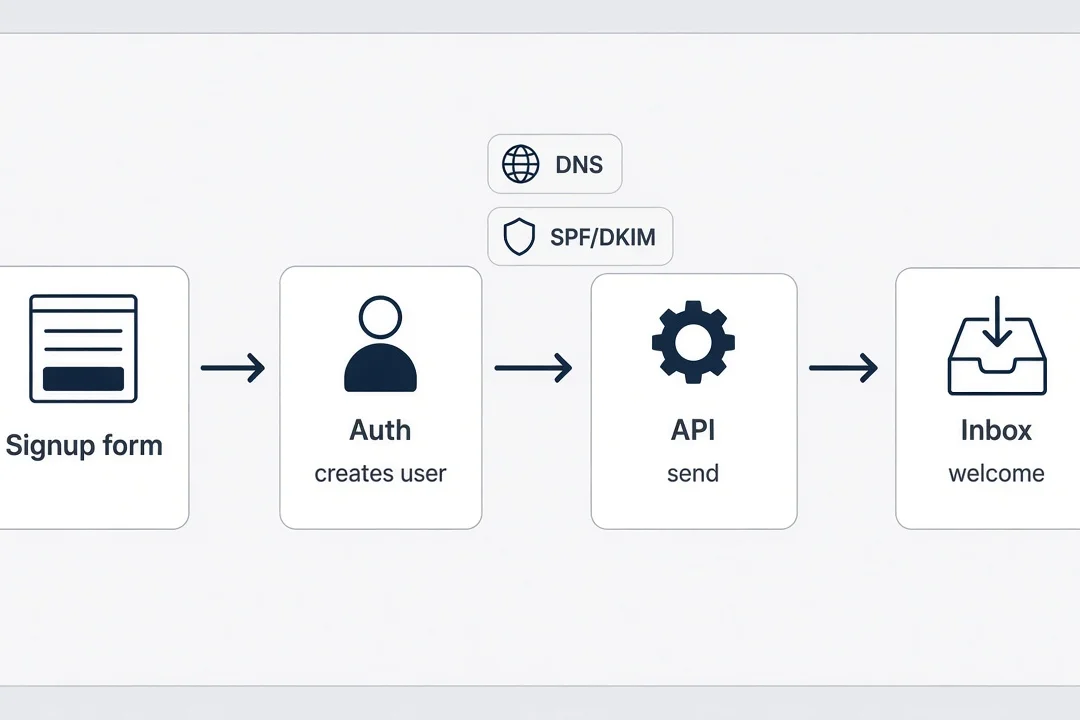
Welcome email without coding is not a branding exercise. It is the moment the user decides whether signup actually happened. The UI said success. Their brain waits for external confirmation. When the message arrives in thirty seconds with a clear subject and one next step, trust compounds. When nothing arrives, they assume the product is fake or broken, even if your auth table has their row.
I think of welcome as the second signup because it completes the loop auth started. Auth creates permission. Welcome creates belief. Belief is what makes someone upload data, connect Stripe, or come back tomorrow without you holding their hand.
My welcome emails stay ugly on purpose early. Short subject: "You're in — [Product name]." Body: one sentence thanking them, one link to the exact page they need, one line about support email. No hero image. No ten-feature tour. The goal is arrival and orientation, not delight. Delight can wait until someone pays.
Timing matters more than copy. Under sixty seconds is the bar I use. If your queue is slower, say so in the UI: "Check your email for a link." Silence plus a spinner is cruel. Silence plus honest instruction is tolerable.
What to put in the first message
Include the product name in the subject so it is searchable later. Repeat the email address they used so they know which inbox to check. Link to the dashboard or onboarding step, not your marketing homepage. If you require verification before access, say that plainly and make the button obvious.
Do not put passwords in email. Do not attach PDFs. Do not pitch annual plans in message one. Those choices scream marketing and hurt deliverability. Save upsell for inside the product after value appears.
If auth already sends a magic link, your welcome might be separate or combined depending on vendor. Combined is fine if the subject line says what the click does. Separate is fine if magic link arrives fast and welcome adds context. What fails is two different From domains arriving minutes apart looking unrelated.
When welcome fails silently
Silent failure is worse than bounce. Bounce at least shows up in a dashboard. Silent means your code never called send, used test keys, or hit the wrong environment. I log a console line or server log entry on every send attempt in production, even if I cannot read code fluently. "Welcome send triggered for user id …" gives your future self a breadcrumb.
When Jordan did not get mail, the fix was not prettier copy. It was wiring Resend in production and redeploying. Welcome is your canary. If it dies, assume reset and receipts are dead too.
Picture a freelancer paying nineteen dollars a month for a tool that saves one awkward client email per week. They signup on lunch break. They check phone mail before the food arrives. If welcome is missing, they assume chargeback bait and delete the bookmark. You lost a customer who was already willing to pay. That is why I obsess over seconds, not font choice.
Some founders hide behind "check spam." That is lazy support. Fix DNS and From domains until spam is rare, then mention spam once in onboarding copy. Blaming the user's inbox when your SPF is wrong trains you to ignore real bugs.
Resend micro saas: the provider I default to
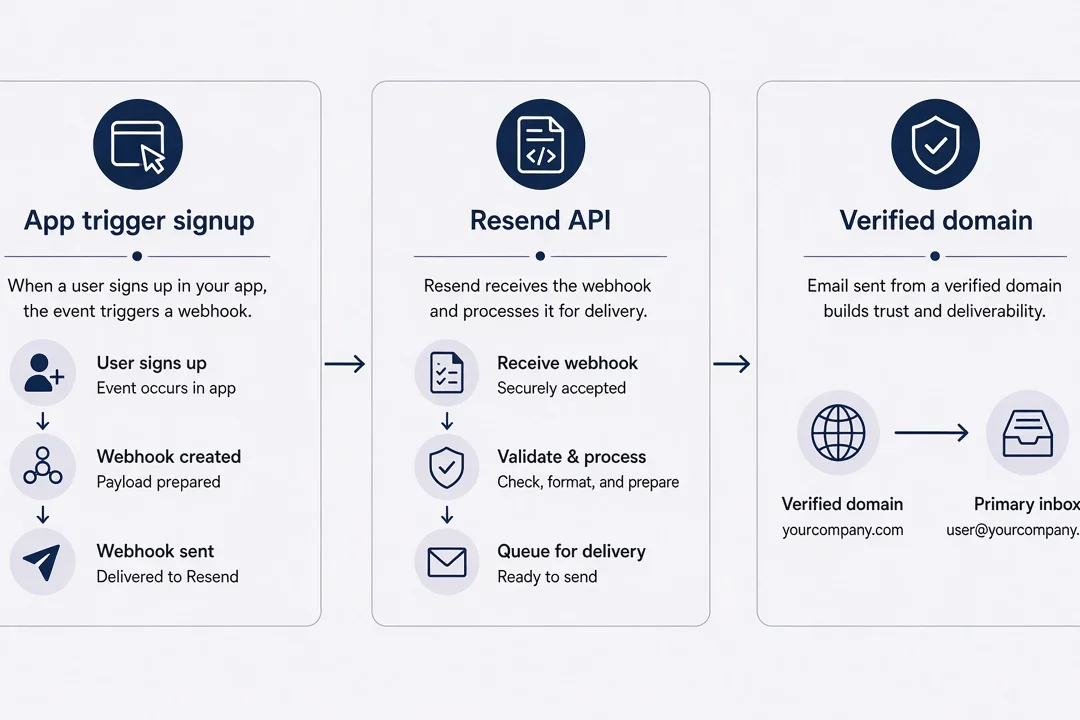
Resend micro saas setups show up in my stack because the docs match the apps AI tools already generate. Next.js route handlers, React Email components, environment variables named RESEND_API_KEY. Cursor has seen the pattern ten thousand times. That matters when you are not debugging TypeScript at 1 a.m.
Resend is not the only choice. Postmark is beloved for deliverability purists. Amazon SES is cheap and mean if you enjoy IAM policies. SendGrid is everywhere and feels enterprise-heavy for a reminder app with twelve users. I pick Resend when I want the fastest path from "auth works" to "inbox shows a message" with logs I can screenshot for support.
The integration shape is always similar. Create account. Add domain. Copy DNS records to wherever you pointed DNS when you deployed. Wait for green checks. Create API key. Put key in host environment. Call send from signup hook, edge function, or route your agent wrote. Verify in dashboard.
Pricing for early stage is usually noise compared to one lost customer. Resend's free tier covers plenty of smoke tests. Budget a few dollars a month once strangers sign up daily. If email volume breaks your unit economics, you have a good problem.
Environment variables are the new SMTP password
Non-coders lose email in the same place they lose auth: localhost secrets shipped to production unchanged. RESEND_API_KEY with a test value, or missing entirely, produces the empty dashboard I saw with Jordan. After every deploy, I open the host's env panel and read keys out loud like a checklist. Not the full secret. Just first and last four characters compared to my password manager entry.
Separate keys for local and production if the provider allows. Never commit keys to GitHub. If you leaked one, rotate immediately and accept that some users may need a resend. Rotation is cheaper than reputation damage.
React Email without becoming a frontend developer
React Email sounds coder-y. In practice you treat it like a template file your agent edits. A heading, a button link, footer with address. You preview in dev if you want, or send test messages to yourself until it looks acceptable. Perfection is not the goal. Readable on mobile is the goal.
If React Email feels like too much, use the provider's dashboard templates for v1. Hardcode strings. Swap to code templates later. Shipping beats elegance.
Postmark fans will tell you deliverability stats I cannot verify from my couch. They may be right for high volume. At zero to two hundred users, my bottleneck is not IP warming. It is that I forgot to call send at all. Pick the vendor your agent and docs already agree on, then execute.
I also keep a single "email config" note in my password manager: domain verified date, From addresses allowed, which auth vendor sends magic links, which Stripe webhook triggers receipt. Future me does not remember any of this after a month building something else.
Welcome email without coding: three templates before features
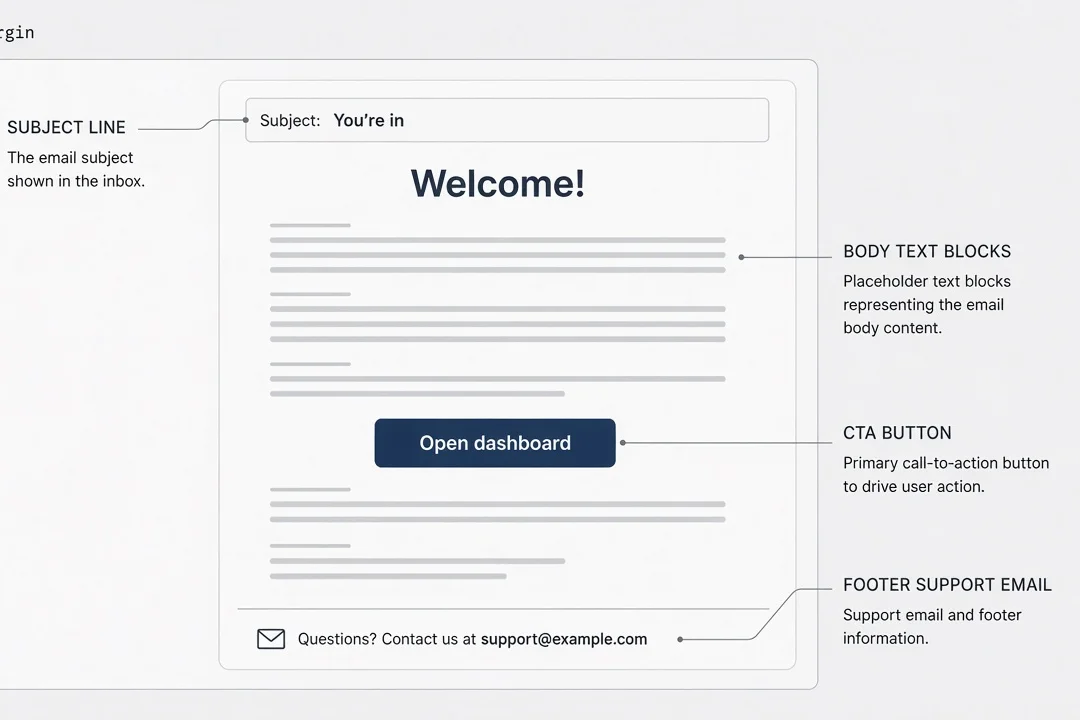
Welcome email without coding is a template problem, not a courage problem. You need one file or dashboard template per message type, variables for name and links, and a trigger you can name in plain language: "after user row insert," "after checkout.session.completed," "after password reset requested."
Template one is welcome. Template two is password reset email saas users expect when they click Forgot password, unless auth sends it entirely and you only customize copy in the auth dashboard. Template three is payment confirmation tied to your Stripe webhook story. Three templates cover most micro-SaaS heartbeats before you add trial warnings or dunning.
Variables should be boring: firstName or email, appUrl, supportEmail, magicLink or resetLink, planName, amount. Every variable needs a fallback when null. "Hi there" beats a blank greeting when firstName is missing. Your agent will forget fallbacks unless you ask.
Subject lines should describe the action, not your brand manifesto. "Reset your password for [Product]" beats "We missed you!" on resets. "Receipt for [Product] — $29" beats "Thanks for being awesome!" on money messages. Boring builds trust.
Triggers you must be able to explain
If someone asks where welcome sends from, you should answer in one sentence. "Supabase edge function on insert calls Resend." or "Next.js API route after Clerk webhook user.created." If you cannot answer, you do not own the system yet. Ask your agent to draw the trigger in comments at the top of the file. Comments are for you, not for computer science professors.
Avoid double sends. Auth welcome plus your welcome two seconds apart feels spammy. Pick one owner for the first message. You can send a second onboarding tip twenty-four hours later from a different template if you must, but not in the same minute.
Copy I reuse
I keep a scratch doc with subject and body snippets that survived real support. "If you did not sign up, ignore this." on welcome reduces panic forwards. "This link expires in one hour." on reset reduces stale link tickets. "Manage billing in Settings → Plan." on receipts reduces "how do I cancel" email. Reuse beats reinventing.
Password reset email saas: support insurance at 2 a.m.
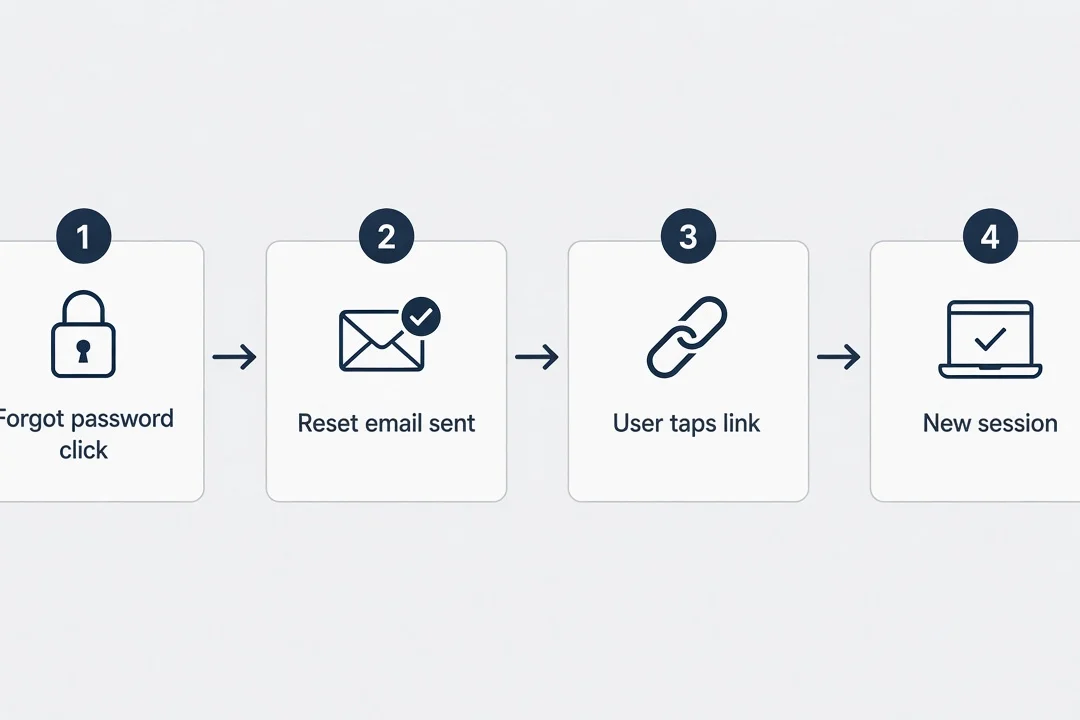
Password reset email saas flows are the message you send when a tired human cannot get in. They are angry in a way welcome never sees. The email must arrive fast, read clearly, and land on a working page that matches production URLs. This is where broken auth redirect settings and broken email combine into a support nightmare.
Reset is insurance. You hope nobody needs it. When they do, it is the difference between a one-click return and a refund request. Magic-link-first products still need a path when the link expires or the user switches devices. Even passwordless apps should document what happens when someone says "I never got the link."
Test reset on your phone's mail app, not only web Gmail. Tap the link. Confirm it opens logged-in or password-change UI on production domain. Test expired links if your vendor allows short TTL in staging. Know what error page says.
Auth-owned vs app-owned reset
Clerk and Supabase can send reset mail themselves. Sometimes that is enough for months. Customize templates inside their dashboards to match your domain and tone. If you outgrow defaults, route through Resend with their SMTP or hook docs. The rule stays: one From domain users recognize.
When auth sends reset and you also send marketing from a different domain, users hesitate. Align domains early even if marketing waits.
Security copy without scaring yourself
Reset emails attract phishing awareness. Include the request IP city if your provider gives it, or skip if you are unsure of accuracy. Always include "If you did not request this, ignore." Never put a password in email. Never ask them to reply with credentials. Keep one obvious button. Plain text alternative is nice; providers often generate it.
If reset rate spikes, someone may be probing emails. Rate limit forgot-password on your UI before you obsess over template colors. Product protection beats prettier footers.
I test reset while logged out on cellular data because wifi DNS caching lied to me once. The link opened fine on my laptop on office wifi and failed on phone LTE until propagation finished. Users do not care about propagation. They care that tap works. Test the worst network you have.
Magic-link products still owe humans a readable "request new link" path in the UI when the old link dies. Email is part of that path. Do not trap people on a dead token screen with no next step.
Transactional vs marketing: keep the lanes separate
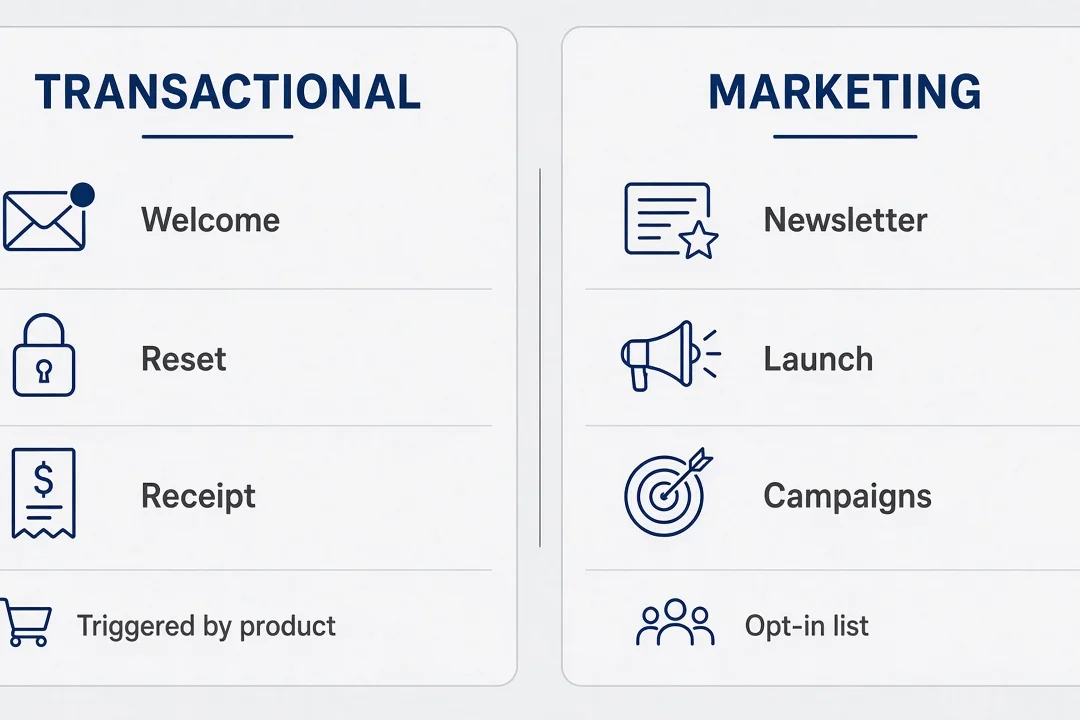
Transactional vs marketing is a discipline problem. Transactional messages are expected because the user did something. Marketing messages are tolerated because they opted into a list. When marketing tools send password resets, footers and headers can mark them promotional. When transactional tools blast newsletters, you lose unsubscribe compliance and annoy people who only wanted a receipt.
Use your waitlist tool for waitlist mail. Use Resend or Postmark for product mail. If you must use one vendor for both, use separate domains or subdomains and separate API keys when possible. notifications@product.com for triggers. news@product.com for campaigns. Inbox providers notice patterns.
Unsubscribe links belong on marketing, not on password reset. Receipts can include "manage email preferences" pointing to account settings, not a global marketing unsubscribe that blocks security mail. Ask your agent explicitly: "This template is transactional; no marketing unsubscribe."
Volume spikes differ. Black Friday campaign spikes differ from Monday morning reset storms. Keeping lanes clean helps you diagnose which spike broke deliverability.
What I delay until later
Drip onboarding sequences, win-back campaigns, and fancy segmentation wait until I have fifty paying users and a support pattern. Early on, one welcome and occasional manual broadcast from my personal email to ten beta users is fine. Product-triggered mail must be automated early. Founder broadcast can stay manual longer.
DNS and the boring week that protects deliverability
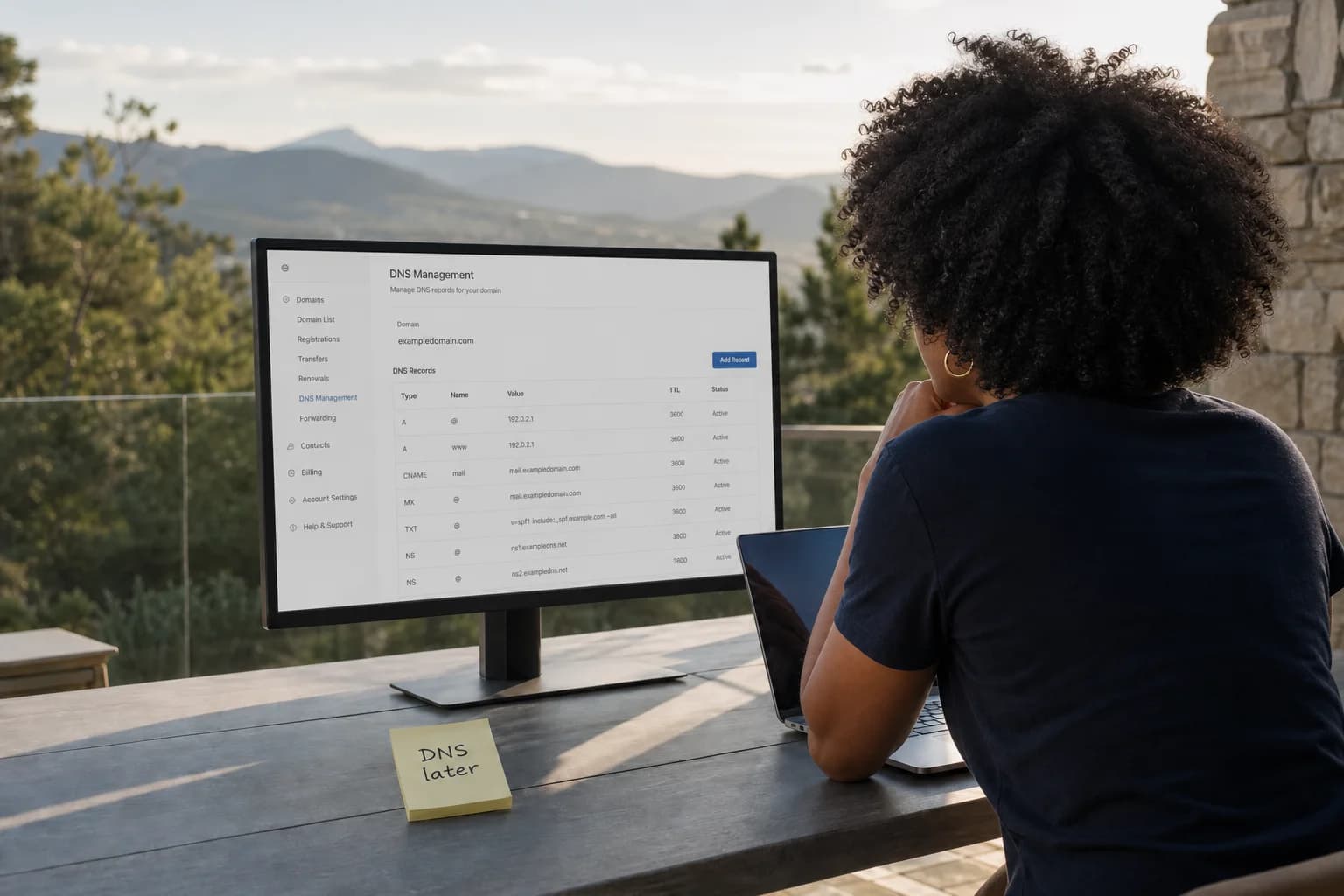
DNS is the homework nobody wants. Your email provider gives you TXT and CNAME records. You paste them into Cloudflare, Namecheap, or Vercel DNS. You wait. You click verify again. You wait more. This is not creative work. It is the toll booth before inboxes trust you.
SPF says which servers may send as your domain. DKIM signs messages so tampering shows up. DMARC tells receivers what to do when checks fail. You do not need a PhD. You need the provider's wizard green and a test message that arrives without a "via" warning that looks sketchy.
Common non-coder mistakes: adding records to the wrong subdomain, typo in a long TXT string, verifying send.yourdomain.com while From uses yourdomain.com, forgetting to remove old SendGrid records from a abandoned experiment. When in doubt, screenshot your DNS panel and ask your agent to diff against the provider checklist.
Propagation can take hours. Start DNS before you announce launch, not the morning of. I schedule a "DNS day" separate from "feature day" so frustration does not blend.
Subdomain strategy
Many founders send from mail.yourdomain.com or notifications.yourdomain.com. That isolates reputation if something goes wrong. Your marketing site stays on www. Your app on app. Email on a subdomain is normal. Follow whatever Resend's wizard labels as the domain to verify.
Do not send bulk product mail from a domain you cannot afford to burn. If you are unsure, subdomain first.
Cloudflare orange-cloud proxy on MX records is a classic footgun. Email DNS often wants DNS only, not proxied. If your provider's verify button flaps between green and red, read their Cloudflare note before you blame yourself. I have spent an afternoon on a toggle I did not know existed.
DMARC can wait a week after SPF and DKIM work. Do not let perfect DMARC block shipping welcome. Add p=none reports when you are ready to learn. Strict reject policies are for later when you understand your send sources.
When the wizard says verified but Gmail still warns
Gmail "via" or "mailed by" lines mean alignment is partial. Compare From domain to DKIM signing domain. Compare return-path. Your provider support docs usually have a literal screenshot of what green looks like in Gmail headers. Forward one test message to yourself and view original if you are curious. You do not need to master headers. You need to know whether you are done or not.
Wiring email to auth and Stripe without RFC homework
Your stack already has pieces. Auth knows who signed up. Stripe knows who paid. Email connects the human's inbox to those facts. The wiring is hooks, webhooks, and edge functions you configure rather than invent.
After signup, something must call send welcome. After Stripe checkout completes, something must call send receipt. Those somethings are often the same serverless function pattern your payment post described. Email is another row in the handoff checklist: event in, message out, log message id.
Keep idempotency in mind. Webhooks retry. Signup hooks may fire twice in weird edge cases. Sending duplicate welcomes is annoying but not fatal. Sending duplicate charges is fatal. Still, use provider idempotency keys or check "already sent welcome" flags in your database when your agent can add them simply.
From names matter. "Imani from ClientKit" beats "noreply" for early trust, but noreply@ is fine if the body explains replies go to support@. Pick one support inbox you actually read.
When Clerk or Supabase sends mail for you
Read their docs once on email customization. If they handle magic links, do not rebuild magic links in Resend unless you must. Complement instead of duplicate. Your welcome can arrive after first login instead of at signup if that reduces double mail.
For Stripe, never email card numbers. Receipt includes last four if Stripe provides it in webhook payload, amount, plan name, link to billing portal. Match currency formatting to what Checkout showed.
If you use Supabase edge functions, keep secrets in Supabase vault or host env, not hardcoded in a file some agent pasted into Git. Same rule as Stripe keys. Email keys are equally stealable and more embarrassing when someone sends mail as you.
Receipt timing should feel instant after success page. Users mentally connect payment tab with inbox ping. Delay over five minutes and they email you before the webhook fires. Monitor webhook failures in Stripe dashboard the same way you monitor failed sends in Resend.
A plain-language map of the handoff
Signup: browser submits email, auth vendor creates user, your hook sends welcome, user sees inbox proof. Reset: user clicks forgot, auth or your route sends link, user clicks, session exists. Pay: user completes Checkout, Stripe fires webhook, your handler updates database and sends receipt, user sees money acknowledgment. If you can narrate that map without saying "I think," you are ready to invite strangers.
When the map breaks, pick the broken arrow first. No webhook event means Stripe config. Webhook ok but no mail means email trigger. Mail sent but not received means DNS or spam. Diagnose in that order instead of rewriting the whole stack.
The smoke test script I run before strangers pay
My smoke script is a note app checklist I copy every launch. Create fresh email alias. Sign up on production in incognito. Confirm welcome within one minute. Log out. Request reset. Confirm reset mail and link. Complete test payment flow if live, or simulate webhook in test then production small charge. Confirm receipt. Screenshot provider logs with message ids.
Repeat on phone cellular, not office wifi, once. Mobile mail apps behave differently. Apple Mail and Gmail app are enough.
If any step fails, I stop marketing. Email failures are P0 even when the core feature works. You are selling reliability, not a demo.
Share the checklist with a cofounder or friend if you have one. Two sets of eyes catch wrong inbox assumptions.
I save message ids in a spreadsheet for the first ten beta users like a nerd. That sounds extra until user seven has a corporate firewall that strips unknown senders. Having ids let me open a ticket with the provider instead of guessing.
Add one line to your landing page FAQ: which address emails come from. Transparency reduces "is this phishing" support. Early products look suspicious because they are new. Showing notifications@yourdomain.com in FAQ gives people a search string.
Logs are your support superpower
When a user says email failed, ask which address and approximate time. Search provider logs. Find message id or absence. Absence means trigger bug. Bounce means mailbox or content issue. Deferred means reputation or volume. You do not need to fix SMTP. You need to classify and act or escalate to provider support with ids.
What broke for me (and what I check first)
Jordan's empty dashboard taught me to check provider logs before rewriting templates. The second failure mode is DNS half-verified: welcome works intermittently. Third is auth thinking it sent while production keys missing. Fourth is links in email still pointing to localhost from an old env. Fifth is Promotions tab hiding success from you because you only checked Primary on desktop.
My order now: env keys on host, provider log for attempt, DNS green, link domain in template, spam folder on phone. That order saves hours.
I once "fixed" copy while the API key was still test mode. Embarrassing. Now I fix plumbing first, poetry second.
Support replies that do not make things worse
When resending, use a manual send from dashboard if available rather than asking user to signup again. Apologize briefly. Explain one action. Do not blame their email provider. Offer alternate login if you have magic link admin tools. Log incident so you notice patterns.
Things I skip until fifty users
Beautiful HTML redesigns, localized templates, advanced analytics on open rates, dedicated IP addresses, BIMI logos, complex preference centers, AI-generated subject line tests, and migration to self-hosted mail. All real tools for later businesses. Early micro-SaaS needs arrival and correctness.
I also skip integrating every lifecycle email into one visual builder. Three solid triggers beat twelve half-wired automations.
Founders sometimes ask if AI can write all their lifecycle copy. Sure, for words. AI cannot click DNS verify for you or notice your production key is blank. Use AI on subject lines after plumbing works, not before.
If you are building with agents like Hermes on a VPS, give email the same skills boundary talk you give payments: which tools may call send, which environments they may use, and a hard rule that test keys never touch production URLs. Agents are eager. Eagerness plus email equals accidental spam to your whole waitlist. I learned that one from a story I would rather not repeat in detail.
Link this work back to the cluster you already built. Auth without working mail feels broken even when sessions exist. Deploy without env keys on the host guarantees silent failure. Stripe without receipt email makes charges feel fraudulent. Email is the thread that makes those posts feel like one product story instead of three tutorials you never connected.
A few honest answers to questions I get
Can I send transactional email for a micro-SaaS if I do not code?
Yes, if you use a transactional provider like Resend or Postmark instead of Gmail SMTP in a script. You verify a domain, paste an API key, create templates or React email files, and trigger sends from auth or webhooks. Your job is DNS, From addresses, and testing in real mail apps. You do not need to understand MIME headers by hand.
Should I use Resend or something else as a solo founder?
Resend is a strong default for AI-built Next.js apps because the docs match what Cursor already knows. Postmark is excellent if you want deliverability obsession and simpler templates. SendGrid works but feels heavier for a first product. Pick one vendor, verify one domain, ship three emails, and stop shopping until fifty users complain.
Why do my welcome emails land in Promotions or spam?
Usually missing or wrong SPF and DKIM on your sending domain, a From address on gmail.com instead of your product domain, or content that reads like marketing when the mailbox expected a receipt. Fix DNS first, send from notifications@yourdomain.com, keep copy short and factual, and test on Gmail and Apple Mail on your phone.
Does auth send email automatically or do I still need Resend?
Auth vendors send some emails themselves. Clerk and Supabase Auth can deliver magic links and password resets through their own mail setup or yours. You still want one provider you control for welcome, receipts, and anything custom. Align From domains so users do not get mixed senders and think one message is phishing.
What emails must exist before I take real Stripe payments?
At minimum welcome after signup, password or magic-link reset if you use passwords, and a receipt or subscription confirmation after checkout completes. Test all three on production with a real address you check on your phone. If receipt fails, people pay and assume you stole from them. That is worse than a broken feature.
How do I test email without spamming friends?
Create two inboxes you own, like you plus an alias. Run signup, reset, and a test payment yourself in incognito. Check spam folders. Ask one patient friend only after DNS is green. Log message IDs in your provider dashboard when something fails so support has a trail.
Send it like the product already works
Email is not the fun part. Neither is auth or Stripe. Together they are what makes your side project behave like software someone can depend on when you are not in the room.
I still google DNS record types when the wizard changes wording. That is allowed. What is not allowed is assuming signup success on screen equals trust in the user's mind. Send the welcome. Test the reset. Receipt the payment. Log the ids. Then go build the feature you actually wanted to build, knowing the boring pipes work.
The product does not care who wrote the template. It cares whether a stranger believes you enough to come back tomorrow. Transactional email micro saas without coding is how you earn that belief without becoming a mail engineer. Rent the post office. Own the smoke test. Ship the three messages. Then iterate on the thing that got you excited in the first place.
Tonight you can stop reading and send one test welcome from production. Not localhost. Not "almost verified" DNS. One real message to an inbox you carry in your pocket. When it lands, you are further ahead than most first-time founders who still treat email like a launch-day surprise. That small ping is the sound of a product starting to behave like a business.



Comments