The Card Declined. They Didn't Leave.
Most "churn" on a young Stripe subscription is a failed payment, not a breakup. Here's the recovery stack I use before I blame the product.
 By Max26 min read
Listen to this article
24:01AI-generated podcast-style overview of this article (not a word-for-word narration).
Tuesday morning. Coffee still hot. Stripe email in the inbox: payment failed, invoice open, subscription now past_due.
My first instinct used to be panic dressed up as product thinking. They're leaving. The feature set isn't enough. Pricing is wrong. I opened the customer row, drafted a breakup email in my head, and mentally tagged the MRR as gone.
Then I clicked into the decline reason. Insufficient funds. Card ending in 4242. Expiry still valid. This person did not cancel. Their bank said no for one charge on one day.
That is the whole game. A huge slice of what solo founders call churn is just a card that did not clear. Stripe dunning for a micro-SaaS solo founder is not a collections department. It is a boring recovery stack: retries that fire at smarter times, a past_due window that keeps access open long enough to fix the card, and emails with one tap to update payment. You already paid to acquire the customer. This is how you keep the ones who still want the product.
Say you sit at roughly $4,000 MRR with a hundred people on a $39 plan. Industry-ish whispers put involuntary churn somewhere in the mid single digits of subscription revenue over a year if you ignore recovery. Even if your numbers are kinder than that, imagine eight invoices failing in a rough month and you recovering only two because retries are off and emails say "contact support." You did not lose a market. You lost operator discipline.
If you are still wiring Checkout and webhooks, read Stripe billing for micro-SaaS first. This piece assumes Billing is live and asks the next question: what happens when the charge fails.
Stripe dunning for micro-SaaS solo founders: what you're actually recovering
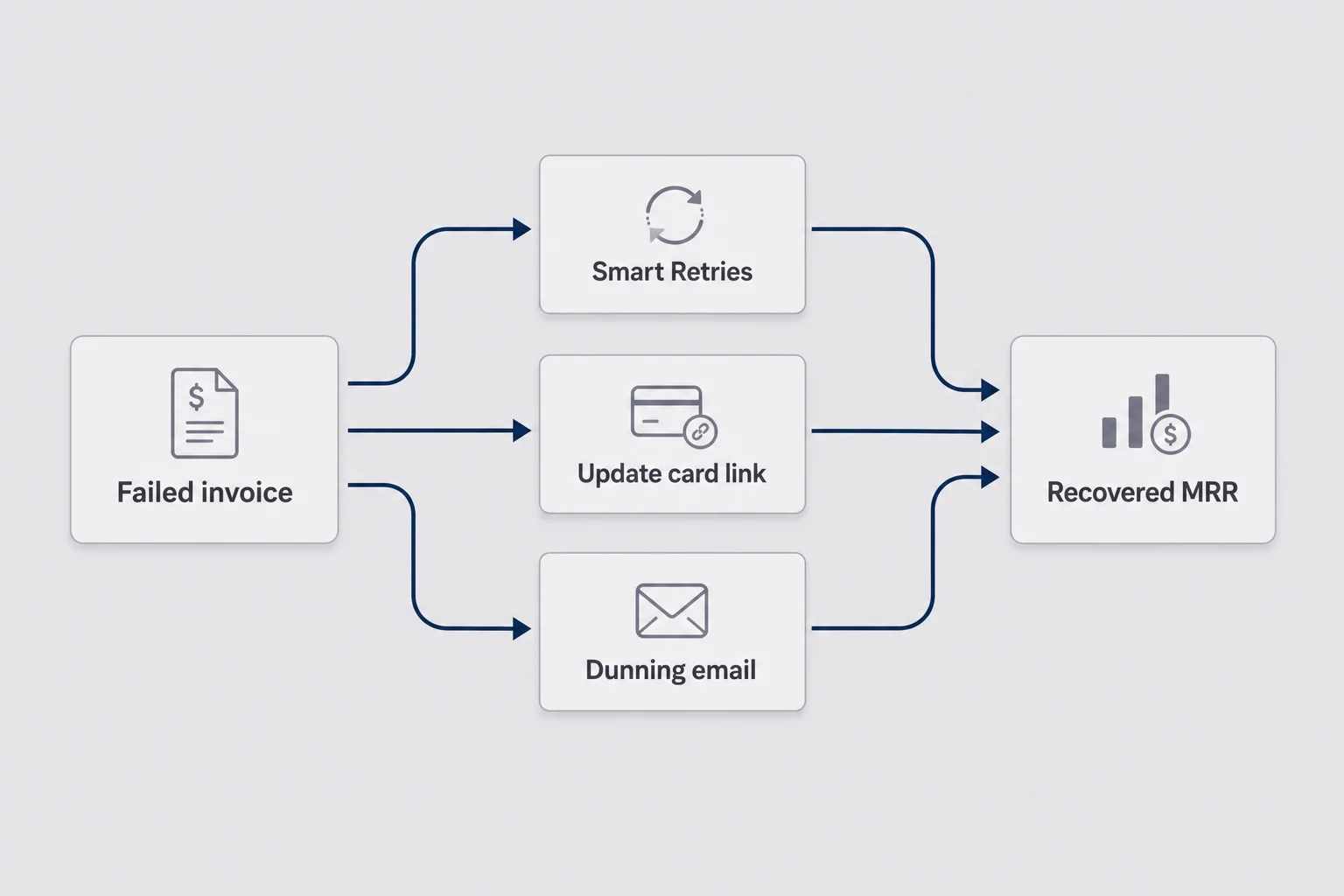
Dunning sounds like a lawyer word. In practice it means: a subscription invoice failed, you try again without being a jerk, and you give the customer an easy way to fix the payment method. Nothing fancy. No enterprise retention suite. No "win-back" A/B lab with twelve variants of the cancel button.
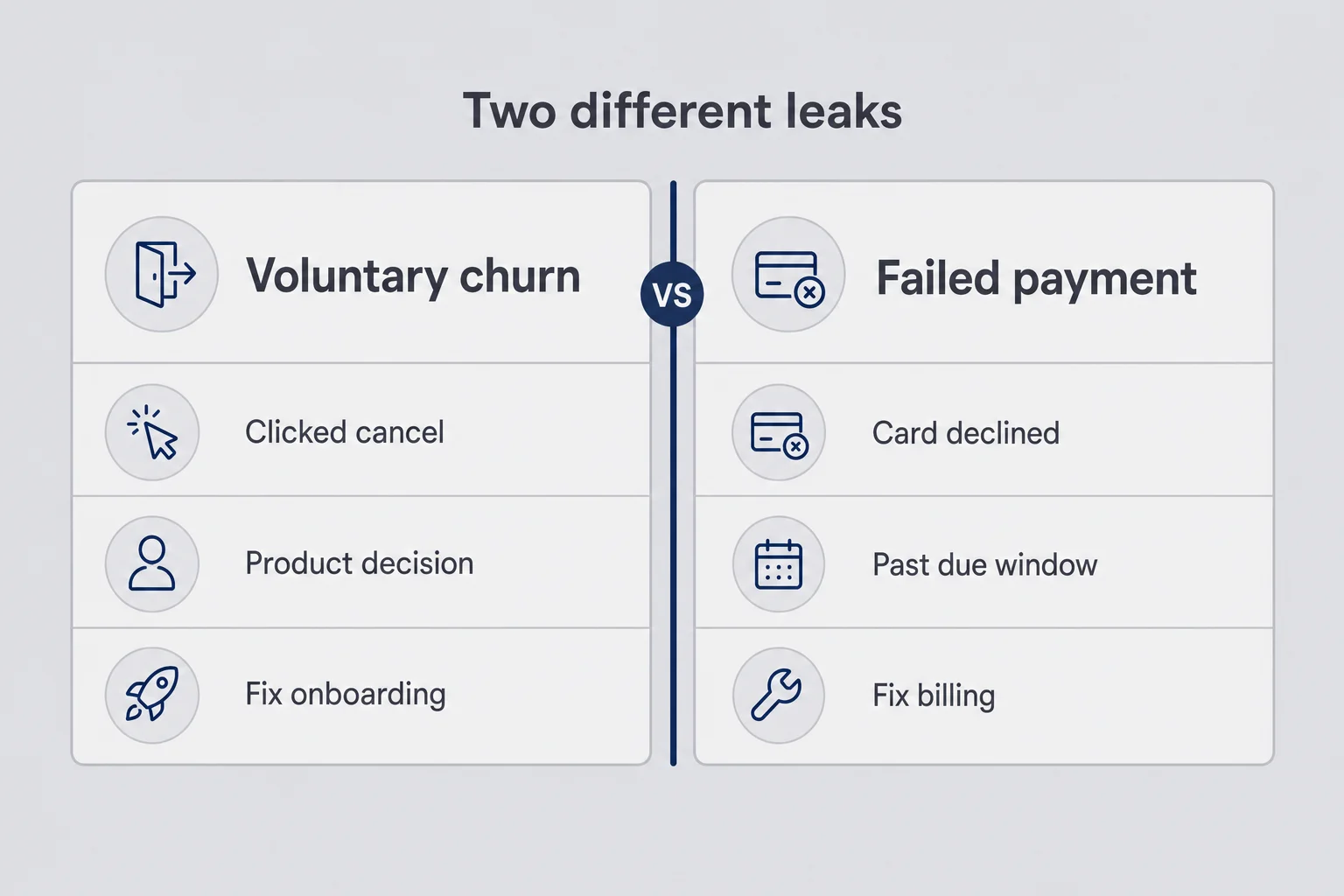
For a micro-SaaS solo founder running Stripe dunning, the goal is simple. Recover revenue from people who still want access. Separate that from people who clicked cancel on purpose. Those are different problems, and they need different tools. I have wasted Saturdays "improving retention" by shipping a vague usage chart while three past_due customers sat in Stripe with dead cards and no email. The chart did not bring them back. A portal link would have.
I treat failed-payment recovery as table stakes once you have recurring revenue. Shipping pricing and a free trial without a recovery path is like installing a roof without gutters. Water will find the edge. You can be right about price and still leak on renew day.
There is also a psychological trap. Founders like building features because features feel like progress. Configuring Smart Retries and writing three short emails feels like admin. Admin does not look like shipping. Admin is still how money stays in the account. If you only work on what is fun, involuntary churn will quietly tax everything fun you ship.
Involuntary churn isn't "they canceled"
Voluntary churn is a decision. The customer opens the portal, hits cancel, maybe leaves a reason. You can argue about product-market fit, onboarding, or support. That is the work in how to reduce churn in a micro-SaaS.
Involuntary churn is quieter. The charge fails. Stripe marks the subscription past_due. If you do nothing useful, the subscription eventually cancels or sits unpaid while you stare at a dashboard that looks like people hated you. Your ego writes a story about the roadmap. The invoice writes a story about a debit card that hit a daily limit.
I have watched founders celebrate "lower churn" after they turned on aggressive cancel-save modals, while their failed invoices piled up unanswered. They optimized the loud exit and ignored the silent leak. The modal may even have been fine. The unpaid pile was still unpaid.
Name the distinction out loud with yourself. When MRR drops this month, ask: how much was cancel, how much was failed payment that never recovered? If you cannot answer, you are flying blind. Write the two numbers on a sticky note if you must. Sticky notes are underrated finance tooling. For the voluntary side, a churn impact calculator turns cancel rate into dollars you must replace just to stay flat.
The three places the money disappears
In my experience the leak shows up in three boring places.
First, expired or replaced cards. People get new plastic after fraud scares or bank redesigns. The old token in Stripe dies. No email, no portal link, no updater service means silent death on renew day. The customer may still log in daily and wonder why nothing feels broken until you lock them out mid-task.
Second, soft declines. Insufficient funds, temporary bank blocks, "try again later." These often succeed on a later retry if you are not retrying at the same dead hour every day. Payday timing is real. A charge that fails on the 28th sometimes clears on the 2nd. Your fixed cron that only knows "retry in 24 hours forever" is not as clever as it feels.
Third, hard declines and fraud holds. Stolen card reports, do-not-honor that will never clear on that number. Retries waste time and can look spammy to the issuer. The move is a clear email, a new payment method, and a short fuse before you revoke access. Pretending the third retry will magically heal a fraud block is optimism, not strategy.
You do not need a PhD in card networks. You need a default path for each bucket: update the card, retry smartly, or stop pretending. When a founder tells me "Stripe is flaky," I ask which bucket. The answer is usually "I never looked." Looking is free.
One more texture check. Open your Stripe Dashboard, filter recent failed invoices, and sort by amount. If the biggest losses are soft declines on otherwise healthy accounts, prioritize retries and calm emails. If the biggest losses are expired cards on active users, prioritize portal links and updater services. Your own failure mix is a better guide than a blog average someone quoted from 2022.
Failed payment recovery is not the same as reducing churn
This is the opinion I will die on a little bit: if your only retention project is "add more features so people stay," you are skipping the cheaper win. Failed payment recovery work often returns more dollars per hour than another settings page. I would rather spend a Tuesday afternoon wiring portal links and retry settings than invent a seventh export format nobody requested.
Caveat: recovery will not save a product nobody activates. If people bounce in week one because they never reach the magic moment, fix onboarding. Do not send prettier dunning emails to accounts that never logged in after signup. That is collecting rent on an empty apartment.
Think of two ledgers. Ledger A: customers who meant to leave. Ledger B: customers who meant to stay and had a card glitch. Your churn article fights A. Your dunning stack fights B. Mixing them makes both measurements useless. Product teams that only track "canceled" without splitting involuntary losses end up rewriting pricing when they should have rewritten an email subject line.
There is a related trap on the support side. A customer writes "I got charged incorrectly" when they mean "you tried to charge me, it failed, and now I am confused." Your support brain goes into refund mode. Pause. Check the invoice. Often there is no successful charge, only a failed attempt and a scary bank notification. Calm copy and a portal link beat a frantic refund workflow.
Soft declines, hard declines, and expired cards
Stripe decline codes are not decoration. Soft declines say "maybe later." Hard declines say "not this card." Expired cards say "wrong vault entry."
When I review a failed invoice, I glance at the reason before I write copy. Soft decline: lean on Smart Retries, send a gentle note so they know you tried. Hard decline or expired: skip the "we'll try again overnight" theater and put the update link in the first sentence. If you only have time for one sentence, make it the link.
You will misclassify some. Banks are weird. Codes are imperfect. That is fine. The point is not perfection. The point is not treating every failure like a breakup or every failure like a network blip. Even a rough triage beats blasting the same corporate template at every decline forever.
A small habit that helps: once a month, skim ten random failed invoices. Read the codes out loud. Patterns show up fast. Maybe half your losses are expiry related and your emails never mention "new card." Maybe travel-related soft declines spike for a seasonal audience. Patterns tell you what to emphasize next, not which enterprise suite to buy.
Why your dashboard lies about "churn"
Most solo dashboards show canceled subscriptions and maybe failed payments as a footnote. Finance-grade SaaS teams split voluntary and involuntary. You do not need their tooling. You need one weekly habit.
Pull invoices that failed in the last thirty days. Count how many recovered, how many are still open, how many canceled after the retry window. That recovery rate is more honest than a vanity "churn %" scraped from customer count. Customer count churn mixes people who hated you with people whose Visa got reissued. Those stories should not share a tombstone.
I have also seen founders mark past_due users as churned in their own database because a webhook handler canceled access immediately. Then Stripe recovered the invoice three days later, the customer got a surprise lockout email from support, and everyone blamed "flaky Billing." The bug was the access policy. Stripe did its job. The app panicked.
Another lie dashboards tell: they hide lag. A failure on day one that recovers on day four looks like a cancel and a new signup if you only snapshot monthly active paying users carelessly. Your brain invents churn volatility that is really recovery latency. Measure invoices over time, not just seats at the end of the month.
Turn on Stripe Smart Retries before you write a single email
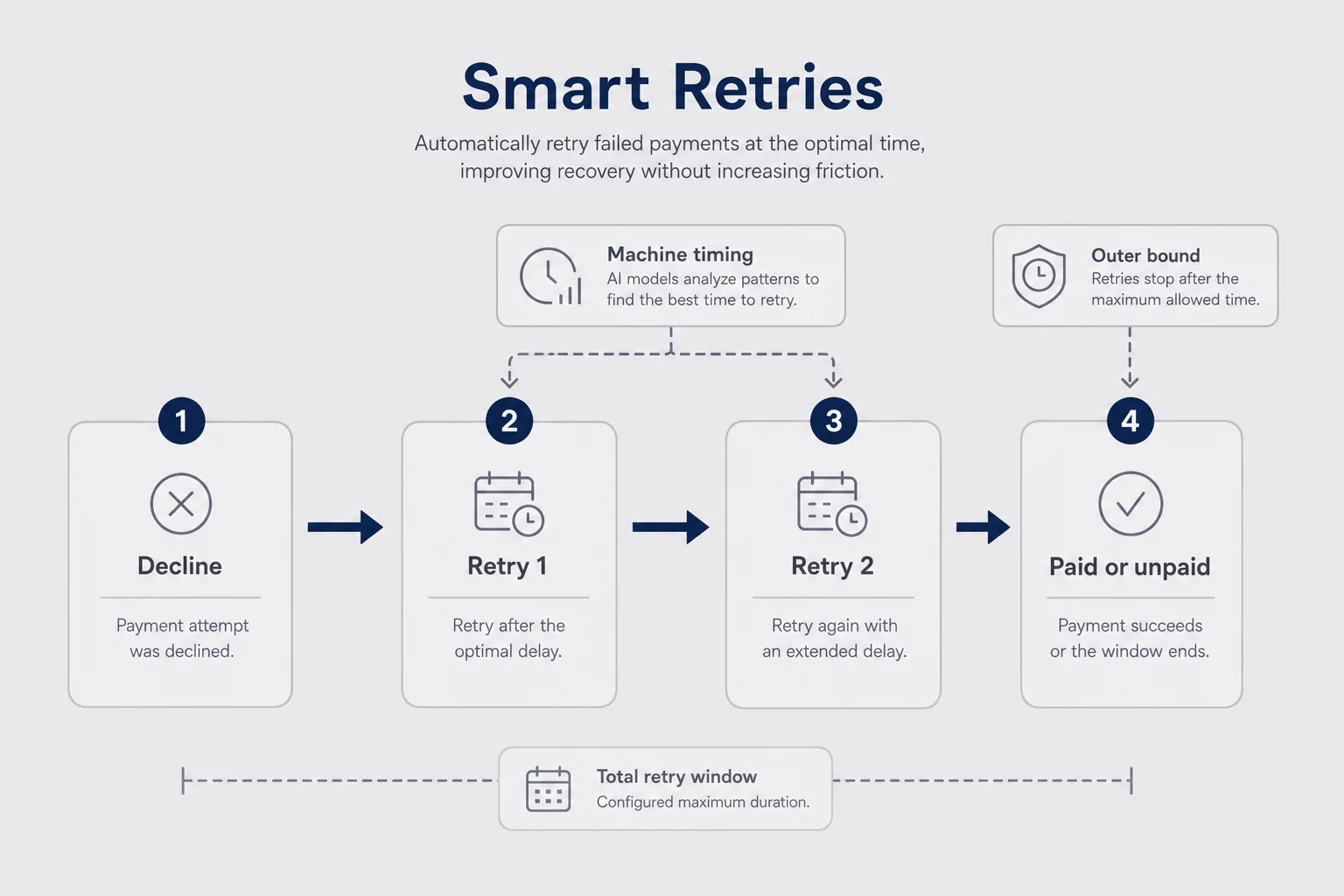
Before you design a five-email guilt sequence, open Stripe Billing settings and confirm Smart Retries are on for subscription invoices. Stripe documents this under Revenue Recovery. If you run Stripe Billing as a solo founder, this is the highest ROI click you will make all week. It costs nothing extra relative to the MRR it protects.
I am not allergic to writing email. I am allergic to inventing a custom retry cron that fires at midnight UTC forever because a tutorial from 2019 said so. Stripe has more decline data than your side project. Let it schedule soft retries. You own the customer communication and the access rules. Division of labor is allowed.
If you rolled your own subscription table and charge cards with PaymentIntents manually, you skipped half of Billing's recovery features. That can be fine at tiny scale, or if you have unusual metering. Just know you are signing up to rebuild retries, statuses, and portal flows yourself. Most solo founders should not. Use Billing. Customize the boring edges.
People ask whether Smart Retries "just work" without any app changes. Retries change invoice payment outcomes. Your app still has to react when status flips from past_due back to active or when payment finally succeeds. If your webhook handler only knows how to celebrate Checkout.session.completed once at signup, you are living in the acquisition chapter and ignoring the renew chapters. Renew is where micro-SaaS money lives.
While you are in the Billing settings screen, also confirm you are not inventing parallel truth. If your app stores subscriptionStatus and never updates it after renew day, Smart Retries can succeed in Stripe while your product still thinks the user is dead. Then support becomes archaeology. Sync first. Copy later.
Smart Retries vs a fixed retry schedule
A fixed schedule feels controllable. Day 0, day 3, day 5, cancel. Easy to draw on a whiteboard. Soft declines do not care about your whiteboard. Banks approve more often at certain times, and machine-timed retries beat a rigid calendar more often than founder intuition admits.
I still like a hard outer bound. Retries should not wander for a month while you keep serving a non-paying account out of politeness. Configure how long Stripe keeps trying, then decide what your app does when the subscription leaves past_due. That outer bound is yours. The minute-level timing can be Stripe's.
One more practical note: make sure your webhook handler is idempotent when retries succeed. invoice.paid after a failure should restore access even if you already sent a dunning email. Customers who fix the card should not need a support ticket to flip a boolean in your database. If they mail you "I updated my card but still see the banner," that is your bug, not their impatience.
I used to keep a personal fixed retry script because I "trusted" my own code more. It made me feel engineering-serious. It also fired into dead hours and never learned. Shipping Smart Retries and deleting the cron was one of those quiet refactors that never looks good on a resume and pays rent anyway.
Card Account Updater: the boring win before dunning
Card networks run updater services that refresh stored cards when banks reissue numbers or expiries. Stripe can participate so some renewals never fail in the first place. It is unsexy. It is also free insurance relative to chasing every expired card by hand.
Enable what Stripe offers for account updates, then stop thinking about it. Dunning emails still matter. Updater services do not catch every case, every bank, every country. They shrink the pile before your inbox gets loud. Shrinking the pile is the entire vibe of good dunning work.
Founders sometimes skip updater features because the Dashboard copy is dense or they are afraid of side effects. Read the current Stripe docs for your account region, turn on what applies, and move on. Fear of unfamiliar Billing switches costs more than the switches themselves for most early SaaS.
I used to treat updater services as "enterprise stuff." That was snobbery. Solo founders get expired cards too. The difference is you do not have a billing ops hire to clean up after. Automation that prevents a failure beats heroics that recover one.
Past due subscription states: past_due, unpaid, and canceled
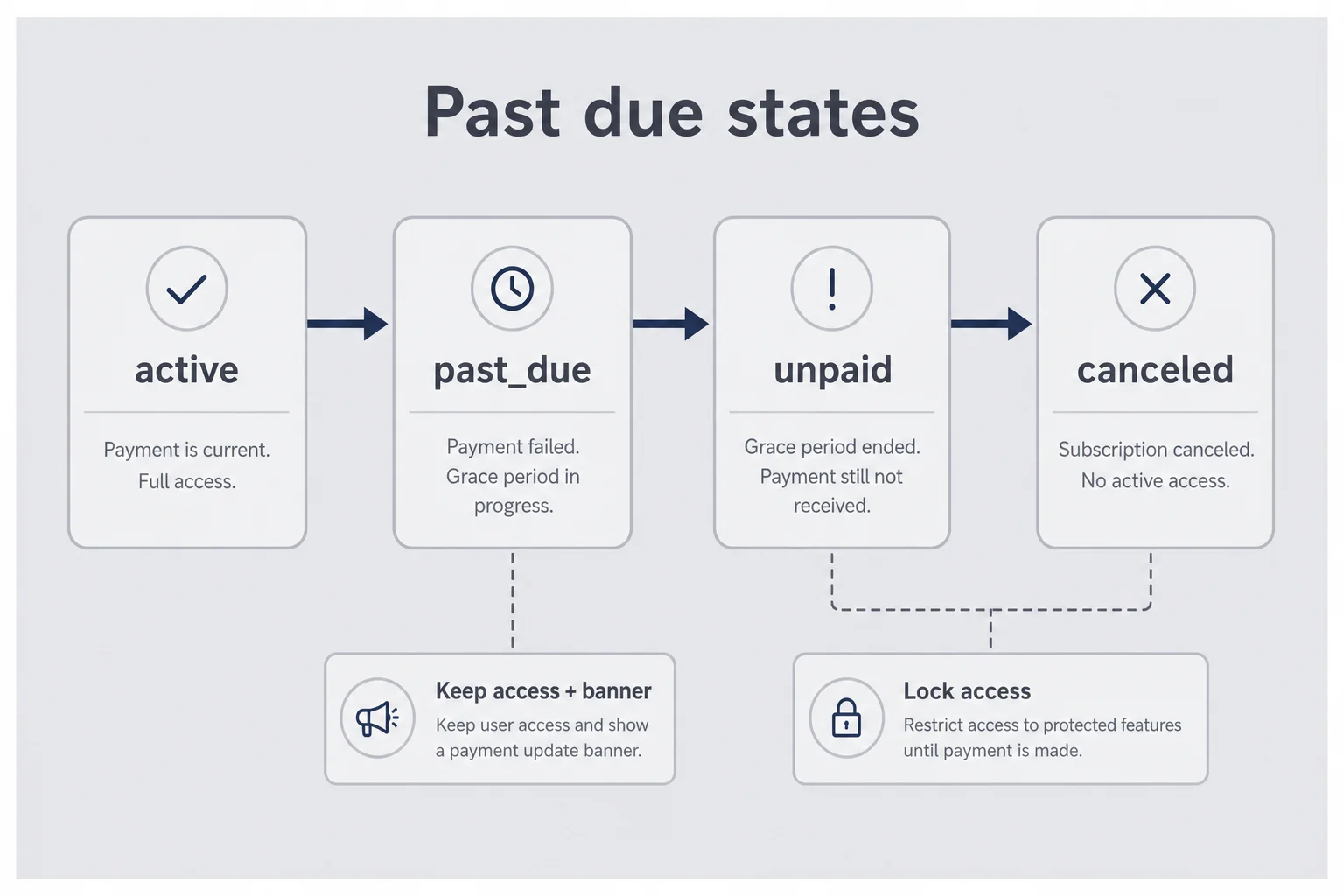
If you only remember one mental model from this article, make it this: past due subscription access in your micro-SaaS should follow Stripe status, not your anxiety.
Roughly: active means the latest invoice is in good standing. past_due means payment failed and recovery is in progress. unpaid or canceled (depending on your settings and version of Billing behavior) means you are past the recovery window. Read Stripe's current subscription status docs when you implement. Names and transitions get tweaks over time. The idea stays: there is a gray zone between "happy" and "gone."
Your product should know that gray zone exists. Keep core access during past_due if you can. Show a banner. Soften write access if you must. Do not hard-lock the whole account on the first invoice.payment_failed unless you are selling something with real cost-of-goods risk (API units, SMS, GPU minutes). Most B2B micro-SaaS tools are not that. An SEO audit dashboard can survive a week of goodwill. A SMS blast product maybe cannot.
I like banners that are honest and short. "We could not charge your card ending in 4242. Update payment. You keep access until Friday." That sentence does more for retention than a soft-focus illustration of a sad wallet. Put the CTA in the product chrome, not only in email. Some people ignore email. They still live in your app.
Document the policy for yourself in a README. Future you, half asleep at midnight, will try to "just lock them out" during an incident. The README is a seatbelt.
Map webhooks to access, not vibes
I still see code that sets user.plan = 'free' from a client-side billing page refresh. That is how you get loot box access. Drive entitlements from webhooks into your database. Trust server events you verify, not the browser's mood.
At minimum, react to:
invoice.payment_failed: start your soft banner, trigger your first dunning email if you own email yourselfcustomer.subscription.updated: sync status, period end, cancel flagsinvoice.paid: clear banners, restore full accesscustomer.subscription.deleted: final revoke
Log the event id. Process each once. If Stripe retries a webhook, you should not double-send the "your payment failed" email. Duplicate dunning is how you train customers to mute you.
This is the same discipline as the rest of Billing. Dunning is just what happens when the happy path stubs its toe. If your signup webhooks are rock solid and your renew webhooks are a TODO comment, you built a store with a locked back door.
Test with Stripe's test clocks and test cards that decline. Do not wait for a real Friday night failure in production to discover your banner logic is inverted. I have been that Friday. It is not character-building. It is just unpaid.
When to keep the door open vs lock the product
Position: keep the door open through past_due for most solo SaaS. Lock after the configured recovery window when status leaves past_due and you no longer reasonably expect a retry to save them.
Caveat: if a customer racks up expensive usage on your bill while unpaid, tighten faster. Usage-based AI wrappers are not the same as a $29/month dashboard. Match the grace period to your cost risk. Generosity that bankrupts you is not kindness.
I used to cut access immediately because it felt "serious." It created tickets from paying customers whose bank flagged a temporary hold. They were confused and slightly insulted. Recovered revenue, worse brand. Bad trade.
A banner that says "payment failed, update card, access continues until DATE" beats a cold lockout nine times out of ten at early MRR. Seriousness is communicating clearly, not slamming doors.
When you do lock, make unlock boring. After they update payment and Stripe marks them good, your webhook should reopen entitlements without a ceremony. Manual "reply to this email to get reinstated" workflows die when you are asleep. Automation is respect for everyone involved.
Dunning emails that get cards updated without sounding like a collections agency
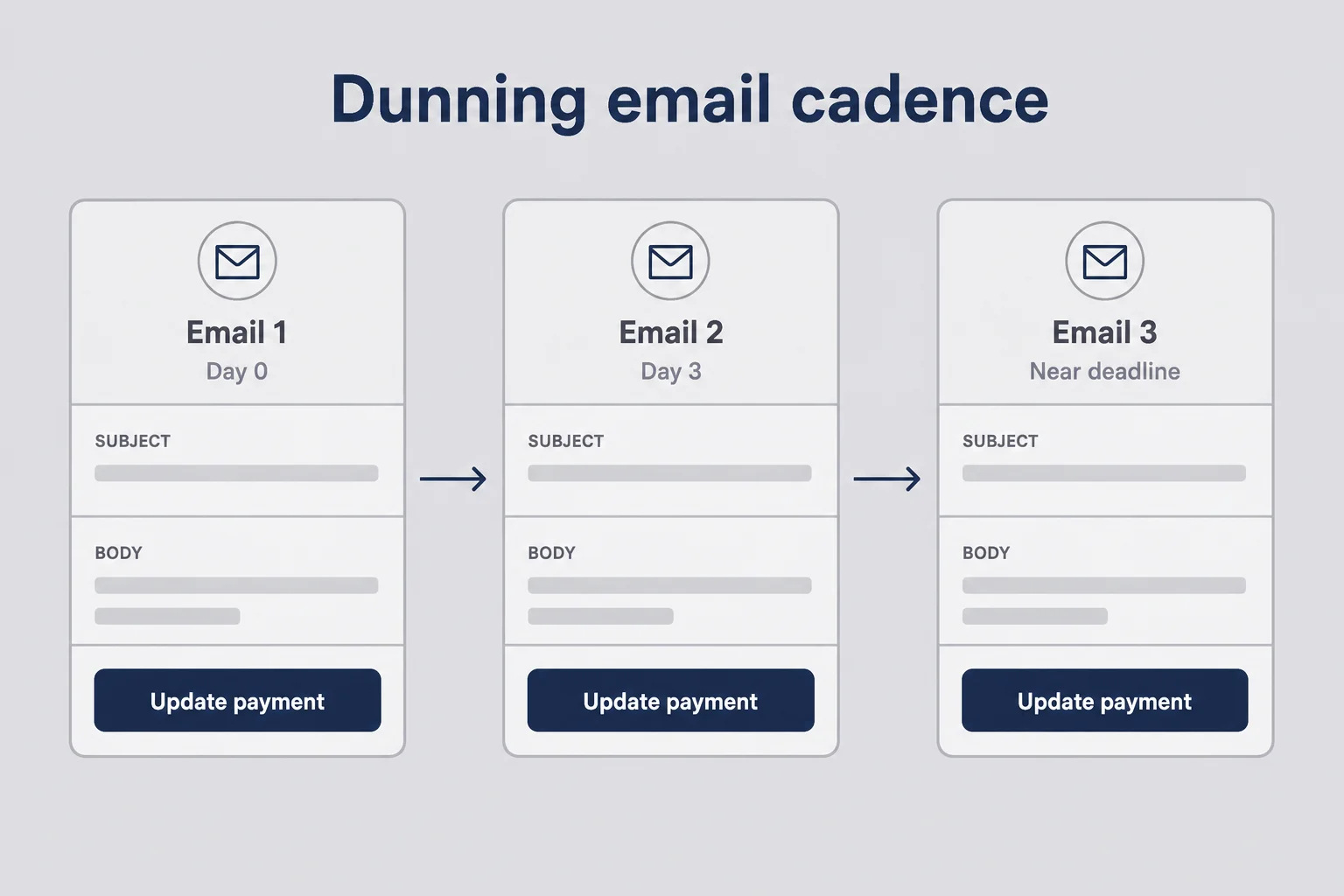
Dunning email copy for a micro-SaaS fails in two ways. Too corporate ("We were unable to process…") or too needy ("Please don't leave us…"). Neither helps someone whose card expired while they were busy running their actual business.
Write like a human who runs a small tool they care about. Lead with what happened. Lead with how long they keep access. Lead with the link. Skip the brand story. Skip the feature list. Skip "as a valued customer." Everyone can smell filler.
Tone I aim for: calm, specific, slightly dry. "We tried to charge the card ending in 4242 for your June invoice. It did not go through. Your account stays open until Friday. Update payment here." That is enough. If you want one personal line, keep it after the link, not before. Action first. Personality second.
Subject lines matter more than founders admit. Cute subjects get marked as promo. Boring subjects that name the product and the word "payment" get opened by ops people who care. "Payment failed for InvoiceFox" beats "A quick favor?" which smells like phishing. You are not a growth hacker in this moment. You are a billing clerk who happens to write software.
The three-email cadence I actually use
You do not need seven emails. Three covers most solo cases. More than that starts to feel like a debt collector with a Mailchimp theme.
Email 1, day of failure. Friendly. No blame. Decline reason if you have something human-readable. Primary CTA: update payment. Mention that retries will keep trying in the background so they know silence from the bank is not silence from you.
Email 2, a few days later. Still helpful. Say access continues until a date. Repeat the link. Mention Customer Portal if that is where they manage the card. If they already fixed it, Stripe should stop the sequence; make sure your email tool respects recovered status so you do not spam winners. Spamming someone who already paid is how you earn a cancel for spite.
Email 3, near the end of the grace window. Clear consequence. "Access pauses on DATE if we still cannot charge." Same one-tap link. No threat theater. No "final notice!!!" subject lines. Adults can read a deadline. Exclamation points do not raise recovery rates. Clarity does.
If you use Stripe's built-in emails, configure them and brand them lightly. Check they actually send in test mode. If you send your own via Resend or Postmark, trigger from invoice.payment_failed and cancel the drip when invoice.paid fires. Own the logic. Do not pray. Prayer is not an idempotency key.
One scene I still remember: a customer replied to email 2 with "lol card expired last month, fixed, thanks." No drama. No feature request. No churn survey. That reply is what success looks like. Unsexy. Highly profitable relative to writing a novel about why they should stay.
Always include a one-tap update path
An email that says "please update your card in settings" without a deep link is a support ticket generator. People will reply "how?" You will paste a URL. You just did the job badly once and paid with your evening.
Use Stripe Customer Portal billing portal sessions, or the hosted invoice page URL Stripe exposes for open invoices. Prefer links that land on update payment, not your marketing homepage. Your homepage will try to sell them again. They already bought. They need a form.
Mobile matters. A lot of card updates happen on a phone at lunch. If your "update card" path requires desktop login plus three nested settings pages, expect lower recovery. Portal links win because Stripe already solved that UX across devices. Borrow their homework.
Also watch auth friction. If the portal session link expires fast and your email sits unread for two days, they hit an error page and quit. Generate fresh links in each email when you can. Dead links are silent recovery killers.
One inbox rule
If a dunning email generates a reply, answer with the portal link first, explanation second. Most people are not trying to negotiate. They cannot find the button.
Customer Portal and hosted invoice pages: stop being the payment help desk
Enable the Stripe Customer Portal for payment method updates and invoice history. You can turn features on and off in the Dashboard. For solo founders, "update payment method" and "view invoices" are the must-haves. Cancel flow is a separate product decision; do not disable cancel just to paper over dunning. That is cowardice dressed as retention. People who want out should get out cleanly. People who want to stay with a dead card should get a portal.
The portal is also useful outside failures. Customers change cards before renew day. That is invisible churn prevention. Every self-serve update is a support email you never answered at 11 p.m. I would rather spend calendar time on product than on "where's billing settings?" threads.
Hosted invoice pages are narrower. They attach to a specific invoice. Great for "pay this failed invoice" emails. Portal is better for "change the default card going forward." I use both depending on which email I am writing. You do not need a perfect decision tree. You need a default and the willingness to switch when the other link fits better.
Branding the portal lightly helps trust. Logo, brand color, your support email. Do not turn it into a marketing site. Trust beats cleverness when someone is typing a card number.
Portal vs hosted invoice: which link to send
If the problem is one open invoice and you want them to settle that invoice now, hosted invoice is clean. If the card is dead and you want the vault fixed for future renewals, portal is better.
When in doubt on email 1, I send portal. Future invoices matter more than heroic single-invoice recovery theater. If they update the default payment method, Smart Retries and later renewals get a fair chance. Settling one invoice while leaving a dead default card just schedules next month's failure.
Also: do not build a custom card-update form unless you have a reason Billing cannot cover. PCI scope, edge cases, 3DS flows, wallet methods: that is a hobby you do not need while you still have five customers. Stripe already hired people to worry about this. Let them.
If you sell through the App Store or another billing surface, this post's Stripe specifics will not map one-to-one. The principles still do: grace windows, clear status, one-tap update, do not confuse involuntary failure with hate. For iOS money paths, your constraints are Apple's. For Stripe web SaaS, you have fewer excuses.
Measure recovery rate, not "we turned retries on"
Checkbox culture is how founders lie to themselves. "Smart Retries: on." Ship it. Never look again. Settings are not outcomes.
I want a number: of subscription invoices that failed this month, what percent eventually paid? That is failed payment recovery, full stop. You can refine later with lag time and decline-code mix. Start with paid-after-fail versus fail-and-die.
Track it monthly in a sheet if you have to. Stripe Sigma or a simple webhook logger into Postgres is nicer when you have time. Do not wait for perfect analytics from your dashboard work. An ugly spreadsheet beats vibes. Vibe-based retention is how roadmaps get loud and bank accounts get quiet.
Share the number with yourself weekly the way you might glance at MRR. If recovery crashes, investigate before you invent a new growth channel to replace "lost" customers who were actually recoverable. Acquisition is hard. Pouring water into a bucket with a hole is harder than it looks because the hole is polite and quiet.
The one number worth tracking weekly
Recovery rate = recovered failed subscription invoices / failed subscription invoices in the period.
Glance at absolute recovered dollars too. A 40% recovery rate on $200 of failed invoices is different from 40% on $4,000. Context matters. But the rate tells you whether the machine works.
If recovery is terrible with retries and emails live, inspect decline mix and link quality before you buy a $249 tool. Sometimes the emails go to a domain that spam-filters you. Sometimes the portal is disabled for the account. Sometimes you cancel subscriptions in code before Stripe finishes retrying. Fix your plumbing. Tools do not unbreak inverted access logic.
Secondary diagnostics I glance at when recovery looks off: bounce rate on dunning messages, time-to-recover for successful ones, and how many past_due seats still have recent product activity. Active usage plus failed payment is a recovery priority. Silent accounts plus failed payment might be voluntary churn wearing an invoice costume. Prioritize humans who still show up.
I also watch whether recovered customers cancel in the following billing cycle. A spike there can mean your dunning tone felt like harassment, or that you recovered a zombie account that was already emotionally done. That is useful feedback. It does not mean "stop dunning." It means fix copy and maybe shorten the cadence. Measurement without interpretation is just spreadsheet cosplay.
When a $249 dunning tool is overkill (and when it isn't)
Enterprise recovery products sell dashboards, experiments, and cancel-save widgets. Some of that is real. Some of it is priced for teams with finance managers and quarterly business reviews. At $2k–$8k MRR, pay the Stripe defaults, write three emails, enable portal, measure for a quarter. Spend the money you would have spent on software on something that raises willingness to pay instead.
I would reconsider a specialist tool when failed-payment volume is high enough that template testing and recovery analytics save real hours, or when you have proven soft recovery is leaving clear dollars on the table after the basic stack is solid. Until then, you are buying anxiety relief. Anxiety relief has a price. It is rarely $249 a month at seed revenue.
Caveat: if you hate email systems and will never wire a drip, a cheap focused dunning helper can be rational earlier. Be honest about whether you will maintain webhooks. Tools do not replace ownership of subscription status in your app. Outsourcing email templates while your access boolean is wrong just sends prettier lies.
Also remember planned calculators and retention tooling elsewhere on this site are separate from your Billing config. No widget replaces Smart Retries plus a portal link. Interactive toys are great. They are not a substitute for reading one failed invoice this week.
Position with a caveat, again, because founders love binaries: either "never buy tools" or "buy the famous one." Buy when the math clears. Stay boring until then.
Questions founders ask about failed payments
What is Stripe dunning for a micro-SaaS solo founder?
Dunning is the process of recovering a failed subscription charge. On Stripe it usually means Smart Retries on the invoice, emails that ask the customer to update their card, and a Customer Portal or hosted invoice link so they can fix payment without emailing you.
Should I cut product access the moment a payment fails?
Usually no. Keep access during past_due while retries and emails run. Restrict or cancel after the retry window ends and the subscription moves to unpaid or canceled. Cutting on the first decline punishes expired cards and creates support noise.
Is Stripe Smart Retries enough by itself?
It is the right first layer and it is free with Billing, but it only recovers soft declines Stripe can retry. You still need emails plus a one-tap update path for expired cards and cases where the customer has to act.
How is failed payment recovery different from reducing churn?
Voluntary churn is a customer deciding to leave. Involuntary churn is a charge that never cleared. Recovery fixes the second problem. Product and onboarding work fix the first. Mixing them makes your dashboard look worse than the product is.
When should I buy a third-party dunning tool?
After Smart Retries, Card Account Updater, Customer Portal, and a short email cadence are live and you have measured recovery for a few months. At a few thousand dollars of MRR, a two-hundred-dollar monthly tool is usually overkill. Revisit when failed-payment volume is large enough that better templates and dashboards pay for themselves.
What webhook events matter for past_due subscriptions?
Handle invoice.payment_failed when a charge declines, customer.subscription.updated when status moves between active, past_due, unpaid, and canceled, and invoice.paid when recovery succeeds. Drive access rules from those events in your database, never from the client alone.
Keep the customers you already won
Acquisition is expensive. Even "cheap" acquisition costs attention: cold emails, SEO posts, launches, portal demos, the awkward DMs where you ask for feedback. Watching those same people leak out the bottom because an expired card met a silent cancel policy is a special kind of self-own. You worked hard to open the front door and left the back door swinging.
Stripe dunning for micro-SaaS solo founders is not glamorous work. It is settings, webhooks, three emails, and a weekly number. It will not make Tech Twitter clap. It will keep revenue you already earned. Boring SaaS survives on boring ops. That sentence could be on a mug. I would not buy the mug. I would still configure the retries.
Do the recovery stack before you rewrite the roadmap to "fix churn." Some of those cancel events were never goodbyes. They were declines. Treat them that way. Then, if people still leave after cards clear and banners are fair, you have earned the right to argue about product. Not before.
If you want a single checklist for next week: turn on Smart Retries, enable Customer Portal payment updates, map past_due to a banner instead of a lockout, ship three emails with live update links, and write your recovery rate on a sticky note every Friday. That is the whole play. Everything else is optional theater.




Comments